Tag: download

  • How Can Artificial Intelligence Protect My Family?

    How Can Artificial Intelligence Protect My Family?

    How AI Works

    When you think of artificial intelligence it’s natural to imagine Skynet or some similar software that is running things for us some day. While that could be the overall goal someday, right now AI is nowhere near that smart. Currently artificial intelligence isn’t intelligent at all. While it does learn from the input that is fed to it, there is currently no way for AI to decide what it needs to learn on its own. There is a very large gap between software algorithms that can learn and an intelligent software that makes its own decisions.

    At CES in 2018 I watched a robot named Aeolus glide across a room cleaning up. It took it a solid three minutes to move from one side of the makeshift living room, reach down and pick up a wii remote, and roll to the table to set it down. It was nothing like we have been promised by television and movies but I guess it was still cool. What parents should understand is that while the developers of an AI can make promises of their algorithms learning and behaving as if they have intelligence, that is not the same as being actually intelligent. Humans still have to do the thinking.

    While it isn’t foolproof and is definitely not sentient, artificial intelligence is a good tool. There are many ways AI is useful and much of the latest hardware and software use AI  to do some of their most minor functions. Here are some of the interesting ways AI can make your parental control and accountability tools even better.

    Filters

    There was a day when an internet filter depended solely on the web or ip address of the site you were visiting to tell if there would be inappropriate content or not. There was a master list that had to be updated continually with new websites and key words. AI is different than that because the filter is based on images and other content that the AI was “fed” over and over again the algorithm then detects actual images, text, and videos on web pages instead of just the address of the site you are visiting. This can be helpful if a website doesn’t typically contain adult content but a certain article or comment section features material that would cross the line. A traditional filter couldn’t catch that but one that uses an AI can.

    Circle (meetcircle.com) and NetNanny (netnanny.com) are examples of filters that use smart algorithm to block web content.

    Accountability

    Accountability software works very similarly to filters except that when it sees something inappropriate it will not block it but alert whoever is on the list to alert. AI has revolutionized this sort of software because it allows parents to receive only lists of unwanted sites instead of having to sort through everything that has been viewed by the person they are keeping accountable. The software I recommend, Accountable2You (accountable2you.com promo code BecauseFamily,) is updated constantly to allow it’s algorithm to properly and effectively scan for adult content. It works very well. You may get occasional alerts for content that shouldn’t be considered adult, but it’s not too often and it’s worth it for the peace of mind.

    Privacy and Security

    Finally, when we discuss AI and algorithms we must talk about privacy and security. Algorithms may have been the beginning of many of our privacy problems but it may also be providing some solutions. Tools like BitDefender can be used to protect your home network. The AI can tell the difference between forgotten passwords and malicious login attempts. Our home networks are becoming increasingly worthy of being targets of hackers and encrypting your web traffic with AI can protect your from that kind of attack.

    I hear a few different reactions when I talk about artificial intelligence. Most people roll their eyes or glaze over because they aren’t even interested. It’s some tech term that they don’t think they can fully understand so they’d rather not talk about it. The other group is super interested, always wanting to learn more about it and understand it better. These are my nerd friends. I love them. Finally there’s the group that just freaks out. They immediately think of the movies and tv shows and just want to move into the woods and unplug. Which person are you? Are you willing to let AI work to your benefit in your family? Is it all too much for you? Let me know in the comments below.


  • Get This Screen Time Management Subscription for 30% Off!

    Get This Screen Time Management Subscription for 30% Off!

    *FamilyTechBlog.com is an affiliate partner with unGlue

    We’ve shared unGlue with you before. It is a very good way to start helping your older kids learn to manage their screen time. Once it’s all set up you can let your kids decide how they manage the time you’ve given them on their devices. They can save it, earn more, or just use it all up. There’s a lot that unGlue can do and features are being added often. It’s affordable and useful. Best of all, you can use the monitoring tools for free and if you subscribe soon, you can save 30% during their spring sale. Learn more about unGlue below and click the links to check it out for yourself.

    How it Works

    [reposted] At home, unGlue works through your wifi. You install software on your main home computer (only works while turned on) and it mirrors your router traffic to see the web activities on the devices you have set up. While on the go, unGlue uses a VPN to keep track of what is being done online. These methods mean your time is managed everywhere you go. You can even set up guest access in your home. If you don’t have a home computer to set up unGlue on, they have a device called the unGlue Puck that will only cost you $30.

    Speaking of cost, you can download the unGlue app for free and start monitoring online time right away. If you want to set up and use the other features you can subscribe for $9.99 per month or $84 per year. Both subscription options include full-featured access to unGlue. For a limited time, you can subscribe for 30% off.


  • TUTORIAL: How to Download All of Your Photos, Videos, and Messages from Facebook at Once

    TUTORIAL: How to Download All of Your Photos, Videos, and Messages from Facebook at Once

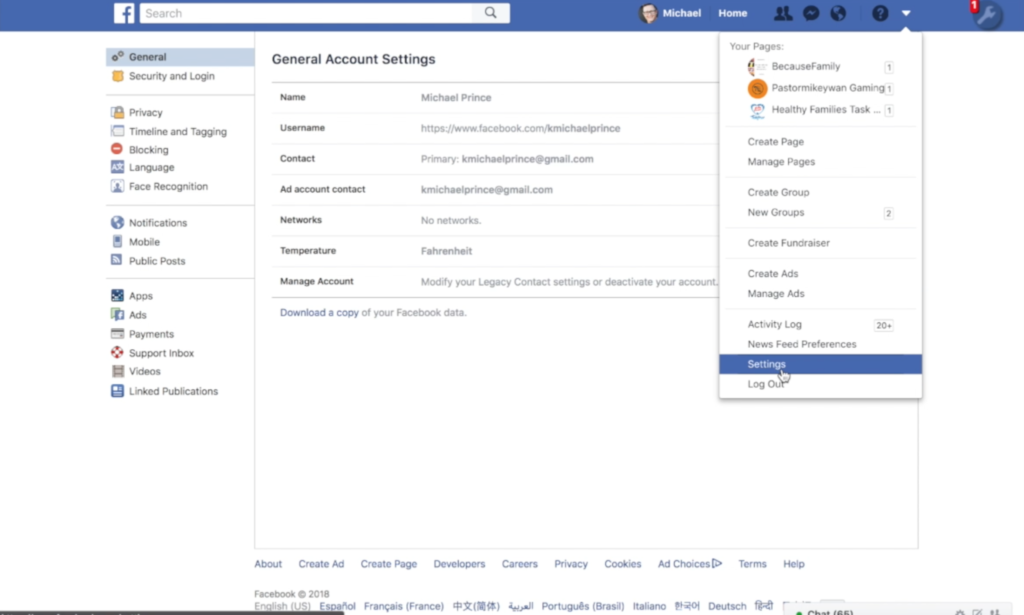
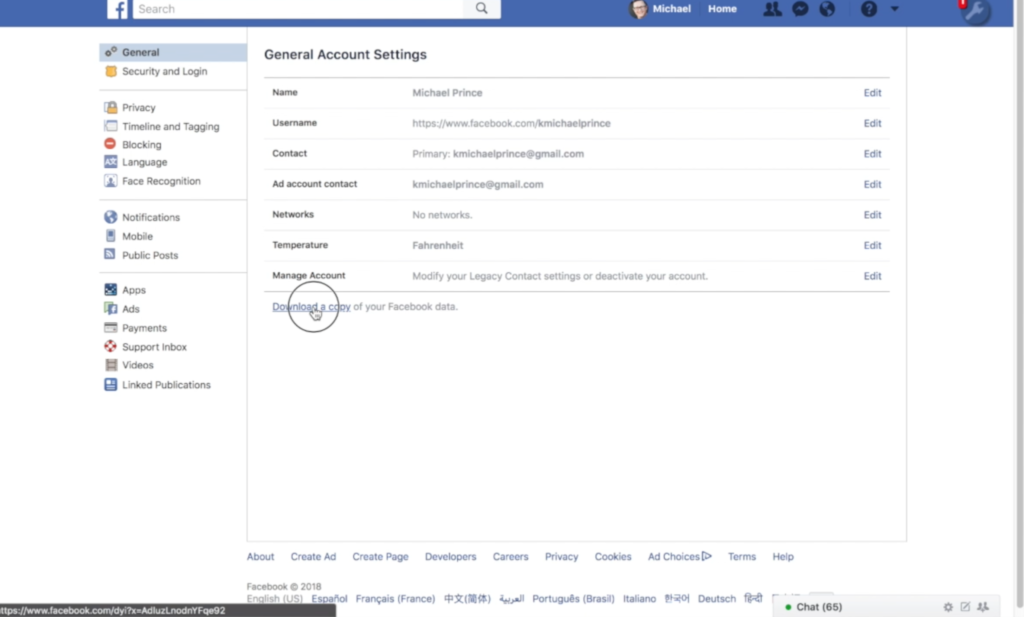
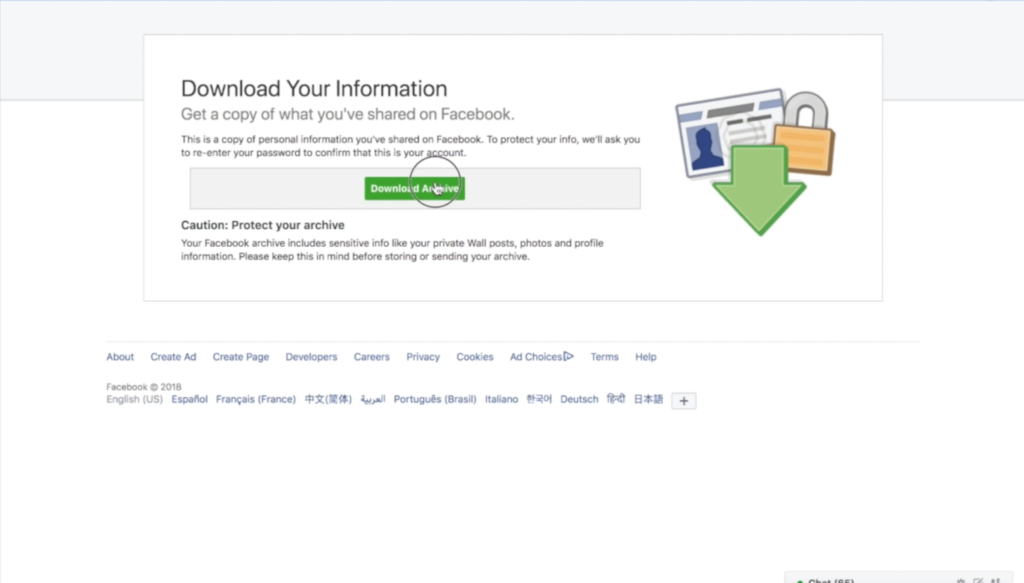
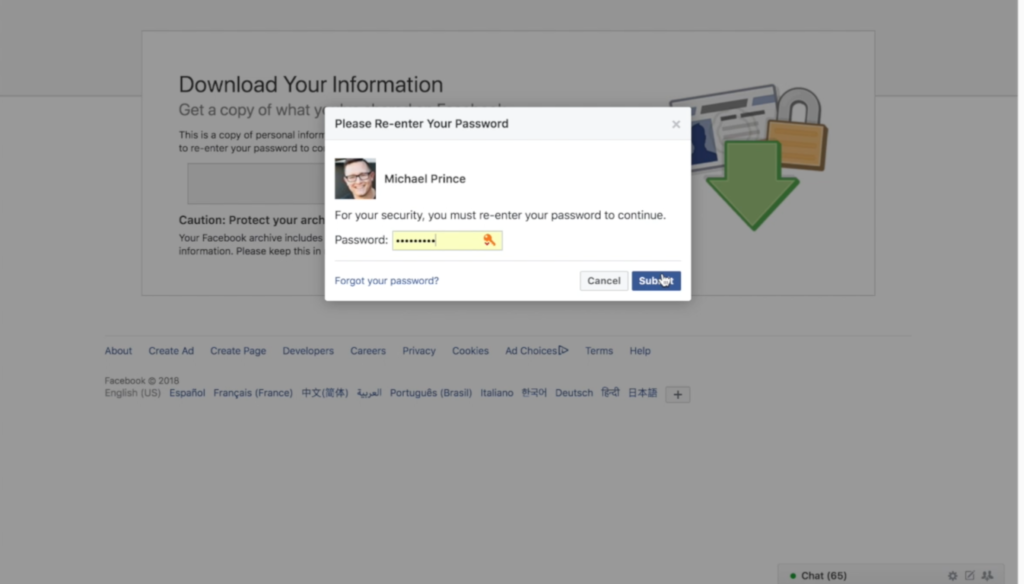
    There could be a number of reasons you’d want to download all of your Facebook data. Maybe you’re making a fresh start but don’t want to lose photos and videos, maybe something’s going on and you need message data downloaded, or maybe you just want to back up all your data for when the giant electromagnetic pulse goes off someday and the internet comes crashing down. Whatever reason you’re interested, here are the simple steps you can take to download all of your Facebook info at once. The tutorial video is at the bottom of this post.


    1. Go to your settings page.


    2. Click on Download a copy Facebook Data


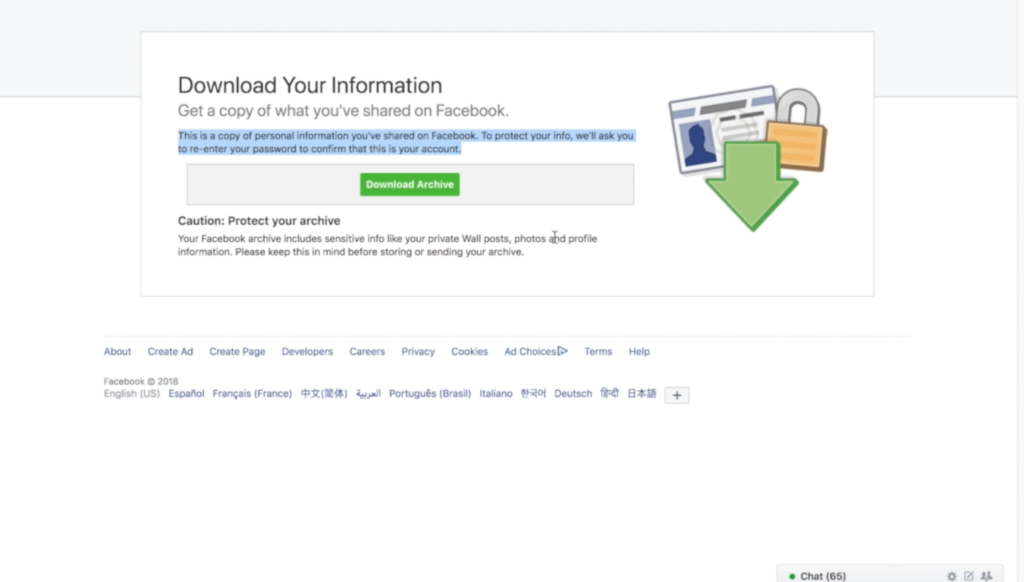
    3. Click download archive.


    4. Enter your password and click Submit


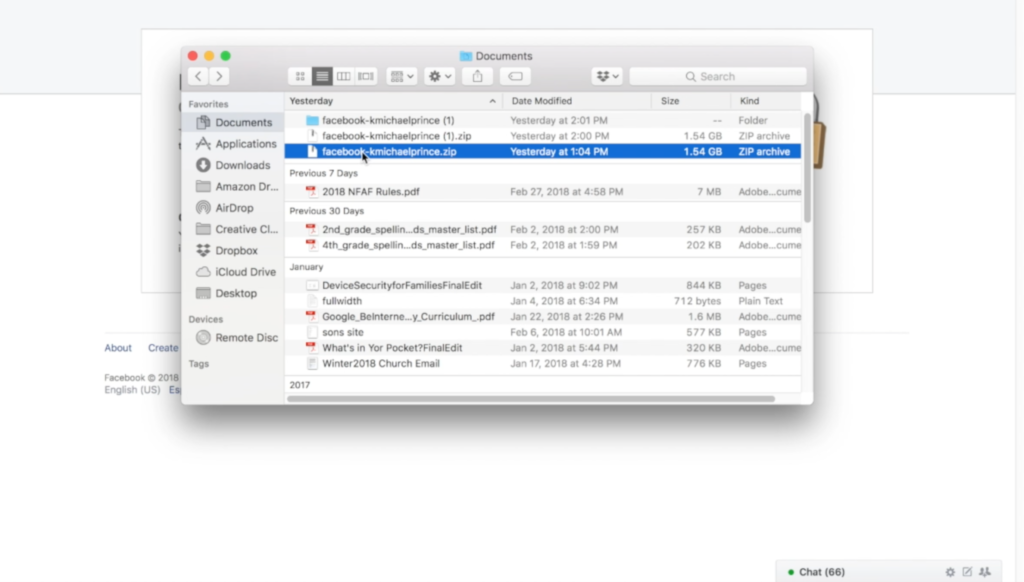
    5. Your data downloads as a zip file.


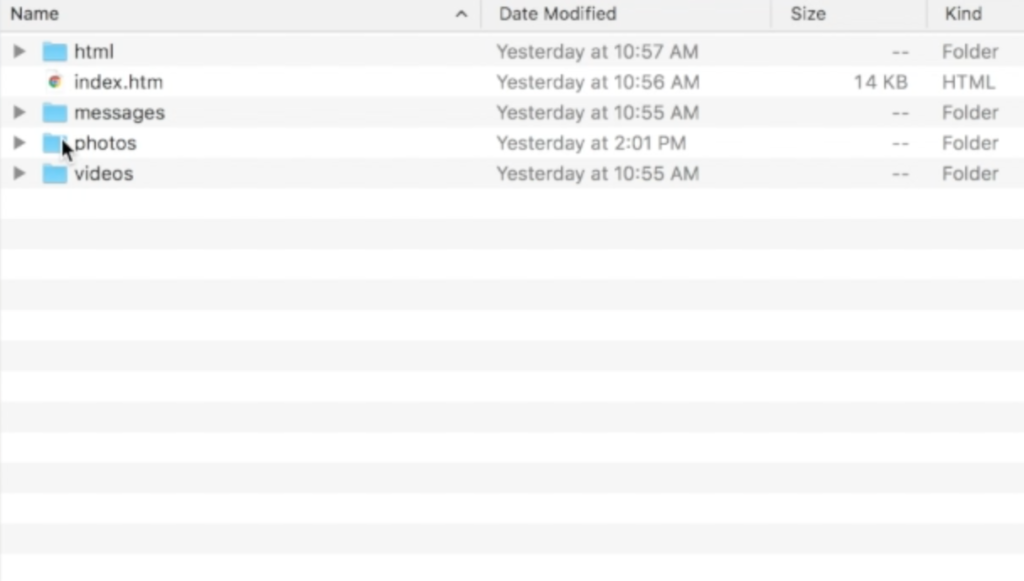
    6. Once unzipped, you’ll see your files separated into folders.


    7. Keep somewhere safe and share with caution as some of the data is personal.


    There are the instructions. Here’s a video tutorial:


  • Here is our Uninstall List for This Spring

    Here is our Uninstall List for This Spring

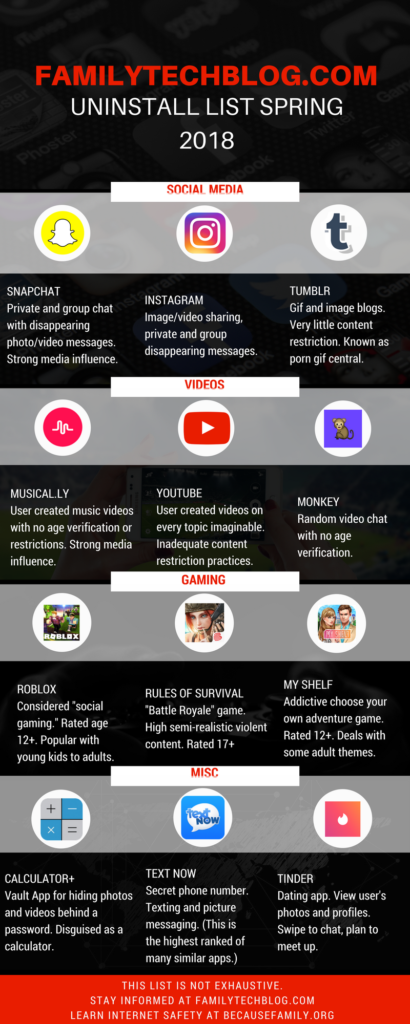
    Some apps are just annoying, some are a bit risky, others should just be uninstalled. This is the list of apps that FamilyTechBlog thinks should be removed from your kids’ phones on sight. No, this isn’t an exhaustive list. There are plenty more apps that can be dangerous. Our list features some of the most popular apps in each category and apps that highlight a certain genre that may need to be avoided altogether.

    Feel free to click on the image below to see the large version of the infographic. If you want some help with internet safety resources and strategies, contact us here. Also, share this post with everyone you know. Let’s make a difference and spread something helpful on our social media timelines for a change.

    FAMILYTECHBLOG.COM UNINSTALL LIST
    SPRING 2018

    CLICK FOR LARGER VERSION

    Please consider keeping resources like this free to you by donating $5 to our non-profit organization.
    Visit BecauseFamily.org/partnership to give.

  • Android’s New Instant Apps Can Undermine Your Monitoring Software

    Android’s New Instant Apps Can Undermine Your Monitoring Software

    If you follow my recommendations on this site you’ve got some sort of monitoring software installed to allow you to see what your kids are doing on their devices. This is important because you can’t help you children navigate the digital world they’re growing up in if you don’t know what they’re doing online. Every now and then, though, a super cool new update comes out for our phones, computers, or tablets that will undermine the goals you have for monitoring your kid’s devices. Android’s “Instant Apps” is one such update.

    Instant apps is a great idea. It’s a really cool way to share new apps and a great way for app developers to give brief access for someone who wants to see something that’s been shared but doesn’t want to download an app to see it. Usually when you see a cool post on social media or someone sends you a link in a direct message you have to use a browser to see the mobile website version of what they’re sharing, Instant Apps makes it easier to see the what’s being shared. For example if I’m creeping Amazon and see the Blu Ray for that super cool movie we saw together and want to share it with you. I can text you a link and when you open it the product will open in the “instant” version of the Amazon app. This will provide you with a much easier and smoother transition to possibly purchasing that product. The instant app permissions won’t allow it to run in the background and will disable some features that would be available if you downloaded the full app but it’s a cool intro to software you haven’t installed yet. Cool idea, yes, but maybe not for our kids.

    What Parents Should Know

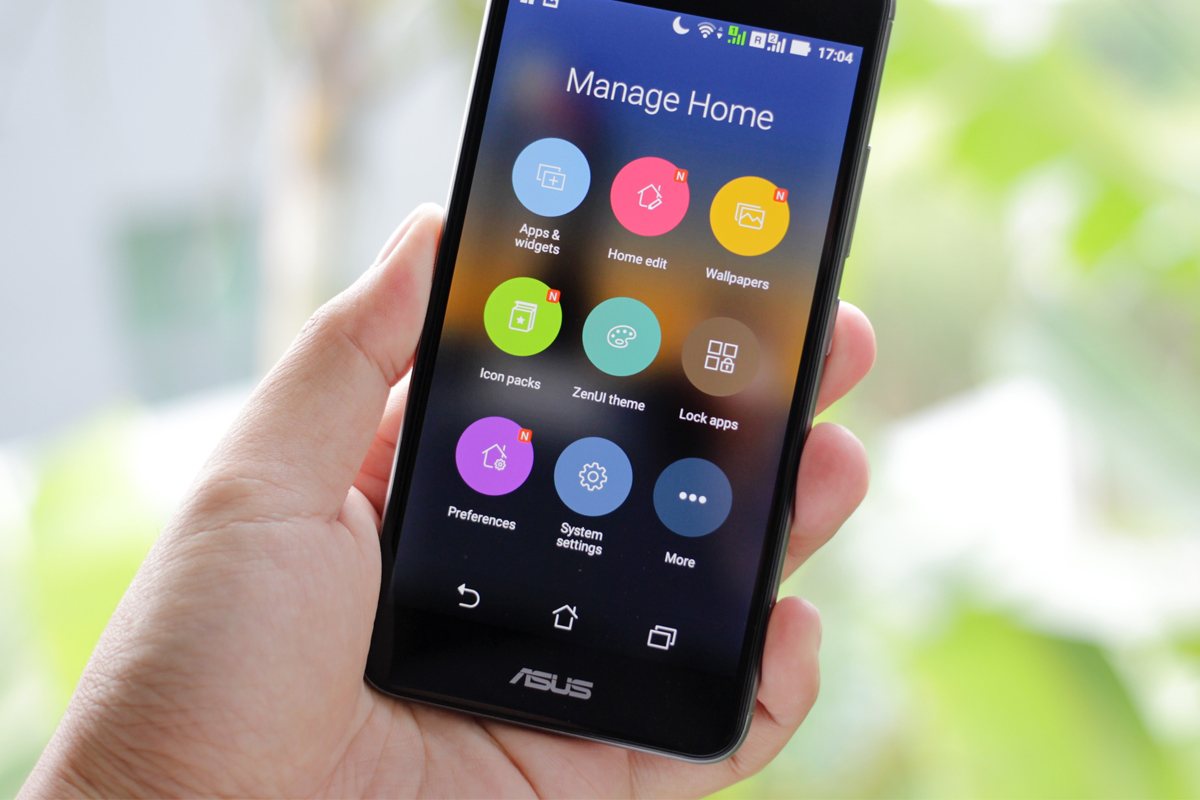
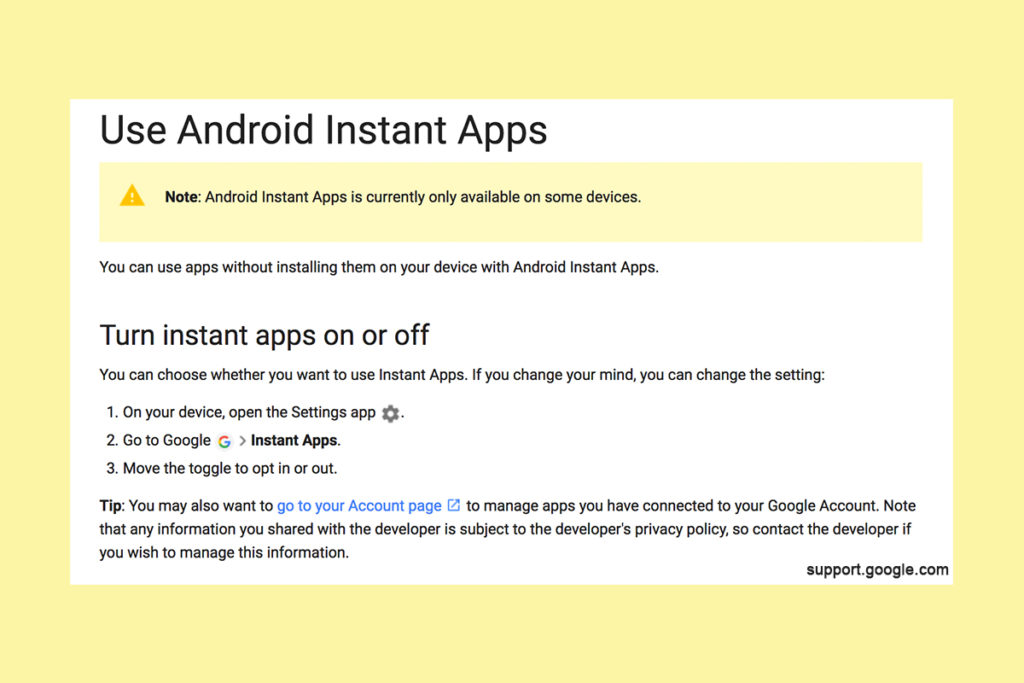
    Being able to see content from an app that isn’t even installed could be troublesome for parents who are trying to monitor their kids online activity. If you have uninstalled apps from your kids’ devices to keep them from seeing what is shared in that app you aren’t going to want them to be able to see the content in instant apps. I recommend disabling Instant Apps in on your kids’ devices if they have it. If you can’t find anything about Instant Apps in the settings of their phone or tablet then it isn’t available for their device and you don’t have to worry about it. If you do see it, follow the steps below to turn it off.


    Whether you’re using an accountability software like Accountable2You, a filter like NetNanny, or monitoring the entire device with something like Mobicip, the Instant App feature could give your child access to the very content you are trying to keep away from them. Be sure to give yourself opportunity to look over their phone or tablet whenever possible and check for the Instant App option. There aren’t very many apps developed with the feature yet but it has been opened up to most developers. More and more apps will be using Instant Apps to allow folks to share content in the near future. Turn it off now and get ahead of the game.


  • Do You Really Own Your Phone?

    Do You Really Own Your Phone?

    The ordeal with the exploding Galaxy Note 7 has brought about an interesting topic as of late. In case you’re a bit behind, I’ll remind you that early in 2016 some Samsung Galaxy Note 7s began to explode. The phone was recalled and many people began to return it for a replacement. Many, however, did not. In order to increase the number of returns Samsung started to roll out updates to the operating system that would eventually render the phone ineffective. The idea is that if phones wouldn’t charge all the way, or eventually at all, then users would have no choice but to turn the phone in and get something that wasn’t just screaming POTENTIAL LAWSUIT for Samsung. This is what started the conversation about who owns the phone we paid for and use every single day.

    The Phone is Yours, Sort Of…

    We pay good money for our smartphones. iPhones can cost up to eight hundred dollars when first released and the cost of a good Android phone is comparable to that. Since we pay so much it stands to reason that we should have complete control over what happens to and in our phone. The truth, though, is that we don’t. In fact, we sign away that right when we purchase, or now lease, our smart device. The terms and agreements page that we sign without reading spells out the fact that the physical device we just bought belongs to us but the software that makes it more than just plastic, glass, and metal, still belongs to the company that developed it.

    This is why Samsung can “brick” a phone with software updates in order to get people to bring them back. They can’t require you to physically bring your phone back because they want it back but they can make it so useless that you can’t stand to use the thing anymore. If it has any use anymore at all. Technically you are using software that belongs to someone else because they allow you to. That doesn’t stop with operating systems, it goes for the apps you download too.

    Here Come the App Police

    Twitter has been flexing their “terms and agreements muscles” recently as they try to crack down on bullying and abuse in their popular social media site and app. Some of their most recent changes include adding the ability to explain why you’ve blocked a user or hidden a post on your feed. With an even larger step, Twitter is using algorithm and moderators to recognise users of previously banned accounts and keep them from setting up a new account to continue their abuse. These steps and some more they’re not being as open about may seem controversial to some but they are definitely allowed under the terms you agreed to when you signed up to use their service.

    What Parents Should Know

    There are a couple of major ways that the ownership of our digital devices is an important topic for parents to understand. First of all you must know that the use of any software, be it an operating system, an app, or computer game, is considered a privilege given to you by the developer of that software. Even if you paid for the right to use it. Your kids need to understand that behavior contrary to what is acceptable in those apps or software can cause them to lose the ability to play or use the software anymore. Secondly, it’s important to update your device when an update becomes available. While it may seem like recent updates slow down your phone or cause other apps or software not to work properly, the developer created that update for important reasons. Security is a major reason that updates come as frequently as they do. Hackers or identity thieves are always working to find ways to sneak through security settings set up in your phone or computer. Updates by the developer allow them to keep up with the new ways those hooligans have discovered to breach your digital defenses.

    Be sure your kids and teens understand that the digital lives we live are a privilege. There are right ways to use our smartphone and wrong ways. When their account is banned in an app it happened for a reason. This means you should be having a conversation with them about what led to that action being taken by the developers of the app. Was it because of other users “flagging” him for his posts? Was there something she posted that she admits crossed the line and caused her account to be shut down. This DOES happen and should be taken very seriously. There are some online behaviors that are as illegal as anything you can do offline. One major example is the distribution of child pornography. This is a felony and punishable by years in prison and the remainder of your life labeled as a sex offender. Sexting, or sending a nude picture of yourself or someone else, if you are under eighteen years old is considered distribution of child pornography. The activities we are involved in online have very real consequences. We may own the device we use but we have agreed to use them in a certain way, and if we fail to meet those standards the privilege can, and will, be revoked.


  • VIDEO: FACEBOOK LIVE Q&A

    VIDEO: FACEBOOK LIVE Q&A


    Circle, Accountable2You, YouTube Kids, Young Kids and Internet Safety. All this and more in this Facebook Live video. This #givingtuesday live video was a great way to meet parent’s needs right where they are. Be sure to visit BecauseFamily.org/partnership to learn more about donating.


  • Your Kids Use “AfterSchool” So You Should See This

    Your Kids Use “AfterSchool” So You Should See This


    Some apps come out and there is no way to know the intentions of the developer. AfterSchool is not one of those apps. The vision behind this app is to turn online activity into real world interaction. In a good way. AfterSchool is an app that lets students connect with other teens in their school. Here’s what their site says about what you can do on the AfterSchool app:

    “After School’s innovative features channel students toward making new connections and friendships, and engaging in positive offline activities. …On After School, students can share openly and honestly, without fearing judgment or ridicule. They choose whether to reveal their name or remain private.” – afterschoolapp.com/about

    While these apps allow you to stay private, a lot of students choose to make their identities known. Most of the “testimonials” from teens about why they like these apps speak to being able to hear what people really think about you. They talk about everyone being open and honest on the app. Honesty and openness is good but if you are saying “what you really think” about someone, that could cause problems in the teen world.

    Yes, the creators of AfterSchool designed this app to ban bullying and hateful behavior but I still say that as a parent, we need to understand how this app works. What it does and what our kids are using it for. If they are wanting to meet up, what are they meeting to do? The app has built in features to block explicit content but there are ways around those filters. They also claim to have live moderators who keep cyberbullying and inappropriate posts to a minimum. While this is all great, there is no better moderator than mom and dad talking to their teens about what they’ve seen on the app.

    Even the creators of AfterSchool understand this and so they’ve put together an extensive guide for parents. I’ve included a link to their PDF below. I recommend you go check out the site. They boast that teens in 80% of US High Schools use AfterSchool. That means your kids are most likely using it to. You should read this:

    Click to Download the PDF
    Click to Download the PDF
  • Instagram Update Proves they’re Serious About “Stories”

    Instagram Update Proves they’re Serious About “Stories”


    Stories is Here to Stay

    Not long ago instagram added a new feature that looked strangely similar to Snapchat’s “stories.” In fact it wasn’t just similar, it was the same thing. They even used the same name for the feature. After about two days of people calling Facebook (who runs instagram now) a bunch of copycats, users were posting multiple stories a day to their instagram accounts and loving it. Funny how we adopt things so quickly after being so “put off” by them.

    boomerangWell, with an update to intagram this week, the focus on stories has been increased. The new update brings boomerang, (a service where you make mini video loops) mentions or tags, and links for “verified” accounts to the stories feature. So you can now make a mini video, tag your friends in your story post, and if your account is verified (only available to celebrities and brands) you can post links to your latest content.

    What does this mean for parents?

    It’s quite simple, really. Stories cashes in on the concept that young people want to post something that is seemingly temporary. The posts in your account’s story only last for twenty four hours. This keeps updates fresh and keeps users coming back to post more and more content. It also causes young persons to feel like they aren’t posting something permanent. We all know this isn’t true. Anything posted online is there to stay.

    Along with a false sense of security, stories is now yet another way for brands and celebrities to alert your kids that they have some sort of message for them. You know that we at BecauseFamily advocate for parents to be the first influence in their children’s lives. It can be difficult to be the first influence when other influences are notifying your child every time they have something new to show them. This update gives the ability to notify your kids with a link to take them out of the app to some other content elsewhere on the internet.

    Don’t Uninstall but Have a Conversation

    seemoreWhile I don’t recommend instagram for kids under 16, I know many parents have children who use the service. My advice is to talk to them about this update and let them know that they maybe shouldn’t click on links in instagram when they aren’t sure where they’ll lead. Remember to have your accountability software (Like Accountable2You) installed so that if they end up somewhere inappropriate you will know about it and can have a conversation. Just be smart and encourage them to be smart. It’s important for parents to stay as ahead of the social media game as they can.

    A subscription to this site is a great way to let us help you stay ahead. You can sign up for just $60 for 12 months. (Normally $180) This offer is only available until the first of 2017 so sign up today and get the most out of SAFE.BecauseFamily.org.

  • Mobile Device Vocabulary Lesson 3: Messaging

    Mobile Device Vocabulary Lesson 3: Messaging


    Our kids and teenagers are communicating more differently than ever before. The note being passed from desk to desk has been replaced with words typed on a screen. Long phone conversations with friends every evening have given way to short, emoji laced text messages with pictures, videos, animated images, and links to other online content. Communication has evolved, or at least changed and it’s more common than you may have ever imagined. Just look at these statistics from April of 2015.

    73% of teenagers have a smartphone and 91% of those teens text. Teenagers send and recieve and average of 30 text per day. (PEW Research Center)

    More than nine out of ten teens who own a smartphone give and receive an average of 30 text messages every single day. That means, your child texts. The following abbreviations/phrases will give you greater insight to what messenger apps are capable of.  (more…)