Tag: device

  • The Past and Future Combine with PBS Kids’ New 24hr Kids Channel

    The Past and Future Combine with PBS Kids’ New 24hr Kids Channel

    Our Young Kids are Learning from Screens

    The number of children who are viewing educational entertainment broadcasted to their home television grew by two percent over the past year. Most of those families are in lower income homes. PBS has always catered to that demographic with their free television content and now they’re extending that privilege to children. Starting today, January 16 2016, PBSKids will have it’s own 24/7 channel.

    Yes, Daniel Tiger, Peg + Cat, and Sesame Street will all be aired on a single PBS channel dedicated to children’s programming. The best part is that it isn’t just a channel, the content will be streaming on the PBSKids app that you probably already have. The online streaming content will also be free.

    PBS has said that they understand the need for educational television for those who can’t afford cable or satellite TV, while they also understand that the majority of children are watching their shows on smaller screens these days. The free broadcast/streaming content is unprecedented in a world where everyone is trying to convince you to pay this or that for their content. PBS is sticking to their model of educational entertainment for all. 

    The plan is to roll out the channel on 73 stations across the United States first and have 107 of the US PBS stations carrying the channel later this year. This will mean that free 24 hour children’s education content will be available to ninety percent of the homes in the united states. The streaming content on their app will increase the audience even further.

    Finally the plans include a Family Movie Night and integrating games into the show content. Characters will prompt the young viewers to further their educational experience by taking part in games and activities on the app that will correlate with what they are viewing. PBS says that research on children’s education has inspired this feature and that the feature will increase the opportunity to learn while consuming their content.

    What Parents Should Know.

    If you don’t already have the PBS App I recommend it for your younger children. The shows on the app are safe and educational and there are no ads or anything that would cause them to click away from the app. The games on the app are clean, safe, and fun. Learning is obviously the first focus of every show and game and short of a few annoying characters, you’ll feel totally glad your kids are getting their entertainment from the PBS App.

  • Snapchat Answers the Photo Messaging Challenge with New Features

    Snapchat Answers the Photo Messaging Challenge with New Features

    The battle for the best messenger and photo messenger app continues and this time Snapchat has launched a counter assault. Excuse my military history illustration, I know I’m a nerd. While Facebook has been building up the features list on their popular messenger app, their photo app Instagram, and their texting app, WhatsApp, Snapchat has been working on some updates of their own.

    Let’s take a look at what today’s update has and what it will allow your kids/teens to do while in the app. Then we’ll chat about what parent’s response to this app should be after the latest update is installed. It’s super important to stay in the know, even if some of the updates may not be potentially dangerous. Here’s our breakdown:

    Snapchat’s New Features

    Paintbrush and Scissors

    These artistic new tools will allow you to do more customization than ever before. Paintbrush is a bit novelty and is just a way to make your photos look different but scissors is actually a pretty cool idea. This feature allows you to take “cut out” portions of a post or photo and save them to use later as a “sticker.” This feature gives you be the ability to become your own emoji. I am kind of looking forward to one of the apps I actually use copying the Scissors feature. It’s pretty awesome.

    Shazam

    You, most likely, are familiar with Shazam. It’s an app that allow you to identify whatever song you’re listening to by allowing the app to “listen” to it and then give you the details. This update allows you to use Shazam right in Snapchat. You just open the camera, hold your finger down, and the option to find the song will come up. Once the song is identified you’ll be asked if you’d like to purchase the song. Shazam has been around for a long time, this integration is a pretty unique idea and will keep users from closing one app to use another one.

    Group Chat

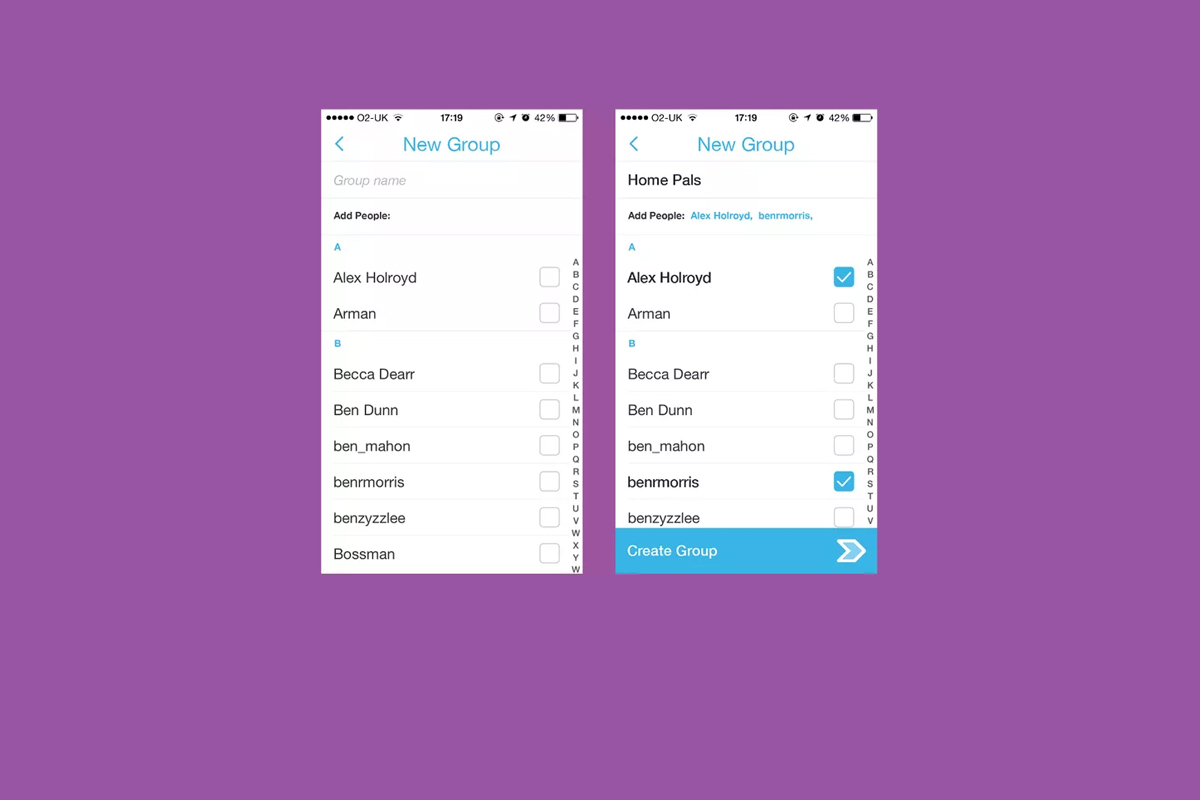
    Group Chat is self explanatory. You can chat with up to 16 people at a time and set up your chats in groups. This allows users to keep their most common friends together in one group so they can have quick access to their conversations. Your teenagers are socializing online now so this allows them to do so in a larger group.

    Every feature included in this update is another step towards Snapchat becoming the catch all app for young people. The most common users are ages 18-35 but there are many high schoolers who have already been snapping their friends for years. If they haven’t already, these updates are sure to lure them in.

    What Should Parents Know?

    As I’ve mentioned before. My main concern with Snapchat isn’t the messaging or photos, it’s the advertising. Their curated “discover” page has been and always will be a deal breaker for me. I know you may not agree so regardless of your reasons for being safe here are my tips for parents of Snapchat users.

    Don’t allow Snapchat if you’re uncomfortable.

    It’s important to remember that you have to have a say over what your kids are doing online. If what Snapchat does makes you feel uncomfortable you shouldn’t allow it on your child’s phone. Whether you’re afraid of what people may send them or what they could see on a public story. Maybe you’re just concerned about people they don’t know getting ahold of pictures of them. You also could simply be trying to keep the marketing gurus who are publishing content straight to your child’s phone from turning them into the consumer they want them to be. No matter your reason, be true to that instinct and hold firm to your position. Your teen won’t understand and will argue but you have to trust yourself on these issues.

    Use family sharing to know when apps are installed.

    I walked through family sharing and how to set it up in THIS tutorial. This is a great way to keep track of what apps are being installed on everyone’s devices. You can even set it up to ask you permission before something is installed. If you have decided to take a stand against your teen joining the Snapchat trend Family Sharing is a great way to be sure they’re sticking to those rules.

    Follow your kids’ “Story”.

    If your teen is using or wants to use Snapchat and you’re ok with it I recommend you get an account as well, even if it’s only to keep tabs on their “Story” yourself. This isn’t spying since you will communicate with them that you’re following them. Let them know it’s not that you don’t trust them, it’s that you have a responsibility to protect them from those who won’t use the social media service in the safest way.

    Talk to your kids about how they use Snapchat.

    Now comes the inevitable plea to be transparent with your children. Be open with them and honest about your concerns with Snapchat. Let them know you want to protect them from whatever it is you’re concerned about. Boundaries become stupid rules if there is no relationship. If you’re going to be following the on their account they need to know about it and know why. If you’ve decided not to allow it at all then you’ll have to be honest about why. Let them talk to you about why they want to use it. “Because it’s how my friends talk to each-other is a legitimate concern for a teenager. Social connection is the most important thing during that time of their lives. That shouldn’t cause you to back down from your rules but instead help you show empathy and compassion while you are patient enough to give them time to adjust to the rule.

    These new updates are being discussed in the tech world as another big “shot across the bow” to Facebook and Twitter and other social media giants. You can expect more and more features to roll out on all of these services. Also expect to be asked by your child if they can start an account and be ready ahead of time with your answer.
  • Instagram Adds Live Video to their Stories Section

    Instagram Adds Live Video to their Stories Section


    It’s no surprise that we are covering more news from Instagram, they’ve been busy keeping up with the likes of Snapchat. Adding Stories and disappearing private messages were just a couple of their latest moves. Today they’ve released the first change that will allow them to pass up Snapchat in the Social Media “engagement” game. Today, they added Live Video!

    Live video has been available on Facebook for a while now so it’s a bit of a no brainer that it’s been added to their other assets. There are a few major differences between Facebook and Instagram’s live video. First, it’s the fact that Instagram’s videos disappear. Unlike making a live video on Facebook, where it will upload to your timeline and allow you to share it, Instagram’s version will end and never be seen again when you hit finish.

    Another major difference is the inability to share while you’re broadcasting. These features may change but for now they set it apart quite a bit from Facebook’s live option. The ability to go live at all is super trendy and sets Instagram apart from Snapchat which is a major win for them. It doesn’t change our view on Instagram but it can teach us a couple of things.

    What Parents Should Know.

    Snapchat is in every Social Media conversation right now, even when we’re talking about a different app. When apps like Instagram work so hard to keep up with what’s popular it’s a major sign for us as parents. We can see that live video is becoming popular on all Social Media platforms. The transparency and realism of Live Video is en vogue these days. Your kids want something real, raw, and in their face.

    As parents we have to keep this in mind while we raise our kids and keep them safe online. They are looking for something real. We have to be real with them when we are teaching them how to make good decisions. Whether it’s decisions online or offline they have to be taught in a way that your kids know is real. Your transparency and openness are critical because they can see through any facade.

    Usually I try to give you tech advice on Safe.BecauseFamily.org, but this post is all about using the trends in technology to help us learn more about our kids.


  • Three Things from This Week!

    Three Things from This Week!


    It’s been a slow Family Tech News week but here are a few tidbits that you should know were making headlines.

    1. Fake News

    Fake News on social media is finally getting labeled for what it is. It’s dangerous and stupid. Our kids buy into these things as easily as anyone so we should be glad that something is being done. We, as parents, also have to be careful not to just post anything that comes across our social media timelines. These messages are spread by those of us who don’t check our sources and just share things because what’s written agrees with our opinion. Nothing is more important than truth. If our children are going to be using social media, and they are, we need to do what we can to keep it the kind of place that can be as safe as possible.

    I have shared about UGC (User Generated Content) before and how it is hard to control. The only thing you can control is what you post on your feeds and what social media you allow you children to be involved in. Let’s share responsibly.

    2. Data Storing Toys

    Did you see that movie where the toys your kids play with are listening to them and saving the information they share in some big company’s database? Remember the part where the toy asks the children questions and uses the answers to store data about the child and their likes and dislikes? That was crazy, how they used it to market to the kids and even let the police and government use the voice data to develop voice recognition software. Man, that was a scary movie. Except it wasn’t a movie, it was what happened in THE ACTUAL NEWS THIS WEEK!

    Parents have to pay close attention to the toys our kids are playing with. Being more connected isn’t always good. Be careful to protect your kids by paying close attention to terms and agreements about what companies do with the information you and your kids put on apps, software, and toys that they use. You can’t be too careful when your family’s personal information and privacy is at stake.

    3. Facebook Messenger Games

    Here’s a fun one. You can now play games (Even some old school classics) within Facebook Messenger. Facebook is trying to get you to spend more and more time using their service so they can spend more and more time putting ads in front of your face. Right now these games are free and fun but there will soon be ads and most likely in-game purchases available too. Be aware that the more time your children spend online with other people the more time they have to be influenced by those people as well as whatever advertisers pay to put their content in front of your child’s face.

    Weekly Recap

    Here’s my advice. Hold your family close this weekend. Put away the tech toys, and the news, and the games and just enjoy being together. We can get so carried away with the next big thing or what’s happening in the news and all over our huge world that we forget what’s happening in our little world at home. Spend some time in that world this weekend. That’s what I’ll be doing. Have a good weekend, see you Monday.


  • VIDEO TUTORIAL: Turning off Safari in iOS

    VIDEO TUTORIAL: Turning off Safari in iOS


    If you have an accountability software and/or a filter installed on your kids’ iPhone, iPad, or iPod you’re wasting your time unless Safari is also disabled. You will want to disable the ability to download new apps as well. In this video tutorial I explain why you’ll want to take these critical steps and walk you through the steps themselves.  (more…)

  • When you DON’T Have Freedom of Speech

    When you DON’T Have Freedom of Speech


    I Have My Rights!

    It happened a few times while I was a youth pastor, a student in my youth group said something online about their employer on social media and lost their jobs. Too often I heard complaints about workplaces and bosses. In reality these teenagers seemed to just be whining about everything being someone else’s fault. Well, when it comes to employers firing you from something you said online you may be surprised to learn that your first amendment right to free speech doesn’t apply to your employer.

    Free speech, as mentioned in our Bill of Rights, exists to protect you from retaliation from the Government when you speak out in disagreement. It doesn’t apply to calling out your supervisor, Jeff, for being dumber than you and a bad boss. Apparently legitimate complaints about work conditions or problems at work mentioned on social media are protected, but negative “vaguebook” posts about employers or customers and pictures that shed the company (or it’s employees) in a bad light can legally be grounds for firing.

    If You Wouldn’t…Don’t!

    complain-boss-facebookMore and more employers look at a potential hire’s social media accounts when deciding if they’ll employ them. Your teen needs to know that what they post online, that song lyric that makes them sound depressed all the time, the nasty comments about the boss at their last job, or even the pics from that night “out” last weekend can come into play when they’re looking for a job. This also applies while they’re trying to keep their job.

    We should help our kids understand that social media is a public place. Everyone can see what you post online and there are often consequences to being too public with your thoughts. If you wouldn’t stand in the middle of a crowded room and yell, “My boss is stupid and doesn’t care about his employees” you shouldn’t post it online either. This sounds like common sense but your teen may not be able to think that far ahead during this time in their adolescent brain development. I recommend a conversation about this with your child when they get a job. Use this chance to remind them that what is posted online stays online and that they can’t just say whatever they want. Anonymity is a myth and it’s our job as parents to help our kids understand that.

  • Firefox “Focus” Private Browsing Poses a New Risk for Your Kids

    Firefox “Focus” Private Browsing Poses a New Risk for Your Kids


    Private browsing has been around for a long while now.

    Whether incognito mode, private mode, or InPrivate, there has long been a way to visit whatever sites you’d like without worrying about being tracked or accumulating a history of sites visited. Mozilla has released a new browser called “Focus” that is designed to allow users to browse privately. The idea is to keep advertisers from storing information on your computer or phone and using it to target their ads while you surf the internet. This can be a good thing, but it’s important to understand some risks involved with private browsing.

    Focus is designed to block ad trackers, analytics, social trackers, and can seek out and block other trackers as well. It can also integrate into Safari on ios (the ios standard browser) and Firefox on your computer. After downloading the app you just open it and begin browsing, searching (on Yahoo,) or surfing as needed. There are no extra tabs or any bells and whistles at all but when you are done you just close the window with the “Erase” button and start again at the first screen. All the data is gone at that point. Like you were never there.

    What Parents Should Know

    focussettingsWhile I am all for the battle for internet privacy and freedom from being tracked by marketers, private browsing presents a major problem when trying to protect our kids from inappropriate online content. Keep in mind that a popular name for private browsing is “Porn Mode.” The ability to view sites without anything being stored on your computer, including a history of your surfing habits, is, of course, a way for our kids to view adult content without us knowing.



    Part of setting protections for your kids on their smartphone or tablet is turning off the ability to install a different browser. If you have installed an accountability or filtered browser then a new way to surf the web will completely undermine your attempts to protect them. While on the computer, filters like NetNanny will continue to block sites and accountability software such as Accountable2You will continue to report (though, with less detail) inappropriate activity. Even in private mode. While on mobile devices, however, especially ios devices, the accountability and filter app should be the only browser available to our kids.

    Learn more about privacy and security from our Mobile Device Vocabulary Series.


  • Your Kids Use “AfterSchool” So You Should See This

    Your Kids Use “AfterSchool” So You Should See This


    Some apps come out and there is no way to know the intentions of the developer. AfterSchool is not one of those apps. The vision behind this app is to turn online activity into real world interaction. In a good way. AfterSchool is an app that lets students connect with other teens in their school. Here’s what their site says about what you can do on the AfterSchool app:

    “After School’s innovative features channel students toward making new connections and friendships, and engaging in positive offline activities. …On After School, students can share openly and honestly, without fearing judgment or ridicule. They choose whether to reveal their name or remain private.” – afterschoolapp.com/about

    While these apps allow you to stay private, a lot of students choose to make their identities known. Most of the “testimonials” from teens about why they like these apps speak to being able to hear what people really think about you. They talk about everyone being open and honest on the app. Honesty and openness is good but if you are saying “what you really think” about someone, that could cause problems in the teen world.

    Yes, the creators of AfterSchool designed this app to ban bullying and hateful behavior but I still say that as a parent, we need to understand how this app works. What it does and what our kids are using it for. If they are wanting to meet up, what are they meeting to do? The app has built in features to block explicit content but there are ways around those filters. They also claim to have live moderators who keep cyberbullying and inappropriate posts to a minimum. While this is all great, there is no better moderator than mom and dad talking to their teens about what they’ve seen on the app.

    Even the creators of AfterSchool understand this and so they’ve put together an extensive guide for parents. I’ve included a link to their PDF below. I recommend you go check out the site. They boast that teens in 80% of US High Schools use AfterSchool. That means your kids are most likely using it to. You should read this:

    Click to Download the PDF
    Click to Download the PDF
  • The ONE Thing You Can Do to Protect Your Family Online

    The ONE Thing You Can Do to Protect Your Family Online


    I’m often asked what my “diagnosis” is for a family’s internet safety. I usually have them fill out a one page form and it tells me what I need to know to give them the basic steps I would take to help them protect their family. Sometimes, though, parents want to make the most minimal changes possible. Maybe it’s a budget/financial thing, maybe it’s just time, or it’s a lack of true motivation. I don’t know. What I do know is that there are two major tools that no family should be without when it comes to being protected online.

    The first tool is a filter. 

    A filter blocks content that you don’t want accessible on your device. These filters are usually specific to a browser and so you should keep track of any new browsers that may have been installed on a device you are trying to protect. I recommend that you use  filter that “reads web content in real time.” This means that instead of just looking at the address or ip of a site, they are actually using the content to decide if the page should be blocked or not. This is critical because of a workaround called proxies, that can bypass filters that only look at the web address or ip.

    When choosing a filter you get what you pay for. The more controls and user friendly the UI (user interface) the more it’s going to cost you. You usually pay for the filters annually or monthly. There are also filters that come built into hardware that you may use. Some routers are now including basic filters in their “back-end.” Or something like circle will allow you to set up controls on any device using your wifi.

    “Giving your kids a smartphone without a filter is like putting them in an adult book store and saying, ‘Be good!’ It’s a bad idea.” -Joe White

    The second tool is accountability software. 

    Imagine a high security building. They have the laser grids on the doors and windows and an alarm system that will go off if someone tries to break in. Security guards patrol outside to keep an eye out for any possible intruders. With all of that work to keep anything unwanted from getting in you’d think they’d be satisfied, right? No, they’re not. You will always see security cameras in high security buildings. This is because things can slip through. This is why I always recommend accountability software.

    accountable2you
    Click to Sign Up for Our Favorite Accountability Software

    Accountability software will identify any unwanted online content and send a report to the person set to be notified. Some even send text messages immediately when something was accessed. This is the security camera inside your online safety net. It’s another layer of protection that will allow you to see when something you aren’t expecting slips through your safeguards. Conversations with your kids are more important than any software or hardware you can use and accountability software allows you to know exactly what conversations you need to have.

    Not either-or, both-and. 

    The answer to “what is the ONE thing I should do to protect my family online” is to do TWO things. Install accountability software and use the filters built into your operating system. If you have had some problems with catching someone viewing things they shouldn’t you may be concerned they would go looking for it again. In this case I recommend purchasing and downloading a more feature filled filter software.

    These steps are really just the beginning. Obviously staying informed on what is happening in your kids’ digital world is critically important which is why an annual membership to this site would be a major help. Click to go register. 

  • Snapchat Spectacles: Now You CAN Document Every Meaningless Second

    Snapchat Spectacles: Now You CAN Document Every Meaningless Second

    People are waiting in line for hours to get a pair of Snapchat Spectacles. These sunglasses allow you to take 10 second videos of whatever you’re seeing. It’s a first person view of your world that you can then share on your Snapchat Stories to allow your friends to take part in every second of your life. Meaningful or not.

    Spectacles are only available from a vending machine that is currently touring the country causing a big stir. Having set up for a day each in Venice Beach and Big Sur California and today in Tulsa, Oklahoma, the exclusivity of these sunglasses is already evident in the fact that the $129 social media accessory is going for a few thousand dollars on EBay already. These things are especially popular with the teen and young adult crowd and all I have to say is “Oh boy. Get ready for even more useless oversharing.”

    How do Spectacles Work? (more…)