Tag: device

  • PODCAST: 2017 in Review and What’s to Come in 2018

    PODCAST: 2017 in Review and What’s to Come in 2018

    Exciting new things coming in 2018 for BecauseFamily. This episode rounds out the rest of 2017 and gives you a heads up as to what to look out for in the coming year.

    Social Media Links

    Facebook: http://facebook.com/4pointfamilies
    Instagram: http://instagram.com/becausefamily
    Twitter: http://twitter.com/becausefamily

    Newsletter Signup

    Ministry Updates:: http://eepurl.com/R7Btr
    Weekly Blog Posts:: http://eepurl.com/cvnhXD

    Websites

    Ministry Site:: http://becausefamily.org
    Tech Blog:: https://safe.becausefamily.org
    Michael’s Speaking Info:: http://kmichaelprince.org

    Donate and Affiliate Links

    http://BecauseFamily.org/partnership

  • Families Receive Threatening Messages after Iowa School Network Hacked

    Families Receive Threatening Messages after Iowa School Network Hacked

    A school district in Iowa canceled a day of classes after a network breach allowed hackers to send hateful messages to families from the public school. The messages contained personal details about students and threatened to do harm to them and their families. Apparently, the threats weren’t credible except to stir up fear and make a show of their ability to access the information. There is a theory that this could be an attempt to threaten people as to warn the FBI to stop investigating them.

    The group is called “thedarkoverlord” and they’ve been responsible for recent info leaks and hacks of organizations like Netflix and Larson Studios. They have been under investigation for these hacks and could have performed this recent “attack” as a warning. They even tweeted out links to the contact information of the students from the school district, stating that predators can now use that information to plan their targets.

    With the student directory from JCSD we released, any child predator can now easily acquire new targets and even plan based on grade level.

    — thedarkoverlord (@tdo_hackers) October 5, 2017

    What Parents Should Know

    Network security is becoming a more and more serious issue. We live in a world where all of your personal information is available in multiple locations online. If you, as a digital citizen, aren’t thinking about important tools like passwords and usernames your information can end up in dangerous hands. The best advice I can give you is to ask your school district if they have someone responsible for the security of their network and if so if they can keep something like what happened in Iowa from happening at your school. Then make sure you follow some simple network security rules yourself. Use different passwords for different sites. Use passwords or passphrases that, while easy for you to remember, aren’t easy to guess, and don’t ever use default passwords on websites, routers, modems, or computers. 

  • Can Your Kids Now Hide Photos from You Right in Instagram?

    Can Your Kids Now Hide Photos from You Right in Instagram?

    Kids hide images on their phones in several ways and for many reasons. Some just don’t want all of their embarrassing goofy pictures with their friends to be shared. Sometimes there’s a more sinister reason. Something involving sexting or cyberbullying. Kids can use different kinds of apps to lock away photos. There are some that look like calculators or phone utilities apps and still some that don’t hide what they do. Now, Instagram is allowing posts to be saved within the app without being made public. It’s called Archive.

    Instagram’s new archive feature allows users to remove posts from their feed without deleting them. It allows you to put the photos in an archive to be looked at in the future and even reposted. If you do repost it falls back in its original chronological order so it kind of just magically reappears where it was originally. A little arrow clock icon in the upper right corner of your profile page in the Instagram app will give you access to your archived posts. You can fill the archives by tapping on the “…” in the upper right of a post. Then just tap “Archive.”

    Why would you want to archive photos? Well, some may decide later that their post wasn’t something they’d want everyone to see. Maybe the pictures from the party you attended last month wouldn’t look good to that employer you just applied for a job with. No problem, just archive those things and you can still see them without them being public. Maybe you broke up with that guy or girl and don’t want everyone to see you together all over your Instagram page. Well, just archive them and they become a private photo stash for you to weep over on your own. Your kids will even use the feature to hide posts that didn’t get as many likes as they want.

    What Parents Should Know

    I recommend you understand the Archive feature on Instagram and learn how to find it on your kids’ profile. If you often take your kids’ phone and look at their social media behavior this is a way for them to share a photo for a brief time and then save it to an archive, knowing you’ll be looking at their feed later. If you don’t know how to access the Archived photos it’s possible you can miss some of what they’ve been posting. “Finstagram” or Spam accounts are popular with teens because it’s a way to have a more private collection of photos that they don’t share with many people. I recommend you find out if your kid has a spam account and follow it. I now, recommend you check to see what photos they’ve archived as well.

  • PODCAST: What’s the Deal With Let’s Play Videos?

    PODCAST: What’s the Deal With Let’s Play Videos?

    Apple and Android are each getting a new OS, teaching healthy tech habits, and the eSports debate.

    FAMILY TECH WEEKLY EPISODE 8

    Social Media Links

    Facebook: http://facebook.com/4pointfamilies

    Instagram: http://instagram.com/becausefamily

    Twitter: http://twitter.com/becausefamily

    Newsletter Signup

    Ministry Updates:: http://eepurl.com/R7Btr

    Weekly Blog Posts:: http://eepurl.com/cvnhXD

    Websites

    Ministry Site:: http://becausefamily.org

    Tech Blog:: https://safe.becausefamily.org

    Michael’s Speaking Info:: http://kmichaelprince.org

    Donate and Affiliate Links

    http://BecauseFamily.org/partnership

  • Amazon is Changing the Parental Controls Game

    Amazon is Changing the Parental Controls Game

    Many parents purchase their children a tablet without taking built in parental controls into consideration. Amazon’s addition of the Parent Dashboard should cause most parents to lead towards a Kindle Fire tablet. Amazon FreeTime has been available for a little while and allows parents to set child profiles, manage content, set time limits and bedtimes, and feature’s curated content. The Parent Dashboard, launching today, takes FreeTime to the next level by giving parents a breakdown of their kids digital habits. The app will allow parents who have set up FreeTime to see the time your kids have spent on certain apps. You can see what they’ve been reading and watching and it even suggests discussion starters for the content your children have been consuming.

    FreeTime features tens of thousands of apps, books, websites, and videos. The built in web browser only allows pre-approved content and features age appropriate Amazon prime videos. All of this content is curated by an actual editorial team. They watch videos through to the end and read every page of every book to be sure it’s suitable for the age group it’s listed under. This is not filtering based on algorithms, it’s work done by live people to help you protect your kids. They’re keeping in mind that you don’t want your kids to run in to something online that they’re not ready to see. In factKurt Beidler, director and general manager of Amazon FreeTime, told Digital Trends: “We take a conservative approach.” 

    What Parents Should Know

    It seems like the internet safety market is always trying to play catch-up with the latest online and social media trends. The stuff we don’t want our kids to see always seems to creep its way onto every platform. The only true way to keep inappropriate content away from our kids is for human eyes to make the distinction between what is suitable and what is not. The human editorial team for Amazon FreeTime is one of the first of its kind, surveying content with a conservative, kid’s health comes first mindset that we can hopefully take comfort in.

    I don’t usually recommend getting devices for our young children but I understand that many parents or grandparents will insist. If that is you or someone you love, may I suggest the Kindle Fire Kid Edition. This thing comes pre-loaded with the kid friendly content and a 12 month subscription to FreeTime. Yes, FreeTime is a pay subscription based service. It’s $2.99 per child or $6.99 per family. That’s not a lot to pay for your own team of content curators working to help your children be safer online. No, I don’t have an affiliate link to promote. I just think this is a great option for families.

    I do recommend, as always, talking to your children about what is appropriate online and what is not. I recommend they know that you are the safe place to come to if they see something that they shouldn’t see. Obviously the goal is to keep this from happening and using Amazon FreeTime with the Parent Dashboard is a great step in that direction.

  • Snapchat isn’t Just a Messenger Anymore

    Snapchat isn’t Just a Messenger Anymore

    It may have all started with “secret” messaging but it hasn’t stopped there. Soon public sharing became the norm on Snapchat, a feature that was copied by many other Social Media networks soon after it’s release. Then, Snapchat’s “Discover” page was released, this was a way for news and media corporations to reach the users of Snapchat with their messages and advertising. Lately, Snap Inc. has been working towards becoming a serious form of entertainment for it’s users, incorporating videos and even original show content into their network. Today, VICELAND has announced they’re producing several new shows exclusively for Snapchat. They’re starting with a “reality” dating show titled “Hungry Hearts with Action Bronson.”

    VICELAND Productions is following several other studios in making original shows for Snapchat. Networks including NBC, CBS, and A&E have already announced that they’re making versions of their existing shows for viewing on Snapchat. These studios are seeing the growing adoption of Snapchat as an opportunity to reach a broader audience with their shows and content. One of the fastest growing demographics on Snapchat is the 18-35 age-group, one of the main target audiences for the late night and primetime television networks. With this trend towards entertainment content on our social media apps, it’s important that parents are aware of what these apps are becoming, we have to make good decisions on whether or not we want our kids consuming the media they’re producing.

    What Parents Should Know

    Snapchat isn’t a trend and it’s not just a messenger anymore. What was once the “Secret Message App” or the “Sexting App,” as some called it, is now a major source of media for those who use the social media platform. This means we have to treat it differently than we do many social media apps. Keeping track of who they are friends with on these networks isn’t enough anymore. We have to keep a few things in mind if we are going to allow our kids to use Snapchat, Instagram, or any of these other apps that give advertisers and media content creators a direct outlet to our kids.

    Same Media as TV, Movies, YouTube, or Games.

    The creators of the content that will be made available through social media (Facebook has been signing agreements with media companies too) aren’t producing special more family appropriate shows. They will be making content that will reflect every other media outlet they produce for. Think YouTube Red, Netflix, or Amazon Prime. In fact, some of the rules that apply to broadcast television don’t apply to shows that are streamed online. This means that you’re more likely to see content like on Game of Thrones or Orange is the New Black than something with more restrictions like Blacklist or CSI. Don’t let the fact that these programs are being produced for free public streaming online fool you. They won’t be family friendly or edited for content.

    No Parental Control

    Snapchat currently has no parental control options. Their app is geared towards teenagers so they most likely won’t feel the need to add parental restrictions any time soon. The terms and agreements on most social media services allow for accounts to be created as long as you’re 13 years old or older. The question you have to ask is whether or not you’re ok with your 14-15 year old watching online reality dating shows or politically fueled sketch comedy. If you aren’t ok with these things then you have to make a choice about whether or not snapchat is welcomed on your kid’s phones or tablets.

    All or Nothing

    Social media apps are basically creating an “all or nothing” atmosphere for content created by these media outlets. Once you have an account on Snapchat, you have access to all that is contained in the app. Every person can be a friend or follower, every feed can be found and viewed, and every original show, no matter the target audience, will be available for viewing. With no parental control options the question isn’t what Snapchat content will be allowed, it’s “all or nothing.” They can see all of it, or none of it, those are your only choices. 

    Whatever you choose, you need to be educated about what these social media apps are producing. Keep checking in to Safe.BecauseFamily.org for up to date tech news that’s relevant for your family. Also, sign up for our Safe Online Newsletter. Just fill in the short form below.

     

    Sign Up for the Latest Family Tech News in Your Inbox

    * indicates required


  • The Risks of a Fully Connected Home Part 1

    The Risks of a Fully Connected Home Part 1

    If there’s one thing that CES 2017 showed us last month, it’s that the “internet of things” is our future. Our world is becoming increasingly more connected and so are our homes. Everything from your television or thermostat to your mirror or even your toaster can be intertwined in a web of wireless connectivity. These advances in technology offer new and exciting levels of convenience but what are the risks involved in being so connected all the time? This three part series of posts will help you weigh the potential risks of home connectivity and make a knowledgeable decision for your family.

    Internet Privacy

    There have been news reports about hackers playing with people’s wifi enabled thermostats, unlocking their smartphone controlled door locks, turning on closed circuit security cameras and even baby monitors. Many of these connected home appliances come with basic, easy to guess passwords and usernames and can be messed with very easily. The best advice for these types of products is to always change the username and password from the one that comes pre-designated. Now, however, more families are inviting a new digital personal assistant product into their home.

    Many experts are looking at smart home and “PA” devices such as Amazon Alexa/Echo and Google Home with some caution due to their microphone “always listening.” There has been much conversation among internet privacy and security experts about the risks involved with a device in your home that can hear every conversation you’re having. Amazon and Google both say that their products were designed with privacy in mind and that they don’t store any information you say that wasn’t preceded by the command words. (i.e. Ok Google or Hey Alexa) What you say after you activate the devices is stored on an encrypted server but spokespersons for the companies are silent on what happens to the data after that. They only admit that your voice patterns and speech is being monitored to help the devices become better at recognizing you.

    What Parents Should Know

    “These devices are microphones already installed in people’s homes, transmitting data to third parties,” Joel Reidenberg, director of the Center on Law and Information Policy at Fordham Law School in New York City, told USA Today. “So reasonable privacy doesn’t exist. Under the Fourth Amendment, if you have installed a device that’s listening and is transmitting to a third party, then you’ve waived your privacy rights under the Electronic Communications Privacy Act.” – Tec.Mic

    Using a device like Alexa or Google Home effectively waives your right to privacy in your home. While you can mute the device to turn off the microphone, that decreases the convenience and usefulness of the product. When you use the product, however, you are accepting the terms and agreements and are allowing a microphone to be “always listening” (Google’s words) during all of your conversations. Be sure, if you think you need to be this connected, to read all of the legal documentation and make sure you feel confident that the risks you may be taking are outweighed by the benefits of having a “smarter,” more connected home.

  • Do You Really Own Your Phone?

    Do You Really Own Your Phone?

    The ordeal with the exploding Galaxy Note 7 has brought about an interesting topic as of late. In case you’re a bit behind, I’ll remind you that early in 2016 some Samsung Galaxy Note 7s began to explode. The phone was recalled and many people began to return it for a replacement. Many, however, did not. In order to increase the number of returns Samsung started to roll out updates to the operating system that would eventually render the phone ineffective. The idea is that if phones wouldn’t charge all the way, or eventually at all, then users would have no choice but to turn the phone in and get something that wasn’t just screaming POTENTIAL LAWSUIT for Samsung. This is what started the conversation about who owns the phone we paid for and use every single day.

    The Phone is Yours, Sort Of…

    We pay good money for our smartphones. iPhones can cost up to eight hundred dollars when first released and the cost of a good Android phone is comparable to that. Since we pay so much it stands to reason that we should have complete control over what happens to and in our phone. The truth, though, is that we don’t. In fact, we sign away that right when we purchase, or now lease, our smart device. The terms and agreements page that we sign without reading spells out the fact that the physical device we just bought belongs to us but the software that makes it more than just plastic, glass, and metal, still belongs to the company that developed it.

    This is why Samsung can “brick” a phone with software updates in order to get people to bring them back. They can’t require you to physically bring your phone back because they want it back but they can make it so useless that you can’t stand to use the thing anymore. If it has any use anymore at all. Technically you are using software that belongs to someone else because they allow you to. That doesn’t stop with operating systems, it goes for the apps you download too.

    Here Come the App Police

    Twitter has been flexing their “terms and agreements muscles” recently as they try to crack down on bullying and abuse in their popular social media site and app. Some of their most recent changes include adding the ability to explain why you’ve blocked a user or hidden a post on your feed. With an even larger step, Twitter is using algorithm and moderators to recognise users of previously banned accounts and keep them from setting up a new account to continue their abuse. These steps and some more they’re not being as open about may seem controversial to some but they are definitely allowed under the terms you agreed to when you signed up to use their service.

    What Parents Should Know

    There are a couple of major ways that the ownership of our digital devices is an important topic for parents to understand. First of all you must know that the use of any software, be it an operating system, an app, or computer game, is considered a privilege given to you by the developer of that software. Even if you paid for the right to use it. Your kids need to understand that behavior contrary to what is acceptable in those apps or software can cause them to lose the ability to play or use the software anymore. Secondly, it’s important to update your device when an update becomes available. While it may seem like recent updates slow down your phone or cause other apps or software not to work properly, the developer created that update for important reasons. Security is a major reason that updates come as frequently as they do. Hackers or identity thieves are always working to find ways to sneak through security settings set up in your phone or computer. Updates by the developer allow them to keep up with the new ways those hooligans have discovered to breach your digital defenses.

    Be sure your kids and teens understand that the digital lives we live are a privilege. There are right ways to use our smartphone and wrong ways. When their account is banned in an app it happened for a reason. This means you should be having a conversation with them about what led to that action being taken by the developers of the app. Was it because of other users “flagging” him for his posts? Was there something she posted that she admits crossed the line and caused her account to be shut down. This DOES happen and should be taken very seriously. There are some online behaviors that are as illegal as anything you can do offline. One major example is the distribution of child pornography. This is a felony and punishable by years in prison and the remainder of your life labeled as a sex offender. Sexting, or sending a nude picture of yourself or someone else, if you are under eighteen years old is considered distribution of child pornography. The activities we are involved in online have very real consequences. We may own the device we use but we have agreed to use them in a certain way, and if we fail to meet those standards the privilege can, and will, be revoked.


  • Who is To Blame for the Dangers of Technology?

    Who is To Blame for the Dangers of Technology?

    Someone is Suing Apple…Again.

    Who’s to blame when the dangers that technology can present become a reality? A series of lawsuits filed in California against Apple claim that we can blame the developers of that tech. California resident Julio Ceja is suing Apple to force them to apply a feature that will lock out an iPhone when you reach a certain speed. He says that they have already filed a patent for the technology to use gps speed to lock a phone. Ceja isn’t suing for any money, except for legal costs and court fees. Apple is claiming that the responsibility for safety lies with the user of the phones to turn off notifications or use “Airplane Mode” while driving.

    Texting and driving are frowned upon everywhere and even illegal in many states but the responsibility has traditionally lied with the driver, not the company who made the phone. Developers of smartphones will say that they can’t ensure that their product will be used as they recommend and therefore they can’t be blamed for any dangers that come from the use of their phone or tablet. These cases are pretty important because they will set a precedent for what safety concerns companies will have to think about as they design, produce, and update their products. We will also learn how much responsibility is considered by law to be personal.

    Parents Should be the First Layer

    …Ceja alleges that Apple willfully did not implement a lock-out mechanism out of a choice to emphasize its business over customer safety, a choice that he believes is an example of “unfair business acts and practices” under California’s Unfair Competition Law. – TechCrunch

    The courts will decide whether or not Apple is guilty of unfair business acts but as parents, we have to look closely at the question of responsibility with tech.  Yes, there is a level of concern that is acceptable for a company to consider when they are producing a product, however, the first layer of responsibility should lie with parents. No, your kids shouldn’t text and drive and they are hearing that from all over. The question is “are they hearing it from you?” Are they seeing something different from you? If you are texting and driving while your kids are hearing the message that it’s wrong and dangerous, then you are removing a layer of education that can be critical to your child or teen’s safety. Our example is very important.
    Texting and driving isn’t the only issue. Frustration with video game addiction or contact with adult content online is understandable but if mom and/or dad aren’t setting any boundaries to help their kids learn healthy behavior, the company who made the video game can’t be blamed. Neither can the pornography industry. The message we send our kids about healthy media and technology practices will set them up for their own behavior in the future. Pay close attention to not only what you say, but even more importantly, what you do.

  • The Only Safe Way to Give Your Child an iPad and Walk Away

    The Only Safe Way to Give Your Child an iPad and Walk Away

    Small Kids Need Internet Safety Too

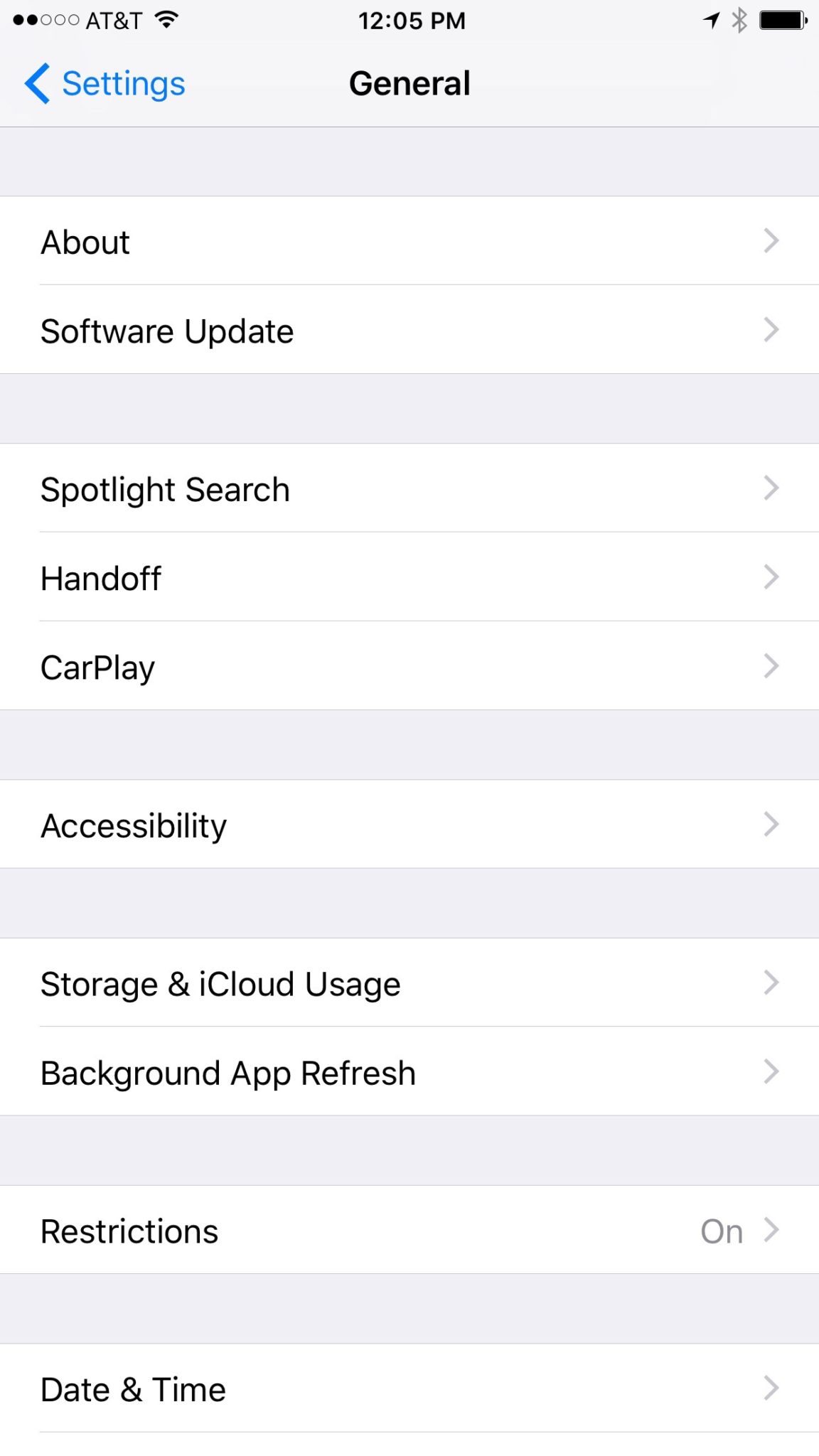
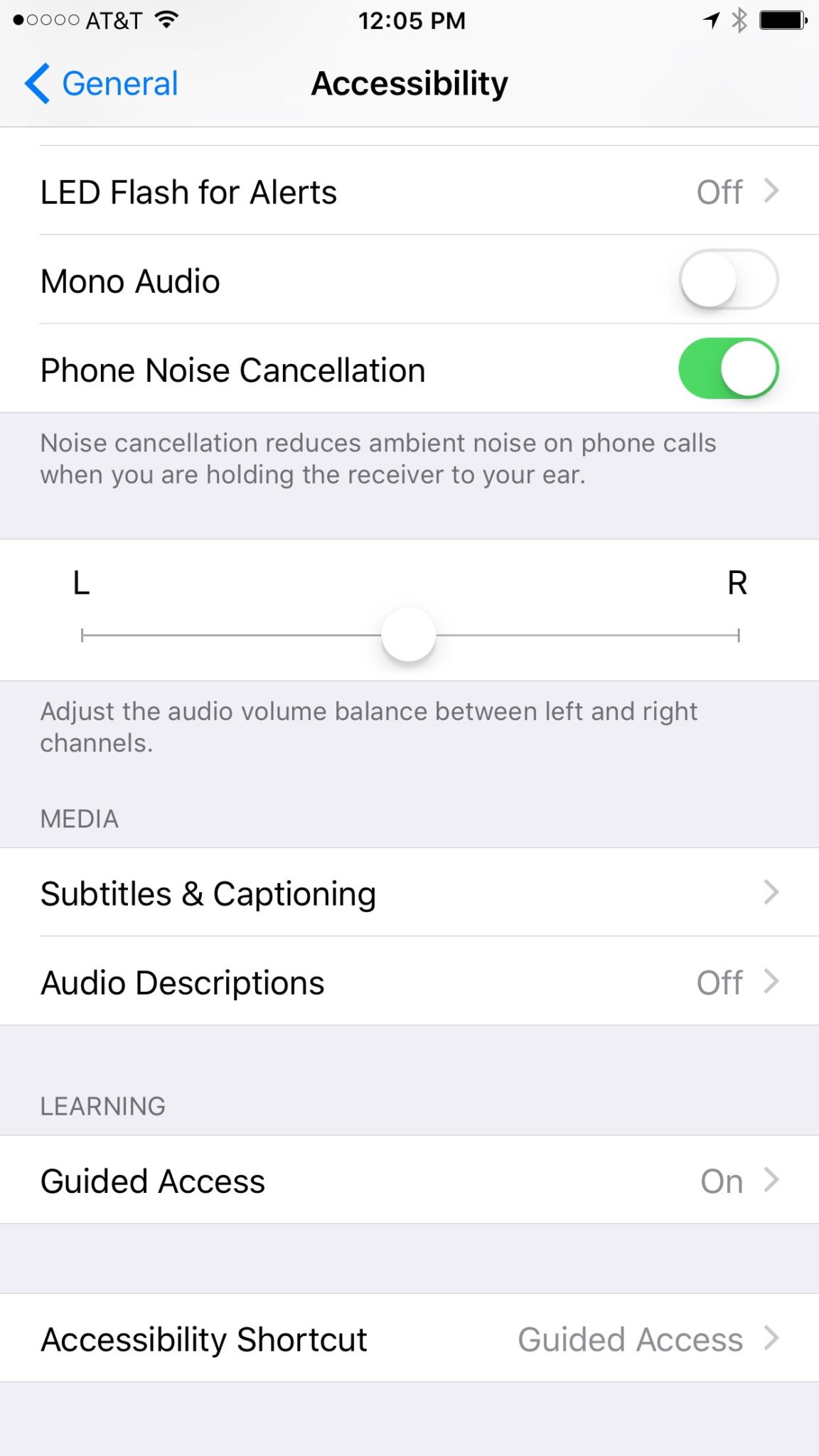
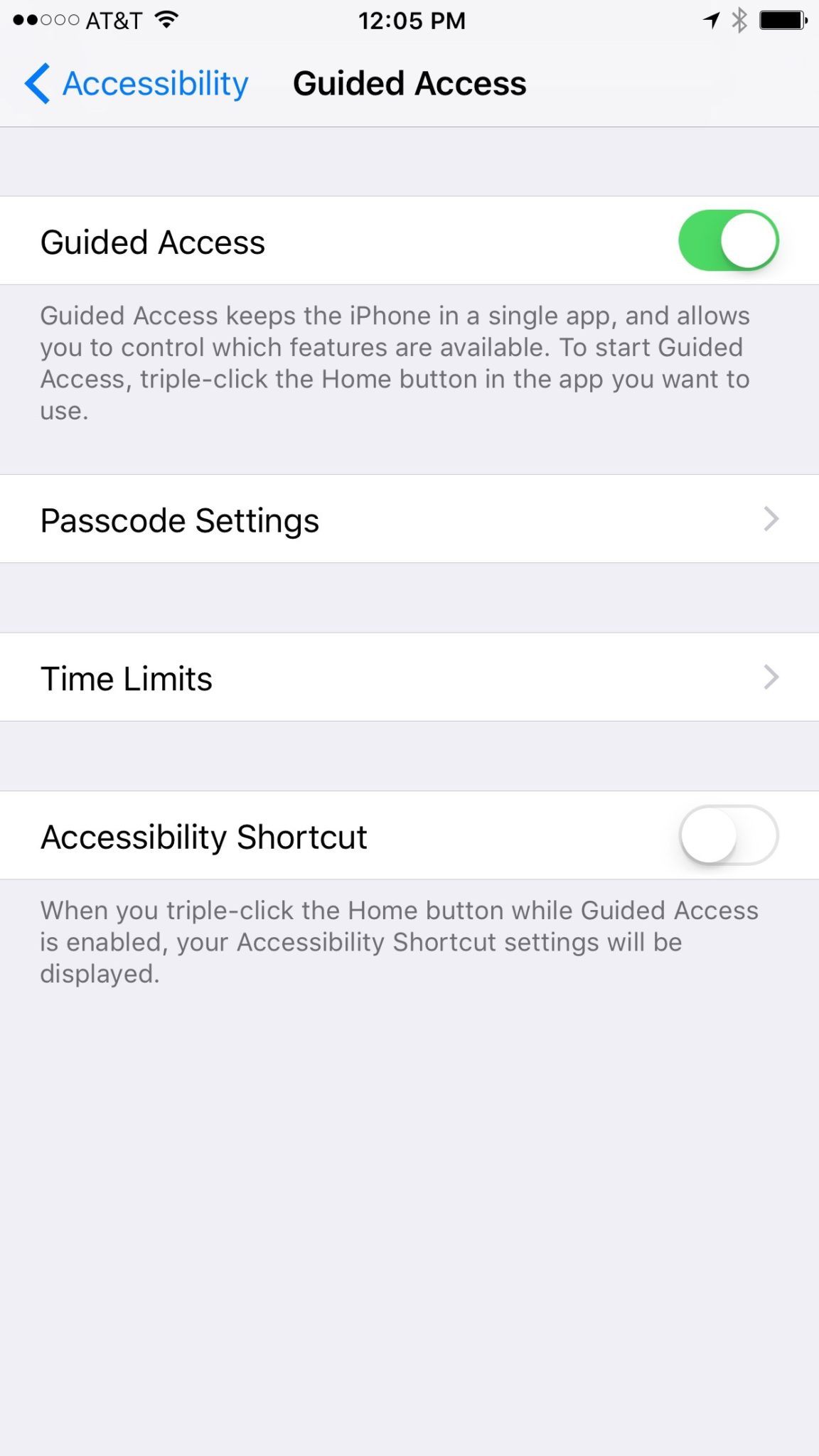
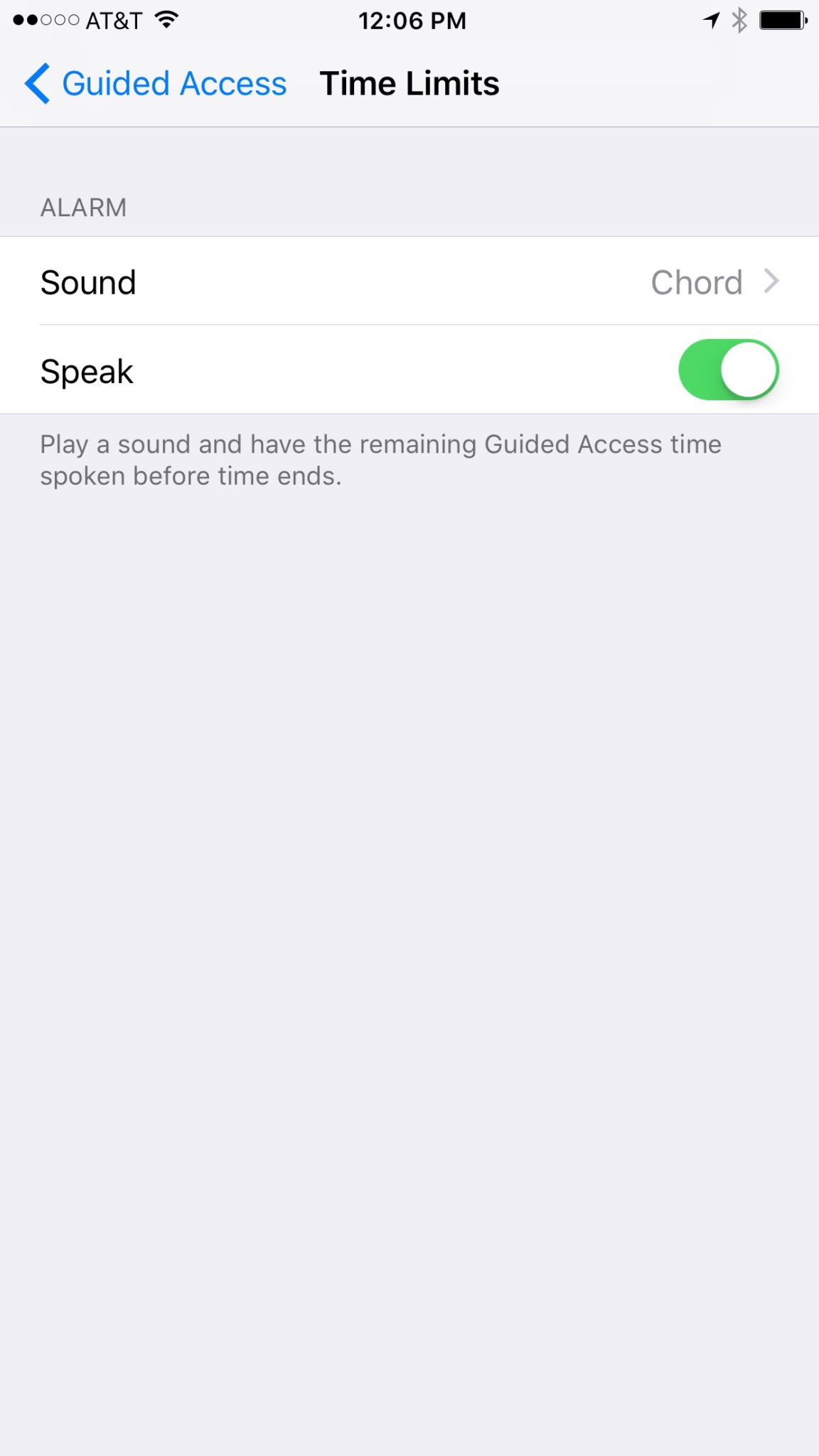
    Those of us with smaller children are often less concerned with them looking for something inappropriate online but we want to protect them from seeing something unintentionally. Apple’s iOS devices have a feature built in called Guided Access just for that purpose. This setting will lock your iPhone or iPad to one app disabling the home, volume, and lock buttons. This is a great feature if you’re wanting to allow your kids to use an app but don’t want them to look around on other parts of your phone.

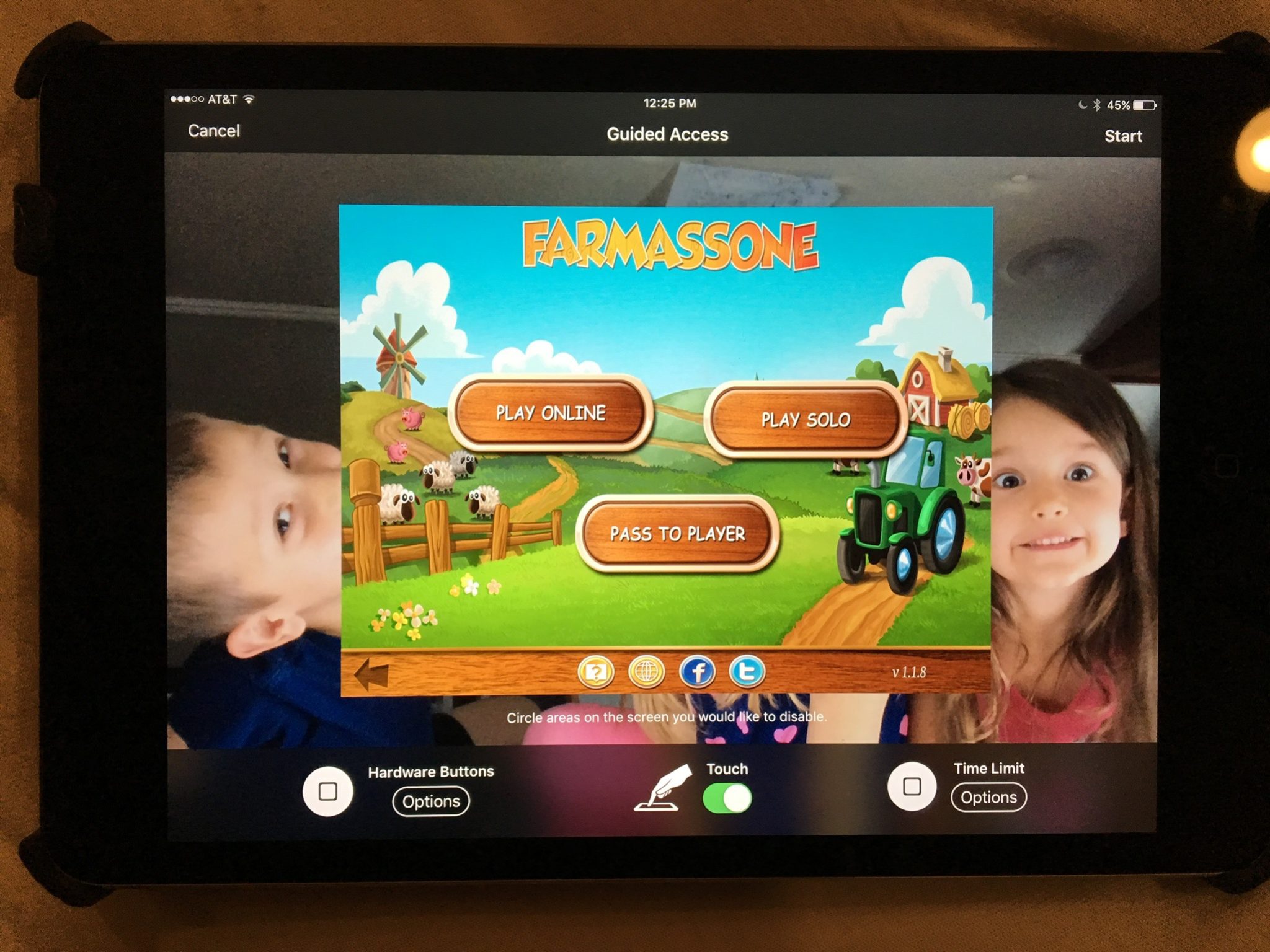
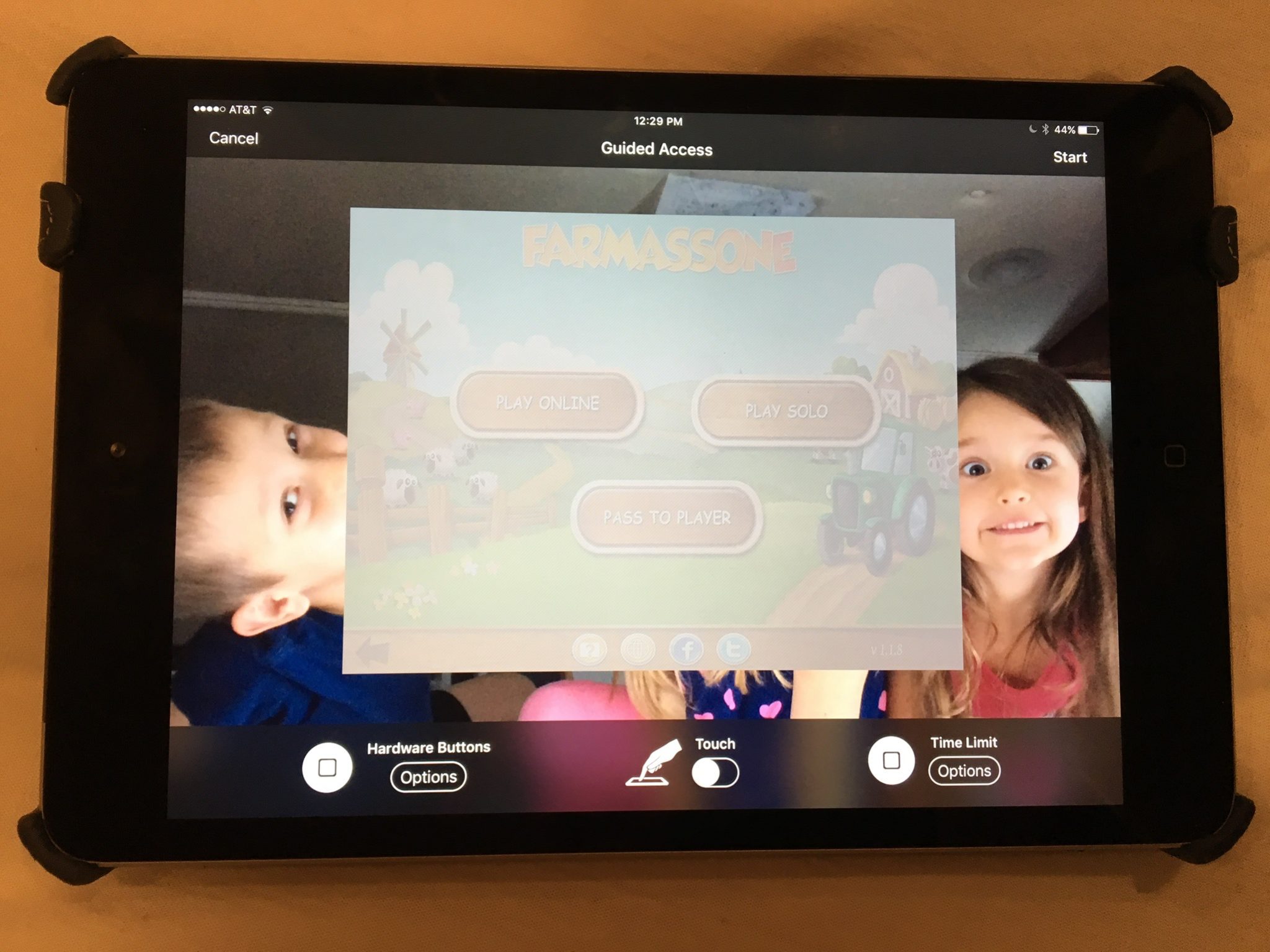
    You may have known about Guided Access for a while but if you haven’t looked at the settings recently you may be surprised at some of the new options that are available. You can turn off the sleep button, turn on the volume buttons, lock the motion (whether the screen rotates when you turn it,) turn on and off the keyboard, touch screen, and time limits. All of these settings are really helpful to customize the guided access for each app you allow your kids too use based on their age and ability to use the iPhone/iPad.

    (*Settings look different on iPhone but they work the same.)

    For example, my two year old likes to mess with the screen while he’s watching something. (He even touches our TV screen if he’s allowed to sit close enough.) This would cause the show to pause or skip or back out of the episode entirely. If you turn off the touchscreen it doesn’t matter what he does, it won’t change the show. Now, of course we are trying to teach him to leave the screen alone but this is helpful while he’s still a defiant little two year old “cutie”. For our older kids we will lock into their school apps so they can’t back out and play Lego Star Wars or something. We also use the time limit extensively, they don’t have their own devices so this helps us make them take turns.

    What Parents Should Know

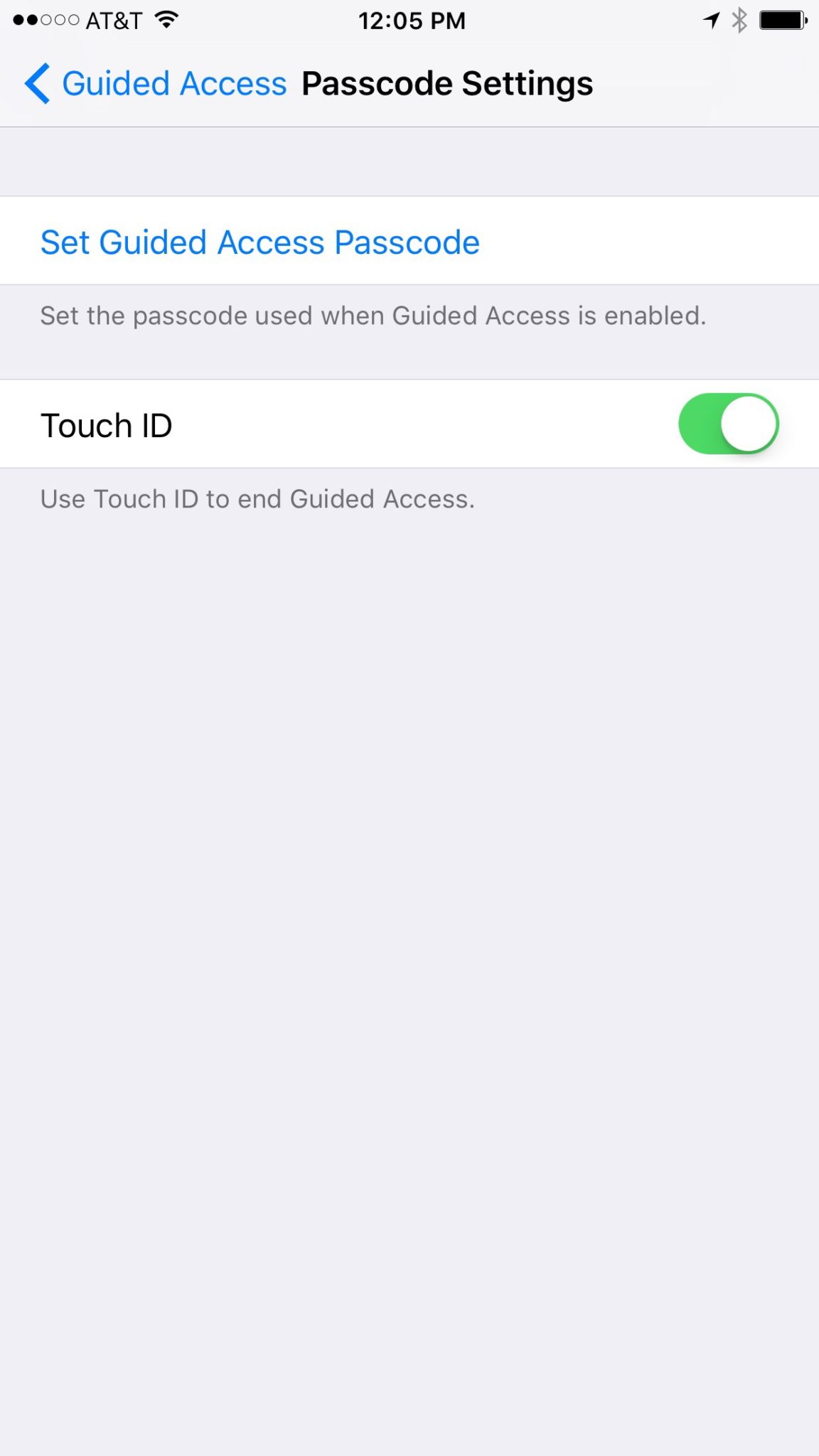
    You should know how to set up Guided Access. (See the slideshow below) Use it for, especially, your younger kids. Keep them away from apps that will link to the internet. Also, you can draw on areas on the screen to keep them from tapping there, this will keep them from tapping ads or the parental control settings button. We are learning that our kids benefit less and less from using screens but if we are going to give them the privilege it’s important to do it safely. You may give them your iPad or iPhone with an app that is safe for them but if they can back out of it and open something else you’re not doing them any favors. Guided Access gives you some peace of mind, knowing that you can protect them while they are on that device and you don’t have to be looking over their shoulder the whole time. Use the slideshow below to help you set up Guided Access and if you’d prefer a video, check it out here.