
Tag: chat

  • New Snapchat Feature Enables 16 Person Video Chat

    New Snapchat Feature Enables 16 Person Video Chat

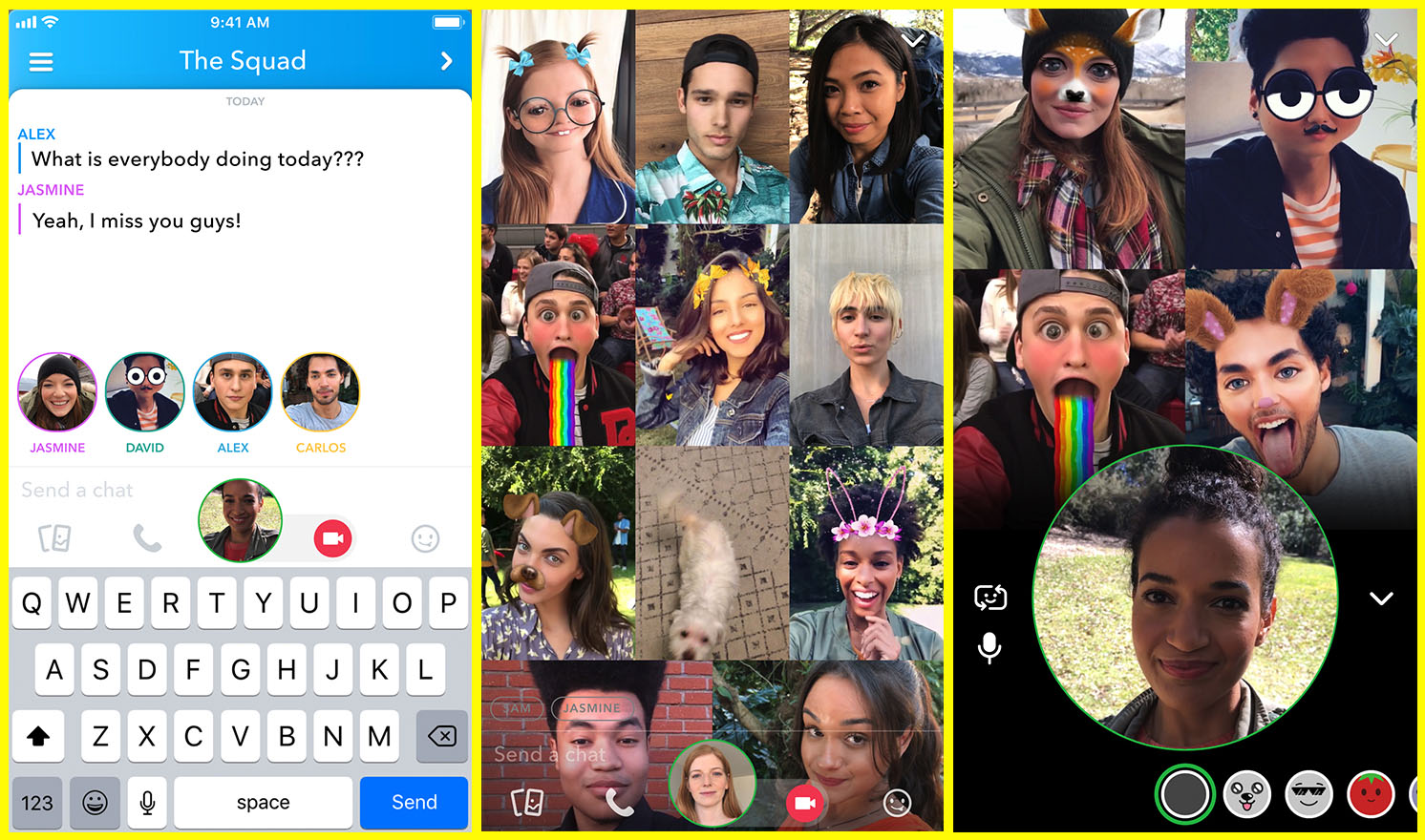
    Group chat has been available for a long while now, even in Snapchat, but now you can hang out with a large group of friends on video without ever leaving home. Snapchat’s new group video chat feature is now available and allows you to include 15 of your friends. You can sign on to a regular chat and add friends as you go or set the chat up with your large group from the beginning. Of course, Snapchat’s AR filters and masks will be available during these chats as well. Another feature that is available with this update is tagging or mentions. You can “@” tag a friend in your posts so they’ll be notified that you’re mentioning them.
    What Parents Should Know

    Parents should already know how much time their kids spend on social media. If unsupervised, they’ll chat with friends and creep their timelines all day long. In fact, many teens say they feel addicted to social media, while not doing anything to curb their own addictions. Addiction isn’t the only problem with extensive social media use. Social contact over our devices has proven to be far less beneficial than face to face interaction. There have been countless studies comparing video chat to actual conversations with someone in person and the conclusion is always the same. Spending time in the same room as someone is better for your development than only texting, calling, or video chatting. Take this excerpt summary from ScienceDirect.com’s 2014 study.

    When engaging in face-to-face communication, social information is conveyed by vocal and visual cues within the context of the situation. Nonverbal communication, defined as communication without words, includes apparent behaviors such as facial expression, eye contact, and tone of voice, as well as less obvious messages such as posture and spatial distance between two or more people (Knapp & Hall, 2010). The understanding of these kinds of nonverbal social cues is particularly important for social interaction because of the need to modify one’s own behavior in response to the reactions of others (Knapp & Hall, 2010). – ScienceDirect.com

    With apps such as Houseparty and Snapchat’s group chat out there, we have to be more intentional than ever about the time our kids spend on their screens. Hanging out with friends through our devices is becoming easier and more acceptable. Kids aren’t going out as much, the malls are closing, arcades are few and far between, and movie theaters are having to serve food like restaurants to attract the older generations because the younger ones aren’t as interested. Why go out when you can stay in and hang out with your friends online? Video chat can be an awesome way to stay in touch with long-distance family or friends but when our kids leave school and go home to do their homework while video chatting with six of their best buds all evening, something is missing from their life experience. We have to monitor their online activity and set time limits. Use unGlue or Circle to set some boundaries. Talk to your kids about the importance of face to face interaction. Don’t deny them opportunities to go spend time with friends (in families you trust). Drive them to that get-together or youth group event. Say yes when a friend wants to come over. Give them opportunities to spend face to face time with friends, outside of school, and you’ll be giving them the best chance you can to develop the skills they need to succeed.


  • New Filters, Reactions, and Screenshot Controls in FB Messenger

    New Filters, Reactions, and Screenshot Controls in FB Messenger

    Facebook is updating their camera in Messenger so you can have some new AR filters while video chatting. The first is Filters which will add color schemes and other effects to your video feed. Reactions will allow you to use the like/love/emoji reactions you can use on FB posts to enhance your live video chat experience. Finally the screenshot button will let you take a still image of your chat with a simple tap of the screen instead of having to fumble around with the hardware buttons on your phone.

    Obviously Facebook is doing its best to separate itself from the rest of the video chatting market. These new features make Facebook live video chatting more interesting than Skype or FaceTime and definitely go a long way to compete against Snapchat’s offerings. What will this all mean for our families? Well, the main thing to remember is that your kids should only be chatting with people they know.

    What Parents Should Know

    It’s important that your kids understand the dangers of video chatting with anyone they don’t know. Messenger uses your friends list to populate your contacts so, in theory, your kids should only be chatting with friends. These augmented reality filters and reactions will add to the reasons to want to upgrade a text messaging session to video chat so if you’re against video chatting by principle then you’ll want to keep them off of FB Messenger. I recommend keeping an eye on who your kids have been messaging no matter what platform they use or if it’s by text, images, or videos. You can do this a number of ways but none is better than having their passwords and checking in on their account regularly. As always I recommend you have a conversation with your children about what they are and aren’t allowed to do on messenger and why. Let them know you’re keeping an eye on things and don’t sneak around. You want your kids on your team.

    Want to get exclusive content and support our work to keep you more informed about your kid’s digital culture? You can partner with us at Patreon.com/BecauseFamily.

  • Group Video Chat is Everywhere! Now, even in iMessage.

    Group Video Chat is Everywhere! Now, even in iMessage.

    Kik has been popular with kids and pre-teens for some time. It’s a messenger that allows them to chat over wifi using a made up profile or “display name.”  The app recently joined the likes of Snapchat, Instagram, WhatsApp, and FB Messenger by adding group video to the mix.

    Then, a few days ago, a new app called Fam came onto the scene. Fam allows group video chats within iPhone’s iMessage. When iOS 10 released for iPhones it came with the ability to add and utilize apps, stickers, and games within the app itself. This has opened up the ability to put in GIFs, use emojis that aren’t available on your keyboard, and even share music or money with just a few taps in the iMessage app. Now, Fam is capitalizing on those abilities.

    How Does it Work?

    You’ll have to find the Fam app in the app store and install it. Once it’s on your phone you can activate it by selecting the apps icon next to your text box and then the small icon that looks like a group of app buttons on the bottom left.  Next you’ll tap store, and then the manage tab on the upper right. Once you toggle Fam to be active it will show up within iMessage (your text messaging app) alongside your other apps. Once you have it you just have to tap the “Create Video Chat” button and it will send an invite to up to 8 people in your iMessage thread. (See the gallery below for those instructions with some photos.) If your friends have the app installed then they’ll be able to join right away, otherwise they’ll have to go install and activate the app too.


    What Should Parents Know?

    The dangers with video messaging are pretty obvious. If your teen is wanting to have an inappropriate video conversation with someone there are plenty of options to do that. The truth is that group video has become a mainstay. The conversation in social media and tech circles is that having group video chat available is now expected on any and every social media platform. As a parent we have to understand what apps can do what and know how to disable certain features if you decide it’s best for your family.

    That said, Fam is a pretty neat addition to iMessage. I was excited when they added the ability to put apps in iMessage and apps like Fam are precisely why. This is a way to communicate over video with the folks you contact the most. I will most likely use it, that is, if the people I talk to would be willing to install it.

    I recently spoke to a father who was trying to make the best decision to let his daughter get her cell phone back after losing it due to some behavior her parents didn’t approve of. My recommendation was that they take baby steps and I advised him to not let her have any messaging apps, to only allow her to use the basic text messaging on her phone. There was a time when that would keep you away from a lot of the danger. The dangers of some of those messaging apps is the creation of often anonymous accounts. Your kids may not always know who they’re talking to. A video messaging app in iMessage (which uses only their contacts) can help keep that from being as much of a fear.With apps like Fam stepping into the light, though, I have to emphasise the importance of checking out your child/teen’s phone every now and then. Look at the apps they use and even the apps they use in their messenger. Read through some of their conversations and make sure you know everyone on their contacts lists. If you don’t you should be finding out who they are immediately. Especially since they can now have a video conversation with your kid.