Tag: boundaries

  • Get Parental Control Tools for Cheap on Amazon’s Prime Day

    Get Parental Control Tools for Cheap on Amazon’s Prime Day


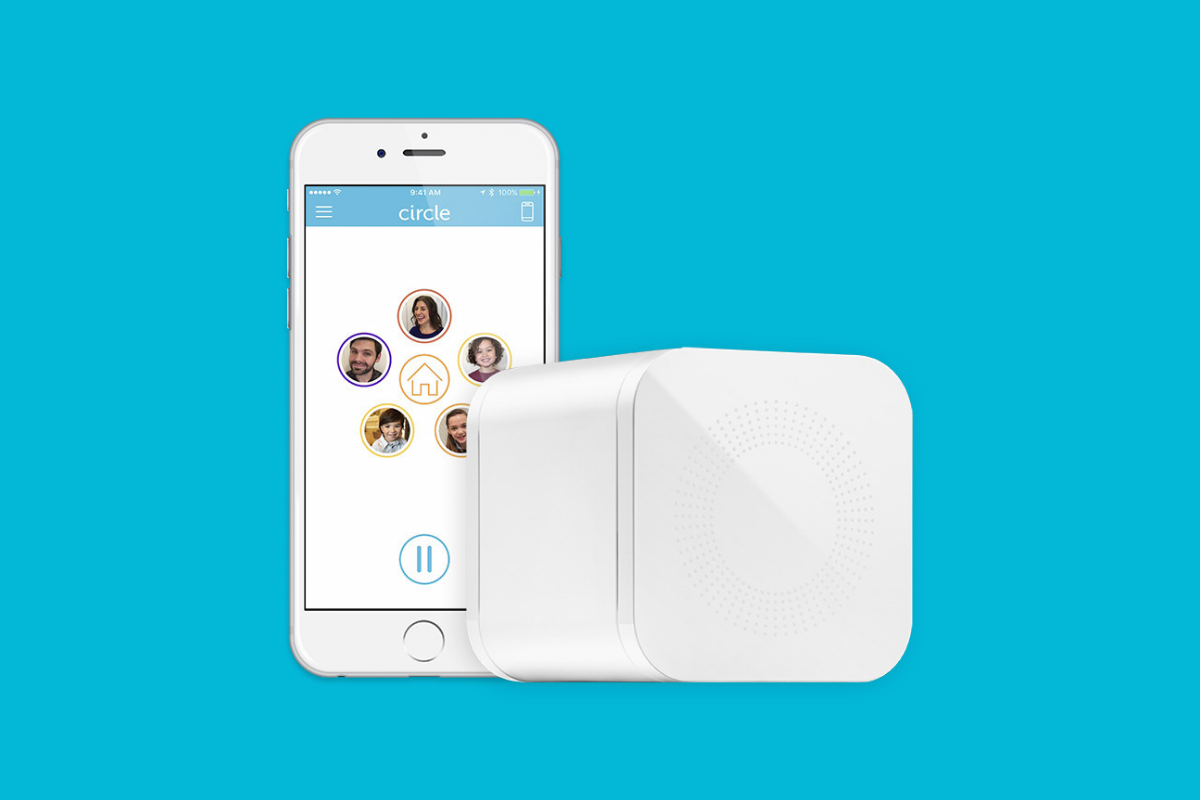
    Meet Circle, Our Favorite Home WiFi Parental Control Solution

    We love Circle. It monitors our kids online activity and protects them from happening upon websites they should be avoiding. I recommend Circle everywhere I go and to everyone I talk to. They have released a NEW VERSION of Circle that includes a year of premium features when you buy the device. If you are ok with having the older version (which is still supported, at least for now) you can get it for a third of the original price on Amazon right now.

    A Kid Friendly Watch with Messaging

    You may not want your child to have their own phone but need them to be able to contact you when necessary. This watch uses the Android operating system and allows GPS tracking, WiFi, Calls and Messaging. It also has a camera. The watch is kid sized, made for children ages 4-12. If you want the phone call option you will need to get a sim card from your cell service provider (Verizon and Sprint not supported.)

    Have Some Screen Free Fun!

    Parental Control doesn’t always mean keeping them safe while on technology. Sometimes it means keeping them off of tech completely. Board games are a great way to achieve the goal of entertaining your kids without screen time.

    Whatever age your kids are, there are some awesome off screen games available on Amazon’s Prime Day today. Whether you want to build a Unicorn Army, expand civilization through villages and farms, or collect jewels to earn more points than your opponents, these games are a ton of fun! Check out the deals on these tabletop games and sit down with your family, with no screens, and have a good time. Board games encourage eye contact, communication, healthy competition, and creative/critical thinking. They are good for learning as well as fun.

     

    Enjoy Each-other Outdoors

    Sometimes you just have to get outside. These activities will give you a chance to leave the technology indoors and head out for some “green time.”  Use your aim and dexterity to score as many points as possible in the classic Ladder Toss game which is on sale at a special Prime Day price for then next couple of days. If you’d rather toss Horse Shoes, this kid safe version of the outdoor favorite is also priced for Prime Day. If you want a new twist on an old classic, check out this Cornhole/Golf Chipping Target combo. It’s only $40 today.

    Thanks for partnering with BecauseFamily (Four Point Families 501c3)

    BecauseFamily exists to protect children and teenagers by bridging the technology gap between them and their parents. As we work to provide resources to parents and kids alike, you partnership helps us continue our mission to keep kids safe. Your options for supporting BecauseFamily are available at BecauseFamily.org/partnership and include direct donation through PayPal, ongoing support of our media content through Patreon, using our affiliate links, and signing up to support us on smile.amazon.com. The links above all direct you to the smile.amazon.com page for those products. You may be asked to sign up for who to support, search Four Point Families to elect us as the benefactor of your Amazon Smile donations. We are eternally grateful for your support!

  • New Research Includes Screen Time Limits as Critical for Childrens’ Cognitive Health

    New Research Includes Screen Time Limits as Critical for Childrens’ Cognitive Health

    The elements that create a healthy environment for our children are ever-changing. We want them to understand how to eat right, get exercise, get an education, stay off drugs, and so much more. A new study in Canada has isolated three critical factors for our kids’ health, and not surprisingly, the amount of time they spend on a screen is one of the major players.

    Jeremy J Walsh of the Children’s Hospital of Eastern Ontario published the study that surveyed more than four thousand children ages eight to eleven. They measured cognitive abilities and the amount of time kids spent in active play, sleeping, and on screens. These three factors proved key to high cognitive health in children. The strongest results were from children who slept for 9 to 11 hours per night, spent at least 1 hour per day in active play, and spent less than two hours per day on screens. The study did not differentiate between types of screen time (entertainment/education) but researches say they are continuing their studies in that direction. 

    The report stated that sleep and screen time were the categories most strongly related to cognitive health and that only five percent of children surveyed met the requirements on all three categories. Sadly, nearly one third of the children in the study didn’t meet any of the requirements at all. 

    What Parents Should Know

    You’ve probably heard the fact that many of the developers of the most popular tech products have strict screen time limits for their kids. As do family tech safety experts, myself included. Research is continuing to show that unlimited access to screens can be detrimental to our health and especially to our children’s health. Childhood obesity, mental health, and even suicide rates are rising in the United States, right alongside the number of people who would consider themselves addicted to their screens and to social media. 

    I am looking forward to seeing what the researchers conclude concerning the types of screen time children are having. Smaller studies have shown that young kids learn less when they learn on screens, so I wouldn’t be surprised if cognitive health is affected just as negatively by screen time used for education as it is for entertainment. We will have to wait and see. 

    In the meantime I recommend using Apple’s Screen time, Accountable2You, or UnGlue to monitor the amount of time your child is using their screens. Include the amount of time you know they spend in front of a screen at school as well. Remember that four rounds of Fortnite is about two hours (if you’re pretty good at it) and that game is available on every device your kid has. YouTube videos, social media scrolling, and messaging all add up to two hours of screen time rather quickly too. This is why it is so important to monitor their time spent and even limit it with software or hardware on your wifi and data connection. 

  • Three Tech Rules in My House

    Three Tech Rules in My House

    I get asked a lot about how I handle my kids’ technology in my house. It is easy to answer this question because I am pretty active in my kids’ tech lives and also because my kids are pretty young. Below are three of our most important rules for keeping our own four kids safe online.

    Rule #1 | It isn’t YOUR device.

    My kids don’t have their own tech devices. We have a shared iPad 2 and iPad Mini and a couple of old iPhone 4s that our kids use. They often try to claim one of the devices or another as their own but we quickly remind them that they don’t own any of them. We tested it with our ten year old for a few weeks and it caused too many problems. Him thinking he could do whatever he wanted because it was just his device led to a lot of frustration when we tried to enforce our boundaries. The solution was simple. All of these devices are shared, you can’t tell your sister not to use it and you can’t take it to bed with you at night. Done.

    Rule #2 | No tech in bed with you.

    This one is a bit tricky since my kids use their devices to listen to noises or music as they go to sleep. The rule, however, is no browsing once it’s lights out. We often just set it for them and forget it so the device stays across the room. There are studies to show that viewing the glowing screen at night can hinder your ability to rest. Lack of rest can cause serious health concerns in our children. Once I explained all of this to my kids, they have done pretty well to respect the “No tech in bed” rule. They want to be healthy just as badly as we want them to be.

    Why I Told My 10 Year Old EVERYTHING About Pornography

    Rule #3 | You gotta ask first.

    My children aren’t allowed to just grab a device and do as they wish. They don’t have passcodes (because built-in restrictions and a wifi content filter are set up) but if they are caught hiding in another room doing something on a device they lose the privilege for at least a week. We make them ask and when they are playing or watching something we nearly always require that it is in a common area. That part of the rule is flexible when they are doing schoolwork on an app and don’t want to be disturbed or but most of the time they have to be somewhere where everyone’s eyes can see their screen. They always, have to ask though. Mom and Dad must know you are using that device. If we find out they were hiding (and we have our ways) there is a major cost.

    We have more rules but these are the simplest and most easily implemented of our plan. They require no software installation or tech knowledge. It’s really just parenting, plain and simple. Your kids need you to set some boundaries. Maybe you can start with these three rules. Do you have some different rules or different ways to implement these same rules? Tell me about them in the comments below.

  • Internet Safety Training in Your Home

    Internet Safety Training in Your Home

    I approached the mother of a family we have been friends with for a while and asked if she would be willing to host one of our first Digital Boundaries Workshops. She immediately began to tear up and say absolutely yes. I was thrilled but concerned and confused by her tears. She confessed that, while we had discussed setting up internet safety solutions in her home nearly a year earlier, we had never made the scheduling work and she felt horrible. Especially because her son, who was in third grade, had just been caught searching for information on some very adult topics online. A younger child on the school bus had told him what he should search for and curiosity immediately took over. “We need to do something as soon as possible.” she said, “I wish we hadn’t waited, I hope it’s not too late.” We did a workshop for her just a couple weeks later.

    This response is all too common. Our work for families gets far more attention from parents who’ve been through some kind of related struggle than those who want to set up preventative measures to keep their family from such a story becoming their reality. Our children are being called digital natives by psychologists. This is a label that identifies them as a generation that’s so used to technology, it’s like it’s their native tongue. If you’ve spent any time with a young child or teen you’ve probably been impressed with their ability to maneuver digital devices. It’s hard for parents to keep up. It’s even harder if you’re an older parent or a grandparent who feels left behind by the online world. My “Setting Digital Boundaries” living room workshop is an easy way to get some training that will set you on the path towards understanding the digital world your kids are growing up in. Starting next month (August 2017) these workshops will be available both live and through skype.

    What Happens at a Workshop?

    I jokingly tell people that our Setting Digital Boundaries Workshop is like a Mary Kay party. You invite your friends over and serve up some snacks. After everyone has had some time to arrive and say hello we begin the presentation. Instead of selling you make up I’ll be teaching you and your friends how to protect your children online. After updating you on some of the latest dangers and threats available to your kids online I teach you our internet safety plan that I call S.A.F.E. (Setup Accountability Filtering and Education)


    Each section of this presentation will be spent unpacking the four keys of our S.A.F.E. plan all the while highlighting some of the best resources you can use to protect your family. Each section ends with a time for questions. The sessions last anywhere from 40 to 60 minutes and afterward, I always stay available to answer more questions and give feedback on some of yours and your friends’ tech safety needs.

    These workshops are so valuable because of how quickly the internet safety atmosphere changes. Our book is helpful for getting you started and teaching you some of the terms that you need to understand to protect your kids online. A book, however, can’t give you step by step help with your internet safety goals. A blog post or YouTube video can’t listen to your specific internet safety needs and diagnose the best plan for protecting your family. That’s what makes Setting Digital Boundaries Workshops so critical.

    Email Us to book a workshop and go to BecauseFamily.org to learn more about what we teach and how you can partner with us financially to help us keep these workshops free.

  • Five Internet Safety Mistakes Parents Make

    Five Internet Safety Mistakes Parents Make

    I spend most days trying to help parents make and implement an internet safety plan. Too often I run into hurdles that I have to jump over in order to help them out. Here are five of the most common mistakes that get in the way of parents’ internet safety strategy.

    1. Secrecy

    Parents of older kids want to give their kids freedom on their devices but keep an eye on them at the same time. I’m often asked how to do that without the kids knowing mom and dad are watching. My answer is usually, “don’t do that.” The goal is building trust and a better understanding of responsible technology use and internet accountability. Sneaking around and spying on your kid, while it may seem like a good way to see what they’re actually in to, is an even better way to ensure they won’t ever come to you when they need to talk to someone about what they’ve seen or experienced online. Obviously, if they know you’re watching and you approach them about something you didn’t approve of then they’ll know it’s coming and will be ready to have that discussion. If you have to talk with them about something you caught them doing while you were sneaking around they’ll see that as a breach of trust and you’ll find yourself with a much harder road to travel from then on. The best thing about transparency is that your kids are more likely to make better decisions when they know they’ll be held accountable for those decisions. Telling them you’re watching them can lead to better responsibility.

    2. Giving Up

    Setting digital boundaries is not easy. There will be arguments, sneaky kids, tutorial videos, and lots and lots of research. The key is to never give up. Things change fast and it truly is difficult to keep up. You have to find the resources that you trust that can help you stay informed. You should find the people you know can help you set your boundaries up to fit your needs. You have to keep reading up on what’s going on in the digital world your kids live in. If you give up you will get left behind and that means you’re not keeping your children safe.

    3. Sharing Passwords

    As obvious as this may seem, I have to say it. You must resist the temptation to reveal passwords to your kids. What happens is that kids (especially the younger ones) get tired of what they’re doing very quickly. When they are playing a game and you have it set with guided access or something like it that won’t allow them to back out of the app you will have to be the one who has to switch apps for them. Unless you just tell them the password. More convenient? Maybe. Safe? Absolutely not! There is honestly no reason at all to have any kind of boundaries set up if you are easily urged to hand over the passwords to the tools you use to establish those boundaries. Passwords are meant to keep the parental controls within the controls of the parents. Again, seems obvious, but you would be shocked at how many people have to be reminded of this truth.

    4. Not Starting

    The hardest step to take in protected your family online is the first one. Creating your internet safety plan begins with assessing the current situation in your home. That can be overwhelming at best, and extremely discouraging at worst. Some families don’t even know how many devices are in their home or who they all belong to. I worked with a family once that was shocked when their kids kept bringing phones down out of their rooms over and over again. Come to find out, their friends would give them their old phones and they’d use them on wifi when they were grounded from their own. Yes, it is discouraging but it is absolutely necessary. You need to have a plan and you must have conversations with your kids about that plan. You can’t do anything, though, if you never start. Begin today! Email me if you’d like. I will help you get started.

    5. Never Updating Software

    I covered this in a recent post but I have to reiterate because its one of the most common mistakes I see parents make. If your accountability software, filter, or devices are not updated regularly then they aren’t as secure as you’re needing them to be. If you pay monthly for these apps and software then you aren’t getting what you’re paying for, you’re only getting part of it. Updating the software when you see the notification is critical for keeping your internet safety tools in full working order. Filters use updates to load the latest information that lets the filter know what sites should be blocked and what shouldn’t, other apps like accountability software use the updates to keep their “red-flagged sites” lists up to par with what’s out there. If you aren’t updating you are eliminating an entire piece of your digital boundaries puzzle.

    Don’t let yourself fall victim to any of these blunders of internet safety planning. Read all you can on this site and subscribe to our mailing list so you see the latest news. Keep track of internet safety news with other blogs and websites as well. Keep your software updated, talk to your kids about your plan, and for the love of facepalm emojis, get started as soon as you can.