Tag: apps

  • Fidget Spinners are Coming to Your App Store

    Fidget Spinners are Coming to Your App Store

    When something becomes trendy in the offline world you can almost guarantee it’ll show up in some digital form. The theory rings true with the latest elementary school kid craze, the Fidget Spinner. While doing my daily scroll through the most popular apps on the Apple App store I noticed a couple of Fidget Spinner games. “Of course!” I said to myself, “it was only a matter of time before the app store tried to cash in on the popularity of the toy trend. Fidget Spinners have caused a lot of conversation among psychologists, sociologists, parents, and educators recently. Everyone seems to be talking about them. My goal was to avoid them on the blog because, “Hey, they aren’t on a smartphone or tablet.” Well, that’s no longer the case.

    Fidget Toys have gained popularity recently as a way to help kids with ADD, ADHD, and anxiety focus during class and other times when they need a longer attention span. Blocks, dice, balls, and other items have served teachers and psychologists well as they help these children excel in their every day tasks. Spinners toys gave another option and even boast in their advertising that they can increase focus and productivity. The problem with that according to some teachers and psychologists is that a good fidget tool will allow you to keep your eyes focused somewhere else while playing with it. This will increase your attention on the speaker or teacher or video simply because your hands are busy. A Spinner’s main benefit is the spinning itself. This spinning must be viewed to be fully enjoyed. This is why many teachers are banning the toys from their classrooms. They are saying the Fidget Spinner is simply a distraction. In a recent CNN story a teacher said:

    We have kids using them in class and the kids nearby are distracted by them. There are kids playing with them (during class) and showing other kids. – CNN

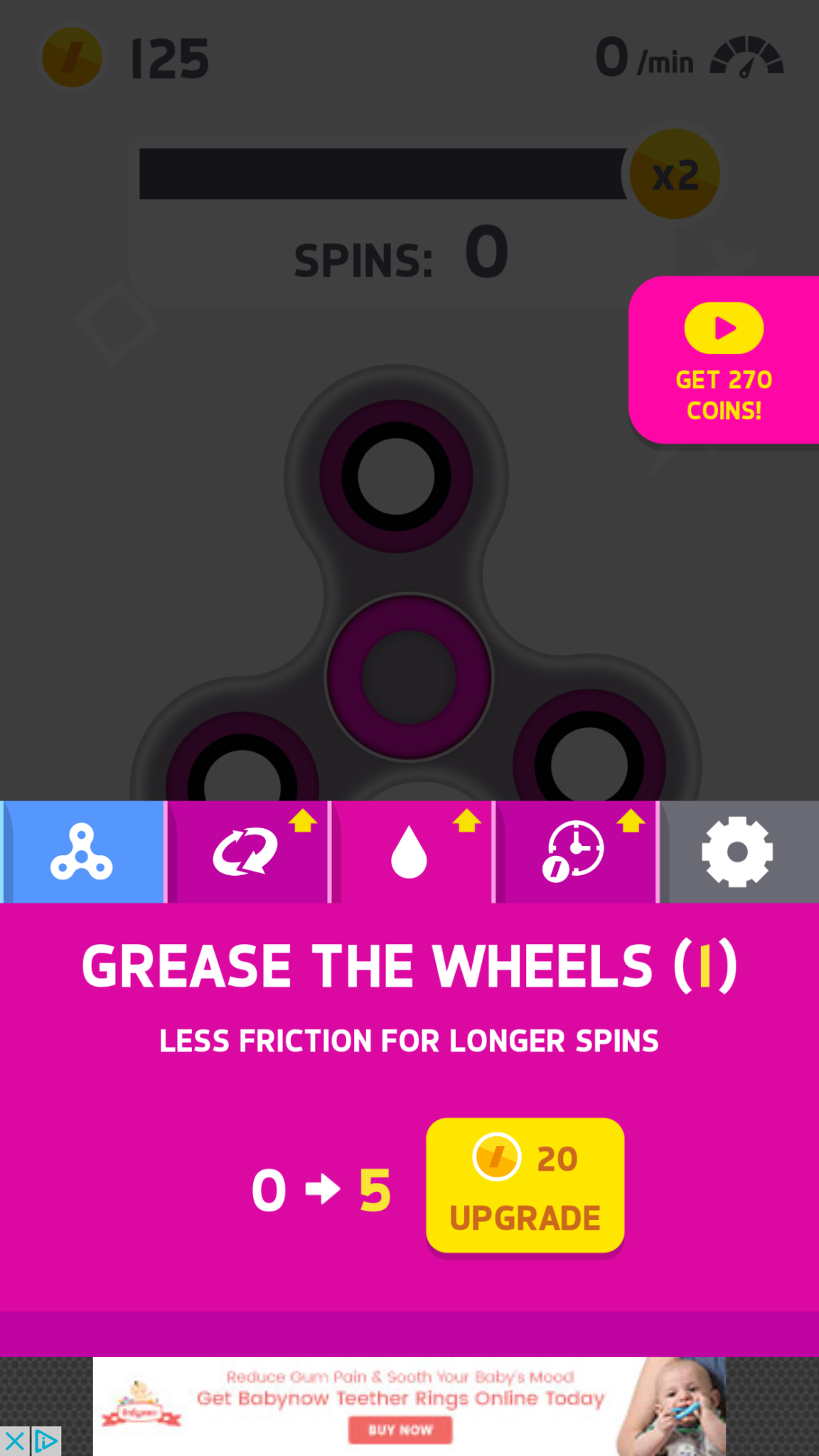
    Many kids have a Fidget Spinner simply because its the latest craze. They don’t need it for focus, its just a toy for them and that’s completely fine. The benefit I’ve heard many parents mention from using the Fidget Spinner as a toy is that it keeps the off of their screens for a longer time. Well, app developers have an answer to that too. Currently, the fasting rising apps on the Apple AND Android app charts are Fidget Spinner games. I downloaded a couple of the iOS games and played for a bit. Here’s how it works.


    What Parents Should Know

    Obviously these apps aren’t dangerous on their own. There is advertising involved, however, and it will most likely not always be geared toward young users. You can also watch ad videos to get coins, the ads were mostly for other free, casual style games. You can pay to get rid of the ads if you’d like. If screen time is a problem then these games could cause some issues. The one I spent the most time on, Spinner, had me trying harder and harder to get more spins out of my spinner. I wanted those coins so I could see what the next spinner design looked like or upgrade my speed. Kids who find themselves hooked on games like this would definitely have the same problem with one of these fidget spinner apps.

    My advice is, as always, to know your child. You have to know if your kid is the type to get hooked on something like this. If they use fidget toys because it helps their attention span then apps like Spinner may not be a good idea since its well known that screen time can cause kids to have more trouble focusing. Let me just finish by saying that these apps are not designed to help your kids with focus or attention. They are simply created to capitalize on the Fidget Spinner craze. In fact, playing the game could take the place of the real spinner altogether for some kids. That just means more screen time, more advertising, and more distraction. We, as parents, have to have the right information and make quality decisions about how our kids spend their time. Hopefully the info in this article can help you take the right steps.
     

  • Android’s New Instant Apps Can Undermine Your Monitoring Software

    Android’s New Instant Apps Can Undermine Your Monitoring Software

    If you follow my recommendations on this site you’ve got some sort of monitoring software installed to allow you to see what your kids are doing on their devices. This is important because you can’t help you children navigate the digital world they’re growing up in if you don’t know what they’re doing online. Every now and then, though, a super cool new update comes out for our phones, computers, or tablets that will undermine the goals you have for monitoring your kid’s devices. Android’s “Instant Apps” is one such update.

    Instant apps is a great idea. It’s a really cool way to share new apps and a great way for app developers to give brief access for someone who wants to see something that’s been shared but doesn’t want to download an app to see it. Usually when you see a cool post on social media or someone sends you a link in a direct message you have to use a browser to see the mobile website version of what they’re sharing, Instant Apps makes it easier to see the what’s being shared. For example if I’m creeping Amazon and see the Blu Ray for that super cool movie we saw together and want to share it with you. I can text you a link and when you open it the product will open in the “instant” version of the Amazon app. This will provide you with a much easier and smoother transition to possibly purchasing that product. The instant app permissions won’t allow it to run in the background and will disable some features that would be available if you downloaded the full app but it’s a cool intro to software you haven’t installed yet. Cool idea, yes, but maybe not for our kids.

    What Parents Should Know

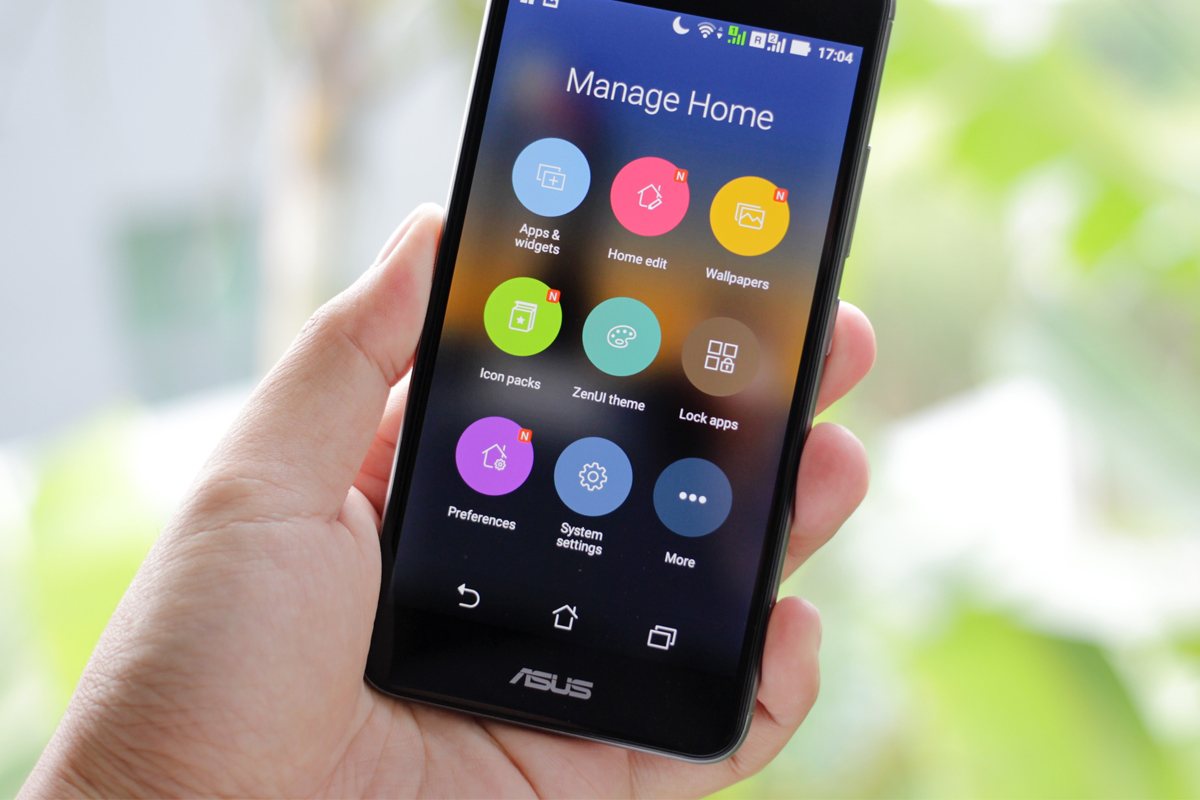
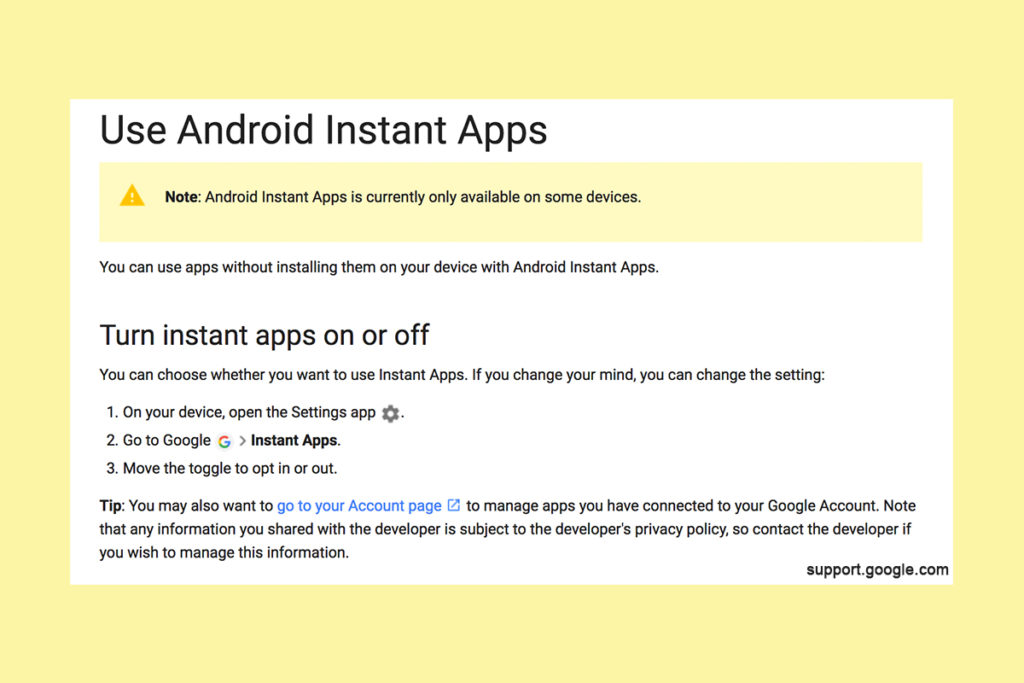
    Being able to see content from an app that isn’t even installed could be troublesome for parents who are trying to monitor their kids online activity. If you have uninstalled apps from your kids’ devices to keep them from seeing what is shared in that app you aren’t going to want them to be able to see the content in instant apps. I recommend disabling Instant Apps in on your kids’ devices if they have it. If you can’t find anything about Instant Apps in the settings of their phone or tablet then it isn’t available for their device and you don’t have to worry about it. If you do see it, follow the steps below to turn it off.


    Whether you’re using an accountability software like Accountable2You, a filter like NetNanny, or monitoring the entire device with something like Mobicip, the Instant App feature could give your child access to the very content you are trying to keep away from them. Be sure to give yourself opportunity to look over their phone or tablet whenever possible and check for the Instant App option. There aren’t very many apps developed with the feature yet but it has been opened up to most developers. More and more apps will be using Instant Apps to allow folks to share content in the near future. Turn it off now and get ahead of the game.


  • Musical.ly Teams Up with Apple Music to Sell You More Stuff

    Musical.ly Teams Up with Apple Music to Sell You More Stuff

    Musical.ly allows users to film themselves lip-syncing and performing current pop music hits and scenes from movies or TV shows. It has become one of the most popular apps for teens and pre-teens and a connecting point for music artists and their fans. In fact, there are now Musical.ly stars who are seeing success in more mainstream markets as well. Most of them are quite young teenagers. Today, Musical.ly has announced that they’re partnering with Apple Music to provide the song clips that make up their lip sync library. They will also be promoting subscriptions to the music streaming service and allowing Apple Music subscribers to listen to full versions of songs.

    Musical.ly grew a ton in 2016 and has seen a tapering off in their young audience during the beginning of 2017. This move seems to be a way to bring more value and financial stability to Musical.ly while putting Apple’s music streaming service in front of another audience. Apple Music has been chasing Spotify for subscriptions and the aren’t gaining ground. This is an obvious attempt to target Musical.ly’s young audience with their option for streaming music. Allowing full versions of the songs kids are lip syncing to in the app is adding value that many of the app’s users will see as valuable. Possibly valuable enough to ask their parents for a subscription to Apple Music. That is if they don’t have the ability to sign up on their own.

    What Parent’s Should Know

    I have been pretty outspoken on my disdain for Musical.ly in the past. One of the major reasons is the lack of an age restriction to sign up and the CEO’s attitude about it. Now I see another potential hang up for parents who’s kids use the app. There are already songs available on the app that many parents may feel are unsuitable for the age of their kids that use the app. Now the entire songs will be available if you are one of the 20million families who have an Apple Music subscription. If you don’t have a subscription be warned that the app will be consistently asking your pre-teen if they’d like to sign up for one. Also, there are likely to be features made available that won’t be useful without an account with Apple Music. How many times will your 13 year old have to be blocked from using a song until they start asking you to subscribe for them. Advertising is still, however, the least of my worries with Musical.ly.

    Parents of young teens should pay close attention to what their kids do on Musical.ly. If your young daughter is spending a lot of time singing and dancing in front of her camera know that there is no age verification so the fourteen year old boy who watches every one of her videos could actually be anyone, anywhere, of any age. In this day and age where kids are being asked to meet up by strangers and actually saying yes, there is no reason for your kid to be unsupervised on an app like Musical.ly. I recommend and uninstall if your kid is under 17 and then to closely monitor their use of the app. 

  • Use Twitter’s New Tools to Protect Your Kids from Trolls

    Use Twitter’s New Tools to Protect Your Kids from Trolls

    Surprisingly, more of our teenagers are using twitter than you may think. The common attitude among young people is it’s a good place to express yourself even if you’re not sure anyone is listening. Twitter is still a place for teens to go public with their thoughts and opinions. The potential problem with such expression is that there are always those out there wanting to counter your opinion. Often this takes on the form of trolling or bullying. Twitter has released some tools that can help their users filter out some of those trolls and parents need to learn how to use them.
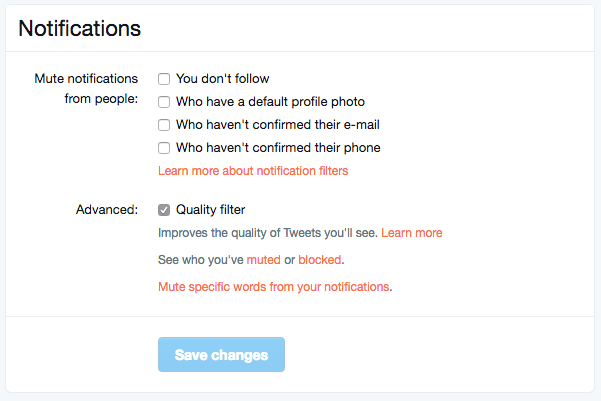

    Twitter was in the news last year because of a common theme of internet trolls bullying users, especially celebrities. This caused Twitter to begin working on some new ways to “clean up” what you see in your feed. In the last several days Android and Desktop Twitter users were given the power to block notifications of posts from certain types of accounts, including those who haven’t verified their email address and phone number. The common practice of these trolls is to create fake accounts just for the sole purpose of messing with someone. They don’t verify the account or even include a profile picture, displaying the default bird’s egg logo instead. The new tools developed by Twitter will allow these trolls to be filtered out by simply clicking a couple of checkboxes.


    What Parents Should Do

    Suicide is now the third leading cause of death among teens and a teen that is cyberbullies is ten times more likely to think about killing themselves. These statistics are a reality in this digital world and are a wake up call that parents need to take the opportunity to filter content in their kids social media feeds seriously. These notification filters can help remove some of the negative and hurtful people that just seem to want to make trouble on Twitter.


    Take note of the above picture. If you go to the notifications tab on twitter you’ll see a Settings link on the upper right. Click that link and you should see something similar to this image. It’s pretty straight forward but if you turn off notifications for anyone who hasn’t set up their profile picture, validated their email, or linked their phone number you’ll eliminate many of those troll accounts that cause so much trouble. Remember that Twitter and other social media sites contain “User Generated Content” and therefore, can’t be considered safe for anyone under 17. This means you should keep an eye on what your child or teen seeing on Twitter and have conversations with them about it. As them why they use Twitter. Find out if they’ve ever been teased or bullies on the app. If so, ask what they did about it and who they told. Kids who talk about being bullied are far less likely to take drastic measure as a result of it so open the lines of communication and be present when they need you. You should be that safe place they can come to with any problem. Bullying on social media is no exception.

    Follow all of our posts to keep in the loop on family relevant tech topics. Sign up for our weekly update newsletter. 


    Get Our Latest Posts in Your Inbox

    * indicates required


  • Three Apps that Can Help Any Parent

    Three Apps that Can Help Any Parent

    We spend a lot of time on this site talking about what apps you shouldn’t let your kids have. For this Friday post I would like to share a little bit about some apps you should get for yourself. I found as I dig around the internet that there are new resources for parents being released all the time. Digital resources are a new way to help you be safer, more organized, and more efficient.

    1. Mothership (by FamilyTech)

    Mothership is a great way to organize all the tasks that you need done in your home. It will pair with other apps like chore monster to distribute some of the needed duties to the members of your family. Mothership is a great idea for the family who is looking for ways to reward kids for doing chores and ways to organize the things everybody needs to get done. There’s even an app I can help mom and dad’s reward each other for accomplishing the tasks they need to do, it’s called Honeydo. We just recently wrote about the fact that Disney circle will connect with mothership to use screen time as a reward.

    2. Daniel Tiger App for Parents

    If you have young children like we do and you may find yourself constantly watching Daniel Tiger. That’s not so bad since some of the songs Daniel tiger sings can help you convince your kids to do the right thing. This app takes that into account. With songs, ideas for conversation starters, and follow up questions, The Daniel tiger for parents app gives you some cool tools to help you bring their love of the character into their learning. The Daniel tiger for parrots app is free on iTunes or android.

    3. Life 360

    As your kids get older you’ll find yourself off and wanting to keep track of where they might be. The life 360 app makes that as simple as opening a map and see for yourself. This app is created to help you stay connected to your family runs on a mobile device and let you if you found the numbers on the map communicate with them, and receive alerts when they arrived at their destination. You can even pay for more features that will allow you to get an alert if they use the phone while driving and many other cool features. These features only cost you about $2.99 a month or $25 a year. That is a small price to pay always know where your kids are and if they’re safe.

    The internet can be a dangerous place. But it also can be very useful. If we as parents learn how to leverage the benefits of digital life we can help our family be more organized, safer, and smarter. Keep informed of the latest trends in social media and other family relevant tech news by subscribing to our mailing list. You’ll also get free access to the online version of our Setting Digital Boundaries Workshops.


    Get all the latest family tech news in your inbox.

    * indicates required


  • Kids Online Too Long? Put the Power of Time Limits in Their Hands with UnGlue

    Kids Online Too Long? Put the Power of Time Limits in Their Hands with UnGlue


    Every now and then a resource comes along that we can’t wait to tell you about. Today, we are excited to show you UnGlue. We are always looking for the newest and simplest way to protect your kids online and UnGlue is answering the time limit question with some pretty great new ideas. Check out the video below to see the heart behind their cool new time limits software.


    “Kids are the ones that are hooked… they’re the ones using these devices …  And it’s not even their fault… they’re fighting with the best minds in the industry that are set on having them scroll just a little bit more. Just one more like, one more picture, one more chat, one more Pokémon, one more level. And they’re losing,” – Alon Schwartz (CEO of UnGlue

    UnGlue runs with the idea that kids truly want to do better at managing their screen time by placing the power in their hands. In fact, the founder of UnGlue doesn’t like to call their service “Parental Controls.” While parents do set the time limits, the kids are able to decide what they do with that time. UnGlue doesn’t only turn off internet access at a certain time, it designates between productive and “entertainment” internet activity. Parents establish the amount of time their kids are allowed to spend being entertained on a screen and their child is then able to use the time as they choose. They can even store up unused time to use later for some good ol’ fashion binge watching or playing. The UnGlue concept is a new one and, I think a great one.

    The only thing more important than keeping kids safe from the dangers of internet use and over use of the internet is teaching them how to be responsible in those areas for themselves. UnGlue puts the power in their hands and allows you to show them, through their own experiences, how they can better manage their time and be more effective and productive every day. In fact, I would go as far as to say that most of us parents could use an education on screen time management.

    I could go through all of the ways UnGlue allows you to set up their mobile app but I’ll just point you to their website and let you watch this video below. UnGlue is FREE to use so go check it out and email us at BecauseFamily@GMail.org to let us know how your experience was.


  • The Past and Future Combine with PBS Kids’ New 24hr Kids Channel

    The Past and Future Combine with PBS Kids’ New 24hr Kids Channel

    Our Young Kids are Learning from Screens

    The number of children who are viewing educational entertainment broadcasted to their home television grew by two percent over the past year. Most of those families are in lower income homes. PBS has always catered to that demographic with their free television content and now they’re extending that privilege to children. Starting today, January 16 2016, PBSKids will have it’s own 24/7 channel.

    Yes, Daniel Tiger, Peg + Cat, and Sesame Street will all be aired on a single PBS channel dedicated to children’s programming. The best part is that it isn’t just a channel, the content will be streaming on the PBSKids app that you probably already have. The online streaming content will also be free.

    PBS has said that they understand the need for educational television for those who can’t afford cable or satellite TV, while they also understand that the majority of children are watching their shows on smaller screens these days. The free broadcast/streaming content is unprecedented in a world where everyone is trying to convince you to pay this or that for their content. PBS is sticking to their model of educational entertainment for all. 

    The plan is to roll out the channel on 73 stations across the United States first and have 107 of the US PBS stations carrying the channel later this year. This will mean that free 24 hour children’s education content will be available to ninety percent of the homes in the united states. The streaming content on their app will increase the audience even further.

    Finally the plans include a Family Movie Night and integrating games into the show content. Characters will prompt the young viewers to further their educational experience by taking part in games and activities on the app that will correlate with what they are viewing. PBS says that research on children’s education has inspired this feature and that the feature will increase the opportunity to learn while consuming their content.

    What Parents Should Know.

    If you don’t already have the PBS App I recommend it for your younger children. The shows on the app are safe and educational and there are no ads or anything that would cause them to click away from the app. The games on the app are clean, safe, and fun. Learning is obviously the first focus of every show and game and short of a few annoying characters, you’ll feel totally glad your kids are getting their entertainment from the PBS App.

  • Group Video Chat is Everywhere! Now, even in iMessage.

    Group Video Chat is Everywhere! Now, even in iMessage.

    Kik has been popular with kids and pre-teens for some time. It’s a messenger that allows them to chat over wifi using a made up profile or “display name.”  The app recently joined the likes of Snapchat, Instagram, WhatsApp, and FB Messenger by adding group video to the mix.

    Then, a few days ago, a new app called Fam came onto the scene. Fam allows group video chats within iPhone’s iMessage. When iOS 10 released for iPhones it came with the ability to add and utilize apps, stickers, and games within the app itself. This has opened up the ability to put in GIFs, use emojis that aren’t available on your keyboard, and even share music or money with just a few taps in the iMessage app. Now, Fam is capitalizing on those abilities.

    How Does it Work?

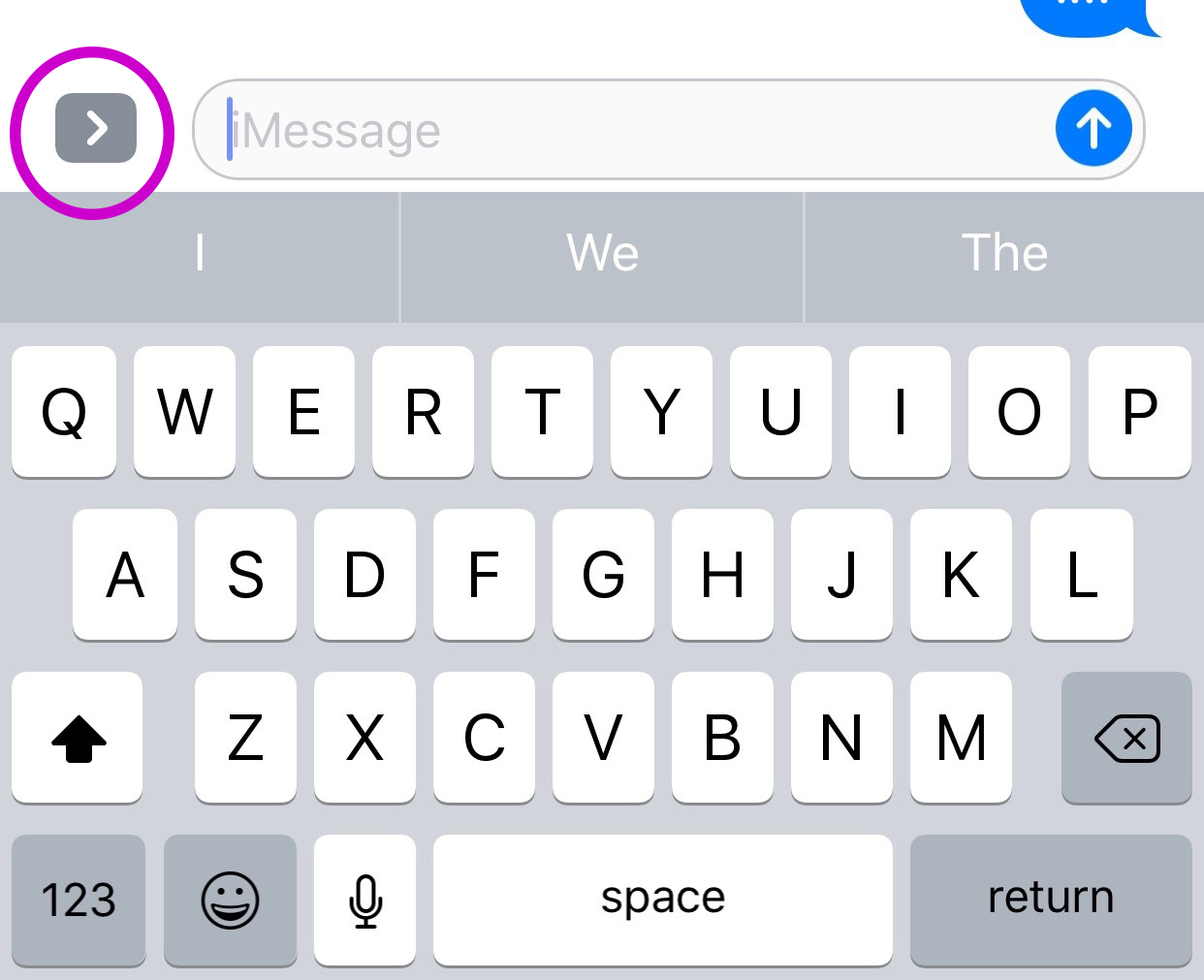
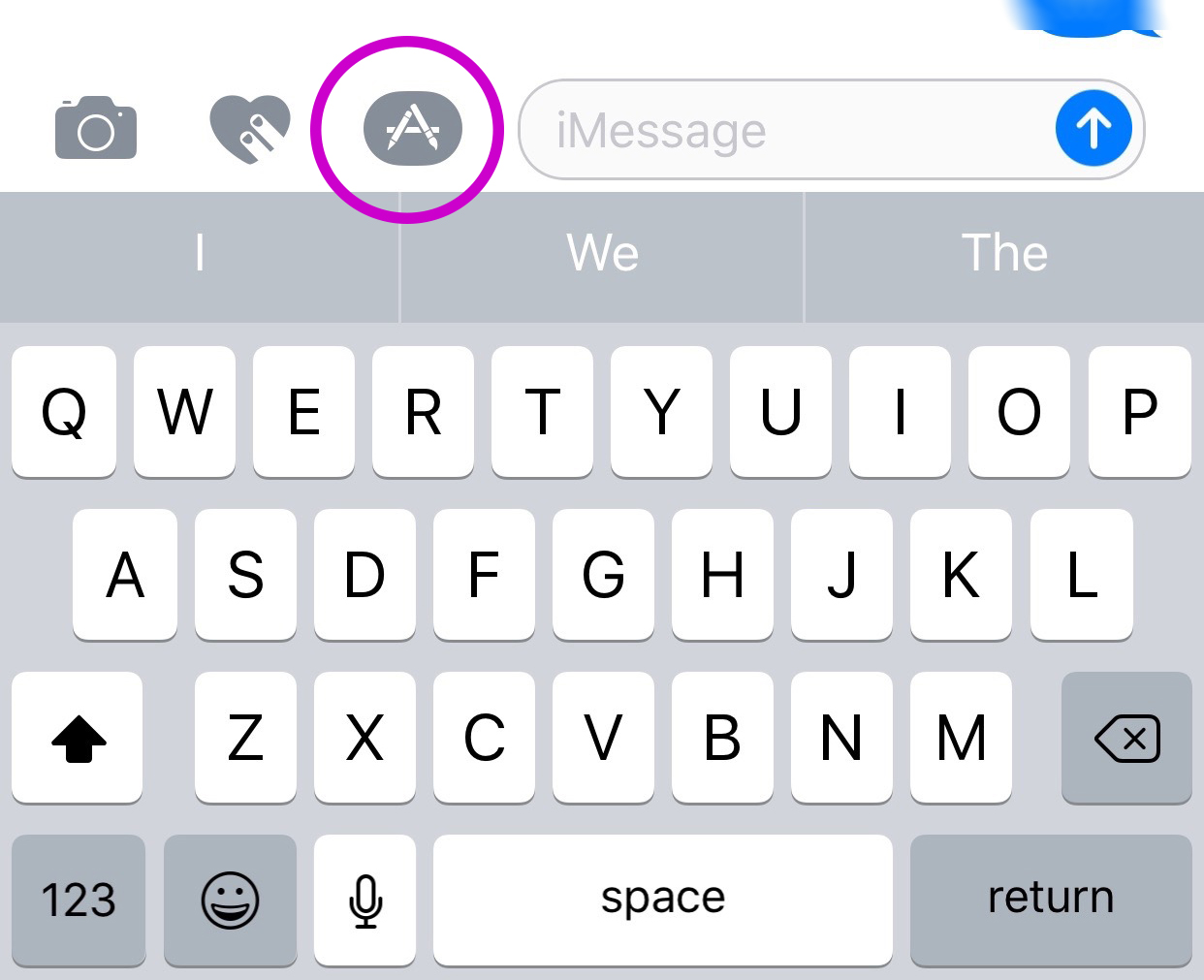
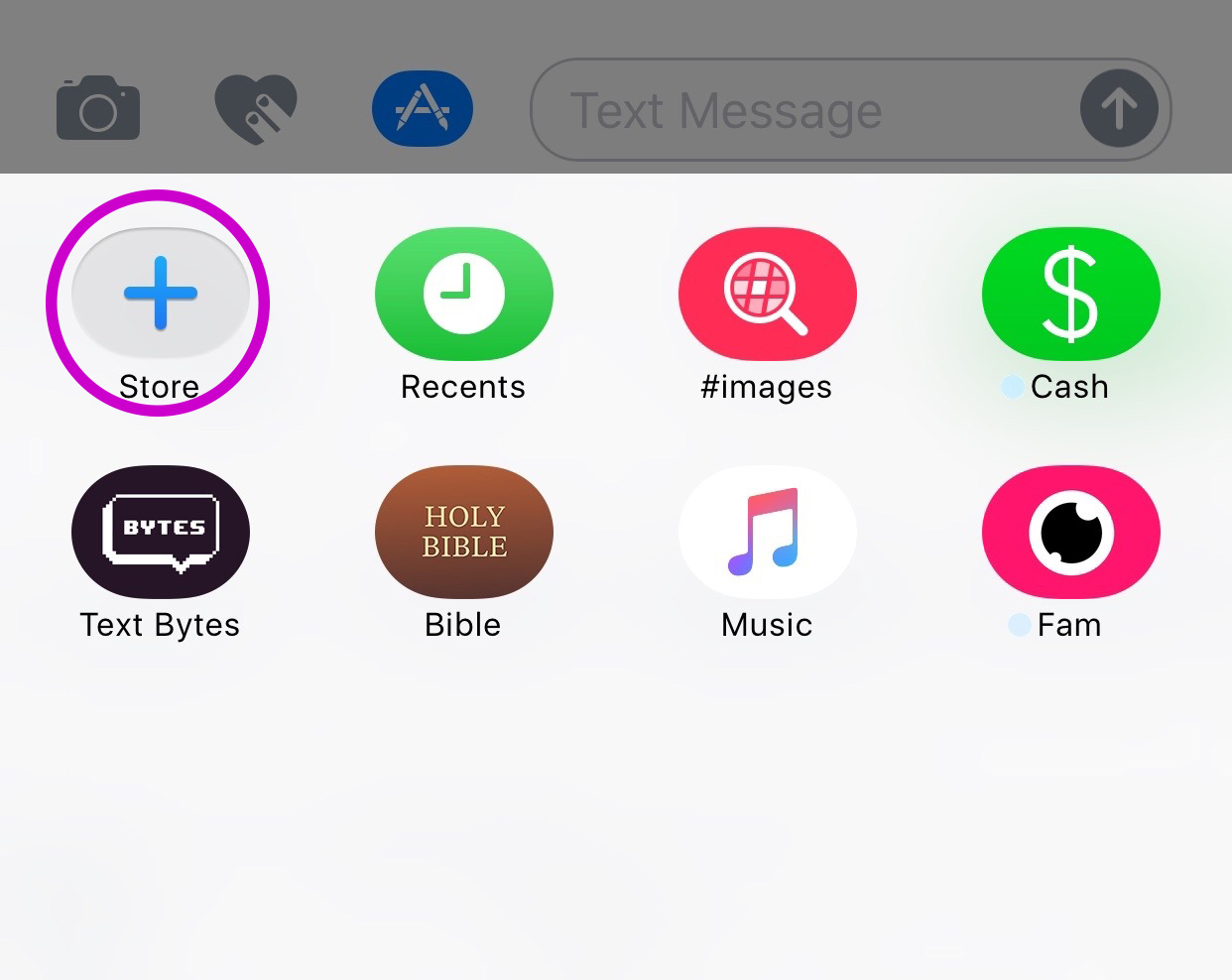
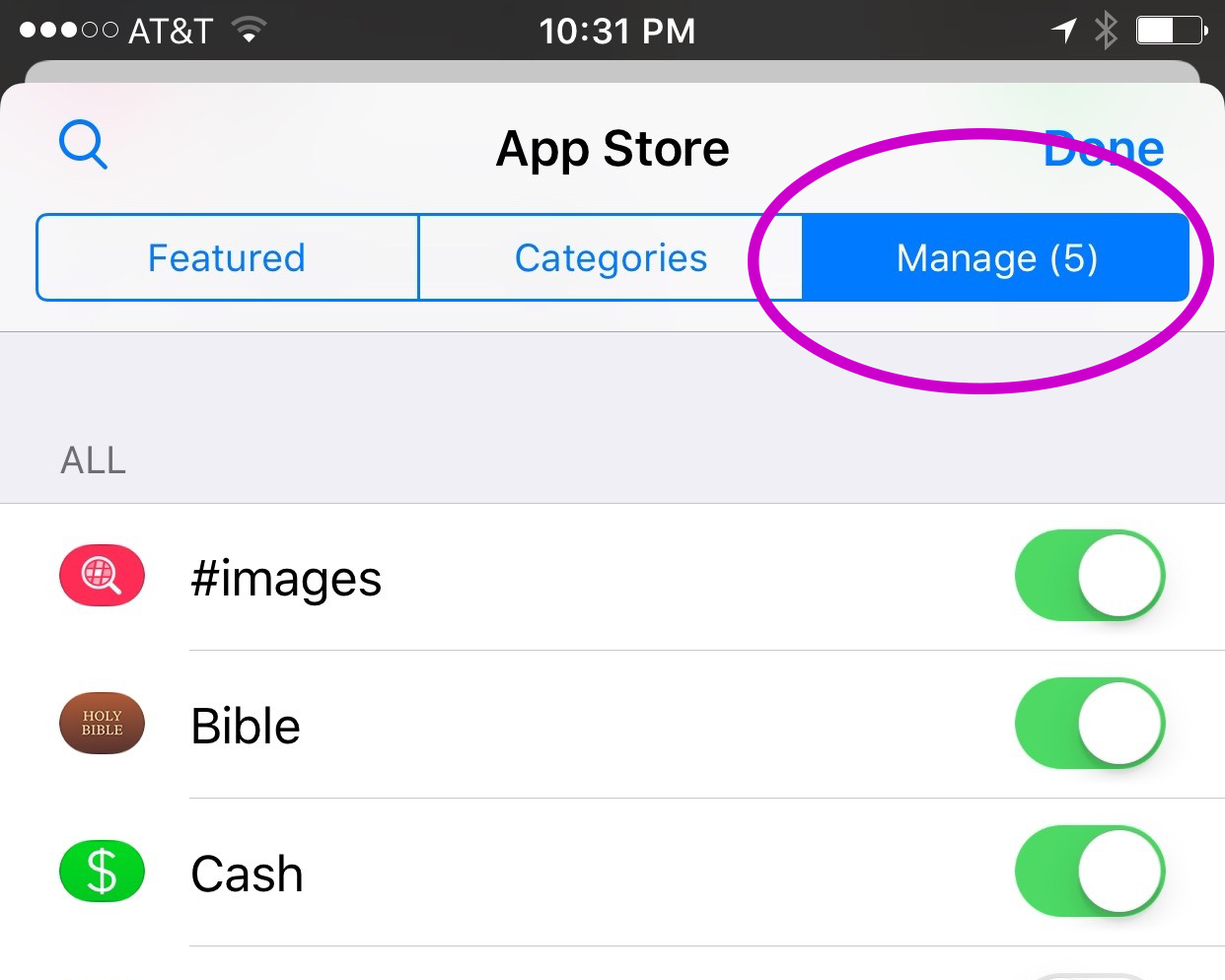
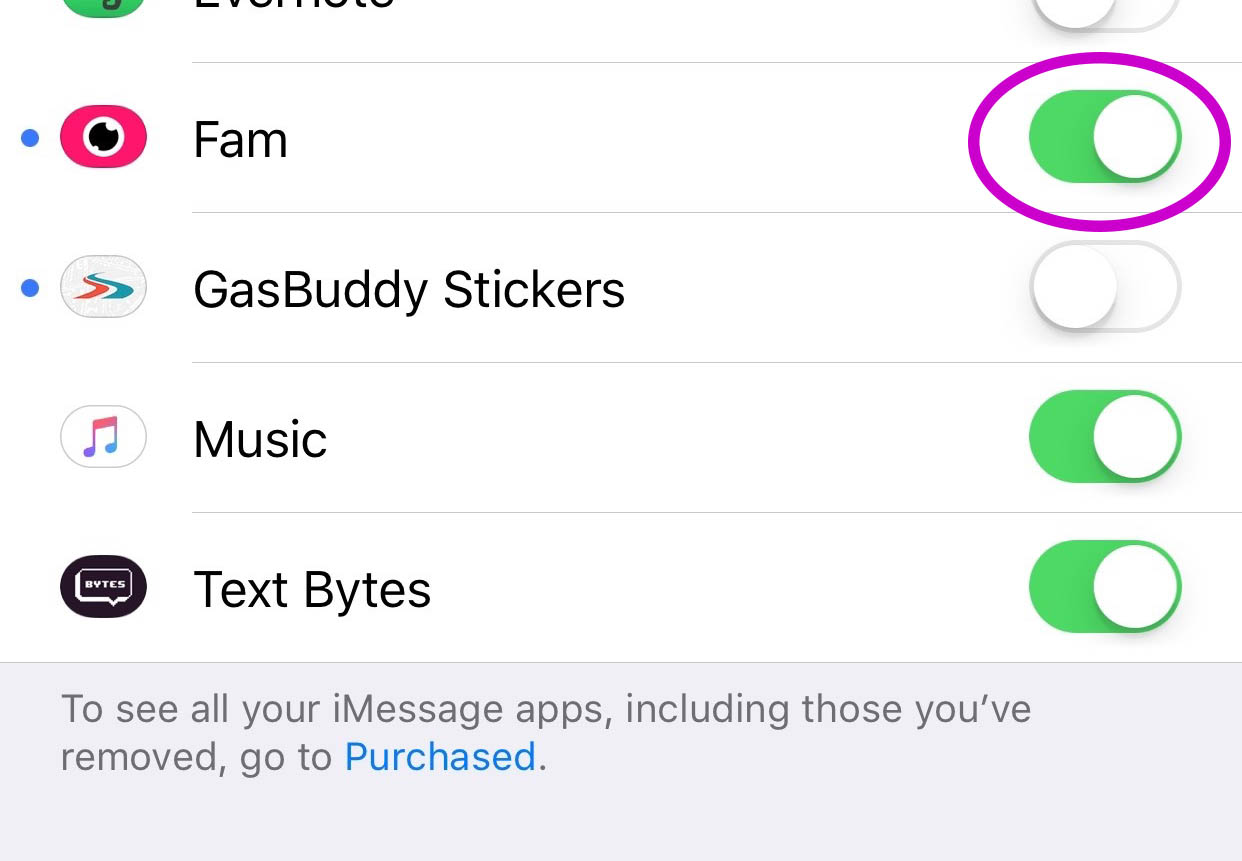
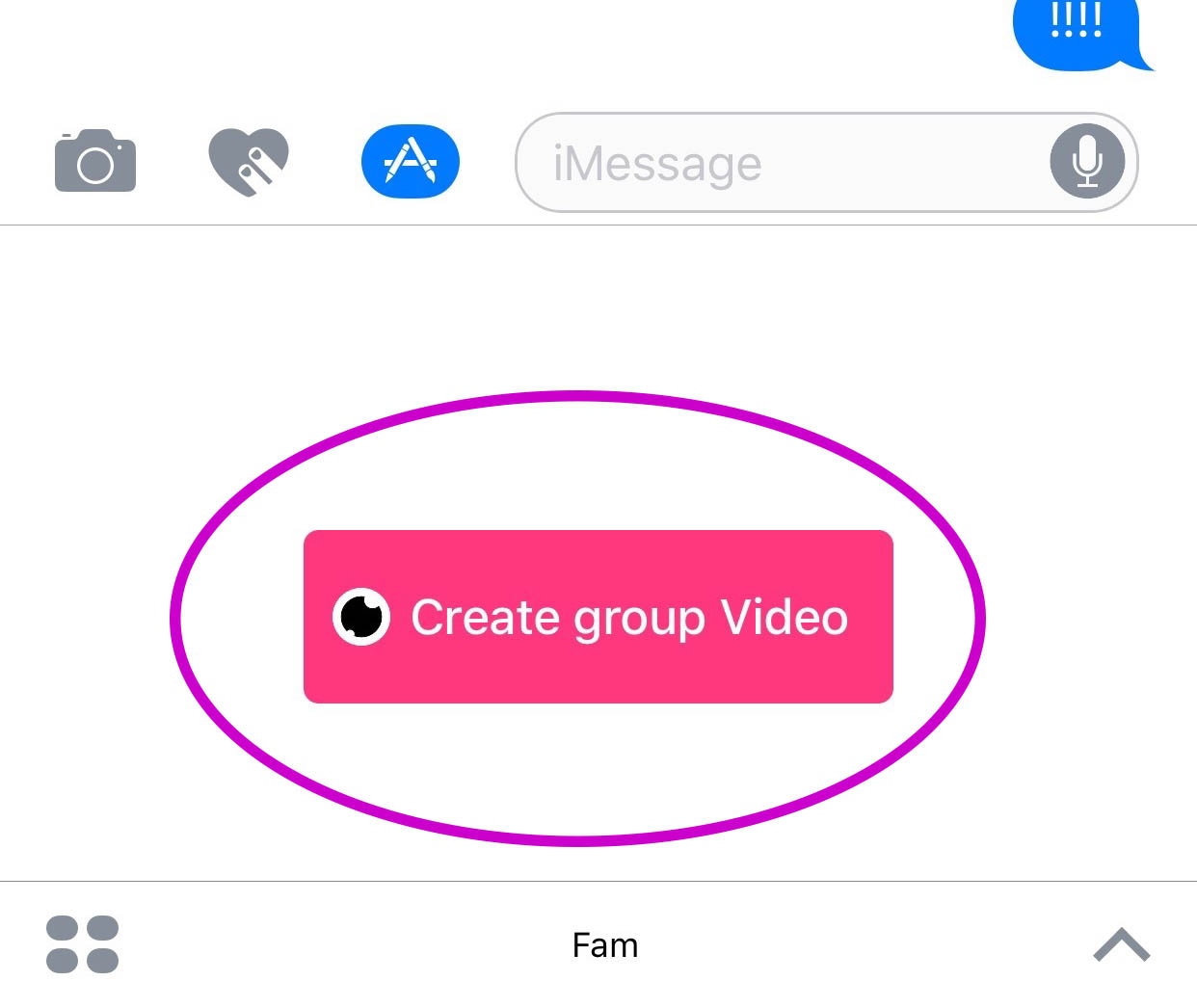
    You’ll have to find the Fam app in the app store and install it. Once it’s on your phone you can activate it by selecting the apps icon next to your text box and then the small icon that looks like a group of app buttons on the bottom left.  Next you’ll tap store, and then the manage tab on the upper right. Once you toggle Fam to be active it will show up within iMessage (your text messaging app) alongside your other apps. Once you have it you just have to tap the “Create Video Chat” button and it will send an invite to up to 8 people in your iMessage thread. (See the gallery below for those instructions with some photos.) If your friends have the app installed then they’ll be able to join right away, otherwise they’ll have to go install and activate the app too.


    What Should Parents Know?

    The dangers with video messaging are pretty obvious. If your teen is wanting to have an inappropriate video conversation with someone there are plenty of options to do that. The truth is that group video has become a mainstay. The conversation in social media and tech circles is that having group video chat available is now expected on any and every social media platform. As a parent we have to understand what apps can do what and know how to disable certain features if you decide it’s best for your family.

    That said, Fam is a pretty neat addition to iMessage. I was excited when they added the ability to put apps in iMessage and apps like Fam are precisely why. This is a way to communicate over video with the folks you contact the most. I will most likely use it, that is, if the people I talk to would be willing to install it.

    I recently spoke to a father who was trying to make the best decision to let his daughter get her cell phone back after losing it due to some behavior her parents didn’t approve of. My recommendation was that they take baby steps and I advised him to not let her have any messaging apps, to only allow her to use the basic text messaging on her phone. There was a time when that would keep you away from a lot of the danger. The dangers of some of those messaging apps is the creation of often anonymous accounts. Your kids may not always know who they’re talking to. A video messaging app in iMessage (which uses only their contacts) can help keep that from being as much of a fear.With apps like Fam stepping into the light, though, I have to emphasise the importance of checking out your child/teen’s phone every now and then. Look at the apps they use and even the apps they use in their messenger. Read through some of their conversations and make sure you know everyone on their contacts lists. If you don’t you should be finding out who they are immediately. Especially since they can now have a video conversation with your kid.

  • What Parents Need to Know About Super Mario Run

    What Parents Need to Know About Super Mario Run

    Guest post by John Wilkerson of The Wired Homeschool.

    Super Mario Run, announced earlier this year, is the first highly anticipated mobile game from Nintendo. Initially released for iOS devices, it is expected to be released for Android early next year, parents can expect to hear about the chart-topping app for months to come.

    On its first day, Super Mario Run was downloaded 2.85 million times according to Apptopia which broke the previous record of 900,000 downloads held by PokÈmon Go. That means if your child hasn’t already installed the game, they’ll want to soon.

    About the Game
    Super Mario Run is a single player, side-scrolling, endless running game where players guide the eponymous Mario through several worlds to rescue Princess Peach from Bowser. Along the way players collect coins while trying to avoid Bowser’s minions and falling off the screen. If you’re a fan of Super Mario Brothers this sounds familiar to you.

    Nintendo has done a good job of making this game unique. It’s not just a simplified version of a very popular game from the 80’s. It has unique game-play elements that will entertain you and your kids.

    The game has a mini-games within it which can be unlocked by earning tickets. You earn tickets by collecting all the pink, purple, and black coins on each level. You can also recruit Toads into your kingdom to restore it to its former glory.

    Initial and On-going Costs
    The first 3 levels of Super Mario Run are free. To unlock the remaining episodes you’ll need to spend $9.99. While this seems like a lot for a casual game, keep in mind that there are no in-game micro-transactions. No need to worry about Johnny or Sally running up your bill.

    Additional Features
    In addition to earning bonuses in the game, bonuses are given for connecting your Nintendo account. If you or your child don’t already have an account, you can create one in your device’s browser.

    Players can also connect with friends by sharing their player ID, linking to social media accounts, email, text, or adding someone’s player ID manually. Once you’re friends with another player you can challenge them in Rally Mode.

    Final Thoughts
    Super Mario Run is a fun game that you and your kids will want to play. It’s challenging and the nostalgia factor for adults is certainly what’s driving its popularity.

    As with any game, parents need to be aware of a few things:

    1. If you link to or create a Nintendo account you should be aware of the privacy policy.
    2. Linking to social media accounts brings with an additional set of privacy issues.
    3. While initially free, the $9.99 price might seem high but there are no micro-transactions.
    4. There is the potential that your child will spend too much time playing it.

    About the Author: John Wilkerson is a homeschooling dad of 7 living in upstate New York. Through his podcast and blog, The Wired Homeschool, John has been providing practical advice to parents on using technology in homeschooling for over 6 years. Connect with John on Twitter: @jwilkers.

  • VIDEO TUTORIAL: iCloud FamilyShare Set-Up

    VIDEO TUTORIAL: iCloud FamilyShare Set-Up

    Apple has a great way to help families keep track of what their children are downloading on their ios devices. Your kids can even have their own profiles. It allows for families to share the apps they have downloaded without having to purchase multiple copies. It lets the administrator see what apps the other accounts have downloaded. Best of all, though, it lets you set requirements for young users to ask permission before an app can be downloaded. If you have specific requirements and standards for the apps you want your kids to use, this feature will help you keep those standards in tact.

    The video below is a simple walkthrough on my Macbook of how to set up your iCloud FamilyShare settings. I will add one new child account and even give some information about why you may want to use this feature.