Tag: android

  • Turn Your Drawings into Playable Games with Doodlematic

    Turn Your Drawings into Playable Games with Doodlematic


    Doodlematic lets you take a picture you’ve drawn on paper and turn it into a playable mobile game. 

    I met Martin Horstman, the dad who developed Doodlematic at CES2020. He talked me through how you can take any kind of art, as long as it uses the colors the APP recognizes, to create a real playable mobile game. They sent us their box set and we were able to play with it. My son had a blast drawing out games, especially platformer games that you had to jump from platform to platform an achieve goals. 

    To use Doodlematic, you simply draw the game on paper, take a photo of it, the APP processes  it, and then you play. You can then share it in the Doodlematic app and other people can jump in and play your games if you’ve allowed them to be public. 

    How it Works

    There are two types of games you can create on doodle matic. You can make the platformer, like I mentioned already, or you can make an Angry Birds style launch game where you shoot your “avatar” over to knock over targets. It’s all based on a series of different colors that create different types of objects in the game. Anything black is your platform or your ground. Red is obstacles, things that get in your way and end the game when your avatar touches them. Blue items are your goals and anything green is your character or avatar. 

    Your avatar jumps from platform to platform trying to grab the blue goals while avoiding all of the red obstacles. The app uses the colors to develop the Games behavior. This allows kids to basically make the game whatever they want it to be. The best part is there’s a lot of trial and error. I don’t know how many times my son drew something, took a photo of it, and then realized game just didn’t work properly. Not because the app was messed up but because his drawing didn’t allow the Doodlematic to do what it needed to do to make the game playable. Back to the drawing board, literally. Just a few fixes here and there and the games was doing what he wanted it to. 

    What You Get

    Doodlematic comes in a box with notebooks to guide you through the game creation process. It takes you through a step by step tutorial showing you what to draw and how to use that to create the behavior you want in game. 

    Doodlematic is probably usable for any kid over three years old. Once they can draw a little bit and grab a pen or pencil, they can create a game in the app. There are some advanced controls you can set up that make things move back and forth constantly or make the obstacles do things.  You can learn how to do that as you gain more experience in Doodlematic. However, all you have to do to get started is draw with the proper colors and play your games. 

    Apps like Doodlematic are great for kids because they teach them that trial and error process that’s necessary in developing any kind of technology. If you’re learning to code or if you’ve done any website building or graphic design you know that there’s a lot of times you start to create something that just cannot work. Then you have to go back to the drawing board. Doodleatic gives you a similar experience but it’s also still fun. It doesn’t take away any of the excitement because you know what you did wrong and can fix it.Then, suddenly, your game is working. That sense of reward and excitement is real and kids love it. 

    I have four kids. All of them have loved Doodlematic. My boys loved it. My Girls Loved it. My twelve year old loved it and my five year old loved it too.? I recommend checking it out at the website below and getting your family into Doodlematic and make yourself some games. You’ll love it.

    ThinkDigital.com


  • Dangerous Random Live Video Chatting Apps are Dominating Social Media

    Dangerous Random Live Video Chatting Apps are Dominating Social Media

    A reader sent me this article written in the Washington Post today and I wanted to post my response. The article outlines the problems that Apple is having keeping “unwanted sexual content” out of apps on their iOS App Store. Apps like Monkey, Yubo, and ChatLive are all apps that allow you to chat live with random people, often only connecting you based on the gender you say you’d like to chat with. The problem with these apps is that most of them have no way to verify your identity, gender, age, or anything. This means that kids who use these apps are chatting with random strangers, many of whom are much older than them and have nefarious intentions.

    The complains in the article are centered specifically around “unwanted sexual material.” As you can imagine, the consequences of this content is often our young kids seeing images of people in mature circumstances whether they were seeking that kind of content or not. When you can just chat with someone randomly, you never know who is going to show up on your screen. When the person that shows up is in a compromising position, you’ve already seen it and it is impossible to unsee it at that point. Our kids are being shown this nonsense and the developers of apps are monetizing some of the only ways you can filter the content. (i.e. Monkey making you spend their in-app currency called “bananas” to select what gender you want to chat with). Those who run the app stores (Google or Apple) often say they do their best to keep apps with inappropriate content off of their stores, especially when it comes to apps that children use, but once they’ve labeled the app 17+ they pretty much shift the responsibility to the adult who is caring for the child.

    The Monkey App will be a Hotbed for Predators

    What Parents Should Know

    Two years ago I wrote an article about the dangers of the app Monkey and how it would become a hotbed for predators and “unwanted sexual content.” Today, Monkey is mentioned in the Washington Post article as one of the main companies with this content in their app, citing: “About 2 percent of all iOS reviews of Monkey, ranked 10th most popular in Apple’s social networking category earlier this month, contained reports of unwanted sexual experiences, according to The Post’s investigation.” Does 2% constitute a “hotbed?” I don’t know. But I will say it is a cause for great concern, especially since this is only a percentage of the reviews that mentioned the problem, mostly parents who saw that their children had been assaulted with adult content in the app. It doesn’t measure those who saw it and didn’t report it for one reason or another. I had been contacted by Allen Loh, head of global expansions for the Holla Group, operators of the Monkey App, six months ago or so and he assured me that they were working to address some of the safety and content concerns within the app. I have reached out again to get updated information about these issues but have not, as of yet, received a response.

    iOS 12’s Screen Time App Changes Everything!| Video

    The only real way to ensure your child is protected from the unwanted content in apps like these is to use the restriction settings built in to your operating system. Apple’s Screen Time has a restrictions setting in which you can set a maximum age rating for apps that your child can download. If your 15 year old has an iPhone, you can set the restriction to 12+ to ensure that apps rated 17+ won’t be available. Android users can use FamilyLink to set App Store restrictions for their younger children. These restrictions, however, will be automatically set to “adult” when your child turns 13.

    As I always say, the most important thing is communication with your child. You have to make them aware of the dangers of chatting with random strangers on the internet. As obviously dangerous as that sounds, these apps are branded and marketed as a fun way to meet new people. They build an environment that is like going to the mall or the movies back in our day, but instead it is all within the anonymity an app. Unfortunately, within an app, the weirdo who wouldn’t go out into public and make advances at your kids is there waiting to find someone he can groom, send adult pictures to, or violate in some other way. Parents need to create a safe space for our kids to come when they feel threatened or violated by someone online or in an app they use. Many of the stories of parents finding unwanted sexual content within an app were made known only because their child knew to come to them when they saw something that made them uncomfortable or feel violated. Do everything you can to protect your children’s hearts, eyes, and minds and then be sure they know they can come to you if something inappropriate comes across their screen.


  • Family Link’s New Features are Great but Still Not Good Enough

    Family Link’s New Features are Great but Still Not Good Enough

    Android has updated their Family Link parental controls feature. The above video will take you though what they’ve done and give you some questions to ask yourself about using the service.

    Make sure your device is compatible.

    The site is very clear that Family Link is only compatible with newer android devices. Go into the settings on your kid’s device and tap the ABOUT button in the menu to see if your software version is 7.0 or newer. If it isn’t your child may not be able to install Family Link which will mean you can’t use the software to set limits and restrictions.

    Double check their privacy policies.

    COPPA regulates the collection of children’s data without parent permission. You have to create an account for your child to use Family Link and to do that you must give permission for Google to collect some of their data. The video explores a bit more of what information they can collect and what they do with that data.

    Be aware that your kids get full control at 13.

    If you are one that wants to be able to see what your older child is doing on their device you’ll have to use the child’s phone to adjust parental control settings with Family Link as control is shifted to the child at age 13.

    Do your homework!

    As I mention in the video above and the podcast episode below, you need to familiarize yourself with the benefits and limitations of Google’s Family Link software. Visit families.google.com to see their information about it and check out our other articles and videos about Family Link as well. You can never be too informed.


  • How “Kids Games” Give Predators Unmonitored Access to Children

    How “Kids Games” Give Predators Unmonitored Access to Children

    I was contacted this week by a parent who was shocked to find that adults had been chatting with her young son in Disney Heroes, Battle Mode, an app rated 9+ in the Apple App store. She sent me screen shots in which players were asking her son if he was a boy or girl. They asked how old he was and where he was from. One of them even confessed, “I am not a kid. LOL.”  Obviously, when his mother found these messages she was extremely concerned, she removed access to that game and set some limits for their whole family for a while. Then, just a few hours later I received a link from a concerned parent about an app in which people are posing as employees of the game company and asking children to send pictures “without a shirt on” to prove their age. She asked if this was true and my response was that yes, these things are happening every single day. Here’s why these predators can gain such easy access to our kids.

    Disney Heroes Battle Mode

    After hearing about the trouble with Disney Heroes Battle Mode I downloaded the app to see what it was all about. After a short cenimatic and then playing through the tutorial you get a notification that the app has purchases built-in and that you shouldn’t be under 13 (app is rated 9+ in the app store. if you want to play. I simply tapped continue and moved right past the warning. No age verification, no password, no face id, nothing. Once in the app I started looking through the settings. I did find controls for the chat feature, including a password protected on/off toggle for chat access. This was good to see, especially since the issue I was researching had to do with chatting.

    The problem is that apps like Disney Heroes give parents a false sense of security. The app is made by Disney, the company’s name on anything makes many parents think that the product is made with their kids’ health in mind. This could not be further from the truth. Disney is out for exactly what every other major corporation is out for, their financial bottom line. We have to remember that data is big money and apps that are made for kids collect just as much data as any other app. Data that is personalized to a user is worth more money which means app developers need users to make an account to sort and identify their data more easily. The easiest way to convince app users to create an account is by making it the only way they can chat with friends in the game.

    What Parents Should Know

    I recommend taking a look at the game your kids play on their pones or tablets. Just because the game features cartoon characters doesn’t mean there aren’t adults playing the game. If the game has a social feature like chat or friend-mode you can be sure that your kids will be contacted by strangers. Look in the settings, preferences, or options of the games to see if there is a way to turn off chat mode. If they don’t allow you to disable social features, I would uninstall the game and encourage your child to find a different game to play.

    We must remember that the companies that make these games offer them for free because their money comes from in-app purchases and advertising. In order to make money they have to keep people playing the games as long as possible. Research shows that there is no better way to keep someone in your app than social engagement. People will be sure to keep coming back if they have friends in the game to play with or against. This means that they will continue to put these social features in their games and while app stores may rate these games as safe for younger children, my rule is that if it has a social element it should be for kids older than 13. Even then you should ensure that you child understands what they should do if they are approached online by a stranger and encourage them to tell you if someone makes them uncomfortable in any social engagement online. We can do our best to protect them from this software but nothing is more affective in preventing these dangerous encounters than teaching them how to recognize them and end the conversations immediately.


  • FB Messenger Kids “Error” Allowed Thousands of Kids to Talk to Unapproved Strangers

    FB Messenger Kids “Error” Allowed Thousands of Kids to Talk to Unapproved Strangers


    Facebook Messenger kids was created to give children a safe place to communicate through text, stickers, video, and gifs with friends that are pre-approved by their parents or guardians. This week, however, the kids’ messenger app has had to send notifications to thousands of parents about their children having access to strangers in the app. 

    What happened is that a technical error allowed kids to create a group message with friends who would then invite their own friends who, while approved for them, may not have been approved by the parents of the first child. Confusing? Ya, this is possibly why the flaw was even possible in the first place. Facebook says they have alerted parents whose children may have had this type of interaction and that they’ve disabled any chats that were created, using this flaw. The story isn’t over, though, as some are calling for the FTC to look in to the error since it may have resulted in a COPPA violation.

    Released Today: Facebook Messenger For Kids!

    What Parents Should Know

    The moral of this story centers around trust. It is important that, while we may trust our children, we can’t always trust who our kids are in contact with. We definitely shouldn’t blindly trust the companies who make the hardware and software that our children are using. When our kids use an app like Messenger Kids, the whole point of the app is that it gives parents control. When the control is hindered, even by a “technical error,” that is a severe violation. We can, however, take actions to protect our kids from dangerous effects that could come from these errors.

    I recommend having a copy of the messenger kids app on your phone logged in to your child’s account. My wife and I are each logged in to one of our kids’ messenger kids apps and can see when they get messages and what the messages are about. We are notified when they receive a message and can look to see who it is from and even read it. I have, a time or two, jumped into the app to tell a friend to stop messaging since my son was past his allowed time for social media that day. I received a “yes sir,” and there were no more messages until the next day. We also use BARK to monitor their messages and alert us of any dangerous or inappropriate content.

    Parents are gate keepers. Our job is to be sure our kids are growing up with guidance through every area of life. If they aren’t being taught how to manage social media and internet use safely then they will struggle to make healthy decisions when they are older. Messenger Kids is a good tool to help your kid learn the right way to use a messenger but it won’t work if you are uninvolved, pretending that the creators of the app only have your kid’s best interest in mind. The truth is that they want to provide you a service to make a profit. We cannot overlook that. It is our responsibility, and ours alone, to teach our kids how to be safe online. We should take it seriously. We should hold companies accountably when they have errors that put our kids at risk but ultimately we should be the ones making sure our children are protected on every app, site, and software they use.

  • What Are Browser Cookies? How Do They Work?

    What Are Browser Cookies? How Do They Work?

    Facebook and Google have both had their major development announcement events over the past couple of weeks. They have both focused highly on privacy, and what they’re going to do to protect users data. This comes as no surprise because many governments have called them to action in this department saying that they have to protect their users’ data more securely. Since privacy is such a major topic as these events, the term cookies is being thrown around all over the place. You’ll see article after article talking about what Google is going to do with your cookies and what Facebook is doing with your cookies and how advertising companies are tracking you using your cookies. You even get a little pop-up banner when you go to a new website that says, “Hey there, we use cookies.”

    What’s the big deal about cookies?

    There was a day where when you would log onto a website, you were basically visiting it for the first time every time. Cookies help make sure that when you go to a website that website remembers you and may even remember what you did the last time you were there. Here is how that works: I open my browser and sign on to a site, as if to say: “Hi, my name is Michael and I’m going to www.teachmeaboutcookies.com.” That website hands me a “cookie” and says keep this for when you return. We’ll look for this cookie, and when we will remember you so you won’t be starting from the very beginning when you log on to our website.” That is called a first party cookie. First party cookies are how websites remember that you logged in so you don’t have to log in every time you go there or how Amazon remembers what’s in your shopping cart so you can go back to Amazon.com two or three times this week and add things to your cart and order it all at once later without having to log in again every time you go. That’s how a first party cookie works.

    Here’s how third-party cookies work. I go onto teachmeaboutcookies.com and they give me that cookie that I need to have so that I will be recognized again when I return to the website. That cookie is stored in my browser. However, there are ads on this page. There’s an ad from YouTube telling me to go watch these videos, there’s an ad from safe.becausefamily.org saying, “Hey, you should learn about tech safety interested in cookies.” These ads have little bits of code in the website you’re visiting and are now sending cookies to your browser and saving them there. Every time you go to any website on the internet with advertising it is adding more third-party cookies which are all being stored in your browser. All of that ad tracking data is saved in your browser through their cookies so when you go to other websites they will know what ads you’ve seen and responded to and will put ads for more things similar to that on other websites that you visit. That’s how third-party cookies work.

    The reason “browser cookies” has been in the news these days is not because of the first party cookie being put onto your website to make it easier and more convenient for you to use that website. We like not having to log in every time we visit a website, we are happy to go back to a shopping cart in which everything has been saved or revisit a form we started days ago and continue filling it out from right where we left off. We can do this because of first-party cookies. The latest issues are coming from third-party cookies. The government and many privacy agencies and internet safety experts, including myself, would like for companies to be held a little more accountable for what they do with those third-party cookies.

    What Parents Should Know

    Cookies and other web traffic information is often taken and then sold to help other ad agencies that you never connected with in the past create profiles on you. Then you can be advertised to more effectively and therefore buy more stuff. The issue gets even bigger because our kids are using these websites and apps and this data is being collected on them. Even they are having profiles created that track how they use the internet and the apps that they use for advertising purposes. Companies are beginning to wake up to the fact that people don’t want their data sold and traded all over the place like it’s the stock market. They’re starting to do things like Google announced with Chrome being more strict on how websites use cookies that they store on your browser. Safari has done the same thing recently. There are other browsers such as Brave or Duck Duck Go that are very strict on how advertising code is used when you surf the internet. There are even certain laws requiring companies to be transparent about how they use cookies on their website. That’s why you get those annoying little pop-ups that you just click ok on just to get them out of the way. I recommend you click more information next time go and see what they do with the information that they get from you and you browse their website. You might be surprised.

    Unfortunately, opting out of that cookie storage is not really that simple to do. However, you can go in and clear your cookies on any browser that you use. I advise you to ask yourself this question. Do the websites that I’m using need my web browsing information in order to serve me properly? Some websites actually do. Amazon can’t really sell me stuff I’m interested in if it’s not allowed to collect the type of data it needs to know what I’m interested in. Facebook can’t allow me to just log on a check my notifications real quick without entering a password without first-party cookies allowing it to. Ask yourself, “Does this website need my information to work? If so, great, I’ll allow it. Otherwise, if you’re just browsing or you’re just looking at something or if you’re on somebody’s blog or something then there is no reason for them to collect your information. You must protect your cookies.

    Listen to this article in the podcast below:

  • Ten Screen Free Things to Do This Week!

    Ten Screen Free Things to Do This Week!

    Today marks the first day of Screen Free Week 2019. We have become so used to doing everything on our phones, TVs, tablets, and computers that it can be difficult to think of things to do when we unplug. It can especially be difficult for our kids who spend so much time on screens every day. Here are some ideas to help you start thinking of how you’ll spend your time this Screen Free Week. I’m sure that whichever activity you chose to do you’ll be blown away at how good it was for you to be screen free, even if only for a little while.

    1. Read Books

    No, I mean a physical book. With paper and glue and pages and everything. Many of us are spoiled to our audio books and ebooks. We carry around a library of hundreds of volumes and read whichever we want, whenever we want. This Screen Free Week, why not forget about the books in your digital library and take a look at some of the adventures you have on your actual bookshelf. You’ll be amazed at how cathartic it can be to just turn a real page instead of swiping to the next set of pixels that make up the story.

    2. Share a Screen Free Meal

    Having a meal with friends and family can be a great way to reconnect and charge up that need for social interaction. Food brings people together. Unfortunately, our phones can often get in the way of this beneficial time. Celebrate Screen Free Week by choosing to keep your phones away from the table during meals together. Look each other in the eye, have conversations, and share the time with your friends and family.

    3. Play Board Games

    You can pull out the old classics like Monopoly and Life or maybe sit down to a newer hit like Settlers of Cataan, Forbidden Island, or Dice Forge. Whatever board games you choose, you and your family and friends can enjoy screen free entertainment. Personally, I look forward to Dungeons and Dragons every week when I sit down with some guy friends, eat snacks, roll dice, and tell a story together. A story filled with imagination, humor, and adventure. Don’t underestimate the power of time around a table playing a game.

    4. Play Outside

    Trade in Screen Time for some Green Time! Get outside and get moving. Play a sport, run a race, skip, hop, jump, run, anything you can think of outside will be so good for you. Your body will thank you for the exercise and your brain will thank you for the release.

    5. Go for a Hike

    Screen Free Week is a wonderful time to get out and experience the beauty nature has to offer. You’re bound to have a hiking trail just a short drive from your home. Maybe it is just through a park in the city but it will be great to slow down, walk through nature, and stop and look at what the beauty all around you. Bend down and look at those leaves or that insect working away. Feed some ducks or squirrels. You’ll be amazed at how wonderful life is beyond the six inch space in front of your eyes that your phone often tends to occupy.

    6. Act Out Your Own Play

    We love to be entertained. Netflix, Youtube, Hulu, and Amazon Prime make their money off of our desire to escape reality by enjoying a movie or series. Take this week without screens to create your own entertainment. Play an improve game or charades to get your imagination moving. Get some friends together and act out some of your favorite scenes from the movies and shows that you love. How fun will it be to play the characters you love and laugh with your friends as you channel that inner child.

    7. Play a Musical Instrument

    How long has it been since you’ve picked up that guitar in the corner of your room? How long has that violin been sitting in its case, untouched? Without the distractions of y0ur screens this week you can take some time to play that instrument you’ve been neglecting. Maybe you aren’t a musician. Why not try something new? Borrow an instrument from a friend or just bang out a beat on your knees with some pencils. Make some music this Screen Free Week!

    8. Write in a Journal

    Social Media is often the place where we share our deepest feelings. Many of us look for validation by posting what we think about this thing or that. Since you’re avoiding screens more this week, start practicing a new train of thought. When you have an opinion you think would make a good Tweet or status update, write it down in a journal instead. Write down your deepest thoughts on all of the topics you usually post about publicly. You may find that journaling gives you the same cathartic feeling without the drama of other people’s comments and debate.

    9. Do an Art Project

    Our screens train us to consume consume consume. Why not take this break from consuming so much media as a chance to do some creating. I have a weekly goal to create more than I consume. I ask myself every day what I’ve created that I can be proud of. Often my creations are videos, blog posts, and podcasts but I can look back and say I created something instead of just consuming all day long. Give yourself a chance this week to be more creative. Make something awesome. Do some art. Maybe sidewalk chalk, or a craft project, perhaps you can knit or crochet. Do something creative that you can look back on at the end of the week and actually see the product of your time. It is so very rewarding.

    10. Plant a Garden

    Again, Screen Free Week is a great time to get outside. The spring weather is just waiting to be enjoyed. This early in the spring, it is also a great time to plant a garden. Go get some flowers and plants and set yourself up a nice patch of nature. Your kids will love helping and digging around in the dirt and your whole family will love seeing the plants come to life as the spring and summer progress.

    Beyond Screen Free Week

    There are lots of things you can do without your screen. If you are like me, Screen Free Week is a great reminder to adjust my priorities. Hopefully this Screen Free Week, you can remember the importance of time in which you intentionally unplug and spend time with those you love. Use tools like Screen Time to monitor that amount of time you spend using your devices. It is amazing what good just being aware of your screen time can do for you. Have a happy happy Screen Free Week.

    For 101 more Screen Free Week ideas visit ScreenFree.org!

    Listen to this post as a podcast below:

  • Indian Agencies Ask for Removal of TikTok from App Stores Citing “Pornographic and Illicit Content.”

    Indian Agencies Ask for Removal of TikTok from App Stores Citing “Pornographic and Illicit Content.”

    The Ministry of Electronics and Information Technology in the country of India has asked Apple and Android to remove Tik Tok from their app stores due to pornographic and other inappropriate content. The statement says that the app encourages illicit content. This comes just months after being fined by America’s Federal Trade Commission for improperly managing data collected from users in their young target audience.

    TikTok, managed by Chinese company Bytedance, has hundreds of millions of users and features user generated lip-sync, livestream, and other short form videos. The app has come under fire from many child protection agencies because of their lack of age verification and limited parental controls. The app is most popular with kids under 20 and mostly with girls. The app is wildly popular with kids under the age of 13 but it isn’t likely that stats will show that demographic since most who sign up say they are over 13 years old to line up with the company’s terms and agreements.

    Tik-Tok Under Fire as Study Finds 25% of Kids Talk to Strangers Online

    What Parents Should Know

    TikTok is another example of user generated content getting away from the company who is supposed to manage that content. They say they are doing all they can and boast how many videos and posts they’ve removed due to violations, all the while more illicit content is being uploaded by new accounts. While these companies play catch up our kids are the ones seeing the inappropriate videos that haven’t been flagged enough yet and being contacted by the creepy predators who’s accounts have yet to be removed. As I often say, the responsibility falls to parents to protect our kids from this content.

    You have to ask what it is, besides the sheer scale of numbers, that makes it so difficult for companies to get a handle on this. These issues continue to flare up yet the companies continue to grow and growth is ultimately the goal. Growth means money. Companies need more users to grow. More content will earn you more users. So perhaps they try to remove as little content as possible because it is easier to ignore the illicit and pay the bills than take a stand to protect your users and possibly slow the growth of your company. 

    Parents have to be aware of what apps their kids use. We should know when they are live-streaming or posting videos of themselves. We should follow their accounts and see what everyone who follows them see. If they won’t allow you to follow them you shouldn’t allow them to use the app. It’s really simple. Tic Tok, Snapchat, Instagram; none of them exist to keep your kids safe, they exist to make money and only take steps toward security and privacy when not doing so may hurt their bottom line. Parents have to stand up, not to these companies, but to our kids, and tell them that our goal is safety and health. Then set the right example and work with them to have the right attitude about our time on social media and other tech. You can do it! We’re here to help you.

    Listen to this article as a podcast below:

  • Does Your Kid Need a Fitness Tracking Smartwatch?

    Does Your Kid Need a Fitness Tracking Smartwatch?

    We all want our kids to be healthy. Parents are always telling me they’re concerned that their kids play video games too much and just need to play outside for a bit. I agree. Couldn’t agree more! The fitness wearable (think Fitbit and Apple Watch) industry has made some huge promises about giving us motivation and inspiration to get out and get moving. The wearable trend is making its way to children now too. Garmin and Fitbit have both put out new products that are made for kids. These wearables serve as a watch, a step tracker, a sleep habit monitor, and even reward your kids for meeting goals with achievements and celebrations. My eleven year old son likes wearing a watch. He doesn’t necessarily care about tracking his steps or heart rate, but I’m sure he would love a Fitbit. Should I get him one. I have to ask a few questions first.

    Do Fitness Wearables Work?

    There have been multiple studies since the invention of the Fitbit that have tested the effectiveness of these health tracking watches. Of course the earliest studies featured products that could only track your steps. These “one trick” smart watches weren’t very smart but they promised to get you out and moving so you’d be healthier. The studies showed that those who were originally committed to fitness stayed pretty committed and were a little bit more effective at working out since they could monitor what they had done. People who were given an incentive to work out using their Fitbit tracker did exercise more but no more than those without a Fitbit who received the same incentives, also they stopped excercising as much when the incentives ended. Finally, the extra activity that was logged didn’t result in increased health outcomes. Basically, you are going to be as committed to fitness with a fitness wearable as you would be without one, the same thing is true about your kids.

    Does Your Kid Need a Fitbit or Garmin?

    These products can help those who use them keep track of the amount of activity they are getting. They can use this information to make better decisions about what they do through their day. As mentioned above, however, awareness doesn’t always equal action. Especially when it comes to fitness. Nobody will tell you you shouldn’t do something to keep your kids from being healthy. You know your child. You know if they will be inspired or intimidated by activity tracking and goal setting. You know if they will use their watch for ten days and then set it down, never to pick it up again. Finally, you are the only one who knows for sure if your child will just loose the Smartwatch within ten minutes of putting on their wrist.

    You have to take all of these factors into account when deciding if a fitness tracker is right for you child. As for which ones work best, I don’t have any data to provide you with a conclusion on that. I do, however, have a few family tech safety tips to encourage you to think about while you decide on a wearable for your kids.

    1. Data Security
      It is pretty obvious that the companies that sell fitness wearables use your data quiet liberally. They have to use it to affectively communicate your health information to you and to keep records for you to access later. Fitbit requires parents to make accounts for their children in order for their kids to use their products. By creating this account parents are giving Fitbit permission to access their children data and us it according to their Privacy Policy for Children.
    2. Smartphone Sync
      Most (basically all) of these devices require you to sync with a smartphone of some kind. While it is possible for you to sync the device up with your own phone, your child will see another opportunity to try and convince you that they need a smartphone of their own. Let’s be honest, none of us need our kids to have more points to support the argument that they need a smartphone. Maybe they already have one, great, maybe they have a device they are only allowed to use at home, that’s good too. Be sure you’re allowing them time to sync and use those apps in junction with the smartwatch or you kind of defeat the purpose.
    3. Location Sharing
      The security policies for Fitbit and Garmin both state that they do not automatically collect location data from Fitbit accounts created for children. However, they do collect IP addresses which often contain location data, and you are able to share your location manually which kids could do without realizing it. It is especially important, if you are concerned about leaked or sold location data, that you don’t allow your kids to use a fitness wearable that is connected to an adult’s account. These accounts do share location information by default.

    Be Fit, With or Without a Fitbit

    I’m not going to tell you what to do. As I said above, you know your child and their habits. You know if they are active or not. Some of these wearables can save lives, for kids with diabetes for example, but those are specific situations and, in my opinion, the absolute best and intended use of these products. Most of us have discipline and motivation problems and a fitness tracker can only bring our lack of a healthy lifestyle to our attention, we still have to do something about it. I speak as one who loves pizza and begrudgingly runs about six miles every two weeks. I am “preaching to the choir” as they say, and while I think an Apple Watch or one of the latest Fitbit Smartwatches would be cool to have, the truth is, there are data security issues to discuss, and the trade off for increased health outcomes aren’t guaranteed. Lets just get our kids to a playground more often, and maybe even get out there and play tag with them.

  • It’s Being Called the Ultimate Unsend Button, Does it Encourage False Anonymity?

    It’s Being Called the Ultimate Unsend Button, Does it Encourage False Anonymity?

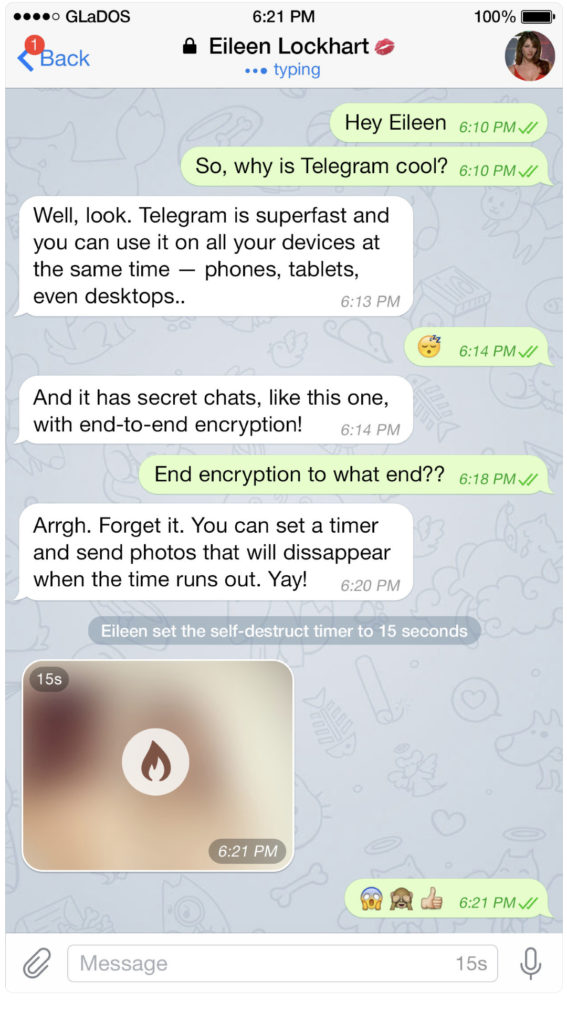
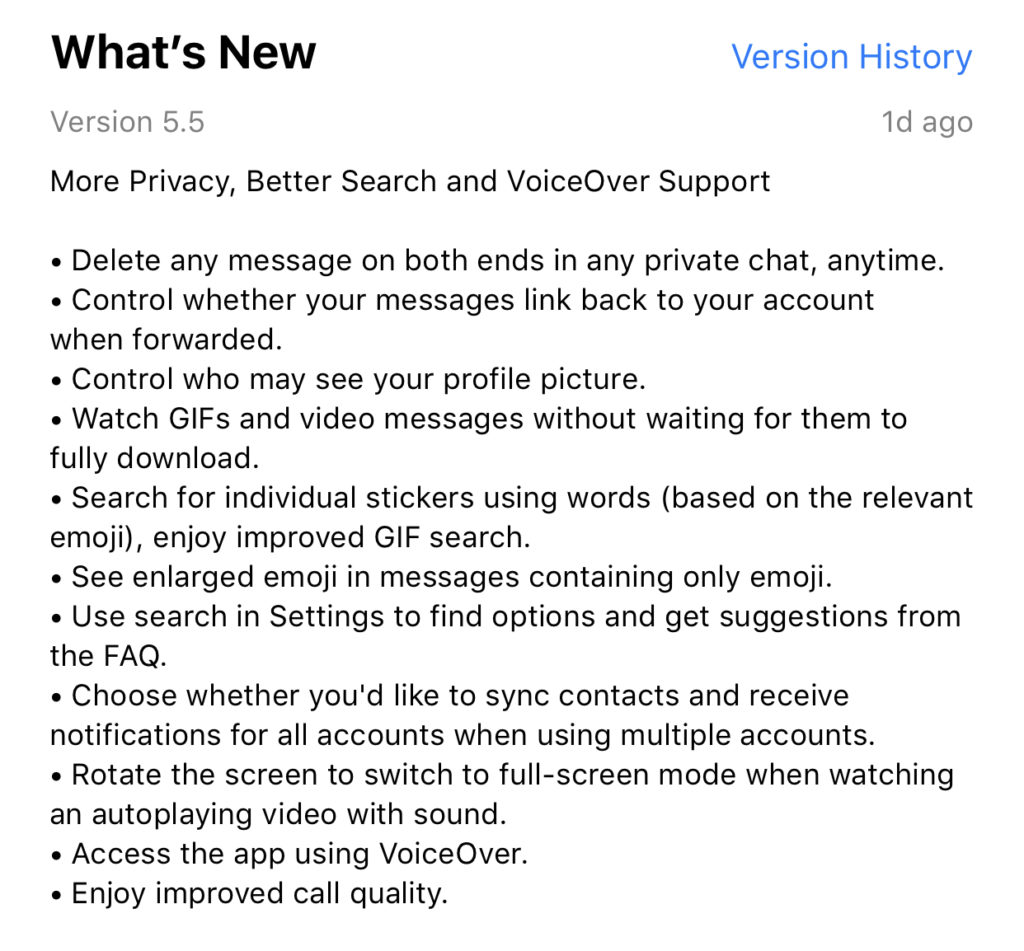
    Telegram is an end to end encrypted messenger that touts speed, privacy, and security. They have featured private messaging and self destructing messages for a while but their new feature takes privacy to a new level. You can now delete a message you’ve sent from your account and the account you sent it to no matter how long ago it was sent. Telegram is, again, standing up for privacy and users are buying in. Millions have flocked to Telegram after Facebook’s data leak news from the past several months. It looks like Telegram is doubling down on Privacy as their claim to fame. They’ve also added the ability remove your information from a message when the message is forwarded to other users. Some accessibility and ease of use features have also been aded.


    What Parents Should Know

    Security and privacy are often overlooked when we allow our kids to use internet connected devices. Privacy is becoming a major concern for experts and activists of family tech safety. Messengers that allow data to be collected and used for advertising shouldn’t be used by children and even teenagers due to the risks of such data being released or revealed without the messenger app developer’s consent. When an app features privacy as it’s distinquishing feature, you have to ask who the data is being kept private from. Obviously, we want data to be kept from third party companies who would use that data to advertise. Sometimes data is even kept private from the company that developed the messenger app that you are using. Telegram has a “secret messages” setting that must be set to keep your information encrypted from end to end. (End to end encryption means not only the company can see or collect what is being sent.)

    Anytime the ability to delete messages you’ve sent is added, I see red flags. While I think privacy is critical, there is also a risk of kids thinking they are safe from inappropriate or incriminating photos or messages being saved and used for nefarious purposes. It only takes a half a second to screen shot a message or image on your screen. Most phones allow you to record your screen to a video very easily. This means that you are non always anonymous online. If you are sending messages to someone, thinking you have complete privacy, you are trusting that the person you’re sending the messages to has your privacy in mind as well. Telegram is an easy way for predators, cyberbullies, and those interested in sexting, to send and receive messages that do their damage and then are removed as evidence.

    I have spoken to parents who have taken their kids to the police with complaints about people trying to groom them online but the police had no evidence because the messages had all been deleted. This is why a messenger makes the FamilyTechBlog uninstall list as soon as they add disappearing messages. It isn’t safe for your kids to chat with a feeling of anonymity or for them to chat with people who can send what they want and make the message go away after it’s been viewed. Telegram is rated 17+ and I fully agree with this rating. Private messengers that allow you to chat with anyone, anywhere shouldn’t be used by children and young teenagers. Especially when the messages can be removed at will.