
Tag: adult content

  • YouTube’s Children Privacy Policies Causing Content Creators to be More Crude in their Videos

    YouTube’s Children Privacy Policies Causing Content Creators to be More Crude in their Videos


    I am an avid YouTube viewer. I get most of my entertainment from the video streaming service, watching gaming videos, D&D streams, and educational tutorials. I have noticed a trend since YouTube changed its policies for creators to be more responsible for their channel’s content as it pertains to advertising to children. 

    Since YouTube cannot collect viewer data from videos that are intended for children, the company has asked creators to label whether their videos are for kids or not. They are also using an algorithm to view popular videos and identify the content as meant for kids or not meant for kids. This algorithm has content creators concerned for the viability of their channel. This has caused them to be more blatant with crude content and swearing in order to make it very obvious to this algorithm that their video is not meant for children.

    One YouTuber that I enjoy watching, partially because he isn’t overly crude, has been starting his videos with strings of swear words and jokingly saying “This video isn’t for kids YouTube, just be aware, not meant for children.” One of the reasons he feels the need to say this so blatantly is because he plays video games on his channel that may appeal to children. The images of the game alone could lead a person or artificial intelligent software to believe the video was made for children even though that isn’t this creator’s main target audience. Another YouTube content creator that I know has lamented on social media that his channel, which is family-friendly, has lost hundreds of dollars monthly in revenue since YouTube changed their policies. 

    SirWillow is a Family-Friendly YouTube Channel with nearly 30,000 subscribers and over 4 and a half million views.

    1. Would you be willing to tell me a percentage your ad revenue went down when YouTube changed their policies?

    I’m still waiting to see how it all sorts out, but right now in my case I’m looking at about a 30% drop, but it’s in a state of flux. What will be telling will be the end of January when the full force of the new policies kicks in.

    1. How have the changes to the ad policy changed your process for making videos?

    In my case, it hasn’t changed any of my process.  But I may not be the norm in that regard. I know several that do YouTube “full time” and for them, it has meant some drastic changes.  I know at least one that is likely going to shut down, another is cutting back on YouTube to increase time in other projects. For me, it’s been a hobby that has brought in a part-time job income, and while the income has dropped it’s still going to fit the same role.  It has meant a change in how many videos though. I am cutting back my production some from 10-12 videos a month to closer to 7.

    1. Your videos are “family-friendly.” Do you think that YouTube is becoming a less friendly place for families in general or is it mostly up to creators?

    I absolutely think YouTube is becoming less family-friendly, and these changes are going to directly impact that and make it worse.  The changes are going to pretty much destroy financial benefits for anyone producing kid-focused videos, and there are a lot of family-friendly channels that are going to get caught in that backwash and cut back or stop producing. It’s also going to be harder to find kid and family-friendly videos because of all of the blocks that will remove them from the normal algorithms that recommend videos.

    And there are a number of producers who have, as you mentioned, increased cursing and crude language, along with images and subjects to make it clear that they aren’t “kid-focused”  It’s going to make it hard to find, and hard to produce and make money, kid and family-friendly content.

    My thanks to SirWillow for answering these questions for me. He does videos about theme parks and what it has been like working at theme parks. Go check out his channel!

    What Parents Should Know

    It should be very clear by now that YouTube isn’t intended for children. It is becoming harder and harder for people who make videos for kids to sustain a profitable channel on the site. This is causing some different reactions. Some kids’ channels are switching to a subscription method where you can sign up to pay monthly for more content from them. Others are changing to Facebook or Twitch because of their less strict ad policies. 

    The only real way to be sure your kids aren’t watching videos that aren’t intended for their age is for you to control what they are viewing. Legally, our young kids (under 13) are supposed to be using only apps intended for their age group. The legal responsibility, however, doesn’t fall to our kids or even us as their parents, it falls to the company. Hundreds of millions of dollars worth of fines have been handed out by the FTC for companies illegally collecting data from children. They are being investigated and forced to make changes. The changes seem like they should be good for the safety of our children but so far they are only truly helping protect the company from the repercussions of disobeying child safety laws.

    When the safety measures protect only from advertising info being collected, they may be intended to protect children but in practice, they seem to be increasing the volatility of the content on the service while only protecting the service itself. Parents are the only true guardians of our kids’ hearts and minds. The only way to protect them from adult content and crude language on the videos they watch are to take responsibility for their screen time ourselves. Here are some tips:

    • Only allow screens in a public area. 
    • Limit headphone use so you can hear what they are watching.
    • Build playlists on YouTube to ensure they are only watching videos meant for kids.
    • Use apps like PBS Kids or DisneyPlus to keep them watching family-friendly videos.
    • Use YouTube kids instead of YouTube; while not foolproof its a far better option than basic YouTube. 
    • Limit the amount of time watching videos; the more time spent on YouTube the more chance of coming across inappropriate content.

    Parents should take the steps necessary to protect their children online. Companies should be held responsible for their advertising practices and the content on their sites and apps but the responsibility for protecting our children falls strictly to parents. When the measure taken by companies to protect kids backfire by causing creators to lose money unless they swear, use violent and sexist language, or show adult images on their videos, the measure don’t protect our kids, they make the app more dangerous. Parents are the gatekeeper. Protect your children. 

  • How Video Game Developers can Help Parents

    How Video Game Developers can Help Parents


    I think video games can be fun and good for my kids if kept in the right context. We have very strict rules about gaming in our home and do our best to limit our kid’s access, screen time, and exposure to some of the gaming content available. Unfortunately many developers build their games (even kids’ games) that make screen time and other restrictions hard for parents. If I could speak to a room full of game devs, here a few of the things I would say.

    1 Let me save the game whenever I want.

    My children have a strict 30 minutes per day rule on our xbox. They understand when they sit down to play they they have a limited amount of time. My kids know that they’ll be “kicked off” the xbox after a half hour so they save often. They save their Minecraft worlds because they can’t build the crazy epic structures they’ve planned in just 30 minutes. 

    The problem rises when we play games, like the Lego games, that don’t allow you to save your game whenever you want. You have to reach certain milestones or the end of levels to save. When the xbox kicks you out of the game, it resets the game causing you to lose your progress. This means mom or dad have to either continually add time to the limits for the day until they can save the game or we just have to deal with the kids’ frustration for wanting to see the next levels of this game but not being able to because of our time limits. We, as parents, don’t mind being the bad guy but a simple save mechanic built into the pause menu sure would make life easier.

    Parent Guide: Call of Duty Black Ops 4

    2 Password protect your content controls.

    The most popular comment on my review for last year’s Call of Duty game is “hey man, you can turn off the graphic violence.” I’ve replied to most of those comments with, “Cool, but it isn’t password protected so it may as well not be there.” Can we please put content restriction settings behind some sort of pin code? It isn’t that difficult to do. I don’t want my kids playing games that are meant for adults, but some families are ok with their fourteen year old playing a Rated M game if the gore is turned off. Unfortunately, most warm blooded 14 year old boys are into or at least interested in that sort of violent content in film and video games. That means they’ll often turn the restrictions off when mom and dad aren’t looking.

    Maybe that’s a bit too restrictive as your kids get older but isn’t that the parent’s decision to make? Game developers make their games with over the top graphic violence and pretend that their target audience is adults. The reality is that at least half of those who play your games are below the recommended age. This is why they add a content restriction in the game, however, that restriction isn’t helpful if it is only buried a couple of levels deep into your settings menu and doesn’t require any sort of passcode to change.

    3 Don’t force me to make an account to play your game.

    It is already frustrating to have to have an account for everything I do online. Then I have to create separate accounts for each of my kids to let them play games or use apps with parental control settings turned on. If I want each of my kids to have their own settings or their own way through the game I have to have an account for them on our gaming system. When I turn on a game and see that the developer of that title wants me to create yet another profile, on their site this time, it is infuriating. I don’t want to give you my email address. I paid to play your game, isn’t that enough? I get having an online account so I can play multiplayer but games that require me to have a profile with your company even to play the local offline campaign is simply data mining. I don’t need it. Especially with my kids information.

    Parents Guide: Apex Legends (Titanfall Battle Royale)

    What Can Parents Do?

    This post may be a bit ranty but I’m not the only parent I know who has complaints about these issues. It’s hard enough protecting our kids from cyberbullies, adult content, and predators. We have enough drama from our kids alone when we want to simply limit their screen time. The last thing we need is some setting or lack thereof in a video game to make it even harder. The truth, however, is that it’s unlikely a game developer will see this article or video. We have to take responsibility as parents. Either we have to take the role of gatekeeper and keep our kids from games that pose these problems or we have to just have the conflict when it arrives because it’s worth it. It’s worth it to have kids who know how to function when screens are turned off. It’s worth it to have kids that are safe from violent thoughts, nightmares, and attention problems. It’s worth it to protect our kids private information and data from collection by gaming companies and who knows who else.

    Talk to your kids about the limits you’ve set. Take a stand when they try to bypass your settings. Don’t let them play games that cause their behavior to change or keep them interested to the point of obsession. Protect their information by only creating accounts for them on sites that absolutely require it and when you do, use an alias. We live in a new world. A world where data is a form of currency and your kids gaming behavior can be used in so many ways so it is invaluable to the companies that create these games. We have to be responsible for our own family’s Internet safety and healthy tech habits. We can ask developers to make it easier and hope for the best but when it all comes down to it, it is up to you and me.


    Podcast:

  • Tik-Tok Under Fire as Study Finds 25% of Kids Talk to Strangers Online

    Tik-Tok Under Fire as Study Finds 25% of Kids Talk to Strangers Online

    Tik-Tok is at the center of a controversy surrounding the exposure to predators and child pornographers through live streaming on their app. One in twenty children who use live-streaming apps have been asked to take off their clothes according to a study by the UK’s Children’s Charity NSPCC.  Originally called Musical.ly, Tok Tok claims to “empower everyone to be a creator directly from their smartphones, and is committed to building a community by encouraging users to share their passion and creative expression through their videos.” Their mission statement sounds like they are building a place for our kids to stretch their creative muscles and build a supportive audience but in reality it is exposing them to potential danger.

    Sexual exploitation is only a part of the issue, there are popular hashtags on the app that highlight self harm and eating disorders. Tags like #thinspo (thinsporation) feature videos of children as young as eight showing their rib cages through their skin and proclaiming that they are inspiring to others who desire to be thin. Suicide and self harm are also featured on the app with complete with encouragement to hurt yourself and instructions on how to do so. Tik-Tok says you have to be 13 to use the app but as we have shared multiple times on this site, that age exists to protect the company from legal action concerning the collection of children’s data, not to protect your children from content on the app.

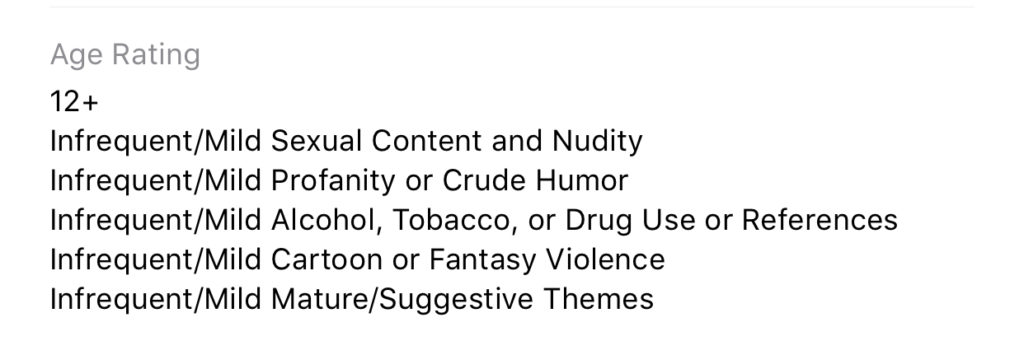
    While the app is rated 12+ in apps stores in the U.S. the reasons listed for the rating prove to be, in fact, very mature. The issue, again, as I’ve mentioned, is user generated content. Anyone with a smartphone and a wifi connection can make videos and now livestream in Tic-Tok, they can also watch you perform on the app. This makes for an open, dangerous atmosphere filled with predators, adult content, scams, and violence.

    What Parents Should Know

    Tik-Tok says they have filters and parental controls in the app that allow you to set the app to private but all of these measures have proven to be less than effective. Kids who use the app on their own can easily come across content that isn’t age appropriate. The content restriction and  time management settings in the app are password protected; they can be useful and should be set up if you allow your child to use Tik-Tok. Also be sure to turn off the ability for non-friends to comment on, share, and download (this is on by default, creepy right?) your child’s videos.

    We don’t want our kids talking to strangers online. All parents understand the dangers associated with live-streaming and posting public videos to the internet. Unfortunately many parents feel that their hands are tied when it comes to keeping their kids safe on these apps and websites. That isn’t the truth, however, there are tools (some in the app and some third party) which you can use to keep them from accessing things that are dangerous. An algorithmic filter is never going to be enough, though, so it is important that we have open communication with out kids about what they are posting and seeing on apps like Tik-Tok. Also, if your child doesn’t meet that age restriction then they shouldn’t use the app.

    Twenty five percent of kids talking to strangers online is a horrifyingly high statistic. It shows that while there are privacy settings and parental controls out there for parents to use, either parents aren’t using them or their kids are getting around them. I know that the privacy settings in Tik-Tok aren’t password protected so if your children want to talk to strangers on the app and they have time using the app by themselves there are ways for them to make that happen. It is important that parents take the responsibility to protect our kids online. Many media outlets are blasting these companies for putting our kids in danger but I have to be honest, you don’t blame the slide for your kid falling off and busting their face, you think of precautions that YOU can take to keep that from happening in the future.

  • I Can’t Help You Protect Your Kids on Apps Meant for Adults

    I Can’t Help You Protect Your Kids on Apps Meant for Adults

    I field messages and requests all week long from parents who want the latest tools for keeping their kids safe online. They ask about everything from YouTube to Instagram to Snapchat and want apps that will monitor social media use, block adult content, and limit screen time. While there are resources to help parents in each of those departments, some apps just aren’t intended for your younger child. Unfortunately many parents have a real problem giving in to that fact.

    Streaming Videos

    Let’s look at YouTube as our first example. The video app was created in 2005 as a place for anyone to upload short videos to share with their friends. Google purchased YouTube in 2006 and Social Media became popular soon after, rocketing YouTube to the successful streaming platform it has become. The site is loaded with videos from filmmakers, vloggers, video gamers, makeup artists, geeks, professionals, educators, ministers, animators, artists, basically any category you can think of. It has evolved into an immovable force on which there are 300 minutes of footage uploaded every single minute. YouTube has come under fire for some of their content being too mature or sensitive and so they’ve employed algorithms to keep tabs on inappropriate videos. They also released n app for children called YouTube Kids. This app has also seen its share of controversy after YouTube has been unable to keep sensitive material from showing up in videos on the app.

    YouTube obviously wasn’t intended for young viewers. It is a site that is populated primarily by videos uploaded by its users. Some companies that make content for kids use YouTube but this is a choice by these companies in response to the popularity of the platform. It’s an attitude that says: “Kids are there, so we should be there too.” The goal is to reach the audience already there, not necessarily to build an audience on YouTube. There are no real parental controls (safe search is mostly useless) and videos that are labeled as kid friendly are done so without any human eyes ever seeing the entire video. The only time a content reviewer sees the video is when enough users of the site have flagged it as inappropriate. Allowing your kids to watch YouTube on their own is a risk that many parents don’t even realize they are making.

    What about Social Media?

    Snapchat, Instagram, or Facebook are all the same. They, like YouTube, feature content created and posted by the users of the service. This “User Generated Content” can vary from political or religious views, to silly cat videos or memes, and random personal updates that mean nothing to anyone. People also post updates on their serious mental health issues, they share about their plans to harm themselves or others, the post images of themselves in compromising situations, and that’s just what people post publicly. Private messaging contains content that people post when they think nobody except those they trust is watching. Private messaging is how predators groom their victims. It’s how the out of control teenage boy convinces the girl to send him inappropriate pictures of herself. Social Media is intended to be a place to connect with people, some you may know, some you don’t. It is meant to be a public forum and that which is meant to be private, is meant to be completely private. This is where the problems come in when parents ask for ways to monitor their kids social media.

    Age Rating vs Terms and Agreements

    I see a lot of parents giving their kids access to social media and other online activities when they reach the age of 13. This is based on the fact that the terms and agreements that these sites have you approve before making an account list 13 as the minimum age to use their service. A common mistake parents make is thinking that this age is meant to protect their kids from content on the site when, in fact, it’s intended to protect the company from having data and information on kids under the age of 13. COPPA laws say that companies can’t collect and use information of kids under 13 without parental consent. If a company says you can’t use the site if you’re under 13 then they can do whatever they want with all of that data and if your kid is underage, it isn’t their fault. You ignored the Terms and Agreements when you allowed them to use the site.

    Age rating is the age recommendation you’ll see in the app store when you are downloading and app. This age restriction is based on the actual content in the app, not any legal requirements for the company. The usual standard is that apps populated by user generated content are rated 17+. This is because the company can’t guarantee that what is seen on their product won’t be considered adult content. When we allow our kids to use apps that contain user generated content we are allowing them to be subject to the opinions, behavior, and whims of everyone else who uses that app.

    Parental Involvement Before Parental Control

    When I am asked to help parents protect their kids in apps that are obviously not made for children I feel like I’m being asked to give parents a suit their kids can wear to protect them while they play in a burning building. I get it. It isn’t easy to tell your kids they can’t do something they want to do. “My friends are all on Snapchat.” or the one that irritates me to no end, “The teacher/coach says I have to use Facebook to get the homework/practice schedule.” Sometimes we just have to say no. It is difficult to set the boundaries and limits that keep our kids safe but if we have the right attitude about what we’re protecting them from it becomes easier. Social Media, YouTube, video games that are rated M for mature, non of these things are intended for people under the age of 17 and when we allow our kids to use these products, we open them up to a world that is meant for adults.

    It is difficult for algorithms to catch nudity or violence in uploaded videos. Social Media sites and private messaging apps go to great lengths to keep prying eyes from seeing what is being sent. This makes parental monitoring software hard to develop. Unfortunately some burning buildings are just too dangerous and there isn’t much that can be done to protect you if you’re inside. If you aren’t ok with your child seeing content that is meant for grown ups then I recommend thinking about uninstalling that app instead of trying to find software that doesn’t it allow it to do what it was intended to do.

  • How Can Artificial Intelligence Protect My Family?

    How Can Artificial Intelligence Protect My Family?

    How AI Works

    When you think of artificial intelligence it’s natural to imagine Skynet or some similar software that is running things for us some day. While that could be the overall goal someday, right now AI is nowhere near that smart. Currently artificial intelligence isn’t intelligent at all. While it does learn from the input that is fed to it, there is currently no way for AI to decide what it needs to learn on its own. There is a very large gap between software algorithms that can learn and an intelligent software that makes its own decisions.

    At CES in 2018 I watched a robot named Aeolus glide across a room cleaning up. It took it a solid three minutes to move from one side of the makeshift living room, reach down and pick up a wii remote, and roll to the table to set it down. It was nothing like we have been promised by television and movies but I guess it was still cool. What parents should understand is that while the developers of an AI can make promises of their algorithms learning and behaving as if they have intelligence, that is not the same as being actually intelligent. Humans still have to do the thinking.

    While it isn’t foolproof and is definitely not sentient, artificial intelligence is a good tool. There are many ways AI is useful and much of the latest hardware and software use AI  to do some of their most minor functions. Here are some of the interesting ways AI can make your parental control and accountability tools even better.

    Filters

    There was a day when an internet filter depended solely on the web or ip address of the site you were visiting to tell if there would be inappropriate content or not. There was a master list that had to be updated continually with new websites and key words. AI is different than that because the filter is based on images and other content that the AI was “fed” over and over again the algorithm then detects actual images, text, and videos on web pages instead of just the address of the site you are visiting. This can be helpful if a website doesn’t typically contain adult content but a certain article or comment section features material that would cross the line. A traditional filter couldn’t catch that but one that uses an AI can.

    Circle (meetcircle.com) and NetNanny (netnanny.com) are examples of filters that use smart algorithm to block web content.

    Accountability

    Accountability software works very similarly to filters except that when it sees something inappropriate it will not block it but alert whoever is on the list to alert. AI has revolutionized this sort of software because it allows parents to receive only lists of unwanted sites instead of having to sort through everything that has been viewed by the person they are keeping accountable. The software I recommend, Accountable2You (accountable2you.com promo code BecauseFamily,) is updated constantly to allow it’s algorithm to properly and effectively scan for adult content. It works very well. You may get occasional alerts for content that shouldn’t be considered adult, but it’s not too often and it’s worth it for the peace of mind.

    Privacy and Security

    Finally, when we discuss AI and algorithms we must talk about privacy and security. Algorithms may have been the beginning of many of our privacy problems but it may also be providing some solutions. Tools like BitDefender can be used to protect your home network. The AI can tell the difference between forgotten passwords and malicious login attempts. Our home networks are becoming increasingly worthy of being targets of hackers and encrypting your web traffic with AI can protect your from that kind of attack.

    I hear a few different reactions when I talk about artificial intelligence. Most people roll their eyes or glaze over because they aren’t even interested. It’s some tech term that they don’t think they can fully understand so they’d rather not talk about it. The other group is super interested, always wanting to learn more about it and understand it better. These are my nerd friends. I love them. Finally there’s the group that just freaks out. They immediately think of the movies and tv shows and just want to move into the woods and unplug. Which person are you? Are you willing to let AI work to your benefit in your family? Is it all too much for you? Let me know in the comments below.

  • Tumblr Removed from Apple App Store for Child Pornography

    Tumblr Removed from Apple App Store for Child Pornography

    Photo blogging app Tumblr has been removed from the iOS App Store because of child pornography. Earlier this month the iTunes App Store removed Tumblr from their market unexpectedly. The reason wasn’t announced at the time but it has recently become clear that scans showed child pornography was making it through Tumblr’s content filters. A statement from Yahoo (owners of Tumblr) confirmed that child pornography was the reason for the app’s removal and said that they are working hard to fix the flaws in their scanning algorithm and get the app back on the app store.

    Tumblr has been criticized for their lack of concern for adult and inappropriate content on their app. Some even call it “porn gif central.” They added an on/off switch for adult content when Apple made it a requirement but didn’t password protect it. Tumblr has a reputation for doubling down on the fact that pornography is what makes their app so popular. The app is still available on Android’s Google Play Store.

    What Parents Should Know

    It didn’t take much research for me to add Tumblr to my uninstall list a couple of years ago. It is still there and this latest news only solidifies that fact that it belongs there. There is content on Tumblr that many feel they want to see. Geek stuff, memes, humor, art, and photography are all featured on the app prominently but a simple search or click on the wrong related image can lead you to hardcore adult images and animated images. Your children shouldn’t be allowed to use Tumblr and your teens should be advised against it.

  • What Can You Learn from Search Bar Auto-Complete

    What Can You Learn from Search Bar Auto-Complete

    I have no better advice for parents than putting your eyes on the devices your kids use as often as possible. As long as you’re communicating with your child it isn’t spying to take a peek at what their friends are posting on social media or what they’ve been searching for in their web browser. I do not, however, advise that you let yourself get too worked up over the recommended search results or auto-complete results in the social media apps your kid/teen uses. It can be frightening to type in a couple of letters and get a dropdown full of accounts you’re unsure of or search terms you wouldn’t want them to be searching for. The initial reaction of parents is usually to be concerned that this means their child has been looking for something inappropriate in the past. That isn’s always the case and I’ll try to explain why.

    Instagram, Facebook, Pinterest, and other photo or video sharing sites use algorithms that combine your past searches, popular items on their site, and your location to recommend the search results that may interest you. I don’t recommend parents take suggestions from these apps as evidence that their child was doing something inappropriate. You can, however, on many of those sites go find a search history and actually see what they have typed in the search bar in the past. This information is also deletable though. Regardless, looking at the search history is a much better way to monitor what your child is doing on these sites than assuming something from the first two letters you type in to the search bar.


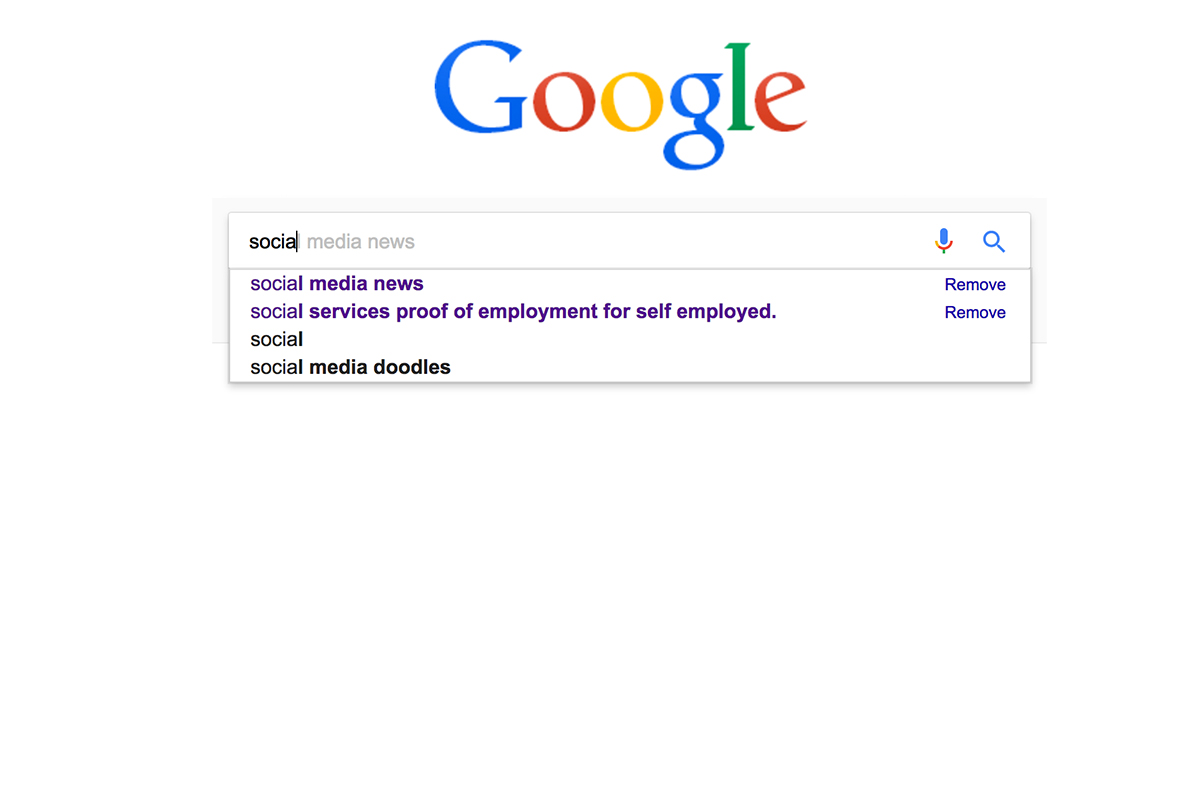
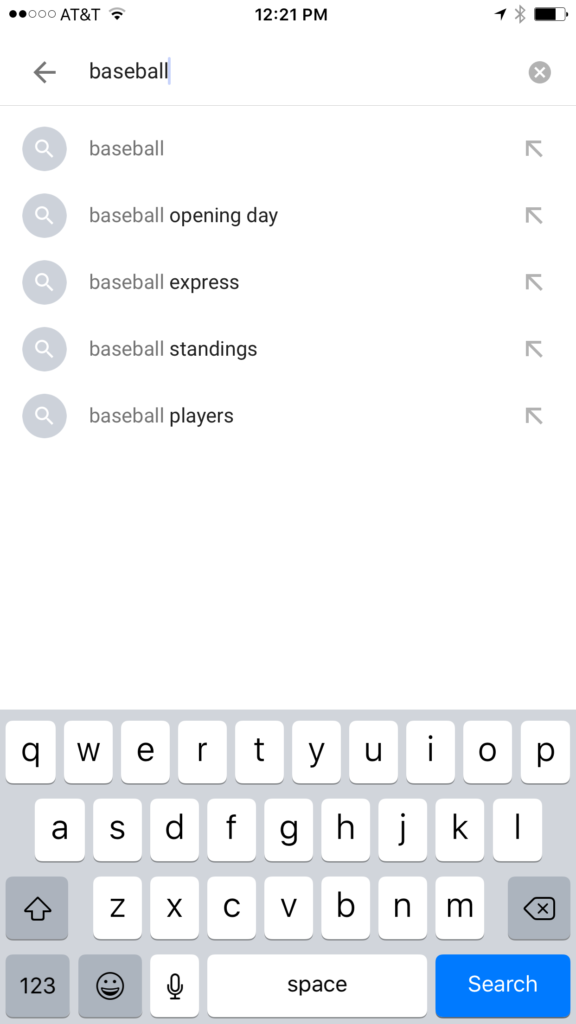
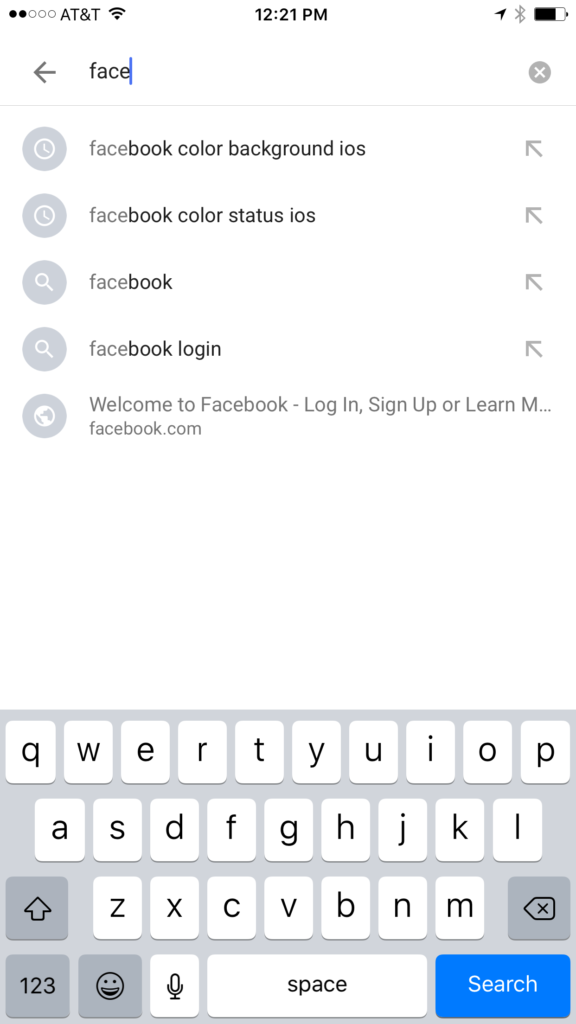
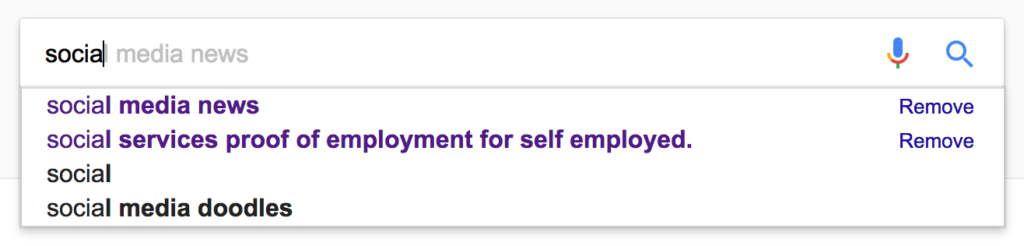
    Google and YouTube are the two most popular search engines on the internet. Thankfully, they’re a bit easier to monitor. The Google app has identifiers to help you know why it’s recommending certain things. You’ll see a clock icon if the recommendation is from search history and a magnifying glass icon if it is just recommended based on other data. On your browser the auto-complete results are a different color and you receive an option to remove them if they’re from history. YouTube, being a part of Google, uses the same methods to identify auto-complete search items.


    What Parents Should Know

    There is a lot to consider when you’re trying to monitor your child or teen’s online activity. Because so much of the internet is now consumed with photo and video sharing it goes without saying that some of the content you wouldn’t want your child accessing makes it’s way to those platforms almost immediately. This being said, there are better ways to monitor than trying to creep through search histories. I recommend using a good accountability software like Accountable2You or a filter like NetNanny. Another option is to install the social media apps they’re using and get to know how the search bars work for yourself. Find out if it’s using your history to establish the items it recommends for you or not. As you get used to it you’ll be able to get a better feel for what’s happening in your child’s account when you check their device.

    Remember that communication is key. Your kids should know you’re looking at their devices and social media accounts. Rules are good but without conversation and relationship they create conflict. Your goal is to set boundaries that will help your children develop healthy habits. A healthy approach to monitoring and regulating their internet usage will speak volumes to them about your family’s online safety standards.