Tag: accountability

  • PODCAST: Date Night Monkey Business

    PODCAST: Date Night Monkey Business

    Amazon is changing the parental controls game, Instagram has 200 mil users, and MONKEY is a hotbed for predators.

    FAMILY TECH WEEKLY EPISODE 3

    Social Media Links

    Facebook: http://facebook.com/4pointfamilies

    Instagram: http://instagram.com/becausefamily

    Twitter: http://twitter.com/becausefamily

    Newsletter Signup

    Ministry Updates:: http://eepurl.com/R7Btr

    Weekly Blog Posts:: http://eepurl.com/cvnhXD

    Websites

    Ministry Site:: http://becausefamily.org

    Tech Blog:: https://safe.becausefamily.org

    Michael’s Speaking Info:: http://kmichaelprince.org

    Donate and Affiliate Links

    http://BecauseFamily.org/partnership

    Music by incompetech.com

  • Snapchat isn’t Just a Messenger Anymore

    Snapchat isn’t Just a Messenger Anymore

    It may have all started with “secret” messaging but it hasn’t stopped there. Soon public sharing became the norm on Snapchat, a feature that was copied by many other Social Media networks soon after it’s release. Then, Snapchat’s “Discover” page was released, this was a way for news and media corporations to reach the users of Snapchat with their messages and advertising. Lately, Snap Inc. has been working towards becoming a serious form of entertainment for it’s users, incorporating videos and even original show content into their network. Today, VICELAND has announced they’re producing several new shows exclusively for Snapchat. They’re starting with a “reality” dating show titled “Hungry Hearts with Action Bronson.”

    VICELAND Productions is following several other studios in making original shows for Snapchat. Networks including NBC, CBS, and A&E have already announced that they’re making versions of their existing shows for viewing on Snapchat. These studios are seeing the growing adoption of Snapchat as an opportunity to reach a broader audience with their shows and content. One of the fastest growing demographics on Snapchat is the 18-35 age-group, one of the main target audiences for the late night and primetime television networks. With this trend towards entertainment content on our social media apps, it’s important that parents are aware of what these apps are becoming, we have to make good decisions on whether or not we want our kids consuming the media they’re producing.

    What Parents Should Know

    Snapchat isn’t a trend and it’s not just a messenger anymore. What was once the “Secret Message App” or the “Sexting App,” as some called it, is now a major source of media for those who use the social media platform. This means we have to treat it differently than we do many social media apps. Keeping track of who they are friends with on these networks isn’t enough anymore. We have to keep a few things in mind if we are going to allow our kids to use Snapchat, Instagram, or any of these other apps that give advertisers and media content creators a direct outlet to our kids.

    Same Media as TV, Movies, YouTube, or Games.

    The creators of the content that will be made available through social media (Facebook has been signing agreements with media companies too) aren’t producing special more family appropriate shows. They will be making content that will reflect every other media outlet they produce for. Think YouTube Red, Netflix, or Amazon Prime. In fact, some of the rules that apply to broadcast television don’t apply to shows that are streamed online. This means that you’re more likely to see content like on Game of Thrones or Orange is the New Black than something with more restrictions like Blacklist or CSI. Don’t let the fact that these programs are being produced for free public streaming online fool you. They won’t be family friendly or edited for content.

    No Parental Control

    Snapchat currently has no parental control options. Their app is geared towards teenagers so they most likely won’t feel the need to add parental restrictions any time soon. The terms and agreements on most social media services allow for accounts to be created as long as you’re 13 years old or older. The question you have to ask is whether or not you’re ok with your 14-15 year old watching online reality dating shows or politically fueled sketch comedy. If you aren’t ok with these things then you have to make a choice about whether or not snapchat is welcomed on your kid’s phones or tablets.

    All or Nothing

    Social media apps are basically creating an “all or nothing” atmosphere for content created by these media outlets. Once you have an account on Snapchat, you have access to all that is contained in the app. Every person can be a friend or follower, every feed can be found and viewed, and every original show, no matter the target audience, will be available for viewing. With no parental control options the question isn’t what Snapchat content will be allowed, it’s “all or nothing.” They can see all of it, or none of it, those are your only choices. 

    Whatever you choose, you need to be educated about what these social media apps are producing. Keep checking in to Safe.BecauseFamily.org for up to date tech news that’s relevant for your family. Also, sign up for our Safe Online Newsletter. Just fill in the short form below.


    Sign Up for the Latest Family Tech News in Your Inbox

    * indicates required


  • The Risks of a Fully Connected Home Part 1

    The Risks of a Fully Connected Home Part 1

    If there’s one thing that CES 2017 showed us last month, it’s that the “internet of things” is our future. Our world is becoming increasingly more connected and so are our homes. Everything from your television or thermostat to your mirror or even your toaster can be intertwined in a web of wireless connectivity. These advances in technology offer new and exciting levels of convenience but what are the risks involved in being so connected all the time? This three part series of posts will help you weigh the potential risks of home connectivity and make a knowledgeable decision for your family.

    Internet Privacy

    There have been news reports about hackers playing with people’s wifi enabled thermostats, unlocking their smartphone controlled door locks, turning on closed circuit security cameras and even baby monitors. Many of these connected home appliances come with basic, easy to guess passwords and usernames and can be messed with very easily. The best advice for these types of products is to always change the username and password from the one that comes pre-designated. Now, however, more families are inviting a new digital personal assistant product into their home.

    Many experts are looking at smart home and “PA” devices such as Amazon Alexa/Echo and Google Home with some caution due to their microphone “always listening.” There has been much conversation among internet privacy and security experts about the risks involved with a device in your home that can hear every conversation you’re having. Amazon and Google both say that their products were designed with privacy in mind and that they don’t store any information you say that wasn’t preceded by the command words. (i.e. Ok Google or Hey Alexa) What you say after you activate the devices is stored on an encrypted server but spokespersons for the companies are silent on what happens to the data after that. They only admit that your voice patterns and speech is being monitored to help the devices become better at recognizing you.

    What Parents Should Know

    “These devices are microphones already installed in people’s homes, transmitting data to third parties,” Joel Reidenberg, director of the Center on Law and Information Policy at Fordham Law School in New York City, told USA Today. “So reasonable privacy doesn’t exist. Under the Fourth Amendment, if you have installed a device that’s listening and is transmitting to a third party, then you’ve waived your privacy rights under the Electronic Communications Privacy Act.” – Tec.Mic

    Using a device like Alexa or Google Home effectively waives your right to privacy in your home. While you can mute the device to turn off the microphone, that decreases the convenience and usefulness of the product. When you use the product, however, you are accepting the terms and agreements and are allowing a microphone to be “always listening” (Google’s words) during all of your conversations. Be sure, if you think you need to be this connected, to read all of the legal documentation and make sure you feel confident that the risks you may be taking are outweighed by the benefits of having a “smarter,” more connected home.

  • Who is To Blame for the Dangers of Technology?

    Who is To Blame for the Dangers of Technology?

    Someone is Suing Apple…Again.

    Who’s to blame when the dangers that technology can present become a reality? A series of lawsuits filed in California against Apple claim that we can blame the developers of that tech. California resident Julio Ceja is suing Apple to force them to apply a feature that will lock out an iPhone when you reach a certain speed. He says that they have already filed a patent for the technology to use gps speed to lock a phone. Ceja isn’t suing for any money, except for legal costs and court fees. Apple is claiming that the responsibility for safety lies with the user of the phones to turn off notifications or use “Airplane Mode” while driving.

    Texting and driving are frowned upon everywhere and even illegal in many states but the responsibility has traditionally lied with the driver, not the company who made the phone. Developers of smartphones will say that they can’t ensure that their product will be used as they recommend and therefore they can’t be blamed for any dangers that come from the use of their phone or tablet. These cases are pretty important because they will set a precedent for what safety concerns companies will have to think about as they design, produce, and update their products. We will also learn how much responsibility is considered by law to be personal.

    Parents Should be the First Layer

    …Ceja alleges that Apple willfully did not implement a lock-out mechanism out of a choice to emphasize its business over customer safety, a choice that he believes is an example of “unfair business acts and practices” under California’s Unfair Competition Law. – TechCrunch

    The courts will decide whether or not Apple is guilty of unfair business acts but as parents, we have to look closely at the question of responsibility with tech.  Yes, there is a level of concern that is acceptable for a company to consider when they are producing a product, however, the first layer of responsibility should lie with parents. No, your kids shouldn’t text and drive and they are hearing that from all over. The question is “are they hearing it from you?” Are they seeing something different from you? If you are texting and driving while your kids are hearing the message that it’s wrong and dangerous, then you are removing a layer of education that can be critical to your child or teen’s safety. Our example is very important.

    Texting and driving isn’t the only issue. Frustration with video game addiction or contact with adult content online is understandable but if mom and/or dad aren’t setting any boundaries to help their kids learn healthy behavior, the company who made the video game can’t be blamed. Neither can the pornography industry. The message we send our kids about healthy media and technology practices will set them up for their own behavior in the future. Pay close attention to not only what you say, but even more importantly, what you do.

  • Your Device May Not Have Parental Controls 

    Your Device May Not Have Parental Controls 

    Setup is Key

    In every Digital Boundaries Workshop I do I encourage parents to set up the built in parental controls on their devices. I’ve now been in several homes to do these setups for them and I’ve noticed a troubling trend. Many of the devices kids are using don’t have any parental controls built into them. That’s right, you should check out your phone and check the operating system because on many of them there is no way to setup filters or monitors of any kind.

    Android before Jellybean

    Android phones have no family safety settings before version 4.2. If your Android phone or tablet is running something older than 4.2 (Jellybean) then you have to install a third party software like Parental Control or NetNanny.

    Windows Before 8

    Many Windows users delay the upgrades of their PC for one reason or another. If your PC is running something older than Windows 8 you won’t have a built in parental control option and you’ll need to run separate software. My recommendation is K9 or NetNanny. K9 is free and a pretty good filter with some customization options but it’s not the absolute strongest filter and doesn’t have a lot of support. Also, the “backend” controls on it can be a little out of date and tough to understand. NetNanny is a “whole page scanning” filter that protects you from a proxy and has some easy to understand controls. You can use THIS LINK to sign up for NetNanny and help BecauseFamily out with a little kick back.

    iPhones and iPads Should be Good

    Apple introduced parental controls on the mobile device when they launched iOS3. Almost every iPhone or iPad will have parental controls built in but if they don’t NetNanny is a good option for those too.

    Update Your Software or Upgrade Your Device. 

    Your best option is to keep your technology updated. If you’re running a PC and it meets the requirements you should upgrade to the latest operating system. The parental controls alone are worth the time it takes to learn some of the nuance of the new user interface. If your devices are too old to upgrade and you don’t know how or want to install new software you need to sell that device on eBay (probably for parts) and upgrade to something new. 

    Parental Controls is Step One

    Using parental control software to protect your children is step one of internet safety. I highly recommend finding out what’s available for your operating system and setting that up. If you need to install something else then don’t be afraid to invest in a software that will protect your kids at the level you need. Obviously you’re going to have different needs if your kids are young and you want to keep them from finding something on accident than if you have a child who has been sneaking around online. Know what it is you need, know what your technology offers, and then act by setting something up or installing something new.


  • Snapchat Answers the Photo Messaging Challenge with New Features

    Snapchat Answers the Photo Messaging Challenge with New Features

    The battle for the best messenger and photo messenger app continues and this time Snapchat has launched a counter assault. Excuse my military history illustration, I know I’m a nerd. While Facebook has been building up the features list on their popular messenger app, their photo app Instagram, and their texting app, WhatsApp, Snapchat has been working on some updates of their own.

    Let’s take a look at what today’s update has and what it will allow your kids/teens to do while in the app. Then we’ll chat about what parent’s response to this app should be after the latest update is installed. It’s super important to stay in the know, even if some of the updates may not be potentially dangerous. Here’s our breakdown:

    Snapchat’s New Features

    Paintbrush and Scissors

    These artistic new tools will allow you to do more customization than ever before. Paintbrush is a bit novelty and is just a way to make your photos look different but scissors is actually a pretty cool idea. This feature allows you to take “cut out” portions of a post or photo and save them to use later as a “sticker.” This feature gives you be the ability to become your own emoji. I am kind of looking forward to one of the apps I actually use copying the Scissors feature. It’s pretty awesome.

    Shazam

    You, most likely, are familiar with Shazam. It’s an app that allow you to identify whatever song you’re listening to by allowing the app to “listen” to it and then give you the details. This update allows you to use Shazam right in Snapchat. You just open the camera, hold your finger down, and the option to find the song will come up. Once the song is identified you’ll be asked if you’d like to purchase the song. Shazam has been around for a long time, this integration is a pretty unique idea and will keep users from closing one app to use another one.

    Group Chat

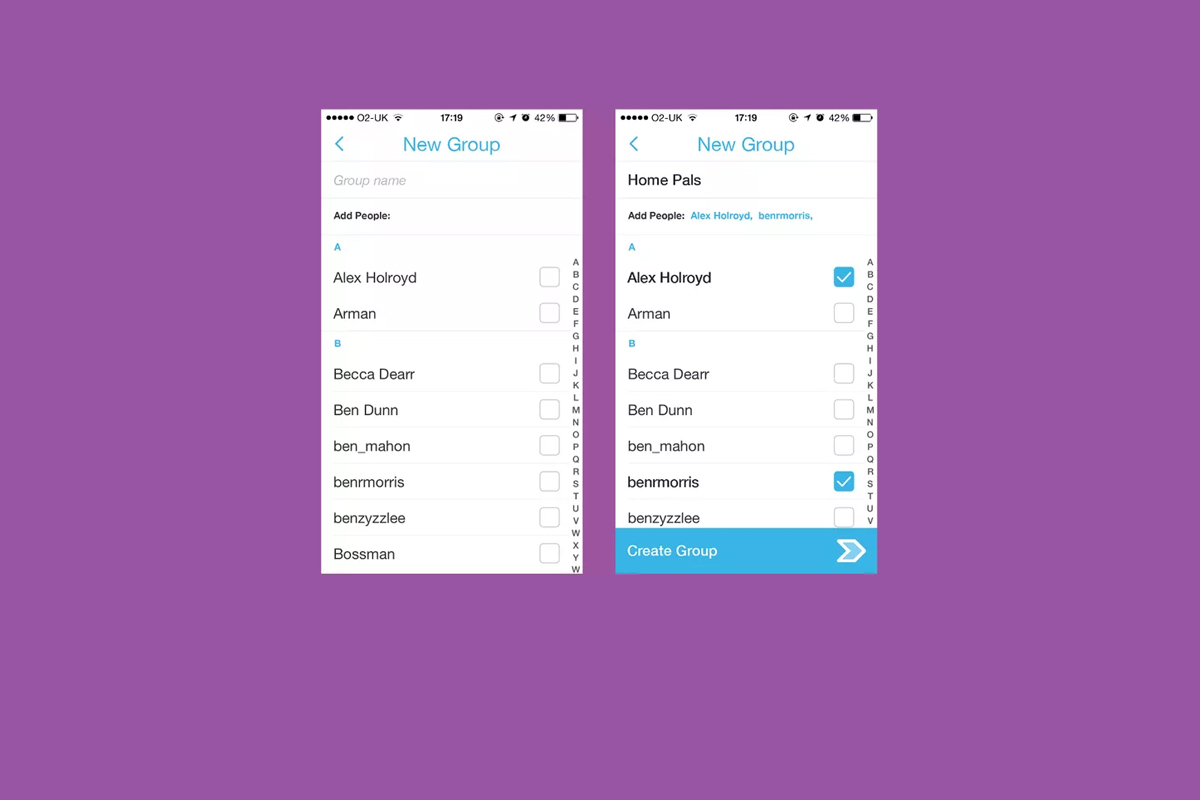
    Group Chat is self explanatory. You can chat with up to 16 people at a time and set up your chats in groups. This allows users to keep their most common friends together in one group so they can have quick access to their conversations. Your teenagers are socializing online now so this allows them to do so in a larger group.

    Every feature included in this update is another step towards Snapchat becoming the catch all app for young people. The most common users are ages 18-35 but there are many high schoolers who have already been snapping their friends for years. If they haven’t already, these updates are sure to lure them in.

    What Should Parents Know?

    As I’ve mentioned before. My main concern with Snapchat isn’t the messaging or photos, it’s the advertising. Their curated “discover” page has been and always will be a deal breaker for me. I know you may not agree so regardless of your reasons for being safe here are my tips for parents of Snapchat users.

    Don’t allow Snapchat if you’re uncomfortable.

    It’s important to remember that you have to have a say over what your kids are doing online. If what Snapchat does makes you feel uncomfortable you shouldn’t allow it on your child’s phone. Whether you’re afraid of what people may send them or what they could see on a public story. Maybe you’re just concerned about people they don’t know getting ahold of pictures of them. You also could simply be trying to keep the marketing gurus who are publishing content straight to your child’s phone from turning them into the consumer they want them to be. No matter your reason, be true to that instinct and hold firm to your position. Your teen won’t understand and will argue but you have to trust yourself on these issues.

    Use family sharing to know when apps are installed.

    I walked through family sharing and how to set it up in THIS tutorial. This is a great way to keep track of what apps are being installed on everyone’s devices. You can even set it up to ask you permission before something is installed. If you have decided to take a stand against your teen joining the Snapchat trend Family Sharing is a great way to be sure they’re sticking to those rules.

    Follow your kids’ “Story”.

    If your teen is using or wants to use Snapchat and you’re ok with it I recommend you get an account as well, even if it’s only to keep tabs on their “Story” yourself. This isn’t spying since you will communicate with them that you’re following them. Let them know it’s not that you don’t trust them, it’s that you have a responsibility to protect them from those who won’t use the social media service in the safest way.

    Talk to your kids about how they use Snapchat.

    Now comes the inevitable plea to be transparent with your children. Be open with them and honest about your concerns with Snapchat. Let them know you want to protect them from whatever it is you’re concerned about. Boundaries become stupid rules if there is no relationship. If you’re going to be following the on their account they need to know about it and know why. If you’ve decided not to allow it at all then you’ll have to be honest about why. Let them talk to you about why they want to use it. “Because it’s how my friends talk to each-other is a legitimate concern for a teenager. Social connection is the most important thing during that time of their lives. That shouldn’t cause you to back down from your rules but instead help you show empathy and compassion while you are patient enough to give them time to adjust to the rule.

    These new updates are being discussed in the tech world as another big “shot across the bow” to Facebook and Twitter and other social media giants. You can expect more and more features to roll out on all of these services. Also expect to be asked by your child if they can start an account and be ready ahead of time with your answer.


  • Protect Your Whole Family for A Buck a Month with Net Nanny

    Protect Your Whole Family for A Buck a Month with Net Nanny

    I recommend two major tools for protecting your children online. Accountability software and an internet filter. You know about our connection with Accountable2You but now I’m excited to have partnered with one of the best internet filter options out there, Net Nanny. The best part is that for the next couple weeks, they’re offering their best deal at an even bigger discount, %35 off.

    What is Net Nanny?

    Net Nanny is an internet filter and time management software. With customizable filters, remote management, and filter reports it’s one of the best options on the market.


    You create your admin account and can set up everything from there. With different users you’re able to customize your filters depending on who you’re protecting. Social media monitoring will report cyberbullying, sexting, privacy concerns, and any unexpected contacts by potential predators.

    Internet filters are critical for protecting your children and teens from unwanted content online. There are, however, ways to get around many filters. Some of the most common ways are image searches, i.p. address lookups, and proxies. These things are all problems for some filters because of the way that filter works. Many filters use the name, address, or metadata (informational tags built into web pages) to know if the content on the site is inappropriate. If the site is one that is trying to engage young users, they can often hide their content with unrelated metadata. They can also put their sites behind something called a proxy. The proxy will disguise the address and i.p. of the site so a filter doesn’t know what kind of content is on it.

    Net Nanny can’t be fooled so easily. Their system’s specialty is the ability to read the content on the page in real time to determine whether or not the site contains adult images or language. This allows them to block web pages no matter how you get to them. If you have younger kids it may not seem as big of a deal to have such a foolproof system. Unfortunately it’s getting harder and harder to protect them from content that may try to get through. If, however, you have caught your teen or child looking at something inappropriate you will definitely want to equip your computers and devices with the best filter software available. I think Net Nanny is one of the best.

    If you click the link you can sign up for their “Family Protection Pass.” A year of access to Net Nanny for just $60. That’s 12 bucks a month to cover up to five devices. $.99 per month per device. If you have more to cover you can get their next level to protect 10 devices for $89.99. There is also an option for coverages for 15 computers, smartphones and tablets for $119.99. Whichever option you choose, the link below will include us as affiliates and contribute a portion of your payment to BecauseFamily. This will help us continue to do free workshops and educate parents on how to protect their families online.


  • Three Things from This Week!

    Three Things from This Week!


    It’s been a slow Family Tech News week but here are a few tidbits that you should know were making headlines.

    1. Fake News

    Fake News on social media is finally getting labeled for what it is. It’s dangerous and stupid. Our kids buy into these things as easily as anyone so we should be glad that something is being done. We, as parents, also have to be careful not to just post anything that comes across our social media timelines. These messages are spread by those of us who don’t check our sources and just share things because what’s written agrees with our opinion. Nothing is more important than truth. If our children are going to be using social media, and they are, we need to do what we can to keep it the kind of place that can be as safe as possible.

    I have shared about UGC (User Generated Content) before and how it is hard to control. The only thing you can control is what you post on your feeds and what social media you allow you children to be involved in. Let’s share responsibly.

    2. Data Storing Toys

    Did you see that movie where the toys your kids play with are listening to them and saving the information they share in some big company’s database? Remember the part where the toy asks the children questions and uses the answers to store data about the child and their likes and dislikes? That was crazy, how they used it to market to the kids and even let the police and government use the voice data to develop voice recognition software. Man, that was a scary movie. Except it wasn’t a movie, it was what happened in THE ACTUAL NEWS THIS WEEK!

    Parents have to pay close attention to the toys our kids are playing with. Being more connected isn’t always good. Be careful to protect your kids by paying close attention to terms and agreements about what companies do with the information you and your kids put on apps, software, and toys that they use. You can’t be too careful when your family’s personal information and privacy is at stake.

    3. Facebook Messenger Games

    Here’s a fun one. You can now play games (Even some old school classics) within Facebook Messenger. Facebook is trying to get you to spend more and more time using their service so they can spend more and more time putting ads in front of your face. Right now these games are free and fun but there will soon be ads and most likely in-game purchases available too. Be aware that the more time your children spend online with other people the more time they have to be influenced by those people as well as whatever advertisers pay to put their content in front of your child’s face.

    Weekly Recap

    Here’s my advice. Hold your family close this weekend. Put away the tech toys, and the news, and the games and just enjoy being together. We can get so carried away with the next big thing or what’s happening in the news and all over our huge world that we forget what’s happening in our little world at home. Spend some time in that world this weekend. That’s what I’ll be doing. Have a good weekend, see you Monday.


  • VIDEO TUTORIAL: iCloud FamilyShare Set-Up

    VIDEO TUTORIAL: iCloud FamilyShare Set-Up

    Apple has a great way to help families keep track of what their children are downloading on their ios devices. Your kids can even have their own profiles. It allows for families to share the apps they have downloaded without having to purchase multiple copies. It lets the administrator see what apps the other accounts have downloaded. Best of all, though, it lets you set requirements for young users to ask permission before an app can be downloaded. If you have specific requirements and standards for the apps you want your kids to use, this feature will help you keep those standards in tact.

    The video below is a simple walkthrough on my Macbook of how to set up your iCloud FamilyShare settings. I will add one new child account and even give some information about why you may want to use this feature.


  • VIDEO TUTORIAL: Turning off Safari in iOS

    VIDEO TUTORIAL: Turning off Safari in iOS


    If you have an accountability software and/or a filter installed on your kids’ iPhone, iPad, or iPod you’re wasting your time unless Safari is also disabled. You will want to disable the ability to download new apps as well. In this video tutorial I explain why you’ll want to take these critical steps and walk you through the steps themselves.  (more…)