Tag: accountability

  • Looking Forward to CES 2019

    Looking Forward to CES 2019

    As CES 2019 approaches (my flight leaves in 17 days) I find myself more and more interested in the different topics that will be discussed at the Kids@Play Family Tech Summit. The summit features leaders in the industries of tech, toys, education, psychology, software, and entertainment. Sessions last all day long and the topics discussed are exactly the kind of information we parents need to know as we raise our kids in this digital age. The problem is, those in attendance are all industry people who are making apps, toys, and technology for our kids and families. There is very little to no representation of those who work to educate parents themselves on the connected age we live in. That’s where I come in.

    To my knowledge, BecauseFamily’s FamilyTechBlog, is the only publication in attendance at CES that offers our news and stories exclusively from the viewpoint of helping parents protect their children. While I sit and take notes and record footage of the summit my mind is processing how this information can help parents make quality decisions to keep their kids safe on their tech devices. I am glad that this event exists and happy that leaders in this industry are having serious discussions about how to be responsible while developing their products for children. I am also glad that our donors and readers have made it possible for me to be there, as the only exclusive family tech safety website in attendance, and report back to you.

    Here is some of what I’m looking forward to seeing, learning, and reporting on at CES 2019:

    • Jobs of the Future
    • Coding Without Screens
    • Gaming and Creativity
    • Tech Addiction
    • Data and Privacy for Connected Kid’s Products
    • Augmented and Virtual Reality to Help Kids Get More Active

    There is a ton more that I’m excited to see and learn but these are going to be the highlights for sure. Parents are always asking about things like gaming and tech addiction and the jobs that are available to our children now will be completely different in ten years. Having some insight on these questions will be pivotal to making decisions as parents. Many of us have issues with keeping our kids active as they’d rather play with tech than each other at times. Can the tech increase their activity without impacting them in other negative ways? Finally, coding will soon be a skill that is not optional if you want to have your pick of the jobs of the future. How can we introduce coding logic and principles to our children without exacerbating the screen addiction problems we already see in out kids? I am looking forward to finding answers or at least more insight on these topics and questions at CES 2019.

    You Can Help!

    Very briefly, allow me to ask for your help for this trip to Las Vegas for CES 2019. The costs associated with this event are covered solely by donations from our non-profit partners and donors. If you would like to sponsor a meal, an Uber or Lyft ride, or something like that, please visit BecauseFamily.org/partnership to see how you can donate to BecauseFamily and send your family tech safety representative to CES on your behalf. Thank you.


  • The Family Tech Blog Needs You

    The Family Tech Blog Needs You

    As you make your #givingtuesday plans please consider BecauseFamily. As a small startup non-profit I can guarantee that your donation goes to help us protect kids and teens by bridging the technology gap between them and their parents.

    No VP or CEO pockets to line with cash, no big fancy expensive parties or fundraisers to finance. Just a guy doing his best to spread the word about the importance of screen safety for our families. Please donate and share.

    Visit becausefamily.org/partnership to learn more.

  • TUTORIAL: How To Use Accountability Software

    TUTORIAL: How To Use Accountability Software

    One of the easiest ways to protect your kids online is to monitor their internet activity. Accountability software is the most effective way to do that. Accountability software does not block anything, it will report when something inappropriate has been viewed so you can talk to your child or significant other about what they spend their time doing online. 

    Our favorite Accountability Software is Accountable2You. I love it for a lot of reasons, probably the biggest reason is their support base. I have had a great experience when I have had to contact their support team to help me figure out setting up new devices. Some of the best features of Accountable2You are their GPS tracking (included,) their iOS VPN settings, and their time management tracking. 

    The video above will walk you through how to sign up and use Accountable2You. We are an affiliate of this software and you’ll get 30 days free if you use our promo code: BECAUSEFAMILY. 

  • PODCAST: 2017 in Review and What’s to Come in 2018

    PODCAST: 2017 in Review and What’s to Come in 2018

    Exciting new things coming in 2018 for BecauseFamily. This episode rounds out the rest of 2017 and gives you a heads up as to what to look out for in the coming year.

    Social Media Links

    Facebook: http://facebook.com/4pointfamilies
    Instagram: http://instagram.com/becausefamily
    Twitter: http://twitter.com/becausefamily

    Newsletter Signup

    Ministry Updates:: http://eepurl.com/R7Btr
    Weekly Blog Posts:: http://eepurl.com/cvnhXD

    Websites

    Ministry Site:: http://becausefamily.org
    Tech Blog:: https://safe.becausefamily.org
    Michael’s Speaking Info:: http://kmichaelprince.org

    Donate and Affiliate Links

    http://BecauseFamily.org/partnership

  • Superzoom on Instagram and Share Links in Snapchat

    Superzoom on Instagram and Share Links in Snapchat

    Every update announced by the developers of the apps your kids use isn’t earth shattering but you should still know what’s going on. This week has been a pretty slow internet safety update week but some teen favorite social media platforms have released some updates in the last couple of days.  These updates are mostly cosmetic seasonal features but they’ll be interesting to your kids so they’re worth learning about.


    Instagram Superzoom

    Remember the dramatic chipmunk? He’s the cute little guy on the youtube video that gave an epic, three-level zoom, dramatic (and comical) look. There was a song and everything. Instagram has added a feature to their camera that can give you that same hilarious zoom in effect. The product manager for Instagram said they’ve seen users making funny “zoom in” videos in their story and wanted to give them a tool to make this easier. The feature zooms into whatever you’ve told the camera to focus on, it will work on the front or rear facing camera, and even features the dramatic orchestration you’d expect to hear from such an epic shot. This feature comes today along with some Halloween filters and masks.

    Snapchat Link Sharing

    Snapchat will now let you share links from other apps in iOS. Pulling up the “share sheet” or sharing menu will now show you the option to share in Snapchat. This is a pretty big change for Snapchat who previously didn’t do much to affect usage outside of the app itself. Links will still open within Snapchat’s web browser but more and more content can now make its way into the app through the accessibility of link sharing. Also, Snapchat is changing the way you view Snaps from within the app by letting you press and hold a friend’s name anywhere in the app to open their Story. Finally, there is a new feature that will allow you to go into “Ghost mode” temporarily, setting your location to stay hidden for 3 hours, 24 hours, or “until I turn it off.”

    What Parents Should Know

    Every update brings more features that our kids love on their social media apps. We should know what these features are and what they mean for how our kids use the app. Camera effects and modes add interest and fun but may cause the young kid you’ve been keeping off of social media to ask you even more if they can join. Truthfully, Snapchat is late in the game when it comes to link sharing. It’s been possible in so pretty much every other social media app out there for a long time. Being able to bring links into Snapchat from any other app increases the potential for it to be used to share different sites between users. This could include sites you’d consider inappropriate. My advice is to turn on built-in filters on your iOS devices as they should make it harder if not impossible to access adult content on any browser on the phone.


  • Diagnosing Your Tech Safety Needs with 3 Questions

    Diagnosing Your Tech Safety Needs with 3 Questions

    After I do a workshop and unpack the many threats and resources related to internet safety I am met with several different responses. One of the most common is the overwhelmed parent who wants to do something to help their kids be safe but doesn’t know where to start. These are the parents that I try to set up a consultation with to diagnose their internet safety needs. Here are the three questions I ask to help them make a plan and what their answers tell me.

    Question 1: How many devices are in your home?

    First of all I need to know how many phones, tablets, computers, game systems, smart TVs, and such you have floating around your house. I get all kinds of answers to this question and they all require a different approach. The main thing I need to know is who uses what devices and if everyone has their own. If everyone is using their own then something like Circle is a good idea because you can give each family member a profile and assign their devices to their account, thus, applying restrictions to each device depending on who uses it. If there are shared deices in the home it changes things. This requires you to use something like net-nanny or an accountability software like Accountable2You so that you can either have different accounts per device (on computers) or have an overall scan to catch and report any unsavory activity. This allows you to approach each situation and correct what’s allowing inappropriate content to get through. Try taking an inventory of all the electronic devices that are in your home. This will help you have a better understanding of your internet safety needs and what solutions will work best.

    Question 2: What are your devices mostly used for?

    You’ll need different options for devices that are used for research than for entertainment only. If your child likes to wander around on YouTube then you’ll want to set up the safe-search settings and install something that can keep some of the more mature content away from them. If they’re searching Google for school or other projects then you’ll have to be sure your internet filter and accountability software are strong. Smaller children can be protected by settings or apps that lock them out of other apps and browsers while your older kids can be trained by time limits, bed times, and wifi pausing features. The purpose of the device will go a long way to define the settings you’ll need to lock them down in the best, most helpful way.

    Question 3: Who are you protecting?

    The gender, age, and previous behavior of your kids are important for determining how you should protect your kids online. Older kids need to be protected from things they may seek out while younger kids usually happen upon inappropriate content on accident. Girls (often boys as well) should be monitored on social media, boys are especially prone to constant video gaming, and any child who’s been caught doing something unsavory in the past should have more strict boundaries set up for them. Knowing who you’re protecting is just as important as knowing what devices you have and what they’re used for.

    It’s Time to Evaluate!

    So now it’s up to you to start asking yourself these questions. Maybe sit down with your family and discuss the questions together. Talk with them about what healthy boundaries would look like in your home and task some of your older kids with seeking out some internet safety solutions. Work together to find the filters, accountability software, time management apps, and devices that are right for your family. Building this plan as a team will help you find keep the plan in place as you have all contributed to the strategy equally. As always, please send us an email or comment on this post if we can help you with your plan in any way.

  • YouTube’s Restricted Mode to Allow Non-Graphic LGBTQ Content

    YouTube’s Restricted Mode to Allow Non-Graphic LGBTQ Content

    Restricted Mode Guidelines for YouTube have been updated to allow for content from the LGBTQ community as long as it doesn’t contain content deemed graphic. YouTube restated their firm support for those in the LGBTQ community and apologized for content from that community being blocked by their previous restriction guidelines. The update has specifically unblocked over 12 million videos that were previously blocked by the restrictions for some reason. The statement says that the goal was never to keep the voices of those in the LGBTQ community silent but only to provide an option to institutions that would prefer to keep the “adult” side of YouTube off their screens.

    Restricted Mode was originally designed as an optional feature for public institutions like libraries and schools to prevent the viewing of mature content on YouTube. But in looking more closely at the feature, we found that there was LGBTQ (and other) content that should have been included in Restricted Mode but was not, like kissing at weddings, personal accounts of difficult events, and speaking out against discrimination. – YouTube Creator Blog

    You can read YouTube’s full statement here. 

    What Parents Should Know

    These different guidelines have taken effect immediately and some previously blocked content will already be available. Parents should know what their kids are watching. This is the only way to uphold the values you have decided your family should live by. YouTube and other companies have an obligation to provide content for every member of their audience. It is not their obligation to keep any message from your child’s ears and mind. Depending on your stance, you should be the one making the decisions for what your children are allowed to watch, whether you use monitoring software or keep your eyes on the content with them.

  • Android’s New Instant Apps Can Undermine Your Monitoring Software

    Android’s New Instant Apps Can Undermine Your Monitoring Software

    If you follow my recommendations on this site you’ve got some sort of monitoring software installed to allow you to see what your kids are doing on their devices. This is important because you can’t help you children navigate the digital world they’re growing up in if you don’t know what they’re doing online. Every now and then, though, a super cool new update comes out for our phones, computers, or tablets that will undermine the goals you have for monitoring your kid’s devices. Android’s “Instant Apps” is one such update.

    Instant apps is a great idea. It’s a really cool way to share new apps and a great way for app developers to give brief access for someone who wants to see something that’s been shared but doesn’t want to download an app to see it. Usually when you see a cool post on social media or someone sends you a link in a direct message you have to use a browser to see the mobile website version of what they’re sharing, Instant Apps makes it easier to see the what’s being shared. For example if I’m creeping Amazon and see the Blu Ray for that super cool movie we saw together and want to share it with you. I can text you a link and when you open it the product will open in the “instant” version of the Amazon app. This will provide you with a much easier and smoother transition to possibly purchasing that product. The instant app permissions won’t allow it to run in the background and will disable some features that would be available if you downloaded the full app but it’s a cool intro to software you haven’t installed yet. Cool idea, yes, but maybe not for our kids.

    What Parents Should Know

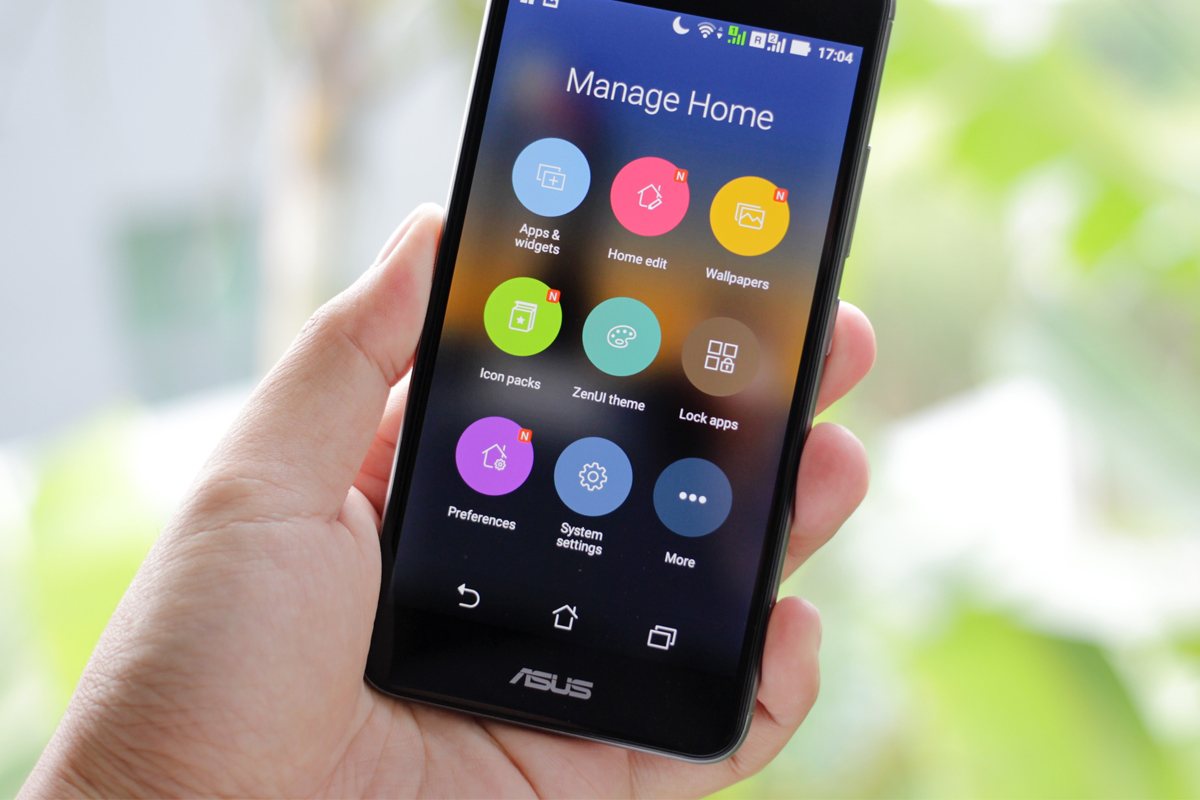
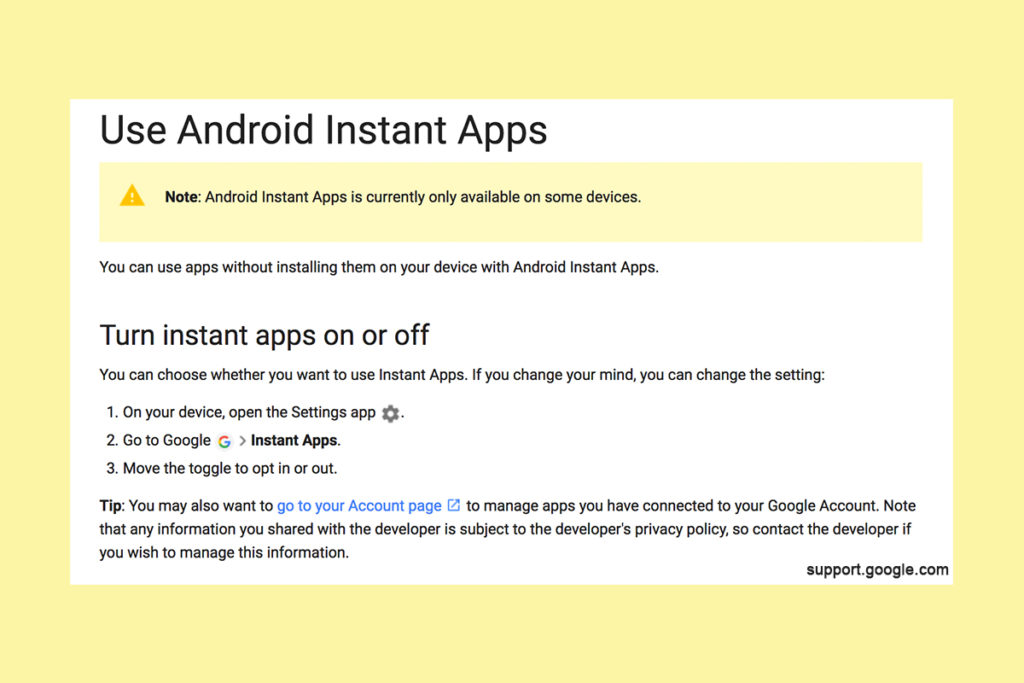
    Being able to see content from an app that isn’t even installed could be troublesome for parents who are trying to monitor their kids online activity. If you have uninstalled apps from your kids’ devices to keep them from seeing what is shared in that app you aren’t going to want them to be able to see the content in instant apps. I recommend disabling Instant Apps in on your kids’ devices if they have it. If you can’t find anything about Instant Apps in the settings of their phone or tablet then it isn’t available for their device and you don’t have to worry about it. If you do see it, follow the steps below to turn it off.


    Whether you’re using an accountability software like Accountable2You, a filter like NetNanny, or monitoring the entire device with something like Mobicip, the Instant App feature could give your child access to the very content you are trying to keep away from them. Be sure to give yourself opportunity to look over their phone or tablet whenever possible and check for the Instant App option. There aren’t very many apps developed with the feature yet but it has been opened up to most developers. More and more apps will be using Instant Apps to allow folks to share content in the near future. Turn it off now and get ahead of the game.


  • Musical.ly Teams Up with Apple Music to Sell You More Stuff

    Musical.ly Teams Up with Apple Music to Sell You More Stuff

    Musical.ly allows users to film themselves lip-syncing and performing current pop music hits and scenes from movies or TV shows. It has become one of the most popular apps for teens and pre-teens and a connecting point for music artists and their fans. In fact, there are now Musical.ly stars who are seeing success in more mainstream markets as well. Most of them are quite young teenagers. Today, Musical.ly has announced that they’re partnering with Apple Music to provide the song clips that make up their lip sync library. They will also be promoting subscriptions to the music streaming service and allowing Apple Music subscribers to listen to full versions of songs.

    Musical.ly grew a ton in 2016 and has seen a tapering off in their young audience during the beginning of 2017. This move seems to be a way to bring more value and financial stability to Musical.ly while putting Apple’s music streaming service in front of another audience. Apple Music has been chasing Spotify for subscriptions and the aren’t gaining ground. This is an obvious attempt to target Musical.ly’s young audience with their option for streaming music. Allowing full versions of the songs kids are lip syncing to in the app is adding value that many of the app’s users will see as valuable. Possibly valuable enough to ask their parents for a subscription to Apple Music. That is if they don’t have the ability to sign up on their own.

    What Parent’s Should Know

    I have been pretty outspoken on my disdain for Musical.ly in the past. One of the major reasons is the lack of an age restriction to sign up and the CEO’s attitude about it. Now I see another potential hang up for parents who’s kids use the app. There are already songs available on the app that many parents may feel are unsuitable for the age of their kids that use the app. Now the entire songs will be available if you are one of the 20million families who have an Apple Music subscription. If you don’t have a subscription be warned that the app will be consistently asking your pre-teen if they’d like to sign up for one. Also, there are likely to be features made available that won’t be useful without an account with Apple Music. How many times will your 13 year old have to be blocked from using a song until they start asking you to subscribe for them. Advertising is still, however, the least of my worries with Musical.ly.

    Parents of young teens should pay close attention to what their kids do on Musical.ly. If your young daughter is spending a lot of time singing and dancing in front of her camera know that there is no age verification so the fourteen year old boy who watches every one of her videos could actually be anyone, anywhere, of any age. In this day and age where kids are being asked to meet up by strangers and actually saying yes, there is no reason for your kid to be unsupervised on an app like Musical.ly. I recommend and uninstall if your kid is under 17 and then to closely monitor their use of the app. 

  • Parental Control Options for Your Kids’ Chromebook

    Parental Control Options for Your Kids’ Chromebook

    The Chromebook is unique because it isn’t really a full fledge computer. They are designed to just run a browser so you can access the internet. This makes them affordable and easy to use. Because of this the Chromebook is often the chosen computer for schools. So your child may have been assigned a Chromebook when they were enrolled in school. While they must have content controls set while they are on school property there aren’t any regulations requiring schools to keep them protected while off campus. Here are some options for how you can protect your kids while they use their Chromebooks.

    Supervised User

    UPDATE: Google has discontinued Supervised User in favor of FamilyLink.

    This is an account based system that’s built into the Chrome browser. It allows you to set filters, monitor sites visited, prevent installation of apps, turn on safesearch, and change settings. You do have to use blacklists or whitelists to block websites, there is not an automatic filter built in. I recommend using THIS LIST of blacklist sites provided by a University in France. It’s a pretty extensive set of blacklists and will take some effort to set up but if you don’t want to just set the Chromebook to only access a few domains then copy pasting sites from these lists is your best option. You can access the supervised accounts by going to chrome.google.com/manage.

    Click THIS LINK to see Google’s set up instructions for a supervised user account.

    MobiCip

    One of the only full service filter and monitoring apps for Chromebook, Mobicip offers a plugin that you can download from the Chrome app store. Mobicip will give you customizable filters, time limit controls, and usage reports and its pretty easy to set up. You just download the extension from the Chrome app store and then login. It takes you through the setup steps and lets you set your desired filter levels. Once it’s all set up you can make changes from anywhere using their web based controls dashboard. Their SUPPORT page has good How-To resources to walk you through the process.

    If you want more controls than the Supervised User option gives you then Mobicip is a pretty good choice. It’s $39.99 per year for all of the features mentioned above for up to five devices. If you are going to need to protect more than twenty devices (I’ve met families with upwards of 30) then you’ll have to get a quote for their “Enterprise” option. Mobicip is a good option and will give you quite a bit of control.

    Accountable2You

    The final option is an accountability software. This, combined, with the Supervised User Account may be all you need.  Accountability software doesn’t block content. This software will keep an eye on what’s being viewed and then red flag and report anything that it deems inappropriate. This allows you to more easily see when something questionable has been viewed. Otherwise you’ll spend time sifting through link after unrecognizable link to find something that may be naughty. You can even set up Accountable2You to send you a text message when an inappropriate site was accessed. The software works across all of your devices including Chromebook and is $6.99 per month for six devices and $9.99 per month for twenty devices. They have easy setup instructions on their SUPPORT page and have excellent customer service.

    Whether your kids got Chromebooks from you to help with schoolwork or they were school issued, it’s critical that you have some sort of parental control solution set up. I recommend using one or more of these to set up a plan to help your kids be safer online. The statistics say that only one out of every three kids who saw something inappropriate online was looking for it. The fact that you have well behaved children doesn’t apply here. The internet isn’t well behaved and we have to make the effort to keep them safe.

    This article contains affiliate links…