Category: Social Media

  • Instagram’s Comment Controls Can Help Parents Breathe a Little Easier

    Instagram’s Comment Controls Can Help Parents Breathe a Little Easier

    Cyberbullying and suicide are two of the most dangerous symptoms of our digital culture. Suicide is now the third leading cause of death among teens and half of all teens admit to having been bullied online. One of the major ways these bullies find their foothold is through comments on social media. My advice to parents is always to keep their kids away from online comments as much as possible. Instagram’s new comment control feature will help moms and dads be more effective. Their new live video reporting feature could even save lives.

    Comment Controls
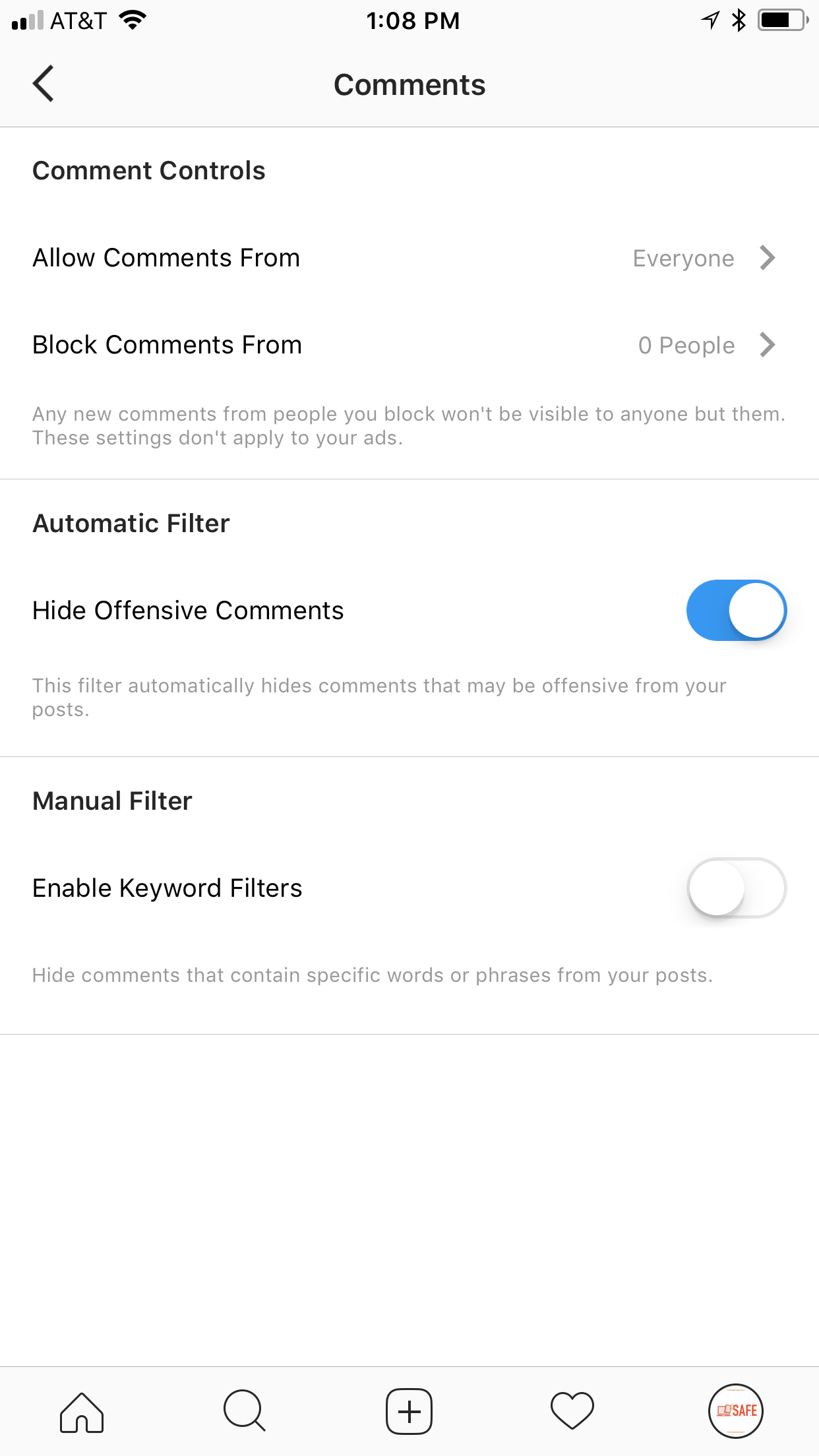
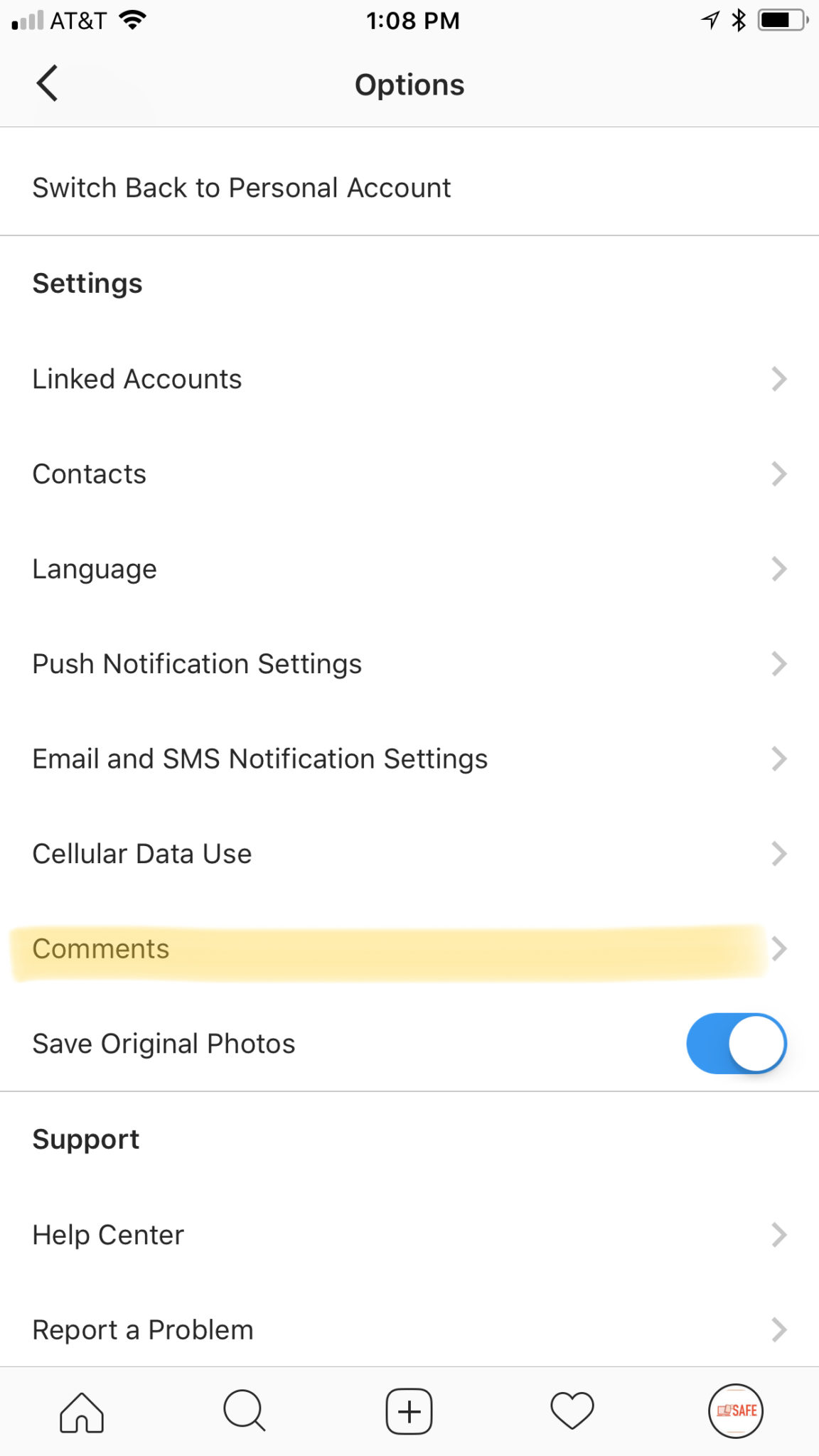
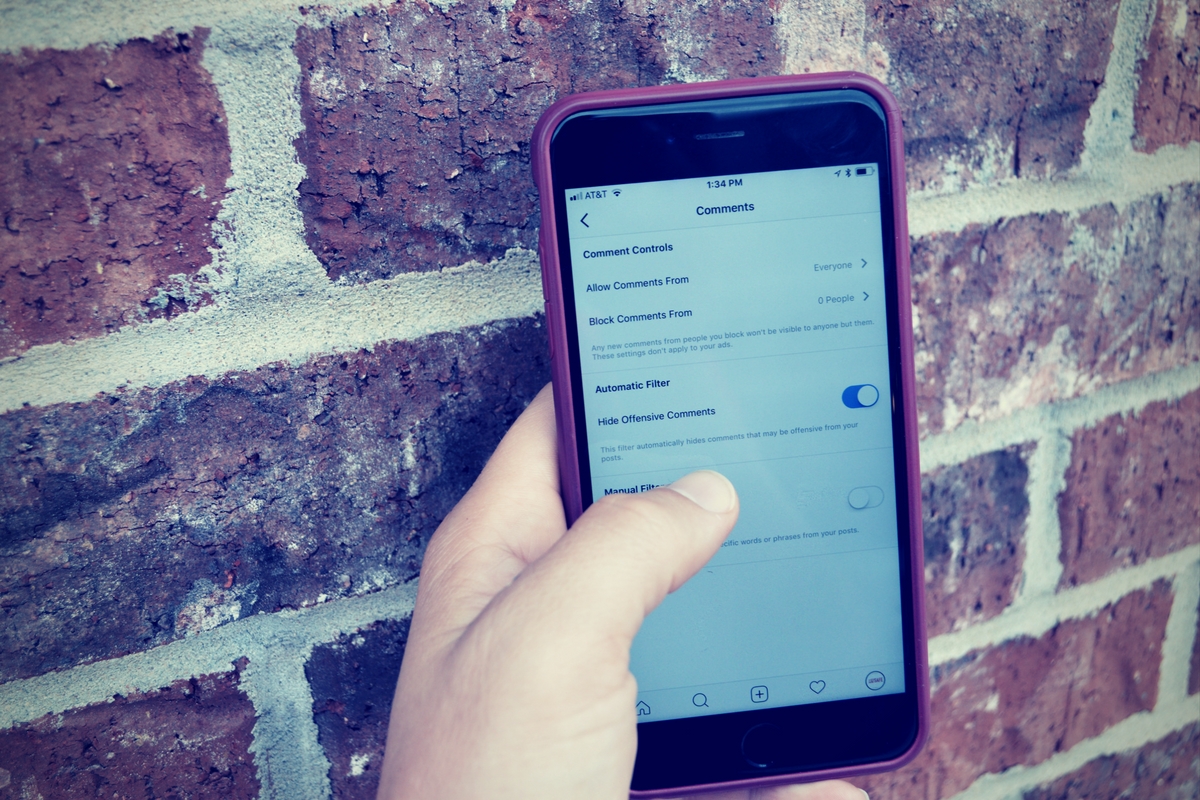
    Instagram wants you to have control over who sees what you post. They’re also giving you control over what people say about your selfies and food pics. Well, not as much what they say but who is saying it. If you are concerned about random strangers contacting your kids on Instagram through their comments section you can have them set their post comments to private. There are actually four settings, Everyone, Your Followers, People You Follow, or People You Follow and Your Followers. These settings allow you to set a smaller group of folks who can comment on your kids’ posts. This can be very helpful but only if your kid agrees with your motives. These settings aren’t password protected so they can be reset at any time. The best way to ensure they’re keeping their settings as you’d want them is to check in on who’s commenting on them. If you don’t recognize them from your child’s account then you should ask about it.

    Live Video Reporting

    Instagram has also added a reporting feature to highlight when someone may be considering self-harm or harming others while filming a live video. If the video is reported they’ll be shown a message that encourages them to reach out for help. Instagram has trained staff available 24/7 to accept messages from people who reach out via the Instagram Live reporting feature. Their hope is to give friends a way to help friends stay safe and maybe even choose to stay alive. What a great way to be encouraged that people care about you. This feature is also available on Facebook Live.

    What Parents Should Know

    Some social media sites are leaning towards the most public and open atmosphere possible (here’s looking at you Snapchat) which can be dangerous for our kids. Instagram and Facebook seem to be taking notice of our desire to keep some things private or in our chosen circle of friends. Understanding and using these features is very important for parents as we work to keep our kids safe online. Be sure to keep yourself informed.

    If you’re looking for even more info about how to protect your children online, you can contact me (Michael) about hosting a workshop to train you and your friends on family internet safety. Home workshops are free and are available all over the country through Skype. Email me at BecauseFamily@gmail.com to learn more.


  • Snapchat News: Are You Being Recorded?

    Snapchat News: Are You Being Recorded?

    Snapchat has been busy with updates lately. The latest numbers show their user numbers barely rising when compared to Social Media giants like Facebook and Instagram. Some of these features are just to lure more users and some are to increase revenue. Either way, you should know what they’ve added.

    Sky and AR Filters

    Snap Inc. is working very hard to highlight the creative possibilities with their Snapchat camera. The sky filter allows you to change what the sky looks like. This feature shows off the ability for the Snapchat camera to detect what’s being photographed and then apply effects. You can turn a clear sky cloudy, a day sky to night, or just add a rainbow. Augmented reality filters were updated last week and you can now place your bitmoji (an animated character that you make look like you) onto different spaces in your photo or video and record different animations.

    iOS Update Allows Capturing of Your “Private” Snaps

    iOS 11 was released last week and it includes the ability to record your screen by simply tapping a button in your control panel. This has been cause for concern for Snapchat users. Especially for those who use Snapchat for very private or personal conversations. As of the publishing of this article, Snapchat currently has no way to alert you that what you’re sending or even your live chat is being recorded. This means that as our kids are chatting with their friends, those friends can record their messages and then post them later. This could be a pretty big problem. It is likely that Snap Inc. will eventually add the ability to be notified when someone is screen recording your Snaps. You’ll see an article about it here, for sure, when that happens.

    Ads will Open New Games, Videos, and Interactive Ads

    Snapchat also announced a partnership with content creators who will be providing new ways for Snapchat users to experience ads. The new format for ads will include videos, interactive ads, and built-in games. Their goal is to cause users to interact more with advertising in Snapchat and lure more marketers to the platform. 

    What Parents Should Know

    Snapchat continues to be a popular social media platform for teens and preteens. Internet Safety experts show concern about Snapchat because of its Discover page, private messaging and video messaging, and disappearing photos and videos. It is important to stay informed as to what the app is capable of when they release updates. Hopefully, this information can help you make a quality decision on what to do with your teen’s Snapchat account.

  • “Anonymous” Polling Apps Your Kids ARE Using

    “Anonymous” Polling Apps Your Kids ARE Using

    I wrote about Sarahah and even discussed it on our podcast a while back but there are competitors for the anonymous messaging app now and they’re climbing the App Store charts. Polly and TBH (To Be Honest) are taking the social media category by storm. These apps are made to allow people to communicate with each other anonymously and share their deepest secrets. They encourage downloads with phrases like “Learn who likes you.” or “What do your friends really think?” Are these apps harmless or is this a disaster waiting to happen?

    Polly

    Polly is a polling app that allows you to create a link to questions you want your friends to answer and share a link in Snapchat. Polls are recommended at random and range from “What’s my spirit animal?” to “What is something I’m really good at?” Or you can create your own. One of the samples on the app store images is the question “What am I to you?” with answers like “Friend, Enemy, and Crush.” Polly boasts the following features:

    • Create a Polly lightning fast
    • Add your Bitmoji to be more stylish
    • Customize your Polly’s look & feel to reflect your vibe
    • Just 1-tap to add it to your Snapchat Story
    • Get notified when your friends vote
    • Track the results to all of your Pollys in one place
    • Share a screenshot of the results with your friends

    Polly is rated for ages 4 plus. 


    TBH

    TBH, which stands for To Be Honest, calls the app a combination of ask.fm and Sarahah. TBH allows you to ask people questions about you and allow them to answer anonymously. You can add yourself and your friends as answers to the questions so you can be voted on by your friends. The testimonials in the app highlight the fact that users feel good about themselves because they’ve been picked in the polls they’ve set up.

    From the app store description: “That tbh app makes me feel so good about myself”
    “tbh is really having a positive impact on people”

    TBH is only available in ten states because you have to choose your school from a list when you sign up for the app. This means you’re polling the people who attend school with you. The app basically sets up a network of high school and college kids who attend the same school and allows them to secretly say what they really feel about each other.

    What Parents Should Know

    The question stands, what do we, as parents, think about our teens posting anonymous messages about each other. Is it a good idea for our kids to be revealing their deepest thoughts about their friends. Sometimes, yes, it could lead to kids starting or strengthening their friendships, but how likely is that to be the norm? Remember what it was like when you were a teenager. Remember the jealousy and shallowness of your feelings toward the other kids around you? In a world ruled by hormones and feelings, it’s tough for me to see anonymous messages, question and answer sessions, and polls as a good way for our kids to communicate. Maybe we should be encouraging them to make eye contact and speak to their friends and potential romantic interests in a way that puts everything on the line.

    Your kids need to understand two things. First of all, nothing is ever truly anonymous online. The sense of secrecy in these apps is really a facade and someone knows who they are. Secondly, the words they say and the votes they cast may seem fun and silly but they can have very real consequences. The teenage psyche can be fragile. Putting someone’s emotions out there waiting to be crushed with too many negative votes in an anonymous poll seems, at least to me, to be a very dangerous proposition. I’m going to recommend uninstalling these apps if you see them. Disagree? Leave me a comment. I’d love to hear why.

  • You May Soon Share Your Instagram Stories on Facebook

    You May Soon Share Your Instagram Stories on Facebook

    Facebook Stories still hasn’t taken off. Despite putting them on the desktop site and constantly encouraging you to use the feature in the app, Facebook hasn’t been able to increase usership of their stories feature. In fact, if you look at the top of your Facebook timeline you will probably notice that only one or two of your six hundred Facebook friends have actually posted a story for you to look at. In their latest attempt to lure users onto stories, Facebook may soon allow you to share your Instagram story to Facebook. 

    Instagram is testing a “share to facebook” feature in the story camera. Once you’ve taken your video or photo for Instagram stories, you’ll then be able to share it to Facebook or share screenshots to Twitter. This is one of the first times we’ve seen Instagram test a feature that will integrate directly into Facebook, even though both networks are run by the same company. We haven’t seen them cross over much since Facebook bought Instagram in 2012.

    What Parents Should Know

    Instagram stories is still the most popular feature of its kind in social media. Hundreds and millions of teens and adults alike use stories every day to share what’s been going on and what they’re into. Facebook, while they are obviously reaping the benefits of Instagram’s success, they’re also wanting to block Snapchat out of the picture completely. Pulling the 2 billion Facebook users into the story feature could go a long way to make Facebook’s social media selections stand far above those of Snapchat. Most likely, however, your kids are still going to be using the service that their friends are on and the fact that parents don’t really “get” Snapchat makes it more appealing to them. Be sure you spend some time using Snapchat, Instagram, and Facebook so you’re familiar with all of the social media options available to your kids and teens. Set notifications so you’ll know when your kids are posting, and you can even log in as their accounts on some of the social media services. Whatever method you use, don’t be outside of the loop when it comes to your kids’ social media preferences. Talk to them about it, follow them on their favorite social media accounts, and use their login information to stay informed as they post and receive private messages.

  • How Your Teen Uses Social Media Differently Than You

    How Your Teen Uses Social Media Differently Than You

    I’ll never forget when this mother came to me and asked me why her kid is using all of these different social media sites. “I can barely keep up with Facebook. How does she do it?” The answer is simple. Your kids use social media in a much different way than you do. All of their friends are there and they all use it in the same way. While you can’t be (and shouldn’t be) expected to change how you use your social accounts in order to mimic your teen; insight into how they see the social media world can go a long way to help you keep them safe.

    They Use Each Platform Differently

    Believe it or not, there is a different way to use each social media platform. Snapchat has a purpose, as does Instagram, and even Facebook. Your teenager understands these differences and most likely uses each one accordingly. Snapchat exists to stay constantly connected with your friends. They keep up their streaks (consistent daily messages) and share the details of their lives on the private posts they send their friends. They then post the more broad and appealing snaps publicly for all to see on their story. Their Instagram is all about public posting and putting their best foot forward. (Whatever that may mean.) Facebook, if they’re there at all is for sharing the stuff they want the authority to see. It’s considered the most public of their social media connections and they use it as such. While you may take a photo on Instagram and connect it to your Facebook, Twitter, and LinkedIn, your teens don’t do that much. Each platform has its purpose and is used in a way that it’s meant to be used.

    They Use It  to Meet New People

    Social media has long been a great way for some of us to keep in contact or make contact with old friends. When we meet people in person we quickly go follow them on their social media profiles. The opposite is often true for your teenager. Young people use social media to find and begin relationships with new people. There are apps dedicated to this activity, some of which will even let you randomly connect and video chat or send private messages to these strangers. There are no such things as strangers for your teens when it comes to their online activities. People on social media are potential new friends to them. It could be a sense of anonymity or security that comes from being online instead of face to face that causes this attitude but either way your teenagers are meeting new people on social media all the time.

    They Self Edit

    I think I used the phrase “best foot forward” earlier and that’s the truth. While some of us may air our dirty laundry or share prayer requests or complaints about what’s happening in life on social media most teenagers don’t behave that way. They prefer to put forward the best version of themselves, even if it is over filtered and made up. The masks and filters available on the cameras in their favorite social media apps give them the ability to doctor up their photos in such a way that makes them seem cuter, or thinner, or smoother complected. They write their descriptions to portray the same image. They’ll do their best to come up with the most clever caption for their photo or they’ll use the emoji that is the most popular and interesting to get the reaction that they want. The most common practice is deleting or archiving posts that don’t get enough likes. Not only do they edit themselves before they post, they’ll edit their entire account by only allowing posts with the most likes and comments to continue to exist. Young people use social media to portray the version of themselves they want everyone to think is truly them. This is probably one of the main reasons they live on social media.

    They Live There

    You probably remember when you started using Facebook or Instagram. You can probably go back in your photo archives and find the first few pictures you took with a Snapchat style filter or mask. For most of us, social media is something that we’ve added to our lives and we use it to document and share much of what we do in our lives. For your teen, though, the realities can often become blurred. Many teenagers live on or through their social media accounts. Since the version of themselves they’re showcasing on social media is the filtered and edited version, teens often prefer to experience that life to the one they live offline. When I speak to teens, I always remind them that their online lives and offline lives are one in the same but they rarely put that together on their own. Any thing that happens to them MUST be shared. Many times they’ll even make decisions about real life based on what it will look like when they share it online. They aren’t like us. We’re talking about digital natives, the world they live in is a gray area between what’s done on the internet and what is done every day in real life.

    What Parents Should Know

    There are many ways that teens use social media differently than their parents. These are just a few examples but they should be eye opening ones. The only way to help our kids understand the blurred vision they can often have is to gently advise them as to what is healthier. Have conversations with them about what they could do instead of worrying so much about how they represent themselves online. Help your kids build confidence by using your own words and actions to show them how much value they have. The generation of teenagers that are growing up today have a confusing road ahead of them and moms and dads (or aunts uncles grandmas and grampas) are the only ones who can help them unravel the confusing path they have to travel.

  • IMVU Lets Your Kid Become a 3D Avatar and Make Out With Strangers

    IMVU Lets Your Kid Become a 3D Avatar and Make Out With Strangers

    (Disclaimer: I sometimes spend time in apps and on social media that I wouldn’t normally mess with because of this blog. I discuss the activity I’ve had in these apps with my wife and with men that I respect and whose opinion I value. I also take other precautions to maintain accountability for my actions online and offline.)

    “IMVU” is number 25 in the iOS App Store Social Media category today. It’s been around for about a year and has grown very quickly. They currently boast over 50 million active users and 10 million unique visitors per month. The app is a reality simulation in which you take on a 3D Avatar and visit chat rooms. In these rooms, you can hang out and chat with other people, interact with the environment, and even make your Avatar do different animations. (Dance, karate kick, or do pushups.)

    I downloaded the app, created an avatar, and started chatting to see what it was all about. It didn’t take me long to see pretty much all that was going on. I registered as a 17-year-old female (because that’s what most 34-year-old males on an app like IMVU are going to do) and started building my avatar. I made her look beautiful and thin and busty and have dark skin and light hair and eyes. She was pretty much exactly what you’d expect some creepy dude who was making a female avatar to create. Within seconds I was in my first chat room getting the lay of the land. I noticed that I could move my character around and sit on furniture, interact with items, and even privately message other characters in the room. All I ever said in chat was “Hey everybody.” I got a few hellos back from the ten to fifteen other avatars in the room. There were a few people in a three-way conversation and I just sat and read what they were saying to each other for a while. It all felt a bit creepy so I left and went to another chatroom.

    This chat room was called “Pleaser.” (I think they meant pleasure, but teens, amiright?) The room was decorated in all black with red lips chairs and neon signs. I saw people standing around and eventually, the chat started to fill. I can’t repeat the conversation I saw in the “Pleaser” room here but it was what you’d imagine. Then I started to look around the room and saw that the usernames that were having this adult conversation were sitting on a nearby bean bag in a full on make out animation. They moved to the floor and I moved over to the chair. When I sat down, my avatar immediately started making the make our animation to look like it was kissing an invisible partner. That’s when I looked over and saw the young man character sitting in the next chair waving handguns around crazily. He reminded me of Ed Norton’s character in Fight Club. He was waving the weapons with some crazy look on his face until a female avatar came and sat with him and they began a make out session as well. Apparently, all you had to do to spark a make out sesh was sit in this chair and wait for some other rando to join you. I had had enough so I backed out of the app, uninstalled it and started making notes for this post. Needless to say, I’m not going to recommend this app for your teens.

    Who is IMVU for?
    IMVU’s core members are young adults age 18-24, however, many members are older. In fact, 7% are 35+. Individuals must be at least 13 years old to use IMVU. – http://www.imvu.com/about/faq.php

    What Parents Should Know

    The quote above says it all. This app is intended for adults. The content in the app is designed to lead to adult conversation and exploration. The clothing you can try on and purchase within the app lends itself to adult oriented conversations and the interactions and animations can be sexual or violent in nature.  I will never understand how an app that is designed for and rated for ages 17+ can allow members under that age to sign up and use the app. In the 15 minutes I spent in this app I saw nobody over the age of 16 and I was checking the ages over every profile that featured their age. Of course, just because the app says they are 15 doesn’t mean they are but that doesn’t make this better. It makes it worse. Remember, I was a 17-year-old girl while I was checking IMVU out.

    This app is being added to our uninstall list. Let’s do a quick recap to help us better understand why. 1. No age verification. You can say your however old or young you want to be. 2. Violent and sexual themes and partial nudity. 3. I saw people (not real people, but still) making out all over the place. 4. The dudes that were waving firearms around like crazy people. 5. Open chat and private chat with who even knows who? These reasons make it very clear to me that if you see IMVU on your young teen or child’s phone you should uninstall it immediately. 

  • Musical.ly Updates Adds “Watch Next” Recommendations

    Musical.ly Updates Adds “Watch Next” Recommendations

    Musical.ly announced earlier this summer that they are going to be featuring original shows from networks like NBC, Seventeen Magazine, and Viacom. We’ve written before about how we don’t like their lack of age verification even though the CEO seems to think it’s no big deal. The lip-syncing video app’s newest update will put more previously unseen and original content in front of your kids. The updates include a “Watch Next” feature that will use what’s called “computer vision” to see what they are watching and make a decision about what other videos (original content or user generated) to recommend they view next.

    The No. 1 goal of the new app design is to make “a wide range of content more accessible,” Hofmann said. – Variety.com

    This update also includes a new look and feel to the app and some new ways to personalize your profile page. The most interesting addition, from a parental control standpoint, is the idea that an algorithm is going to be recommending more videos for your kids to watch.

    What Parents Should Know

    This feature isn’t entirely new to streaming apps. You’ve seen Netflix, Amazon, Hulu, and YouTube feature videos or shows that they think you might enjoy. Their recommendations are based on what you’ve been watching, just like those in the Musical.ly app. The concern, here, is some of what may be available on Musical.ly and the fact that most parents don’t keep an eye on what their kids do on the app. 

    I still don’t recommend parents allow this app on their kids’ and young teenager’s phones because of the lack of age verification. It’s still on our uninstall list and will remain there until they take the risk of predators contacting kids on this app more seriously.

  • Facebook Adds GIFs and Live Video to the in App Camera

    Facebook Adds GIFs and Live Video to the in App Camera

    If your Facebook feed is like mine there are only one or two people using the FB Stories feature at any given time. Instagram and Snapchat pretty much own the story market but Facebook is still chasing that “all inclusive social media app” unicorn.  Today, the app updated to include the ability to go live from the FB Story camera, to turn your images/video into a nifty GIF, and to share text over a colored background. (Much like the text status backgrounds available on your FB timeline.) It’s a bit surprising that the story feature hasn’t caught on as quickly on Facebook as it did on Instagram which has more users on Stories than Snapchat has over their entire app. There are more people using Facebook every day but they seem to prefer the timeline method to the 24-hour stories.

    One thing is certain, however, the apps that are popular with the younger crowd are the ones that get the most out of their stories feature. Facebook is, obviously, trying to attract that same crowd again since their average user’s age has increased over the past several years. Buffing up Facebook Stories is an attempt to reach out to that exact demographic. We’ve seen a small surge in the number of younger users to join or re-join Facebook but it’s nowhere near the growth that we’ve seen on Instagram and Snapchat.

    What Parents Should Know

    You still can’t take Facebook off of your apps to watch list. Your kids most likely prefer Instagram or Snapchat (if you allow them to use it) but some of these new features, which are designed to attract the teen and pre-teen demographic, could draw some kids back to Facebook. My advice is for parents to have their teen’s login information and to check in every now and then. You’ll want to see what messages they’ve received and what is showing up on their and their friend’s story. For many younger people, the fact that their parents use Facebook is a deterrent for them but some of the camera features and other new additions could cause them to change their minds. It’s important that you know if they have a Facebook account and keep an eye on what is going on there.

  • How Your Kids Can Hide Texts

    How Your Kids Can Hide Texts

    One of the major issues facing our teens these days is sexting. Statistics say that one of every ten teenagers admits to having sent naked pictures of themselves to someone. Sometimes our kids use social media to do this. They’ll send photos and inappropriate messages in the private messaging features of these social media platforms. Sometimes, though, your kids just use text messaging to do it. There are several tools out there to allow you to monitor what texts your kids are sending but there are a few ways they can hide their texts, even from the security you’ve set up. Here’s what they’re doing.

    Deleting text history.

    This seems pretty obvious but you’d be surprised how oblivious some parents can be. If there aren’t any text messages in your kids’ messaging app, or if it looks like they’ve only chatted with you, they’ve probably deleted their messages. This doesn’t always mean they’re up to something naughty but it does mean you should be having a conversation with them. Deleting their messages is a bad habit to allow them to get into for a number of reasons. First, it looks like they’re hiding something. They don’t want you to be suspicious of them any more than you want to creep around and spy on them. Secondly, they could be deleting conversations that can come back in the future. It’s not a bad thing to have written (or typed) evidence of these conversations, especially if they’re ever contacted by someone they don’t know. I advise you to encourage your kids not to delete texts. If you’re using a monitoring software that uses the iCloud backup (TeenSafe, mSPY) to monitor their texts then you could be missing what they’ve texted if they deleted them while outside of wifi and before a backup to the cloud. If you have a suspicion that text messages are being deleted then you should disallow the use of texting on their phone. If you can’t disable texting then don’t be afraid to take the phone away for a while. Most of all talk to your kids about the risks associated with keeping their conversations hidden. You should be here to help them and they need to understand that.

    Using Dummy Phone Numbers and Private Texting Apps

    Apps like TextBurner, Anonymous Texting, Buffalo Private Texting, and Smiley Private Texting can easily be used by kids and teens to hide the conversations they’ve been having. Not only do these apps require a pin number to access the text messages but many of them also allow you to set up a new phone number so that you can send and receive texts of calls anonymously. The apps descriptions mention job searches, Craigs List, and dating as some of the main uses for these private texting and dummy phone numbers. They do, however, advise against certain usese of the app and even warn of some of their policies for dealing with those who don’t follow guidelines:


    Screenshot from the Anonymous Texting App


    Check out this list of private texting apps for iOS.     —      Here’s a list of private texting apps for Android.

    Notice the warning about the age requirement? It says you must be 13 years old. If that’s so then why is the app rated for ages 4+? If you do a scan of all of the apps like this in iOS you’ll find that they’re all rated 4+. If you have your app store settings allowing your kid to download apps rated 9+ or lower or even 4+, they’d be able to download one of these apps, create a private and secret phone number that you don’t even know about and begin texting whoever they’d like. This is why I recommend using Family Link (for android phones OS 7 or higher) and iTunes Family Share to require your child to ask permission to download new apps. If you see any kind of app that says secret or private, or anonymous in the description I’d think twice about allowing them to download it. We have a major issue on our hands of kids sending images and texts that are very adult oriented. You, honestly, can’t keep an eye on every message they send on every app. This is why it’s important to limit which apps they’re allowed to use. It may cause that knockdown, drag out fight you’ve been trying to avoid but it’s better than filing a police report about some stranger who has been sending nasty pictures to your child.


  • YouTube Adding Private Messaging

    YouTube Adding Private Messaging

    I spoke to a mother just a few days ago who was lamenting the idea of her son having his own YouTube channel. He didn’t post much but she was concerned about people finding him or learning about him through his videos. She was also concerned about bullying in the comments of his videos which is a real concern since YouTube commenters are notoriously ruthless. YouTube’s most recent update is going to either help solve or intensify these problems.

    YouTube begins rolling out a new update today that will bring private messaging to the video streaming app. The feature is an attempt to keep people on the YouTube app to discuss and share videos they’re viewing on YouTube. Currently, these videos are shared on other social media sites and discussed there but YouTube wants to play a larger role in the social game. Private sharing and chat will allow users to discuss videos and respond with more comments and even reply with another video. The biggest concern with this feature is that you can’t block users who try to contact you. You can, however, deny their requests to chat.

    What Parents Should Know

    Any app that allows private messaging should be taken seriously by parents. Kids of all ages love YouTube and the dangers of allowing them unsupervised access to user uploaded internet videos have been well documented. Adding the ability to send and receive private messages, while it can allow them to discuss videos with people they know without the risk of comment trolls bullying them, provides an opportunity for strangers or who knows who to contact our kids through YouTube. Since predators use social media to learn about and groom their victims, YouTube’s private messages could be a way for those ill meaning individuals to do their work.

    I advise that you allow your kids to watch YouTube on YouTube Kids only. If the videos they like aren’t available there then only let them watch on a browser on a computer. The other option is to share the YouTube account with your children and install the app on your own device. This way you can see who they’re messaging, what they’re talking about, and even be alerted when they receive a new message. I don’t ever recommend spying on your kids. My advice is that you discuss your parental control and monitoring methods with them so they know you’re there to look out for them. You’re supposed to be the safe place.