Category: Social Media

  • You Can Vote For Monopoly Tokens to Reflect the Culture

    You Can Vote For Monopoly Tokens to Reflect the Culture

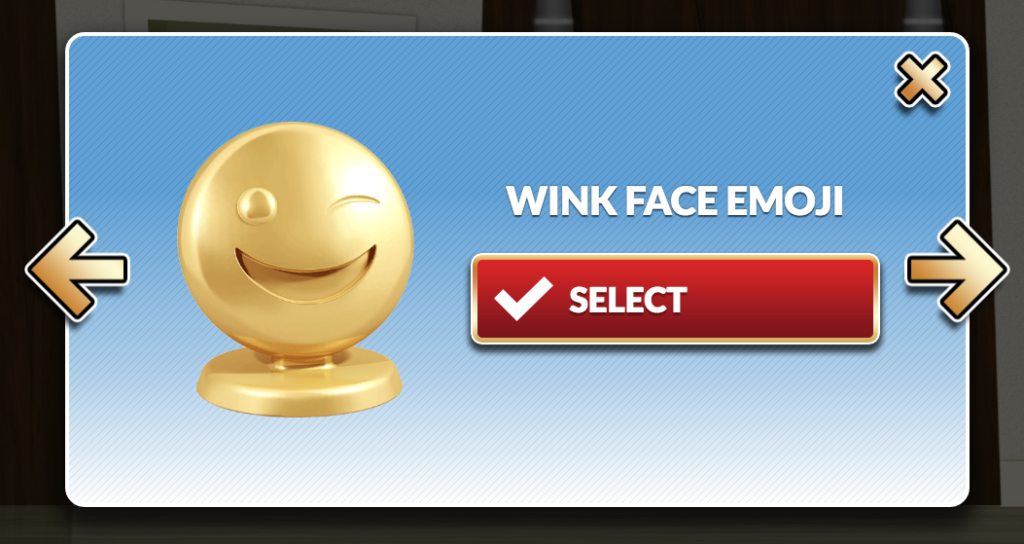
    Does art reflect culture or does culture reflect art? It’s a chicken or the egg level conundrum but Hasbro’s classic board game Monopoly is letting their fans decide. A new website is making it possible, and even fun, to help them choose the next series of tokens or game pieces for their game.  They have over fifty options and the run the gamut from the classic thimble and battleship to new, tech inspired tokens like a hashtag or wink emoji.


    Monopoly has been around for a long time and they always seem to be updating to encourage you to upgrade your version of the game. They’ve added credit cards in the past, they have make different versions for different age groups or interest types, now they are letting fans of the game be involved in the design process. The site is even fun to use. It’s set up like a house and you click your way through different rooms that feature different tokens. When you click on one you like you see it more close up and see the name they call it. You can chose to vote for it there on that popup or you can click an arrow to see the next on the list already in that zoomed in mode. It’s easy to use and fun to look around seeing what they’ve come up with.


    The new version of the game with the winning designs will be available this summer and for the purists like myself, (I HAVE to be the battleship!)  a “Token Madness” edition will be available that will include the classic tokens as well as the newest, fan selected, versions. You can vote until January 31 so head on over and chime in.

    When Tech Bleeds Into the Board Game

    My family loves to play board games. My wife and I even spend the majority of our date nights playing a two-player version of some tabletop game. You will often see the digital world work it’s way to the analog products we enjoy. It’s obviously a way to try and stay relevant and attract buyers. I remember seeing “Words with Friends” the board game in Target and my wife and I laughing at each other…”Isn’t that scrabble???” Maybe, as parents of digital natives, we can use this as an advantage. Use an offline version of a mobile game like “Words with Friends” to encourage a few hours of family time. Maybe some emoji tokens in Monopoly will provide a bit of delight that will cause your 16 and 12 year olds to want to sit down with you and play for a while. Try it out sometime soon. But first, go vote on the new Monopoly Tokens.

  • How Social Media Sites Use Your Photos to Learn About You

    How Social Media Sites Use Your Photos to Learn About You

    A new extension (plugin or addon for a web browser) has just highlighted an issue we all probably won’t be surprised by but have never thought about. Our social media sites are scanning our photos to learn more about us. The extension is called, get ready it’s a mouthful, “Show Facebook Computer Vision Tags Extension” and it displays the detailed tags that Facebook has used to label your photos when you post them to the site. The tag information is built by automatically scanning every image you post and using the information to create trackable details about that image. So, for instance, if you post an image of you and your kids at the zoo it may show tags that say: “3 people, smiling people, animals, nature.”


    This may seem like no big deal but when you think about just how much information can be obtained from a simple thoughtless upload of a family photo, it can get a bit creepy. Most likely this info is used to help Facebook target you better with those advertisers who pay for the privilege to use the data to identify potential customers. It also is used to help with search results when someone is looking for photos of you or somewhere you’ve been.

    Use this as a tool!

    Oversharing online is more than just annoying. When you post a picture of your food that nobody cares about you are identifying yourself as a consumer who wants to be advertised to about that type of food. When you post that bad blurry picture of your kids in their princess dress, you’re highlighting that you should be targeted with more Disney advertising. Use this extension as a tool to help you learn that lesson, and teach it to your kids.

    This extension can be a pretty cool way to help you and your kids see how much information about you is available when you post online. I always advocate for parents to teach their kids that the internet is a public place. Whatever you post can and will be used against you IRL (in real life) and so you should think about that before you post. This extension may be a great way to drive that advice home with your kids.

    If you want to see for yourself, you can download the chrome extension HERE.

  • Snapchat Answers the Photo Messaging Challenge with New Features

    Snapchat Answers the Photo Messaging Challenge with New Features

    The battle for the best messenger and photo messenger app continues and this time Snapchat has launched a counter assault. Excuse my military history illustration, I know I’m a nerd. While Facebook has been building up the features list on their popular messenger app, their photo app Instagram, and their texting app, WhatsApp, Snapchat has been working on some updates of their own.

    Let’s take a look at what today’s update has and what it will allow your kids/teens to do while in the app. Then we’ll chat about what parent’s response to this app should be after the latest update is installed. It’s super important to stay in the know, even if some of the updates may not be potentially dangerous. Here’s our breakdown:

    Snapchat’s New Features

    Paintbrush and Scissors

    These artistic new tools will allow you to do more customization than ever before. Paintbrush is a bit novelty and is just a way to make your photos look different but scissors is actually a pretty cool idea. This feature allows you to take “cut out” portions of a post or photo and save them to use later as a “sticker.” This feature gives you be the ability to become your own emoji. I am kind of looking forward to one of the apps I actually use copying the Scissors feature. It’s pretty awesome.

    Shazam

    You, most likely, are familiar with Shazam. It’s an app that allow you to identify whatever song you’re listening to by allowing the app to “listen” to it and then give you the details. This update allows you to use Shazam right in Snapchat. You just open the camera, hold your finger down, and the option to find the song will come up. Once the song is identified you’ll be asked if you’d like to purchase the song. Shazam has been around for a long time, this integration is a pretty unique idea and will keep users from closing one app to use another one.

    Group Chat

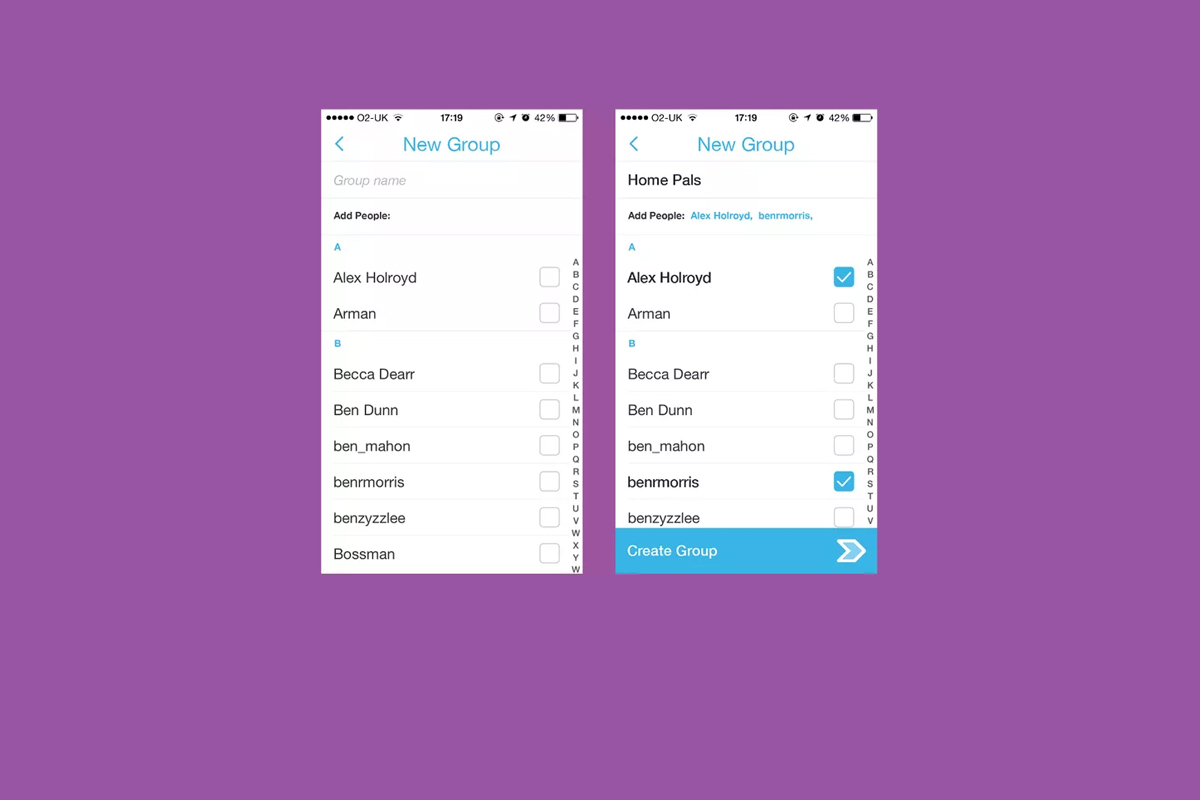
    Group Chat is self explanatory. You can chat with up to 16 people at a time and set up your chats in groups. This allows users to keep their most common friends together in one group so they can have quick access to their conversations. Your teenagers are socializing online now so this allows them to do so in a larger group.

    Every feature included in this update is another step towards Snapchat becoming the catch all app for young people. The most common users are ages 18-35 but there are many high schoolers who have already been snapping their friends for years. If they haven’t already, these updates are sure to lure them in.

    What Should Parents Know?

    As I’ve mentioned before. My main concern with Snapchat isn’t the messaging or photos, it’s the advertising. Their curated “discover” page has been and always will be a deal breaker for me. I know you may not agree so regardless of your reasons for being safe here are my tips for parents of Snapchat users.

    Don’t allow Snapchat if you’re uncomfortable.

    It’s important to remember that you have to have a say over what your kids are doing online. If what Snapchat does makes you feel uncomfortable you shouldn’t allow it on your child’s phone. Whether you’re afraid of what people may send them or what they could see on a public story. Maybe you’re just concerned about people they don’t know getting ahold of pictures of them. You also could simply be trying to keep the marketing gurus who are publishing content straight to your child’s phone from turning them into the consumer they want them to be. No matter your reason, be true to that instinct and hold firm to your position. Your teen won’t understand and will argue but you have to trust yourself on these issues.

    Use family sharing to know when apps are installed.

    I walked through family sharing and how to set it up in THIS tutorial. This is a great way to keep track of what apps are being installed on everyone’s devices. You can even set it up to ask you permission before something is installed. If you have decided to take a stand against your teen joining the Snapchat trend Family Sharing is a great way to be sure they’re sticking to those rules.

    Follow your kids’ “Story”.

    If your teen is using or wants to use Snapchat and you’re ok with it I recommend you get an account as well, even if it’s only to keep tabs on their “Story” yourself. This isn’t spying since you will communicate with them that you’re following them. Let them know it’s not that you don’t trust them, it’s that you have a responsibility to protect them from those who won’t use the social media service in the safest way.

    Talk to your kids about how they use Snapchat.

    Now comes the inevitable plea to be transparent with your children. Be open with them and honest about your concerns with Snapchat. Let them know you want to protect them from whatever it is you’re concerned about. Boundaries become stupid rules if there is no relationship. If you’re going to be following the on their account they need to know about it and know why. If you’ve decided not to allow it at all then you’ll have to be honest about why. Let them talk to you about why they want to use it. “Because it’s how my friends talk to each-other is a legitimate concern for a teenager. Social connection is the most important thing during that time of their lives. That shouldn’t cause you to back down from your rules but instead help you show empathy and compassion while you are patient enough to give them time to adjust to the rule.

    These new updates are being discussed in the tech world as another big “shot across the bow” to Facebook and Twitter and other social media giants. You can expect more and more features to roll out on all of these services. Also expect to be asked by your child if they can start an account and be ready ahead of time with your answer.

  • Instagram Adds Live Video to their Stories Section

    Instagram Adds Live Video to their Stories Section


    It’s no surprise that we are covering more news from Instagram, they’ve been busy keeping up with the likes of Snapchat. Adding Stories and disappearing private messages were just a couple of their latest moves. Today they’ve released the first change that will allow them to pass up Snapchat in the Social Media “engagement” game. Today, they added Live Video!

    Live video has been available on Facebook for a while now so it’s a bit of a no brainer that it’s been added to their other assets. There are a few major differences between Facebook and Instagram’s live video. First, it’s the fact that Instagram’s videos disappear. Unlike making a live video on Facebook, where it will upload to your timeline and allow you to share it, Instagram’s version will end and never be seen again when you hit finish.

    Another major difference is the inability to share while you’re broadcasting. These features may change but for now they set it apart quite a bit from Facebook’s live option. The ability to go live at all is super trendy and sets Instagram apart from Snapchat which is a major win for them. It doesn’t change our view on Instagram but it can teach us a couple of things.

    What Parents Should Know.

    Snapchat is in every Social Media conversation right now, even when we’re talking about a different app. When apps like Instagram work so hard to keep up with what’s popular it’s a major sign for us as parents. We can see that live video is becoming popular on all Social Media platforms. The transparency and realism of Live Video is en vogue these days. Your kids want something real, raw, and in their face.

    As parents we have to keep this in mind while we raise our kids and keep them safe online. They are looking for something real. We have to be real with them when we are teaching them how to make good decisions. Whether it’s decisions online or offline they have to be taught in a way that your kids know is real. Your transparency and openness are critical because they can see through any facade.

    Usually I try to give you tech advice on Safe.BecauseFamily.org, but this post is all about using the trends in technology to help us learn more about our kids.


  • Three Things from This Week!

    Three Things from This Week!


    It’s been a slow Family Tech News week but here are a few tidbits that you should know were making headlines.

    1. Fake News

    Fake News on social media is finally getting labeled for what it is. It’s dangerous and stupid. Our kids buy into these things as easily as anyone so we should be glad that something is being done. We, as parents, also have to be careful not to just post anything that comes across our social media timelines. These messages are spread by those of us who don’t check our sources and just share things because what’s written agrees with our opinion. Nothing is more important than truth. If our children are going to be using social media, and they are, we need to do what we can to keep it the kind of place that can be as safe as possible.

    I have shared about UGC (User Generated Content) before and how it is hard to control. The only thing you can control is what you post on your feeds and what social media you allow you children to be involved in. Let’s share responsibly.

    2. Data Storing Toys

    Did you see that movie where the toys your kids play with are listening to them and saving the information they share in some big company’s database? Remember the part where the toy asks the children questions and uses the answers to store data about the child and their likes and dislikes? That was crazy, how they used it to market to the kids and even let the police and government use the voice data to develop voice recognition software. Man, that was a scary movie. Except it wasn’t a movie, it was what happened in THE ACTUAL NEWS THIS WEEK!

    Parents have to pay close attention to the toys our kids are playing with. Being more connected isn’t always good. Be careful to protect your kids by paying close attention to terms and agreements about what companies do with the information you and your kids put on apps, software, and toys that they use. You can’t be too careful when your family’s personal information and privacy is at stake.

    3. Facebook Messenger Games

    Here’s a fun one. You can now play games (Even some old school classics) within Facebook Messenger. Facebook is trying to get you to spend more and more time using their service so they can spend more and more time putting ads in front of your face. Right now these games are free and fun but there will soon be ads and most likely in-game purchases available too. Be aware that the more time your children spend online with other people the more time they have to be influenced by those people as well as whatever advertisers pay to put their content in front of your child’s face.

    Weekly Recap

    Here’s my advice. Hold your family close this weekend. Put away the tech toys, and the news, and the games and just enjoy being together. We can get so carried away with the next big thing or what’s happening in the news and all over our huge world that we forget what’s happening in our little world at home. Spend some time in that world this weekend. That’s what I’ll be doing. Have a good weekend, see you Monday.


  • Musical.ly Defends Appealing to Underage Users

    Musical.ly Defends Appealing to Underage Users

    We have already said Why We Don’t Like Musical.ly. The app is in the news again. The CEO of musically has defended their handling of young persons who use their app. More than 1 million videos are updated every day. They have over 40 million users and many of them are under the age of 13. Musically doesn’t ask, upon signup, if you are 13 years old or older.

    We would collect ages but those kids would just say they are 13 so it doesn’t change the conversation. – Zuh (Musically CEO)

    The company says that it is up to parents to be sure their child is old enough to use their service. Their goal is to make the “environment safe” meaning that their focus is to protect content and profiles within the app. They maintain that many parents encourage use in the app and some are even involved in the videos posted by their children. However, the CEO of the company admits that they have “no way to know for sure” if children are using the service in the safest way possible. 

    What a Parent Should Know

    Nobody is going to look out for the safety and security of your kids except for you. You have a responsibility to pay attention to the privacy settings and functions of an app, game, or toy and decide if it lines up with the vision of your family. If they you are ok with them doing everything the app allows them to do then no problem. If you are throwing your hands up because you just don’t know what it does, you’re putting your children at risk.


  • When you DON’T Have Freedom of Speech

    When you DON’T Have Freedom of Speech


    I Have My Rights!

    It happened a few times while I was a youth pastor, a student in my youth group said something online about their employer on social media and lost their jobs. Too often I heard complaints about workplaces and bosses. In reality these teenagers seemed to just be whining about everything being someone else’s fault. Well, when it comes to employers firing you from something you said online you may be surprised to learn that your first amendment right to free speech doesn’t apply to your employer.

    Free speech, as mentioned in our Bill of Rights, exists to protect you from retaliation from the Government when you speak out in disagreement. It doesn’t apply to calling out your supervisor, Jeff, for being dumber than you and a bad boss. Apparently legitimate complaints about work conditions or problems at work mentioned on social media are protected, but negative “vaguebook” posts about employers or customers and pictures that shed the company (or it’s employees) in a bad light can legally be grounds for firing.

    If You Wouldn’t…Don’t!

    complain-boss-facebookMore and more employers look at a potential hire’s social media accounts when deciding if they’ll employ them. Your teen needs to know that what they post online, that song lyric that makes them sound depressed all the time, the nasty comments about the boss at their last job, or even the pics from that night “out” last weekend can come into play when they’re looking for a job. This also applies while they’re trying to keep their job.

    We should help our kids understand that social media is a public place. Everyone can see what you post online and there are often consequences to being too public with your thoughts. If you wouldn’t stand in the middle of a crowded room and yell, “My boss is stupid and doesn’t care about his employees” you shouldn’t post it online either. This sounds like common sense but your teen may not be able to think that far ahead during this time in their adolescent brain development. I recommend a conversation about this with your child when they get a job. Use this chance to remind them that what is posted online stays online and that they can’t just say whatever they want. Anonymity is a myth and it’s our job as parents to help our kids understand that.

  • Houseparty App Gives Your Teens a Chance to “Unwind” with Friends Online

    Houseparty App Gives Your Teens a Chance to “Unwind” with Friends Online


    Everyone needs their “third place.”

    The third place is explained by sociologists as

    “the coffeehouse, the bar, the mall — a public space for relaxing, socializing, sharing ideas, or goofing off.” –TechCrunch

    Your kids are finding an online version of that public space and it’s in an app called Houseparty. Houseparty is a group live “hangout” or video chat app and it’s been increasingly popular in high schools since May. This app provides a way for teens to connect with friends away from the pressures of school, work, or even parents. It gives them that “third place” to unwind. It gives them an opportunity to be social, but is it really social?

    “Despite the positive impact of emerging communication technologies on scientific research, our results provide striking evidence for the role of physical proximity as a predictor of the impact of collaborations.” – Harvard Medical School

    Relationships are better built in person. More and more research is showing that time spent near your friends is more important even than time spent talking with them. While video chatting allows for group conversation, it doesn’t allow for the mannerism cues and continuous turn taking. (Bejing Normal University) To say that using a video chat to build relationships is good for our kids, or at least better than nothing, is not really accurate.

    How It Works

    screen322x572The Houseparty app uses your contact list to automatically log you in with up to eight friends who are online when you open the app. You don’t set up or invite people to conversations, it just puts you in a room to hangout with whoever is on. So using your contacts list ensures that you’re hopefully only chatting with friends. You may, however, have the contacts of some folks you aren’t interested in chatting with. There is a “stranger danger” feature that will alert the user if someone joins the chat that isn’t on their contact list. This is a pretty good feature.


    What Parents Should Do.

    I think this app is trying to get a lot right. While there can always be concern with video chatting, simply because anything created with good intentions can easily be used to do something inappropriate. Similar to the AfterSchool app, I would say Houseparty is something that parents should be aware of and talk to their kids about but I wouldn’t advise uninstalling on sight, necessarily. Whether or not your are ok with your children building their relationships through online communication is up to you.

  • Another Instagram Update Makes the App More Like Snapchat

    Another Instagram Update Makes the App More Like Snapchat


    If you have been heeding my advice you have done your best to keep your kids away from Snapchat. Instagram has launched yet another update and this one includes dissapearing pictures and videos in their direct messenger and the beginnings of their soon to be released live video feature. What this means is, if your kids have Instagram, they now basically have Snapchat. (more…)

  • 5 Social Media Rules for Parents

    5 Social Media Rules for Parents


    Social media is a fact of life. In fact, our kids are often more social on social media than they are in the “real world.” I hesitate to say the real world because for your kids, their life online is their real life as well. Use these tips to help you be as diligent as you can while protecting your kids on their social media accounts.

    1. Do Use the Same Social Media Your Kids Use

    Even if your only have this account to be able to see what your kids are doing it’s a good idea. I call this a “stalker account.” That sounds more harsh than it is. It’s just a good idea to be able to see what they are posting. This method is less intrusive than taking their devices and looking at their accounts. If your teen argues with you and says they don’t want you to follow them (or unfollows you themselves) you can always ban their use of that social media site and I recommend that you do.

    2. Do Follow Your Children on Social Media (more…)