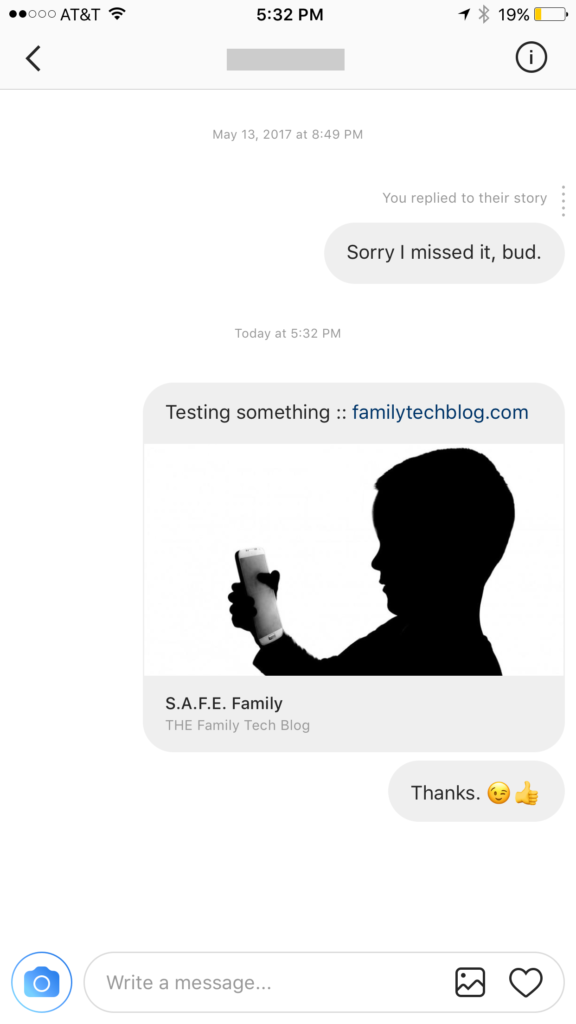
Instagram has launched their seemingly weekly major update today with a focus on their direct messaging feature. Now it’s possible to see previews of links and to send full size images. (Not just squares.) While most of Instagram’s updates have focused on it’s Stories feature, the DM gets quite a bit of attention every now and then too. There seems to be a race between Instagram and Snapchat to develop the best private messaging option out there. Features like link previews and removing the image dimension limits will go a long way to make Instagram a serious contender for direct messages.
Link previews look a lot like in FB Messenger.
What Parents Should Know
Obviously it’s important to know who your kids are talking to online. Private messages open up the possibility for kids to contact people they don’t really know very well. This can lead to full, private conversations with videos and images that are difficult for parents to monitor. There is no way to disable direct messaging in the Instagram app so if your kids are using the service they have the ability to contact people in private. These messages won’t show up on their image timeline and images won’t be stored on their phones unless they manually save them. This can result in private messaging that may cross your line of what’s appropriate.
Links that show up in Instagram will open in the Instagram browser when clicked. This means some accountability software and filters won’t take affect. You should keep that in mind when deciding whether or not to allow them to use Instagram.
My advice, as always, is to take whatever measures you’re most comfortable with to monitor your kids Instagram activity. The only way to monitor their private messaging is to have their login information. I show you how to log in as them on your own device in a video here. Prevention, monitoring, and conversation are the most important things you can do to keep your kids from unwanted material online.
There are a lot of misconceptions about the Blue Whale Challenge. Some are calling it the latest threat to our kids while others are saying it’s being blown out of proportion. The short video below unpacks some of the facts that I’ve discovered as I look deeper into this trending topic.
The Facts:
Kids ARE hurting themselves because of this the Blue Whale Challenge
There have been zero (0) confirmed suicides resulting from the Blue Whale Challenge.
Authorities are concerned we are going to turn this into something because of the popularity we’re giving it.
There are steps you can take and you should take them now.
What Parents Should Know
There are always reasons to take a trend like this seriously. We, as parents should be vigilant to keep an eye on what our kids are doing online while not allowing the trendiness of a topic like the Blue Whale Challenge cause us to inflate it into even more of an issue. Be wise and take the steps you know to take to keep your kids safe online.
My Advice:
Know who they talk to online.
Follow them on your social media accounts.
Have their login information for EVERY social media account they have.
Keep an eye out for the signs of depression or other struggles.
Talk to your children openly about the dangers of buying into these trends and communicating with people you don’t know.
Is there porn on Pinterest? Does Pinterest allow porn? I’ve heard both of these questions many times and the answers are very very different. Today, as Pinterest announced their new approach to advertising videos on their site and app, I’m reminded of the many parents who have discussed the potential dangers of Pinterest with me at workshops and other events. Lets unpack a few of those dangers, what Pinterest’s approach is, and what parents can do about it.
There IS porn on Pinterest.
I can confirm that there is pornography on Pinterest in two ways. First of all, I started some searches for inappropriate topics and (without having to click through to results) could see that there was porn available. Just typing the first few letters of these search terms produced recommended searches that told the entire story.
These results pretty much let you know what is available on the site and in the app. Searching more specific terms would, obviously, produce more specific results.
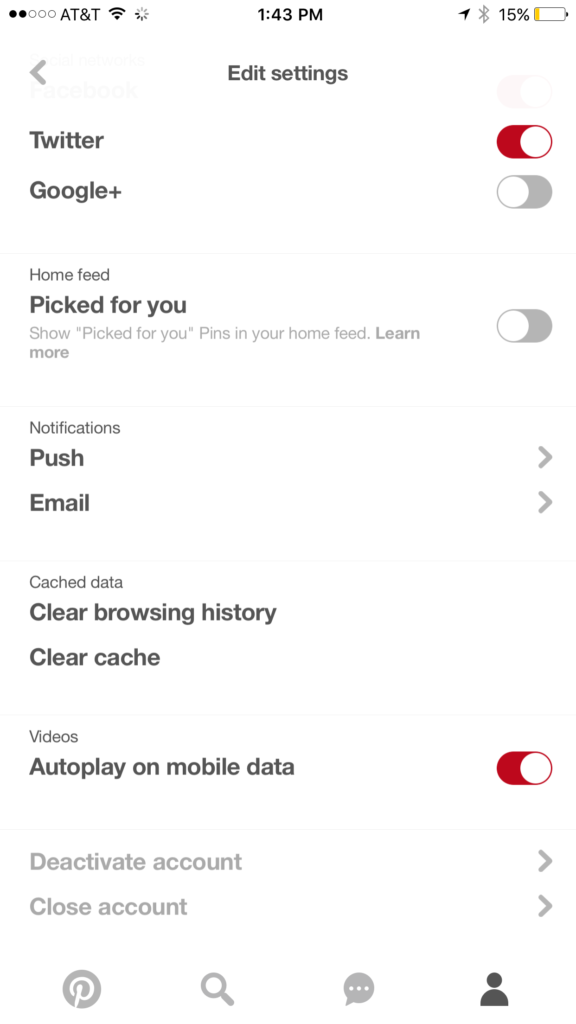
While this covers intentionally searching for content, your kids may not be the type to have been in to that before so you don’t expect them to go searching for it. This is where it gets a bit tricky. Pinterest feeds you new content in two different ways. They show you pins from people you’ve decided to follow and they show you pins that have been “picked for you.” Pinterest uses what you do in their app and site as well as what you do on other websites to recommend different things to you. If you’ve liked art before then you’ll start to get more art posts. If you’re into geeky quotes, you’ll see pins from people you don’t follow based on what you’ve pinned or viewed in the past. This can lead to being shown pinners who’s pins may not line up with what you’d consider “safe” for your kids. There is, however, a way to turn off the “picked for you” option. See the image below:
Go into your profile, then settings, and you can turn off personalization AND picked for you.
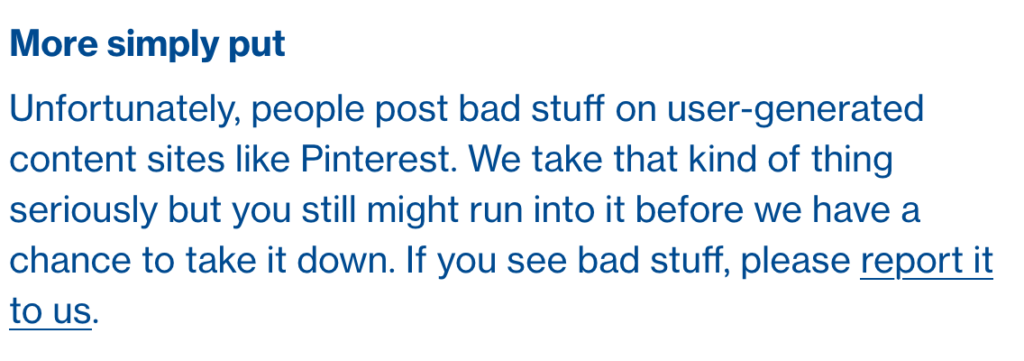
Pinterest Doesn’t Allow “Explicit Content.”
From Pinterest’s terms of service.
Pinterest’s rules don’t allow explicit pornography to be posted but it relies on reporting from users to identify and remove the offending pins. This means that the post can be up for days or weeks before it gets enough reports to have it taken down. Another thing to keep in mind is that Pinterest will still use their own definition of “explicit.” You may think something is not good for your 14 year old son to view while they view it as art or expression. This means you have to truly stay on top of what they’re seeing.
What Parents Should Know
Again, much is left to interpretation. Some parents may say a photo of a nude statue is artistic and cultural and some might say it’s inappropriate. While some folks think any nudity should be considered explicit, there are parents who would disagree unless it’s in a sexual situation or atmosphere. There are many factors that keep photo sharing sites like Pinterest from making a blanket NO NUDITY rule.
I would prefer if there were some way to turn off nudity as an option for users but as of right now that isn’t possible. It also isn’t easy to monitor what content is being viewed in the Pinterest apps. Yes, the service is built to work best on the mobile apps, my recommendation is that you limit your younger teen (over 13 to comply with the service agreement) to using Pinterest on a browser. Use something like Accountable2You to monitor their activity so you can be alerted if they’ve come across something inappropriate. This could help keep you from difficult situations stemming from your kids happening upon something adult oriented on Pinterest.
So, to answer the question, is Pinterest safe for your kid or teen? The answer is no and yes. No it isn’t recommended for your child. The age restriction to get an account is 13. I would, however, begin to ease up on a strict anti-Pinterest rule as my kids enter their teen years but I would monitor their usage in the most effective way possible. Just because you’ve never seen anything when you creep Pinterest doesn’t mean it isn’t there. Know that this risk is real and that your kids are as susceptible as any. Take precautions BEFORE anything regretful happens.
How does a tech safety expert keep his own kids safe online? Is Instagram accessible without the app? What was in the big Snapchat update? What’s with fidget spinners in the app store?
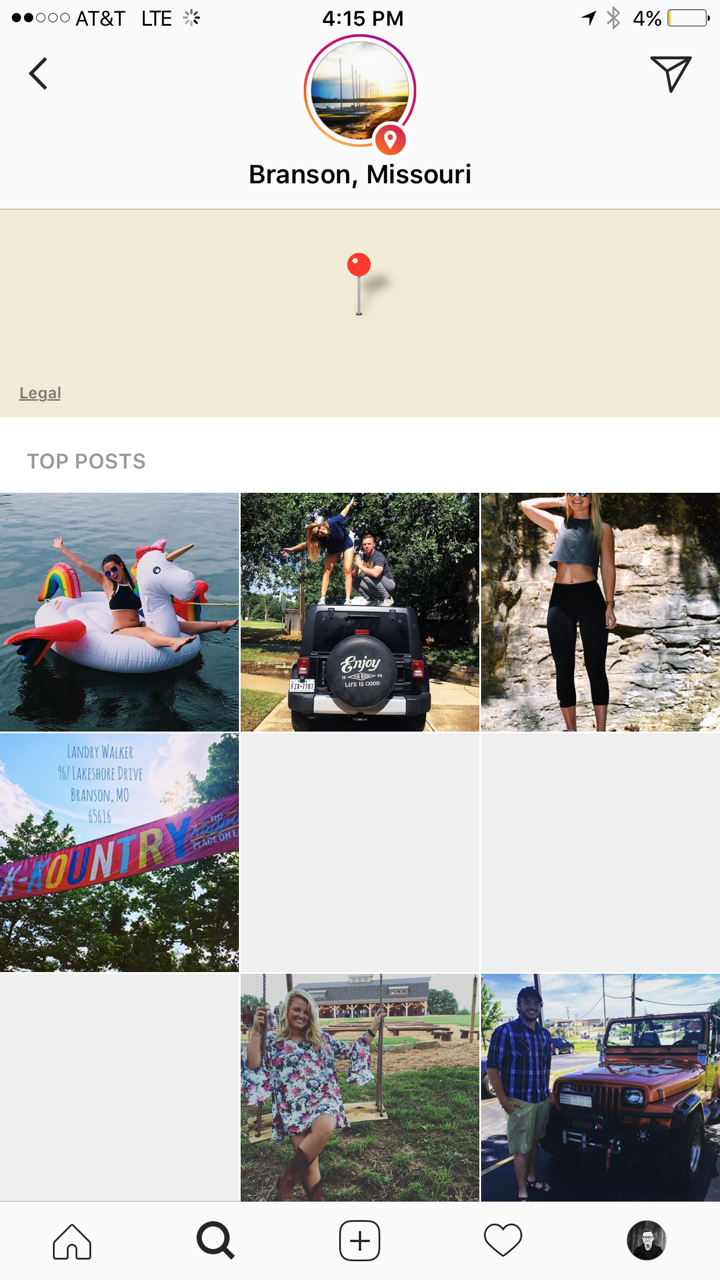
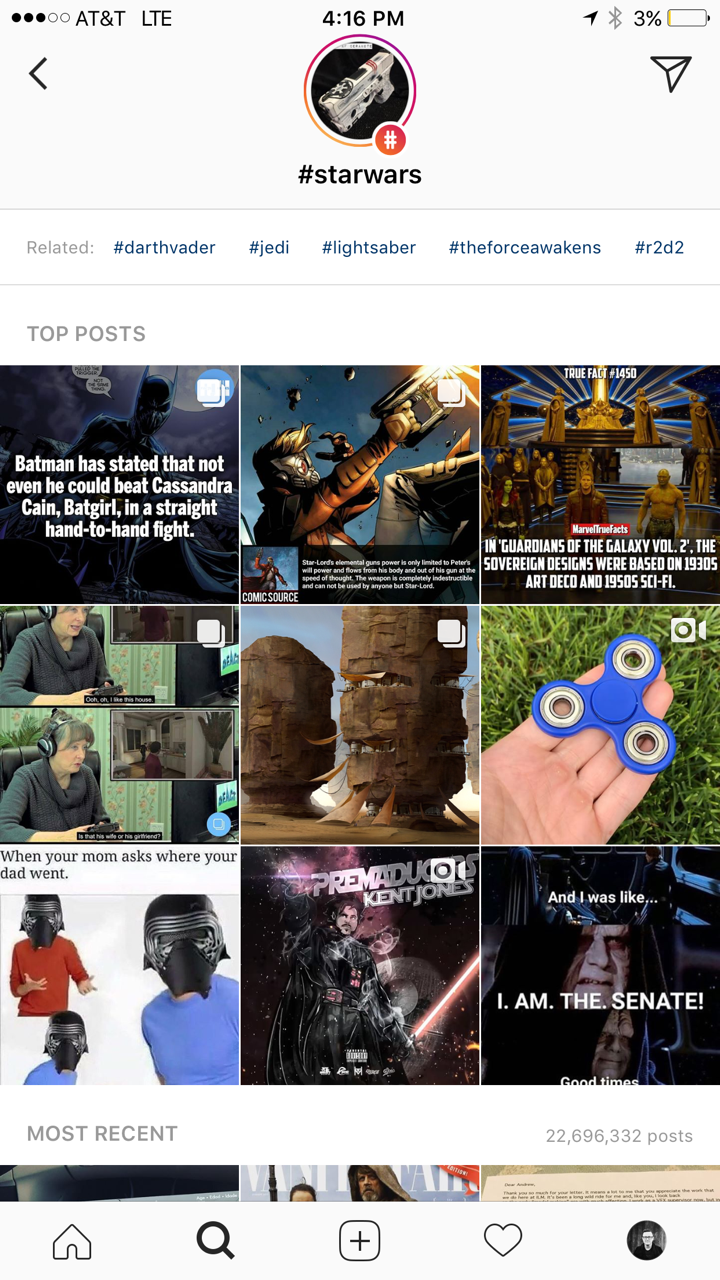
Instagram has added the ability to search Stories by hashtag and location. This means that your explore tab will now give you access to basically unlimited Instagram story content. Instagram is going to feature location tagged stories by people you follow and also from people you don’t. If you search for your town, or any town for that matter, you’ll see a small map, the posts featured from that town, and if it’s been tagged in a story you’ll see that above the map as well. This will give more access to more stories and may lead to following more people on Instagram. Hashtag results will work in much the same way. You’ll be able to search stories by topic with the hashtag. It will also highlight the posts you and your friend’s made by featuring them first in the results.
You can see the location stories above the map.
Location
Location
This is the hashtag search result.
What Parents Should Know
There’s always a bit of a red flag for me when there’s more potential to be connected with strangers on Social Media. Location and Hashtag filters allow you to find people you’ve never met and see what they’ve posted. Granted, the explore feature already makes that pretty easy. Instagram’s algorithm will gather these people and posts and present them to you from a simple search. These explore and search results aren’t going to be monitored by any accountability software since they’re not technically in a browser. You should take steps to monitor what your kids do in Instagram yourself. You should also lead the conversation with them about Instagram as these new updates come out.
When I do Digital Boundaries Workshops I begin by sharing all of the dangers of unsupervised internet and mobile device use. I then walk through the best practices for keeping your kids safe in the digital landscape they are navigating. I also, spend a lot of time answering questions. I received a question this week that I hadn’t been asked ever before. “What are some apps that you would recommend for my family.” Huh…I hadn’t thought of that as much. I spend so much time looking at the dangers that are so prevalent online that I often ignore some of the resources that can be fun for families. Here’s a list of five apps that I approve of.
Social Media
Instagram
While I always recommend parents keep to the age restrictions recommended by the terms of agreements on a social media platform (usually 13 plus;) I also know how popular social media is and that your teen is going to want to open an account as soon as you’ll allow them. When you’re ready to give them permission, I recommend you start with Instagram. The first reason is pretty simple. Instagram is easy to monitor. You can easily put your kids’ account(s) on your installation of Instagram and keep close tabs on what they’re doing on it. You can even use that method to be notified when they get a direct message.
Any social media opens you up for some problems. They say it isn’t great for self image and self esteem and there is always inappropriate content that can be accessed because of the fact the content is posted by users but if you’re going to give in and allow some form of Social Media then Instagram is a better starting point than Snapchat or Twitter. There a a lot of reasons and I’ve written about most of those already.
Gaming
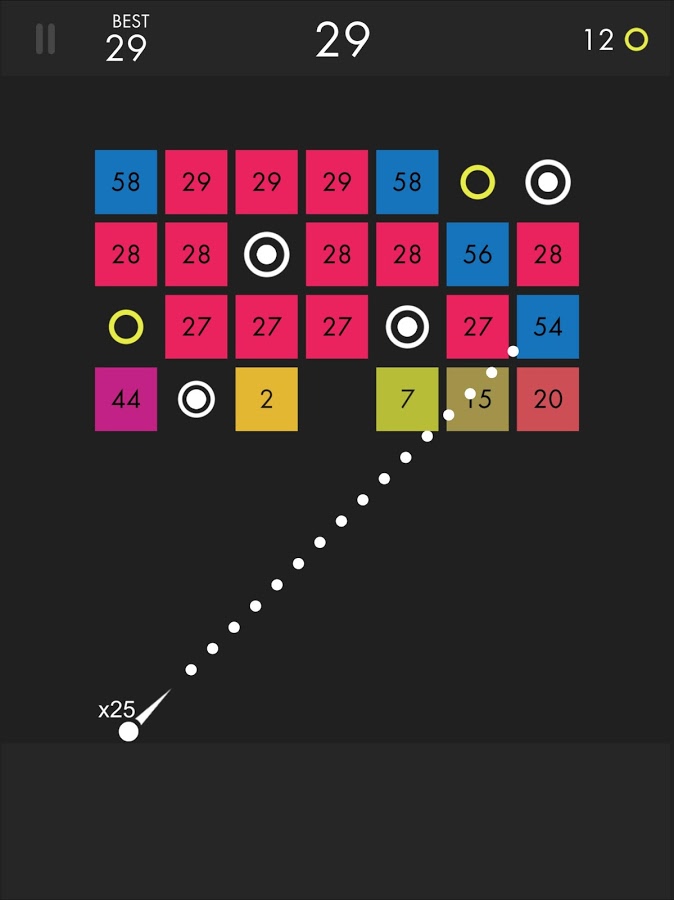
Ballz
This game is super fun and addictive. It’s a pretty basic concept. You swipe back and release to launch a ball to bounce around the game-board and break up blocks. The blocks have numbers on them that show how many times you need to hit the block to make it go away. You collect more “ballz” and launch them all at the same time. (I’ve launched as many as 110 at once.) This becomes extremely satisfying when you fire all of the balls towards the blocks and watch the numbers on them decrease as quickly as the block is hit by each ball. Like I said, while it’s satisfying, it’s also very very addicting.
This game is approved because, while it has ads, the ones I’ve seen have all been for more games by the same developer. This has kept anything inappropriate from creeping up as a banner ad. I approve because it should be pretty safe and because it is just so darn fun to watch all those little balls bounce around and devastate the the game-board full of blocks.
Kiddle isn’t an app. It’s a website. You can very easily save the site to be an icon on the home screen of your phone and then tell your kids to use it as their search engine. I’ve written quite a bit about Kiddle already, so go read about how the search engine works and let your kids research and learn without fear of coming up on anything nasty or scary.
Entertaiment
Amazon Prime and Freetime
Amazon Prime’s kids profiles are some of the best because the shows are curated by human editors. That means that actual people have looked at the shows and determined that they are actually safe for kids.Freetime is a special way to subscribe to only kids content so that you can be sure that they’re not seeing and adult targeted shows. If you don’t have Freetime you won’t have access to kids profiles but you can still set parental controls so that content above a certain age range won’t be accessible without a pin number. Kids can’t see these shows and movies without the pin but they’ll still be able to see the thumbnail image in their “carousel.”
YouTube Kids
YouTube kids is a good option simply because of the popularity of YouTube for our children. Kids love watching all different kinds of content on YouTube and YouTube Kids makes it possible to allow them to watch their favorite channels without potentially finding videos that aren’t appropriate for their age. YouTube Kids separates their content by topics like music, education, and shows so kids can find what they want pretty easily. The only downside to YouTube Kids is that it’s monitored with an algorithm and depends on reports from parents to remove suspicious and inappropriate content. This has caused some concern for parents in the past but if you are going to allow you kids to watch YouTube then YouTube Kids is absolutely a better option.
That Being Said
I’m not used to thinking about what apps parents should install but I’m grateful for the question this week to give me the idea for this article. Please remember that all of these apps constantly add new content and features and sometimes that makes them less appropriate for kids. As for right now, though, I give these five apps a green light for your kids’ devices as long as you and they use the apps in the way they’re designed to be used.
A new update today from Twitter allows users to look at the information that’s been gathered about them by Twitter and by “partner” advertisers. Not only can you view this information but you can edit it as well. If you don’t like a category you’ve been placed in, you can simply uncheck that option and opt out of the advertising for that topic. I took it for a spin and was surprised at a few of the assumptions that were made.
First of all, I was on the list for pretty much every type of food. Packaged food, fresh food, deli meats, non-dairy milk, and the list goes on and on. Apparently I’m an eater. I was also labeled the mother of 3+ children. It’s half right. I’m the FATHER of four kids. Obviously I am being targeted for minivans and pick up trucks and family vacation packages. It was even pretty spot on with my annual income. Kind of crazy, really.
Here’s how you can check out your Twitter ad data for yourself:
Hit the settings button.
Tap settings and privacy.
Hit “Account”
Tap “Your Twitter Data”
Here’s where you can see your data. Just tap Edit.
Enjoy! …?
What Parents Should Know
It’s pretty safe to assume that if Twitter has this information about you then your other social media platforms have the same information or even more. This info can be helpful to us because it helps connect us with the products we want or need. It can be troublesome, though, to think about all of the data that’s been gathered about us and especially our kids. I recommend you use this new feature as a tool. If you have a Twitter account then use the steps above to go check out your ad data and learn about what you reveal about yourself with your online behavior. Then, talk to your kids about what you’ve found. If your kids have a Twitter account then you should have them go take a look at their information as well. Then have a conversation with them about how they represent themselves online and what this date means in real life. Here are a few talking points.
Advertisers track information from all of your internet activity. Not just what you post on social media.
When you click “I Accept” on any Terms and Agreements for a website or social service you’re agreeing to allow them to have this advertising information.
Since this advertising info is being collected you should keep that in mind while you surf the internet. Remembering that info is being saved could help you think twice about unhealthy internet habits.
Using a tool as vast as the internet has its tradeoffs. You’re going to have to give a little in order to get the benefits that the world wide web has to offer. In this case, twitter is allowing you to see a bit of what you’re paying. Thankfully, they’ve also given you a bit of control. Being able to turn off advertising options for different topics is a cool feature that I hope will show up on more social media services. In the mean time, remember to keep talking to your kids about how they use the internet and be sure to be a good example yourself.
When something becomes trendy in the offline world you can almost guarantee it’ll show up in some digital form. The theory rings true with the latest elementary school kid craze, the Fidget Spinner. While doing my daily scroll through the most popular apps on the Apple App store I noticed a couple of Fidget Spinner games. “Of course!” I said to myself, “it was only a matter of time before the app store tried to cash in on the popularity of the toy trend. Fidget Spinners have caused a lot of conversation among psychologists, sociologists, parents, and educators recently. Everyone seems to be talking about them. My goal was to avoid them on the blog because, “Hey, they aren’t on a smartphone or tablet.” Well, that’s no longer the case.
Fidget Toys have gained popularity recently as a way to help kids with ADD, ADHD, and anxiety focus during class and other times when they need a longer attention span. Blocks, dice, balls, and other items have served teachers and psychologists well as they help these children excel in their every day tasks. Spinners toys gave another option and even boast in their advertising that they can increase focus and productivity. The problem with that according to some teachers and psychologists is that a good fidget tool will allow you to keep your eyes focused somewhere else while playing with it. This will increase your attention on the speaker or teacher or video simply because your hands are busy. A Spinner’s main benefit is the spinning itself. This spinning must be viewed to be fully enjoyed. This is why many teachers are banning the toys from their classrooms. They are saying the Fidget Spinner is simply a distraction. In a recent CNN story a teacher said:
We have kids using them in class and the kids nearby are distracted by them. There are kids playing with them (during class) and showing other kids. – CNN
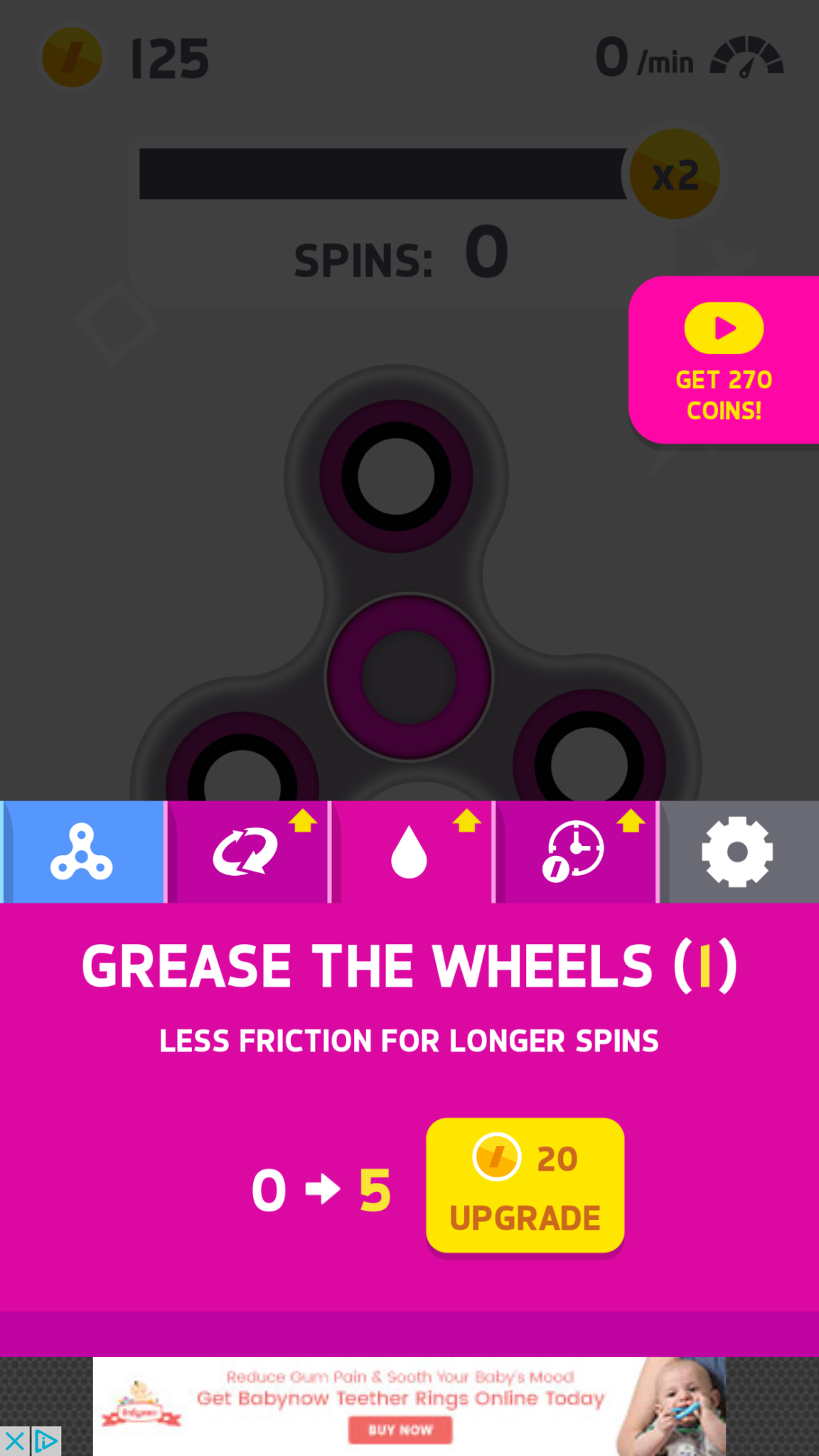
Many kids have a Fidget Spinner simply because its the latest craze. They don’t need it for focus, its just a toy for them and that’s completely fine. The benefit I’ve heard many parents mention from using the Fidget Spinner as a toy is that it keeps the off of their screens for a longer time. Well, app developers have an answer to that too. Currently, the fasting rising apps on the Apple AND Android app charts are Fidget Spinner games. I downloaded a couple of the iOS games and played for a bit. Here’s how it works.
Spin to win.
Earn coins for upgrades.
Get new spinners.
Make it faster.
Even faster!
Earn more coinage.
What Parents Should Know
Obviously these apps aren’t dangerous on their own. There is advertising involved, however, and it will most likely not always be geared toward young users. You can also watch ad videos to get coins, the ads were mostly for other free, casual style games. You can pay to get rid of the ads if you’d like. If screen time is a problem then these games could cause some issues. The one I spent the most time on, Spinner, had me trying harder and harder to get more spins out of my spinner. I wanted those coins so I could see what the next spinner design looked like or upgrade my speed. Kids who find themselves hooked on games like this would definitely have the same problem with one of these fidget spinner apps.
My advice is, as always, to know your child. You have to know if your kid is the type to get hooked on something like this. If they use fidget toys because it helps their attention span then apps like Spinner may not be a good idea since its well known that screen time can cause kids to have more trouble focusing. Let me just finish by saying that these apps are not designed to help your kids with focus or attention. They are simply created to capitalize on the Fidget Spinner craze. In fact, playing the game could take the place of the real spinner altogether for some kids. That just means more screen time, more advertising, and more distraction. We, as parents, have to have the right information and make quality decisions about how our kids spend their time. Hopefully the info in this article can help you take the right steps.
I’ve heard marketers say that it is their job to ruin everything. Well, the cameras and filters built into our favorite social media platforms are proving that. Today Snapchat announced they’re launching advertiser access to their Geo filters and camera “lenses.” This means that you can use the augmented reality settings to not just make yourself look like a puppy but also to advertise for your favorite restaurant, the latest movie coming out, or a special event.
A few weeks ago Facebook announced that they would be opening up the lenses to more developers. This will also increase advertiser use of these products. So now Instagram, Snapchat, and Facebook will all be serving up interactive advertising to our kids.
What Parents Should Know
These updates are just one more way that advertising can get to our kids. We know that marketers are only after our money, that’s no surprise and should be expected. However, we have to know our kids and decide if we are OK with them being advertised to in this way.
My advice is that parents take a look at these Geo filters and lenses and see what they could potential be advertising to your kids. Again, Snapchat is on our uninstall list and advertising is the main reason. Today’s news only strengthens that position.
Have we come full circle? Maybe, because live-TV is becoming the trend. Well, it is now that television companies are bringing programming to social networks. Snapchat is the latest platform to announce that they’re bringing content from traditional TV to their feed. The shows will take the form of short-form supplemental episodes to direct Snapchat users to the shows on their networks. Snap has announced that Turner, A&E, ABC, the NFL, Vice Media, Discovery, and Fox are already signed on to produce this original content. Many of these companies are larger networks that can promote content from a large group of TV channels.
Apparently Snap isn’t interested in advertising disguised as a show. They are after “true original content.” While the hope of the networks is to move users from their short-form shows on Snapchat’s stories to their programming on Television or their streaming services, Snap is hoping to provide more income from these companies. Especially since their first report after taking the company public showed some major losses. (They say most of the losses were due to paying shareholders after going public.) There is already data to support that social media content by TV networks improves their viewership:
Nielson reports that media companies that publish Snapchat content see “notable audience growth” on TV and other platforms, and that the app delivered a 16-percent boost to the average monthly reach. – Digital Trends
This means they shouldn’t have any trouble filling the Snapchat stories and discovery section with more of these shows. These short episodes will have ads that play before, during, or after. That’s where the income for Snapchat will come from.
What Parents Should Know
I think there are two things parents need to take into account as our social media becomes more inundated with traditional media and advertising. First of all, some parents are concerned with overexposure to media and entertainment. Setting restrictions on what content your child can see is getting harder and harder to do. Adding this content to their social media apps just makes it even more difficult. Moms and dads need to keep an eye on what shows and ads are showing up in these apps and take action if they see something that they’re not comfortable with.
The second issue is time. Many of us are learning how important it is to watch the amount of time our kids are spending online or consuming TV, games, and movies. With Twitter, Youtube, Facebook, and now Snapchat moving towards more original TV style content we are seeing social media become more about the entertainment and less about communication and sharing with friends. It’s important for parents to understand that social media platforms now count as entertainment. If you have a time restriction set on Netflix, Youtube, or Hulu, you should have it on Snapchat and Instagram too. That’s just where we are now. Social Media isn’t a trend. It’s basically the state of the internet in this culture. We have to treat it as such.











 Ballz
Ballz