Category: messaging

  • Important Message on Social Media and Censorship

    Important Message on Social Media and Censorship

    Show Notes:

    WELCOME to Raising Connecting Kids the podcast that answers your questions about the connected world your kids are growing up in. 

    Thank you to everyone for partnering with BecauseFamily and making these resources possible. Visit BecauseFamily.org/partnership to help us continue to protect your family by making free content like this podcast. 

    QUESTION OF THE WEEK

    I get multiple questions a week. Sometimes through email or FB messages and sometimes face to face at an event or meeting. In this podcast, I’ll be answering the most common questions I’ve had and even, your questions. Email me at BecauseFamily@gmail.com to get your question read and answered on the Podcast.

    Question: How do Social Media Sites censor content?

    User-Generated Content

    Generally accepted standards.

    • Nudity/Sexual Content
    • Extreme Violence
    • Hate Speech
    • Harmful content disguised as kid content.

    Keep in Mind:

    • Location of the company. 
    • Lawsuits and bad PR
    • More than one reviewer.
    • Usually flagged by users.

    Protecting viewers from dangerous false facts, visual content, and messages is not censorship. It is the company’s right to protect their image and intellectual property.

    These companies can make decisions based on their own guidelines. They are not government entities. The CAN censor content if they want as long as they have put reasons in their terms and agreements.

    CONCLUSION

    Thank you again for listening to Raising Connected Kids, the podcast that answers your questions about the connected world your kids are growing up in.  Subscribe on iTunes, Stitcher, YouTube, Spotify, Google Podcasts, and anywhere else you listen to podcasts. Like/Follow us on Facebook, Twitter and InstagramShare the show with your friends and leave a review on your favorite podcast app to help spread the word. Remember to visit BecauseFamily.org/partnership to partner with us as we protect children and teenagers by bridging the technology gap between them and their parents.

    Full Episode available here: 

     

  • WhatsApp Update Brings Thumbprint and FaceID Lock To Private Messenger

    WhatsApp Update Brings Thumbprint and FaceID Lock To Private Messenger

    The private messenger, WhatsApp, has updated recently to allow users to lock the app from prying eyes by using their Touch or Face ID. Private messaging is becoming more important to users these days since the spotlight has been on Facebook and Google for their data mining and sales. WhatsApp has been a mainstay of private messaging for some time now and this new update takes privacy from an algorithmic/software level to a more obvious tangible place. You can now use your FaceID or TouchID, depending on the generation of your iPhone, to lock people out of the WhatsApp software entirely. This will keep people from opening the app and looking through your messages. Currently this feature is available for iOS only but it is rumored to roll out to Android soon.

    What Parents Should Know

    It’s important to know that there are options that allow you to keep an eye on your kids’ messaging without having to physically take their phone from them. However, if the physical approach is your style then this update from WhatsApp could become a problem for you. Messages being locked in this way needn’t deter you from checking up on your child’s messaging activity, though.  You can store your thumbprint in your child’s device so you can unlock it or just make them unlock the app for you when it comes time to inspect their messages.

    I recommend allowing your children to have a feeling of privacy by using some sort of software to monitor their messaging apps instead of taking the device from them every now and then. Not only does that plan give them a feeling of privacy, it is also a far better monitor then your weekly check up. If a message monitoring algorithm like Bark is active it will look at every single message your child sends or receives in real time, notifying you if any of those messages cross the line to dangerous or inappropriate content. Taking the phone from them to monitor it yourself allows messages to be removed before you get around to looking at it.

    I never advise spying on your children without their knowledge. They should know that you are keeping an eye on their messages and how the software works. They should also know what the consequences are if they send messages they shouldn’t be sending. Finally, you should have an open conversation to allow them to feel like they can come to you if they receive a message they are not comfortable with. No matter what you do to monitor your kids messaging, having a culture of transparency and openness in your home is critical.

  • Instagram and Snapchat go Full Consumer Sales, Will Your Kids Migrate?

    Instagram and Snapchat go Full Consumer Sales, Will Your Kids Migrate?

    If it seems like every time you find the social media platform you like it gets ruined by marketers and salespeople that’s because that is exactly what is happening. First it was advertising, random ads showing up in between your friend’s IG Stories about their kids and coffee shop visits, now we’re seeing actual shopping being added to social media. Snapchat and Instagram seem to be going the way of Facebook by adding ways for companies to add products to their stories so you can shop right inside the app. 

    Instagram has expanded their discover section (when you tap the search icon) to include a shopping tab. This tab will be populated with products that are relevant to your activity on Instagram and will lead you to story posts that allow you to tap on products directly to make a purchase. Snapchat is also going to be adding in-app shopping with “Collections.” Collections will show up in between your friend’s stories and on the Discover page. These posts will give you the ability to actually select items you’d like to buy from within the app.

    What Parents Should Know

    You can expect to see these new shopping features roll out on Instagram and Snapchat over the next several days. Some have already been added. Your kids will notice them too and I expect a couple of different responses. First, kids are used to being advertised to. It happens to them all day long every single day. There is advertising in social media, in their games, and between all of the YouTube videos they watch. Many kids won’t be phased and may even find some useful stuff to buy in Instagram or Snapchat. 

    Secondly, I can see kids getting annoyed with the over focus on ads and migrating to a different option for their social media experience. Many kids already enjoy messaging through ad lite options like WhatsApp and Kik. They video chat with their friends through Houseparty, WhatsApp, GroupMe, or WeChat instead of Snapchat, IG, and Facebook messenger. I imagine their social media profiles will become more of a place to present the best versions of themselves instead of where they go to mindlessly scroll a timeline and connect with friends. 

    As parents, we should always know what apps our kids are using to connect with their friends. Do these apps require age verification are the default settings open and public so that anyone on the app can contact our kids? These are the questions we have to ask ourselves and our kids when they move from one social media platform to the other. Instagram is already so full of moms and dads that many kids are setting up secret “spam” accounts to avoid their oversight. The shopping features being added could lead to more kids moving on to other apps. Keep an eye on their downloads and on this site to see what they’re downloading. 

  • FB Messenger Kids Will Allow Your Child to Send Friend Requests

    FB Messenger Kids Will Allow Your Child to Send Friend Requests

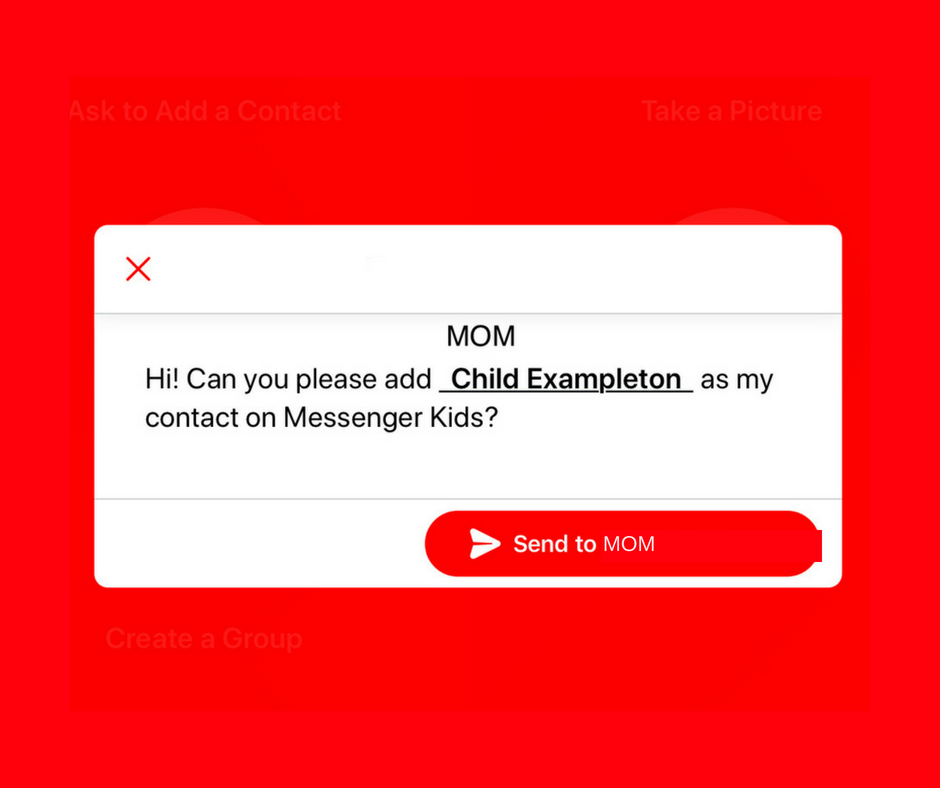
    A parent controlled messenger was the dream of the FB Messenger Kids team when they created their app. They could be finding it a bit tricky to balance the security parents want with the ease of use kids need. Now a code will be available to help your kids identify themselves in the Messenger Kids app. This is a code they can use to send a friend request to other users. Parents will still receive permission requests but it will save the trouble of having to search for the potential contact’s parent’s FB account and send a request.

    Obviously, this method will only work for friends who already use FB Messenger Kids. The code is also an “opt-in” feature, meaning parents will have to turn it on in their own Facebook app for their kids to receive the four-word identifier. The video above features a quick walkthrough of how to turn it on. You can also set up bedtimes in the Messenger Kids controls on your Facebook app’s settings page. 

    What Parents Should Know

    The addition of bedtime settings is a great option for parents whose kids use FB Messenger. The jury is still out on the identifier code, though. It is intended to make adding friends easier but it remains to be seen if that will be the case. Asking your kids to remember their code so they can tell their friends is a bit reminiscent of phone numbers from our own childhoods. If they don’t know their friend’s code, they’ll still receive an option to ask parents to connect them, simply by name. 

    I always recommend limiting screen time for your kids, especially time on social media. The FB Messenger app is still one of the best, most secure options for your kids to keep in touch with friends and family. The stickers, challenges, video chat, and built-in AR games make it a lot of fun albeit easy to throw a lot of time into. This is why the bedtime and screen time limits are so important. 

  • TUTORIAL: How to Download All of Your Photos, Videos, and Messages from Facebook at Once

    TUTORIAL: How to Download All of Your Photos, Videos, and Messages from Facebook at Once

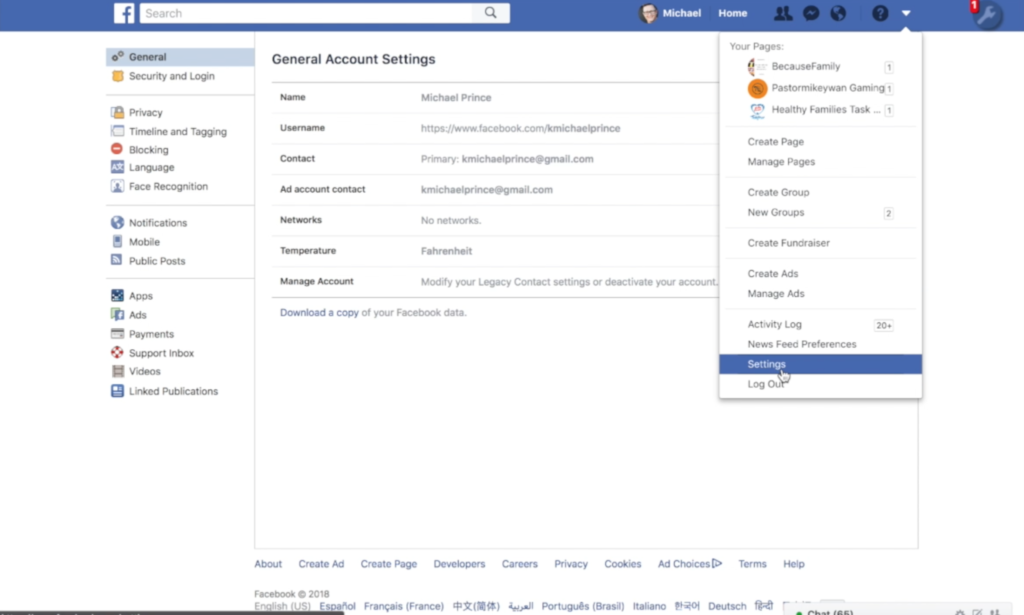
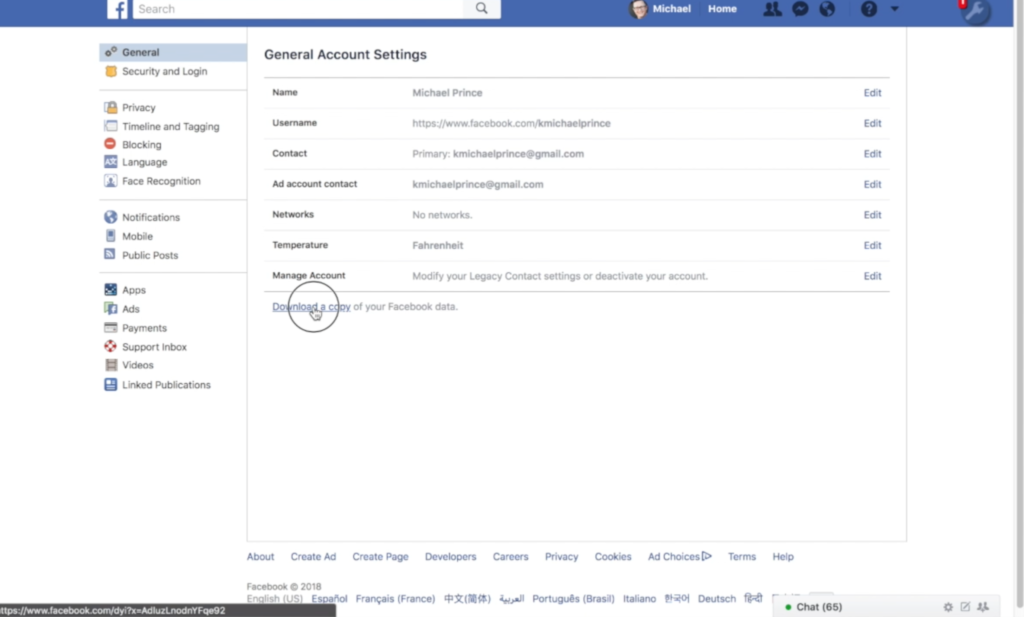
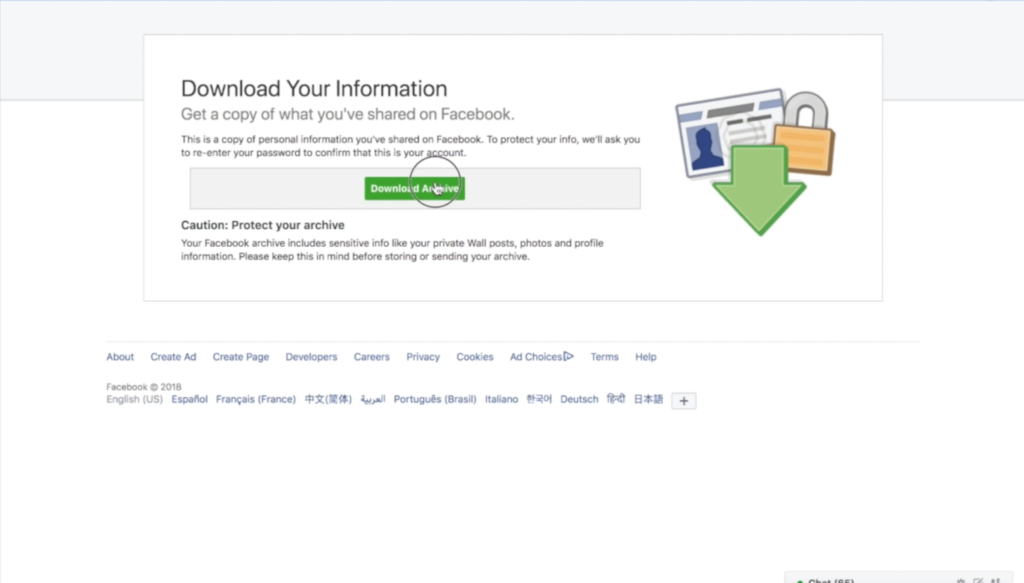
    There could be a number of reasons you’d want to download all of your Facebook data. Maybe you’re making a fresh start but don’t want to lose photos and videos, maybe something’s going on and you need message data downloaded, or maybe you just want to back up all your data for when the giant electromagnetic pulse goes off someday and the internet comes crashing down. Whatever reason you’re interested, here are the simple steps you can take to download all of your Facebook info at once. The tutorial video is at the bottom of this post.


    1. Go to your settings page.


    2. Click on Download a copy Facebook Data


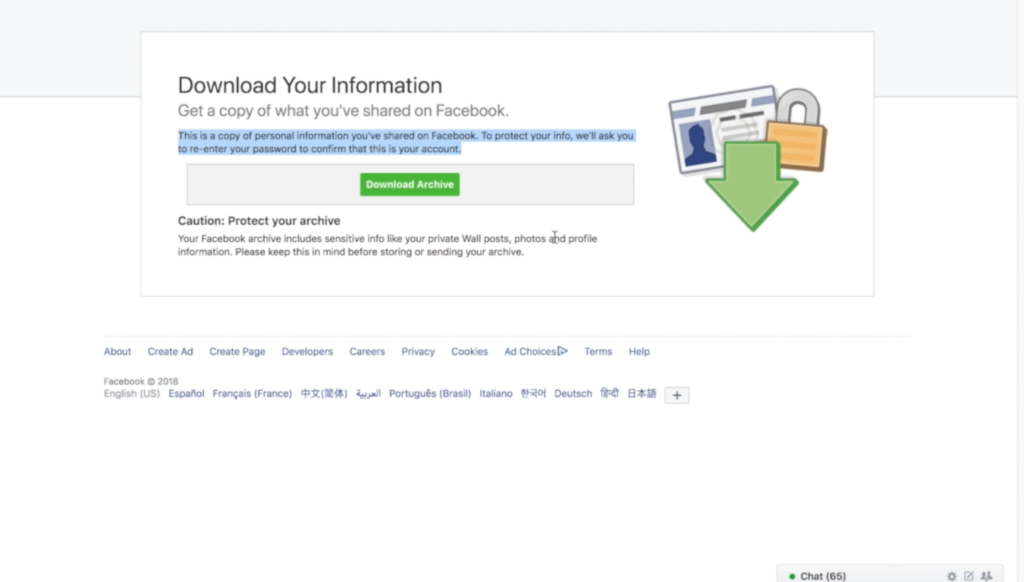
    3. Click download archive.


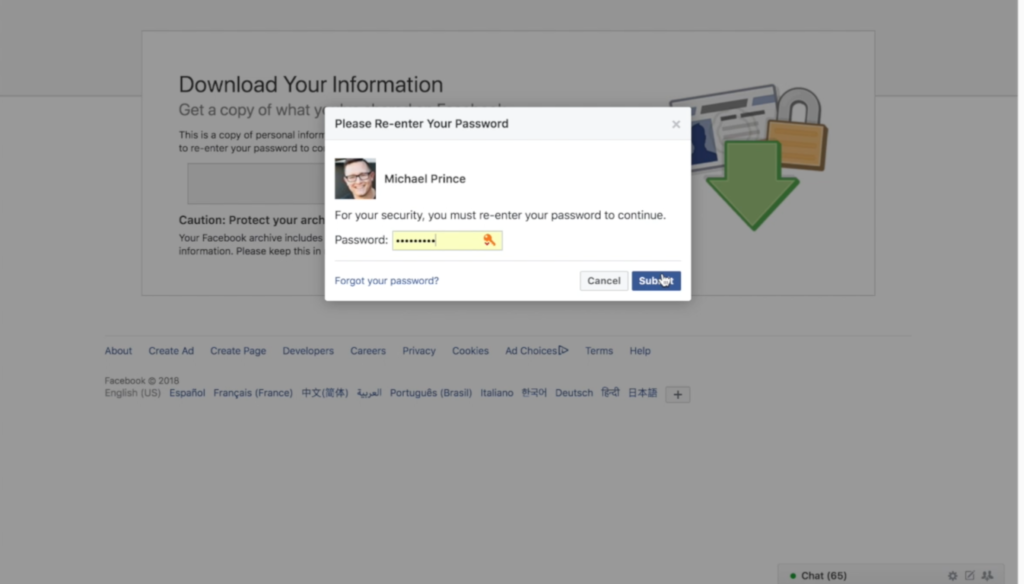
    4. Enter your password and click Submit


    5. Your data downloads as a zip file.


    6. Once unzipped, you’ll see your files separated into folders.


    7. Keep somewhere safe and share with caution as some of the data is personal.


    There are the instructions. Here’s a video tutorial:


  • Families Receive Threatening Messages after Iowa School Network Hacked

    Families Receive Threatening Messages after Iowa School Network Hacked

    A school district in Iowa canceled a day of classes after a network breach allowed hackers to send hateful messages to families from the public school. The messages contained personal details about students and threatened to do harm to them and their families. Apparently, the threats weren’t credible except to stir up fear and make a show of their ability to access the information. There is a theory that this could be an attempt to threaten people as to warn the FBI to stop investigating them.

    The group is called “thedarkoverlord” and they’ve been responsible for recent info leaks and hacks of organizations like Netflix and Larson Studios. They have been under investigation for these hacks and could have performed this recent “attack” as a warning. They even tweeted out links to the contact information of the students from the school district, stating that predators can now use that information to plan their targets.

    With the student directory from JCSD we released, any child predator can now easily acquire new targets and even plan based on grade level.

    — thedarkoverlord (@tdo_hackers) October 5, 2017

    What Parents Should Know

    Network security is becoming a more and more serious issue. We live in a world where all of your personal information is available in multiple locations online. If you, as a digital citizen, aren’t thinking about important tools like passwords and usernames your information can end up in dangerous hands. The best advice I can give you is to ask your school district if they have someone responsible for the security of their network and if so if they can keep something like what happened in Iowa from happening at your school. Then make sure you follow some simple network security rules yourself. Use different passwords for different sites. Use passwords or passphrases that, while easy for you to remember, aren’t easy to guess, and don’t ever use default passwords on websites, routers, modems, or computers. 

  • Group Video Chat is Everywhere! Now, even in iMessage.

    Group Video Chat is Everywhere! Now, even in iMessage.

    Kik has been popular with kids and pre-teens for some time. It’s a messenger that allows them to chat over wifi using a made up profile or “display name.”  The app recently joined the likes of Snapchat, Instagram, WhatsApp, and FB Messenger by adding group video to the mix.

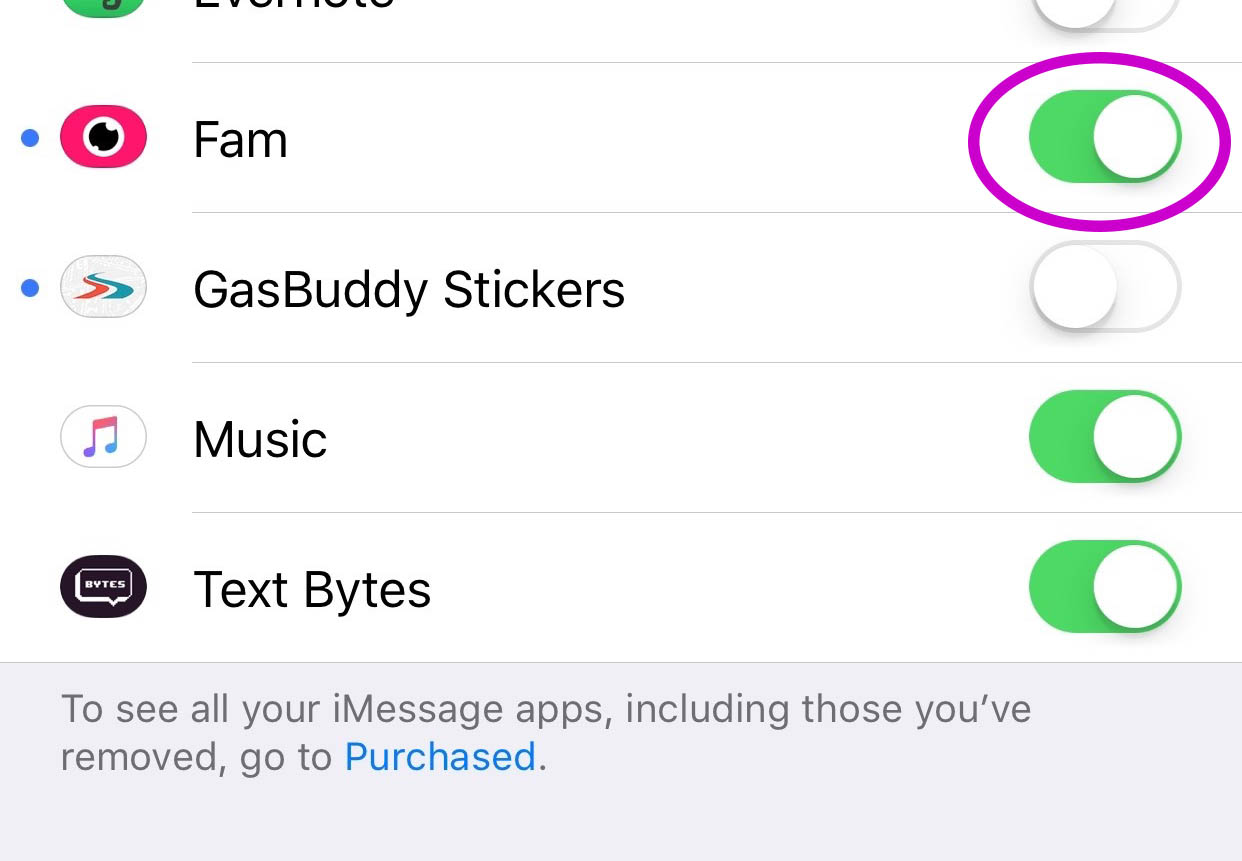
    Then, a few days ago, a new app called Fam came onto the scene. Fam allows group video chats within iPhone’s iMessage. When iOS 10 released for iPhones it came with the ability to add and utilize apps, stickers, and games within the app itself. This has opened up the ability to put in GIFs, use emojis that aren’t available on your keyboard, and even share music or money with just a few taps in the iMessage app. Now, Fam is capitalizing on those abilities.

    How Does it Work?

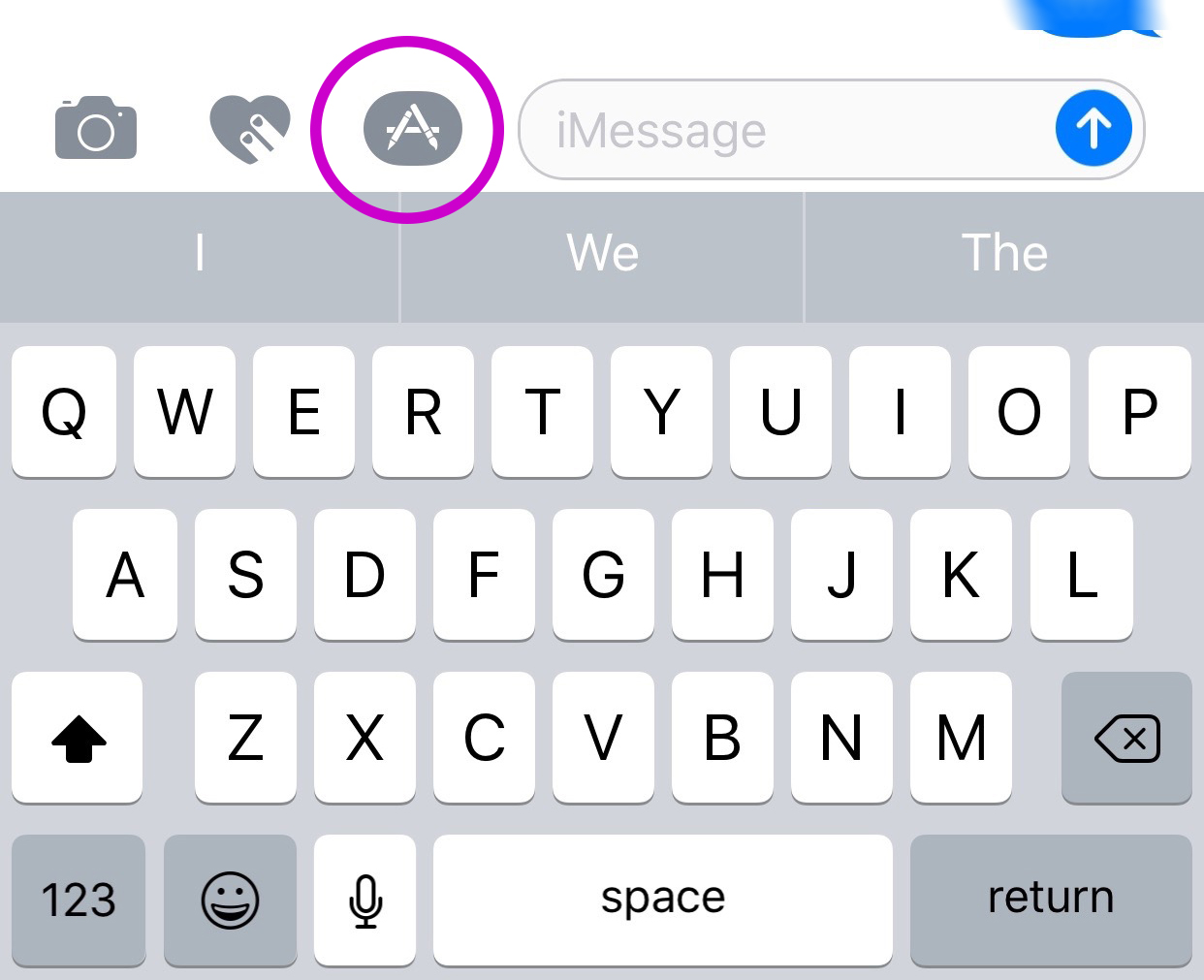
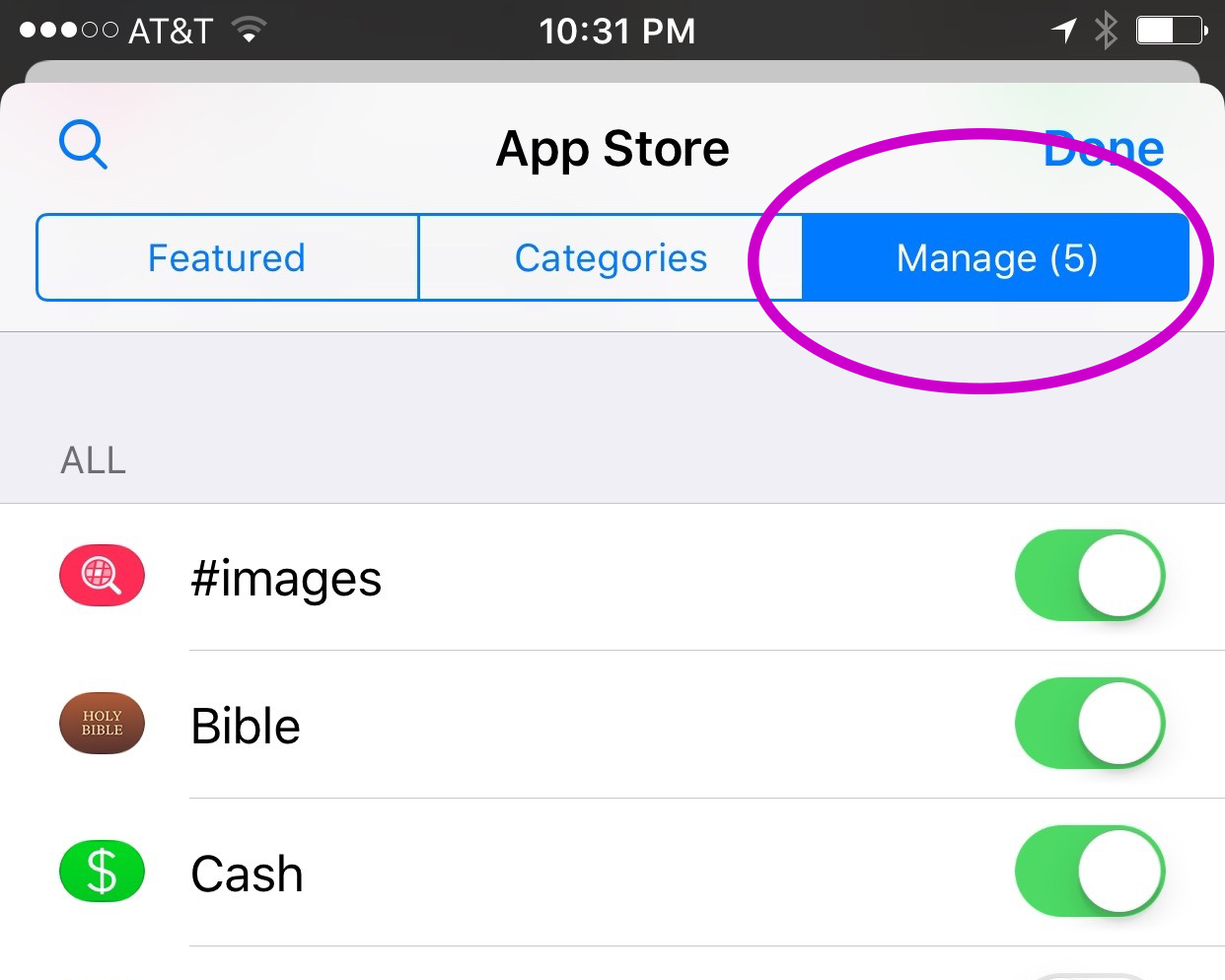
    You’ll have to find the Fam app in the app store and install it. Once it’s on your phone you can activate it by selecting the apps icon next to your text box and then the small icon that looks like a group of app buttons on the bottom left.  Next you’ll tap store, and then the manage tab on the upper right. Once you toggle Fam to be active it will show up within iMessage (your text messaging app) alongside your other apps. Once you have it you just have to tap the “Create Video Chat” button and it will send an invite to up to 8 people in your iMessage thread. (See the gallery below for those instructions with some photos.) If your friends have the app installed then they’ll be able to join right away, otherwise they’ll have to go install and activate the app too.


    What Should Parents Know?

    The dangers with video messaging are pretty obvious. If your teen is wanting to have an inappropriate video conversation with someone there are plenty of options to do that. The truth is that group video has become a mainstay. The conversation in social media and tech circles is that having group video chat available is now expected on any and every social media platform. As a parent we have to understand what apps can do what and know how to disable certain features if you decide it’s best for your family.

    That said, Fam is a pretty neat addition to iMessage. I was excited when they added the ability to put apps in iMessage and apps like Fam are precisely why. This is a way to communicate over video with the folks you contact the most. I will most likely use it, that is, if the people I talk to would be willing to install it.

    I recently spoke to a father who was trying to make the best decision to let his daughter get her cell phone back after losing it due to some behavior her parents didn’t approve of. My recommendation was that they take baby steps and I advised him to not let her have any messaging apps, to only allow her to use the basic text messaging on her phone. There was a time when that would keep you away from a lot of the danger. The dangers of some of those messaging apps is the creation of often anonymous accounts. Your kids may not always know who they’re talking to. A video messaging app in iMessage (which uses only their contacts) can help keep that from being as much of a fear.With apps like Fam stepping into the light, though, I have to emphasise the importance of checking out your child/teen’s phone every now and then. Look at the apps they use and even the apps they use in their messenger. Read through some of their conversations and make sure you know everyone on their contacts lists. If you don’t you should be finding out who they are immediately. Especially since they can now have a video conversation with your kid.

  • Another Instagram Update Makes the App More Like Snapchat

    Another Instagram Update Makes the App More Like Snapchat


    If you have been heeding my advice you have done your best to keep your kids away from Snapchat. Instagram has launched yet another update and this one includes dissapearing pictures and videos in their direct messenger and the beginnings of their soon to be released live video feature. What this means is, if your kids have Instagram, they now basically have Snapchat. (more…)

  • 5 Social Media Rules for Parents

    5 Social Media Rules for Parents


    Social media is a fact of life. In fact, our kids are often more social on social media than they are in the “real world.” I hesitate to say the real world because for your kids, their life online is their real life as well. Use these tips to help you be as diligent as you can while protecting your kids on their social media accounts.

    1. Do Use the Same Social Media Your Kids Use

    Even if your only have this account to be able to see what your kids are doing it’s a good idea. I call this a “stalker account.” That sounds more harsh than it is. It’s just a good idea to be able to see what they are posting. This method is less intrusive than taking their devices and looking at their accounts. If your teen argues with you and says they don’t want you to follow them (or unfollows you themselves) you can always ban their use of that social media site and I recommend that you do.

    2. Do Follow Your Children on Social Media (more…)

  • WhatsApp Update Adds Video Calling

    WhatsApp Update Adds Video Calling


    We recently wrote about WhatsApp and explained a few things parents should know about the messaging app. Now, a new updated requires we update our information as well. This new update brings video calls to the app that is owned by Facebook.
    Video Chat is Awesome!

    WhatsApp is largely considered safe because of its authentication and encryption settings but with the addition of video calls the app enters a completely new realm. Video calling is very convenient and a great way to stay connected to family and friends that you aren’t always near. Apps like Skype and Facetime have been mainstays in allowing you to use WiFi to talk to someone while looking at their face. Something that is priceless for someone as easily distracted from a phone call as I am. The concern with this new feature, though, is how it could be used by those who have ill intentions.

    What Parents Should Know

    I’ll say it like I do in so many articles, you have to be monitoring what your children do in any messenger app. With new features like GIFs and video calling being added all the time we are just seeing more and more opportunities for our kids to get into trouble. Will all kids use these features for evil? Of course not, but it’s too likely that someone they know (or worse, they don’t know) will be using it to cause harm.

    I don’t necessarily recommend not allowing your teenager to use WhatsApp. I do, however, recommend using something (even if it’s just your own eyes) to monitor what conversations your kids are having. If you aren’t comfortable with video chatting being available to your teen then you need to disable it or ask them to use a different app for messaging.

    We did a whole write-up on some key terms related to messaging. These terms and the rest of the terms in our Mobile Device Vocabulary series are too important to miss. I recommend you subscribe to this site so you can check it out. Only $60 per year will get you full access to this site. Sign up now.