Blog

  • It’s Being Called the Ultimate Unsend Button, Does it Encourage False Anonymity?

    It’s Being Called the Ultimate Unsend Button, Does it Encourage False Anonymity?

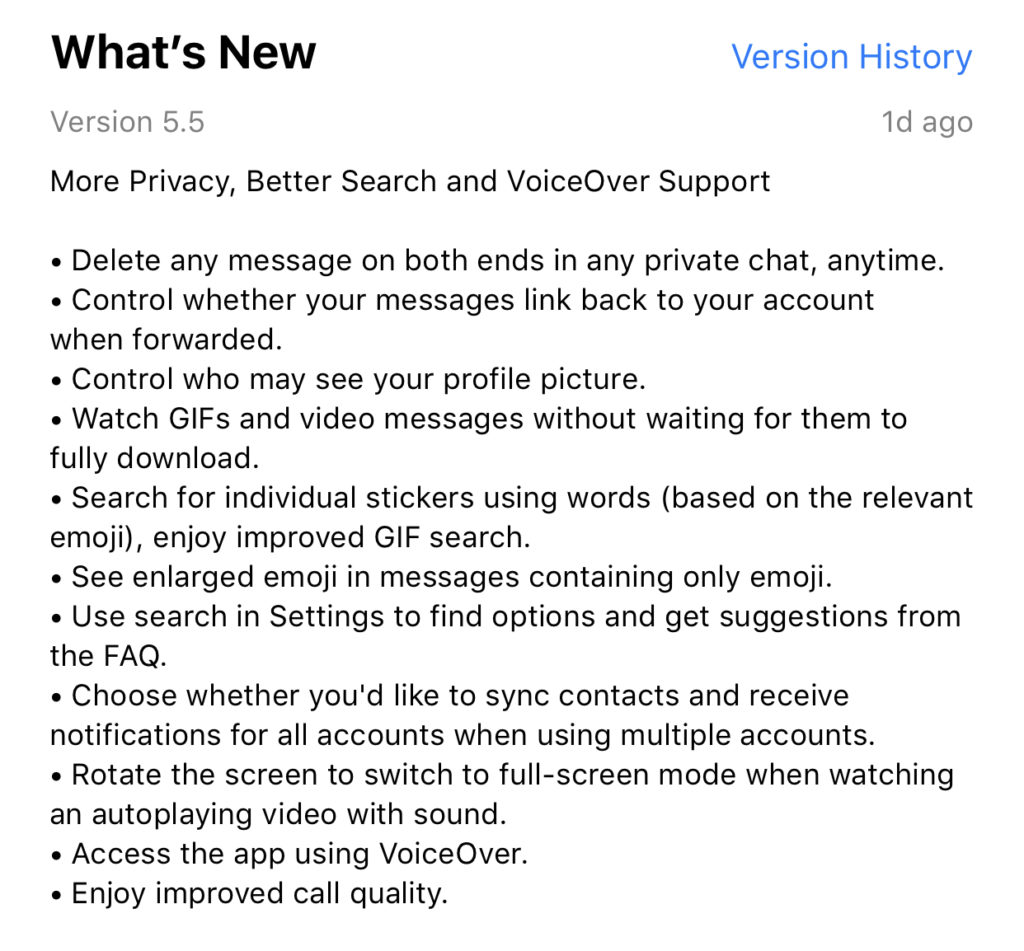
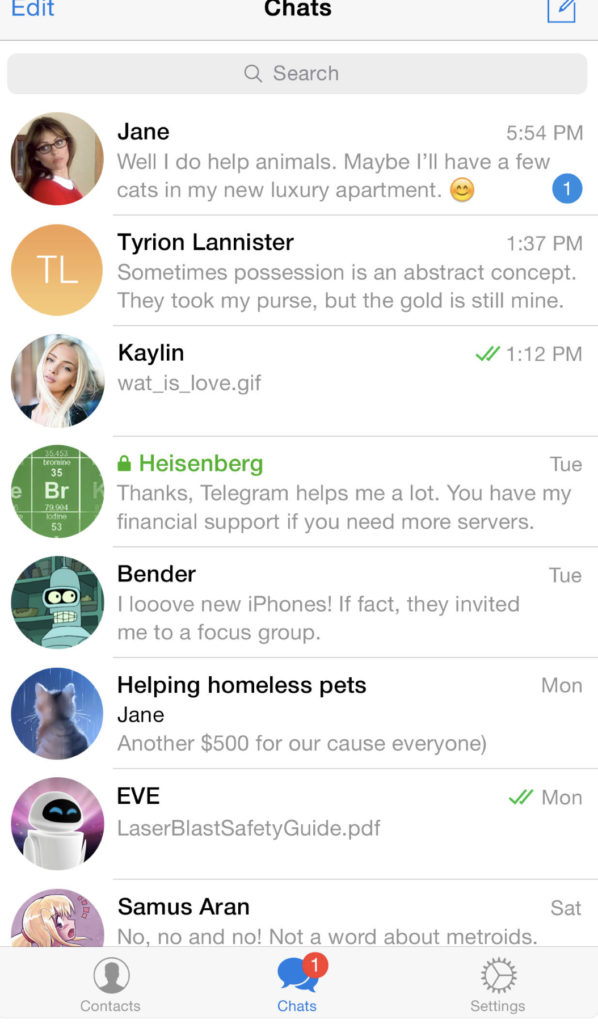
    Telegram is an end to end encrypted messenger that touts speed, privacy, and security. They have featured private messaging and self destructing messages for a while but their new feature takes privacy to a new level. You can now delete a message you’ve sent from your account and the account you sent it to no matter how long ago it was sent. Telegram is, again, standing up for privacy and users are buying in. Millions have flocked to Telegram after Facebook’s data leak news from the past several months. It looks like Telegram is doubling down on Privacy as their claim to fame. They’ve also added the ability remove your information from a message when the message is forwarded to other users. Some accessibility and ease of use features have also been aded.
     

    What Parents Should Know

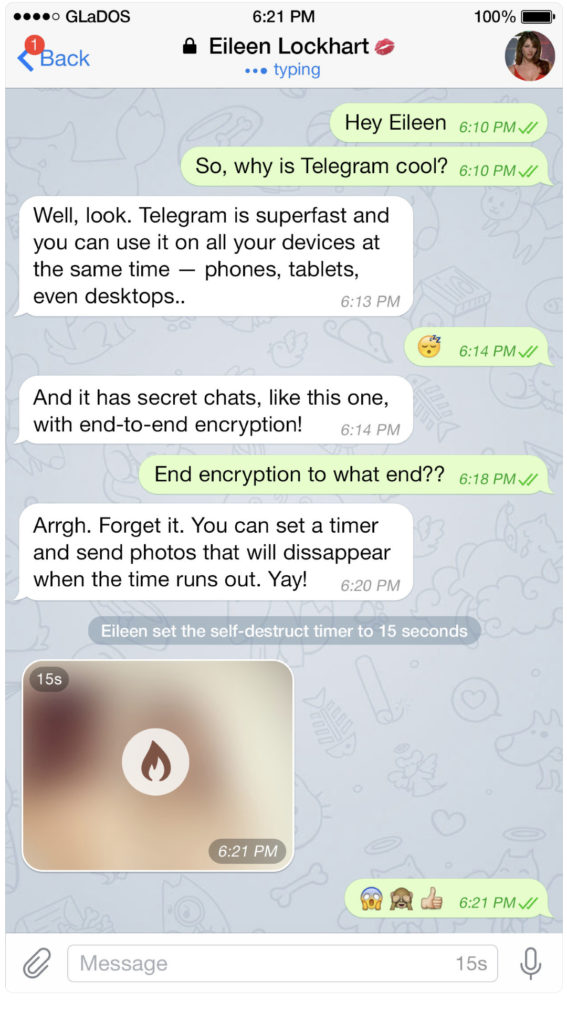
    Security and privacy are often overlooked when we allow our kids to use internet connected devices. Privacy is becoming a major concern for experts and activists of family tech safety. Messengers that allow data to be collected and used for advertising shouldn’t be used by children and even teenagers due to the risks of such data being released or revealed without the messenger app developer’s consent. When an app features privacy as it’s distinquishing feature, you have to ask who the data is being kept private from. Obviously, we want data to be kept from third party companies who would use that data to advertise. Sometimes data is even kept private from the company that developed the messenger app that you are using. Telegram has a “secret messages” setting that must be set to keep your information encrypted from end to end. (End to end encryption means not only the company can see or collect what is being sent.)

    Anytime the ability to delete messages you’ve sent is added, I see red flags. While I think privacy is critical, there is also a risk of kids thinking they are safe from inappropriate or incriminating photos or messages being saved and used for nefarious purposes. It only takes a half a second to screen shot a message or image on your screen. Most phones allow you to record your screen to a video very easily. This means that you are non always anonymous online. If you are sending messages to someone, thinking you have complete privacy, you are trusting that the person you’re sending the messages to has your privacy in mind as well. Telegram is an easy way for predators, cyberbullies, and those interested in sexting, to send and receive messages that do their damage and then are removed as evidence.

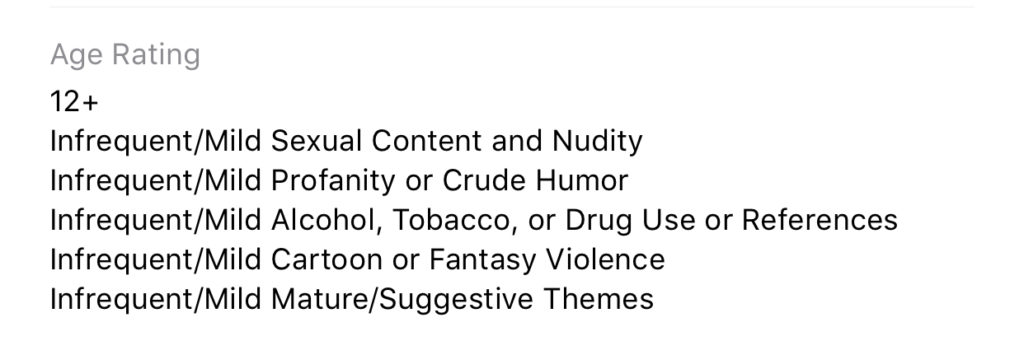
    I have spoken to parents who have taken their kids to the police with complaints about people trying to groom them online but the police had no evidence because the messages had all been deleted. This is why a messenger makes the FamilyTechBlog uninstall list as soon as they add disappearing messages. It isn’t safe for your kids to chat with a feeling of anonymity or for them to chat with people who can send what they want and make the message go away after it’s been viewed. Telegram is rated 17+ and I fully agree with this rating. Private messengers that allow you to chat with anyone, anywhere shouldn’t be used by children and young teenagers. Especially when the messages can be removed at will.


  • What Parents Need to Know About Stadia by Google

    What Parents Need to Know About Stadia by Google

    On March 19th, Google announced their latest product: Stadia. The promise of Stadia is to allow people to play AAA games (Assassin’s Creed, Fortnite, etc.) without having to buy a dedicated gaming console or PC. How does Google plan to deliver on this promise? With Chrome and YouTube.

    Google has stated that Stadia is “the future of gaming.” I agree. Young adults are used to subscribing to services and streaming their entertainment and Stadia is the next step. Kids already watch hours of gaming content on YouTube every day, why not add the ability to play those games too?

    What We Know Right Now

    We don’t know a lot about Stadia right now but what we do know is pretty impressive.

    • A high-speed Internet connection will be required.
    • Up to 4K HDR at 60fps.
    • Plasy using multiple devices: PCs, laptops, tablets, and smartphones will be supported.
    • No need to download games or wait for updates.
    • You’ll be able to use any USB controller connected to you computer.
    • There will be a dedicated wireless controller.
    • Stadia will be available this year.

    What We Don’t Know Right Now

    Despite all the excitement around this announcement, there are many things we don’t know.

    • The price of the service.
    • The price of the controller.
    • Games available at launch.
    • Supported mobile devices at launch.
    • Release date.
    • Minimum Internet connection speed.

    Podcast Episode:

    What Parents Need to Know

    Your kids are going to want this, especially if they watch gameplay videos on YouTube. Being able to instantly play a game that one of their favorite streamers is playing and try that special move is very appealing.

    If the price is right, this could be an affordable alternative to purchasing a gaming console. Being able to play hundreds of games for $50-$60 a month is more affordable than buying a $600 console and a game or two every month.

    The Stadia controller has a streaming button which means your kids could be online and streaming their game and voice instantly. In fact, they could even join in a game with another person. Parents should be aware of this feature and take measures to block it if they don’t want their kids to live-stream.

    Google has been improving their products with better parental controls every year. Parents should familiarize themselves with those parental controls and enable any restrictions they deem necessary. You may want to consider adding time limits, enabling ratings limits, and disabling some of the streaming and cooperative features. Of course, this

  • Creators of Fortnite in Court for “Predatory” Advertising

    Creators of Fortnite in Court for “Predatory” Advertising


    Imagine you go shopping and instead of clothes, toys, or other products you just see boxes. You can’t purchase items on their own, that’s not how this works. Instead, you have to buy a box and hope that what you want is in it. I don’t think that store would be popular for very long, maybe for a while but once the novelty wore off the place would likely go out of business. People want to know that when they pay for something, they are getting what they want or need. In-game “loot boxes,” work basically like the fictional store I described above. You pay a dollar amount small enough to feel meaningless and unlock access to the box. When it opens on your screen you see what you were able to purchase and you can only hope it’s something you wanted or needed for your character.

    Epic games no longer has these types of loot boxes in Fortnite but they did and that’s what this law suit is all about. The boxes advertised the best items that you could get but the family of the young player who this lawsuit is centered around say the chances of actually obtaining those items were very low. This is being interpreted as “predatory,” especially since many of the loot boxes are cute little llama pinatas. Freemium games have been around for a long time but Fortnite is the first game of its kind to have such a large and young player count. Children as young as six or seven are playing Fortnite and purchasing these items to make their characters and weapons look more interesting.

    What Parents Should Know

    If you are inclined to allow your child to play games like Fortnite you need to be aware of a few things. First of all, free is never truly free. There is a reason they don’t charge for the game, it is easier to get a ton of players and have a bunch of them pay for arbitrary avatar and weapon skins than to convince people your game is worth sixty dollars. Many of the top earners in every app store are Free to Play games. These games are popular because they are free to play and the cost of in app purchases seem very low. The trick is how easily you can rack up the amount you spend on the game just to keep yourself playing. Whether it is a game where you’re building a farm and want your crops to grow faster or one in which you are fighting and want better weapons, many of these games let you pay to progress further into the game.

    VIDEO TUTORIAL: iCloud FamilyShare Set-Up


    The question, I guess, isn’t whether or not this practice is legal. (Spoiler alert: it is completely legal.) The question is that should it be legal to create in-app purchases that appeal to especially young gamers? These games made for kids that ask you to pay to continue or educational apps that make you pay to unlock more characters have found a way to get past the parent gatekeeper by making the app free. Then the child just has to click “purchase” when the ad pops up in the app and the purchase is made. There are ways for parents to set up controls to keep that from happening but many aren’t aware of how or just don’t think to set it until their credit card has already been used for hundreds or even thousands of dollars.

    The creators of Fortnite may never be held accountable for the way they market products in their games. Whether or not they should be held accountable is up to the courts to decide. As far as parents go, you do have a responsibility to protect your kids in the digital world they live in. Talk to your children about in-app purchases. Help them understand that the money has to come from somewhere. If you are ok with them spending some money in-game then use gift cards instead of credit cards so that when they run out of money, they’re out. Set up controls so they have to ask you to approve in-app purchases. Whatever method you choose, you can keep your kids from being preyed upon by the advertising in these games. You just have to do the research and take the steps.


  • Tik-Tok Under Fire as Study Finds 25% of Kids Talk to Strangers Online

    Tik-Tok Under Fire as Study Finds 25% of Kids Talk to Strangers Online

    Tik-Tok is at the center of a controversy surrounding the exposure to predators and child pornographers through live streaming on their app. One in twenty children who use live-streaming apps have been asked to take off their clothes according to a study by the UK’s Children’s Charity NSPCC.  Originally called Musical.ly, Tok Tok claims to “empower everyone to be a creator directly from their smartphones, and is committed to building a community by encouraging users to share their passion and creative expression through their videos.” Their mission statement sounds like they are building a place for our kids to stretch their creative muscles and build a supportive audience but in reality it is exposing them to potential danger.

    Sexual exploitation is only a part of the issue, there are popular hashtags on the app that highlight self harm and eating disorders. Tags like #thinspo (thinsporation) feature videos of children as young as eight showing their rib cages through their skin and proclaiming that they are inspiring to others who desire to be thin. Suicide and self harm are also featured on the app with complete with encouragement to hurt yourself and instructions on how to do so. Tik-Tok says you have to be 13 to use the app but as we have shared multiple times on this site, that age exists to protect the company from legal action concerning the collection of children’s data, not to protect your children from content on the app.

    While the app is rated 12+ in apps stores in the U.S. the reasons listed for the rating prove to be, in fact, very mature. The issue, again, as I’ve mentioned, is user generated content. Anyone with a smartphone and a wifi connection can make videos and now livestream in Tic-Tok, they can also watch you perform on the app. This makes for an open, dangerous atmosphere filled with predators, adult content, scams, and violence.

    What Parents Should Know

    Tik-Tok says they have filters and parental controls in the app that allow you to set the app to private but all of these measures have proven to be less than effective. Kids who use the app on their own can easily come across content that isn’t age appropriate. The content restriction and  time management settings in the app are password protected; they can be useful and should be set up if you allow your child to use Tik-Tok. Also be sure to turn off the ability for non-friends to comment on, share, and download (this is on by default, creepy right?) your child’s videos.

    We don’t want our kids talking to strangers online. All parents understand the dangers associated with live-streaming and posting public videos to the internet. Unfortunately many parents feel that their hands are tied when it comes to keeping their kids safe on these apps and websites. That isn’t the truth, however, there are tools (some in the app and some third party) which you can use to keep them from accessing things that are dangerous. An algorithmic filter is never going to be enough, though, so it is important that we have open communication with out kids about what they are posting and seeing on apps like Tik-Tok. Also, if your child doesn’t meet that age restriction then they shouldn’t use the app.

    Twenty five percent of kids talking to strangers online is a horrifyingly high statistic. It shows that while there are privacy settings and parental controls out there for parents to use, either parents aren’t using them or their kids are getting around them. I know that the privacy settings in Tik-Tok aren’t password protected so if your children want to talk to strangers on the app and they have time using the app by themselves there are ways for them to make that happen. It is important that parents take the responsibility to protect our kids online. Many media outlets are blasting these companies for putting our kids in danger but I have to be honest, you don’t blame the slide for your kid falling off and busting their face, you think of precautions that YOU can take to keep that from happening in the future.

  • There is a Child Pornography Ring on YouTube and Everyone’s Making it About the Money

    There is a Child Pornography Ring on YouTube and Everyone’s Making it About the Money

    A YouTuber (sensitive content warning) has found evidence that there is a vast community of child predators and those who watch content that contain child exploitation on YouTube. They are using comment sections and timestamps to lead each other to actual child pornography. They start with a search for a simple popular YouTube trend and then the algorithm that YouTube uses to connect viewers with like content will eventually propose a video of kids that can be considered appealing to these viewers. They then click through in the comments section to parts of the video that seem innocent but are, unfortunately, what these predators have been looking for.

    YouTube’s response didn’t come until after advertisers begin pulling down there ads. They began by removing some of the videos and some of the comments, as well as demonitizing (pausing ad revenue) videos on which these comments are posted. YouTubers are concerned because some of their videos have been or could be demonetized because of a commenter’s words, not something they control. Whether you want to blame the site, the viewers, or the makers of the videos, the fact that the conversation goes strait to money is a serious problem.

    I think the money isn’t the issue. I understand hitting them where it hurts and that YouTube should do something but we have to take some responsibility. I believe we need to have a serious conversation about what types of videos we allow our children to post publicly and we should be very concerned about the types of people who watch these videos. Watch the video above to hear more of my thought son this issue.

    The video to initially expose this issue is below, be warned that it’s disturbing to watch and there is adult language. 


    SENSITIVE CONTENT WARNING!

    .

    .

    .

    .

    .

    .

    .


  • I Can’t Help You Protect Your Kids on Apps Meant for Adults

    I Can’t Help You Protect Your Kids on Apps Meant for Adults

    I field messages and requests all week long from parents who want the latest tools for keeping their kids safe online. They ask about everything from YouTube to Instagram to Snapchat and want apps that will monitor social media use, block adult content, and limit screen time. While there are resources to help parents in each of those departments, some apps just aren’t intended for your younger child. Unfortunately many parents have a real problem giving in to that fact.

    Streaming Videos

    Let’s look at YouTube as our first example. The video app was created in 2005 as a place for anyone to upload short videos to share with their friends. Google purchased YouTube in 2006 and Social Media became popular soon after, rocketing YouTube to the successful streaming platform it has become. The site is loaded with videos from filmmakers, vloggers, video gamers, makeup artists, geeks, professionals, educators, ministers, animators, artists, basically any category you can think of. It has evolved into an immovable force on which there are 300 minutes of footage uploaded every single minute. YouTube has come under fire for some of their content being too mature or sensitive and so they’ve employed algorithms to keep tabs on inappropriate videos. They also released n app for children called YouTube Kids. This app has also seen its share of controversy after YouTube has been unable to keep sensitive material from showing up in videos on the app.

    YouTube obviously wasn’t intended for young viewers. It is a site that is populated primarily by videos uploaded by its users. Some companies that make content for kids use YouTube but this is a choice by these companies in response to the popularity of the platform. It’s an attitude that says: “Kids are there, so we should be there too.” The goal is to reach the audience already there, not necessarily to build an audience on YouTube. There are no real parental controls (safe search is mostly useless) and videos that are labeled as kid friendly are done so without any human eyes ever seeing the entire video. The only time a content reviewer sees the video is when enough users of the site have flagged it as inappropriate. Allowing your kids to watch YouTube on their own is a risk that many parents don’t even realize they are making.

    What about Social Media?

    Snapchat, Instagram, or Facebook are all the same. They, like YouTube, feature content created and posted by the users of the service. This “User Generated Content” can vary from political or religious views, to silly cat videos or memes, and random personal updates that mean nothing to anyone. People also post updates on their serious mental health issues, they share about their plans to harm themselves or others, the post images of themselves in compromising situations, and that’s just what people post publicly. Private messaging contains content that people post when they think nobody except those they trust is watching. Private messaging is how predators groom their victims. It’s how the out of control teenage boy convinces the girl to send him inappropriate pictures of herself. Social Media is intended to be a place to connect with people, some you may know, some you don’t. It is meant to be a public forum and that which is meant to be private, is meant to be completely private. This is where the problems come in when parents ask for ways to monitor their kids social media.

    Age Rating vs Terms and Agreements

    I see a lot of parents giving their kids access to social media and other online activities when they reach the age of 13. This is based on the fact that the terms and agreements that these sites have you approve before making an account list 13 as the minimum age to use their service. A common mistake parents make is thinking that this age is meant to protect their kids from content on the site when, in fact, it’s intended to protect the company from having data and information on kids under the age of 13. COPPA laws say that companies can’t collect and use information of kids under 13 without parental consent. If a company says you can’t use the site if you’re under 13 then they can do whatever they want with all of that data and if your kid is underage, it isn’t their fault. You ignored the Terms and Agreements when you allowed them to use the site.

    Age rating is the age recommendation you’ll see in the app store when you are downloading and app. This age restriction is based on the actual content in the app, not any legal requirements for the company. The usual standard is that apps populated by user generated content are rated 17+. This is because the company can’t guarantee that what is seen on their product won’t be considered adult content. When we allow our kids to use apps that contain user generated content we are allowing them to be subject to the opinions, behavior, and whims of everyone else who uses that app.

    Parental Involvement Before Parental Control

    When I am asked to help parents protect their kids in apps that are obviously not made for children I feel like I’m being asked to give parents a suit their kids can wear to protect them while they play in a burning building. I get it. It isn’t easy to tell your kids they can’t do something they want to do. “My friends are all on Snapchat.” or the one that irritates me to no end, “The teacher/coach says I have to use Facebook to get the homework/practice schedule.” Sometimes we just have to say no. It is difficult to set the boundaries and limits that keep our kids safe but if we have the right attitude about what we’re protecting them from it becomes easier. Social Media, YouTube, video games that are rated M for mature, non of these things are intended for people under the age of 17 and when we allow our kids to use these products, we open them up to a world that is meant for adults.

    It is difficult for algorithms to catch nudity or violence in uploaded videos. Social Media sites and private messaging apps go to great lengths to keep prying eyes from seeing what is being sent. This makes parental monitoring software hard to develop. Unfortunately some burning buildings are just too dangerous and there isn’t much that can be done to protect you if you’re inside. If you aren’t ok with your child seeing content that is meant for grown ups then I recommend thinking about uninstalling that app instead of trying to find software that doesn’t it allow it to do what it was intended to do.

  • Tinder, Grindr, and Predators. Social Media and Suicide. Who do we blame?

    Tinder, Grindr, and Predators. Social Media and Suicide. Who do we blame?


    There were more than 30 instances of abuse of children from the Tinder and Grindr apps since 2015. That number may seem small but when you consider that fact that kids have easily skirted around the age requirements of these dating/hookup apps and made contact with people who wish to harm them, any number is too high. While these companies say they’re doing all they can to keep kids from using their software, all they really say in response to these horrible occurrences is that the predators and kids violated their terms and services. Since the terms say you shouldn’t contact minors and that minors shouldn’t be using their software, they claim the responsibility isn’t theirs because the child was put in danger by using the app in a way that it wasn’t intended to be used.

    Officials are saying that isn’t good enough with law makers in the UK trying to create legislation that will require age verification on apps like Tinder and even some social media apps like Instagram. Recent suicides have been proven to be inspired by images of self harm that were viewed on Instagram. Again, officials at the social media company say that the most violent of the images violate their terms and services. They have recently, however, banned images of self harm and suicide and removed the categories from search results.

    Here is the question: When these horrible things happen, do we blame the companies who make these online products? Is it enough to write a terms and agreements and say that those who break the rules do so at the fault of their own and no fault of the company? So far, legally, that’s all it takes. It seems that the responsibility of the company ends with the terms and conditions page. If the user doesn’t follow the terms, then how is the company supposed to protect users? Some officials are asking for age verification which means keeping more records. This is something many companies don’t want to do because of recent privacy and data breach concerns. There is only one thing I know for sure, if families will get serious about monitoring their kids’ screen time and online activity, the number of these occurrences will dramatically decrease.

    Let me describe a scenario for you. Your 12 year old child wants to meet new people online, maybe they heard some friends talking about a dating or hook up app, maybe they just don’t have a lot of friends in real life. Whatever the reason, they’re looking for a way to meet people. While they’re looking through the app store they see this in the search results:


    They tap download, create a profile and start swiping. Eventually meeting new people on the app. Conversations move to WhatsApp, Facebook Messenger, or Signal and they schedule a meetup. Your imagination can take over from there and if you’ve read some of the news stories it can get pretty awful.

    Imagine, now, that you have parental controls set so that your child has to request permission to download apps. Maybe you even have their controls set to keep them from downloading apps rated for users over 12 years of age. Either of these approaches would keep you from hearing about your child’s new friendship or worse, romantic relationship with a stranger online. Instead, you’ll see that they’re trying to download an app that is designed to connect people for romantic relationships and be able to discuss this with them. You can share the dangers of building relationships with strangers and help them understand the importance of privacy, security, and parental supervision.

    There are built in ways to protect your child on both iOS and Android devices. The key is to set them up. Use the built in protections and features and don’t rely on these companies to protect your children. They don’t exist to keep your family safe or even to help people build healthy relationships. These companies develop their products to make money. It is foolish to expect Instagram to protect your kids from suicide, should they have a responsibility for what is on their app, yes, should you blame them if your kid harms themselves because they see something on the app, not entirely. You have to take some of the blame onto yourself. There are ways to keep your kids safe from that kind of content. If you don’t know about it or don’t use it, it isn’t the fault of the company. It’s yours. Be involved, pay attention, and do the work to keep them safe.

  • TUTORIAL: How to Keep Your Kids in a Single App on Your Android Device

    TUTORIAL: How to Keep Your Kids in a Single App on Your Android Device

    If you’ve ever given your smartphone to your kids to play a game you know that you always run the risk of them opening another app or getting access to something through an Internet browser that might be objectionable.

    Parents using iOS are able to use Guided Access to limit their kids to one app for a certain amount of time but what can parents with Android phones do?

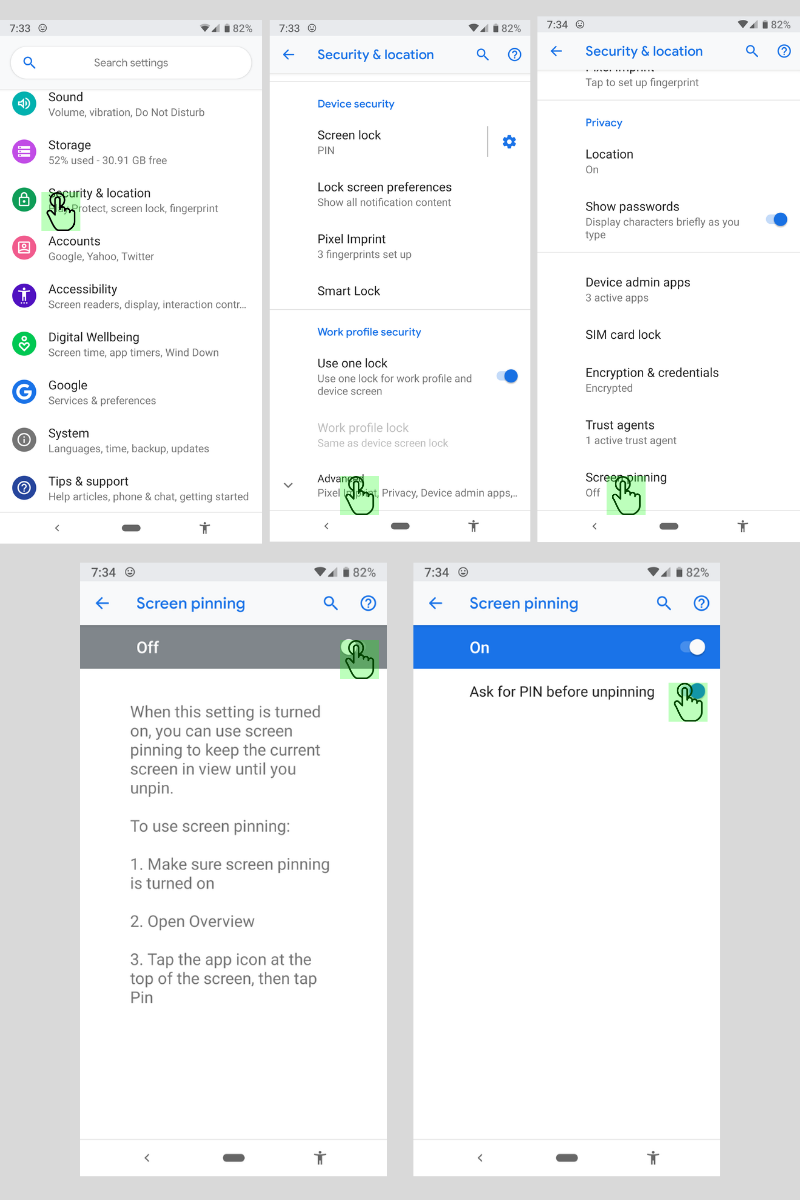
    Screen Pinning is the solution. It’s been available since Lollipop (5.0) and is advertised as a security feature but it’s a good parental control too.

    Screen Pinning only allows one app to run and someone with your phone cannot switch to another app without you PIN or fingerprint.

    There aren’t any time limits built into Screen Pinning so we’ll cover that in another article about “Digital Wellbeing”. For now, here’s how to enable this helpful feature.

    Many smartphone manufacturers implement Android a little differently. If you’re having trouble with these instructions, check with your carrier or phone manufacturer.

    These instructions are for Android 9.0 and up. If you have an older version of Android the instructions are a little bit different. You can find instructions for older versions at Google’s Help Center.

    How to Enable Screen Pinning

    1. Open your device’s settings.
    2. Tap Security & Location > Advanced > Screen Pinning.
    3. Turn on screen pinning (remember to require your PIN to disable).

    How to Pin an App to the Screen

    1. Open the app you want to pin.
    2. Swipe up to the middle of your screen.
    3. Tap the app icon.
    4. Tap the pin.

    The app is now pinned and cannot be switched without your PIN or fingerprint.

    How to Unpin an App From the Screen

    1. Touch and hold the back and home icons.
    2. After your device locks, enter your PIN or use your fingerprint to unlock.

    The app has now been unpinned and you can use other apps.

    That’s all there is to it. The next time you’re waiting in line at the DMV and your kid asks to play a game, you can give him your device without worrying that he’ll watch red band trailers on YouTube.

  • Parents Guide: Apex Legends (Titanfall Battle Royale)

    Parents Guide: Apex Legends (Titanfall Battle Royale)


    Family Tech Blog Rating for Apex Legends: 
    Violence - 2
    Language - 3
    Sexual Content - 5
    Positive Message - 2

    Another Battle Royale game has been added to your kids’ wishlist this week. Apex Legends is a BR game that is set in the world of Titanfall, a first person shooter game with two previous installments. This game features fast paced, squad based combat with your typical battle royale tropes. You jump from a ship onto an island with fifteen other squads (60 players,) collect weapons and supplies, and battle to be the last squad standing.

    Much like Fortnite, this game has a bent toward science fiction and less realism. It does, however, have more bloody combat and some merciless kill animations at close range. It’s a far stretch from the blue ghost fade that results from an elimination in Fortnite. You are able to respawn if your squad members survive long enough after you are eliminated, which can make your rounds longer if you’re playing with someone who is pretty good.

    What Parents Should Know

    There isn’t much by way of profanity in Apex Legends and characters are dressed reasonably appropriate. The only real concern for parents is the intensity and voilence of the gunplay, the pace of which has been shown to increase some behavior and attention problems in younger children. Some reasearch has also shown a temporary increase in aggression in kids who play voilent video games. Online content isn’t rated, as usual, and Apex Legends is an online battle royale game so keep that in mind. There is pretty good squad based communication built in to the game (identifying locations and directions with game controls) so you don’t have to use the microphones as much but it’s still tough to win without being able to talk to your squad. If you don’t allow in game chat on your kids’ games then you may get some pushback from them when they play Apex Legends.

    To recap, Apex Legends is a bit more violent than Fortnite with bloody combat and the rag doll affect when characters are killed. The game is team or squad based and requires playing with friends. It is very easy to add people you’ve been randomly matched with to your friends list and play with them in the future. My advice is for parents to keep an eye on their kids bahavior when they play games like Fortnite, Call of Duty, or Apex Legends. More important than how much time they spend playing is what life outside of gaming looks like. Are they getting the grades they should be getting? Are they still participating in the activities they have loved? How are their relationships both in the family and with friends? Ask yourselves these questions and make adjustments to gaming time accordingly. As your kids get older, you’ll see that this works better than just an arbitrary number of hours you allow them to play.

  • WhatsApp Update Brings Thumbprint and FaceID Lock To Private Messenger

    WhatsApp Update Brings Thumbprint and FaceID Lock To Private Messenger

    The private messenger, WhatsApp, has updated recently to allow users to lock the app from prying eyes by using their Touch or Face ID. Private messaging is becoming more important to users these days since the spotlight has been on Facebook and Google for their data mining and sales. WhatsApp has been a mainstay of private messaging for some time now and this new update takes privacy from an algorithmic/software level to a more obvious tangible place. You can now use your FaceID or TouchID, depending on the generation of your iPhone, to lock people out of the WhatsApp software entirely. This will keep people from opening the app and looking through your messages. Currently this feature is available for iOS only but it is rumored to roll out to Android soon.

    What Parents Should Know

    It’s important to know that there are options that allow you to keep an eye on your kids’ messaging without having to physically take their phone from them. However, if the physical approach is your style then this update from WhatsApp could become a problem for you. Messages being locked in this way needn’t deter you from checking up on your child’s messaging activity, though.  You can store your thumbprint in your child’s device so you can unlock it or just make them unlock the app for you when it comes time to inspect their messages.

    I recommend allowing your children to have a feeling of privacy by using some sort of software to monitor their messaging apps instead of taking the device from them every now and then. Not only does that plan give them a feeling of privacy, it is also a far better monitor then your weekly check up. If a message monitoring algorithm like Bark is active it will look at every single message your child sends or receives in real time, notifying you if any of those messages cross the line to dangerous or inappropriate content. Taking the phone from them to monitor it yourself allows messages to be removed before you get around to looking at it.

    I never advise spying on your children without their knowledge. They should know that you are keeping an eye on their messages and how the software works. They should also know what the consequences are if they send messages they shouldn’t be sending. Finally, you should have an open conversation to allow them to feel like they can come to you if they receive a message they are not comfortable with. No matter what you do to monitor your kids messaging, having a culture of transparency and openness in your home is critical.