

Podcast: Play in new window
Subscribe: Apple Podcasts | Spotify | RSS

Android has updated their Family Link parental controls feature. The above video will take you though what they’ve done and give you some questions to ask yourself about using the service.
The site is very clear that Family Link is only compatible with newer android devices. Go into the settings on your kid’s device and tap the ABOUT button in the menu to see if your software version is 7.0 or newer. If it isn’t your child may not be able to install Family Link which will mean you can’t use the software to set limits and restrictions.
COPPA regulates the collection of children’s data without parent permission. You have to create an account for your child to use Family Link and to do that you must give permission for Google to collect some of their data. The video explores a bit more of what information they can collect and what they do with that data.
If you are one that wants to be able to see what your older child is doing on their device you’ll have to use the child’s phone to adjust parental control settings with Family Link as control is shifted to the child at age 13.
As I mention in the video above and the podcast episode below, you need to familiarize yourself with the benefits and limitations of Google’s Family Link software. Visit families.google.com to see their information about it and check out our other articles and videos about Family Link as well. You can never be too informed.
Podcast: Play in new window
Subscribe: Apple Podcasts | Spotify | RSS
The tutorial video above will walk you through the steps necessary to set up parental controls on your Macbook Pro, Macbook Air, or iMac. These settings work with OSX High Sierra or OSX Mojave. Below is a brief summary of the steps necessary to set up these parental controls.

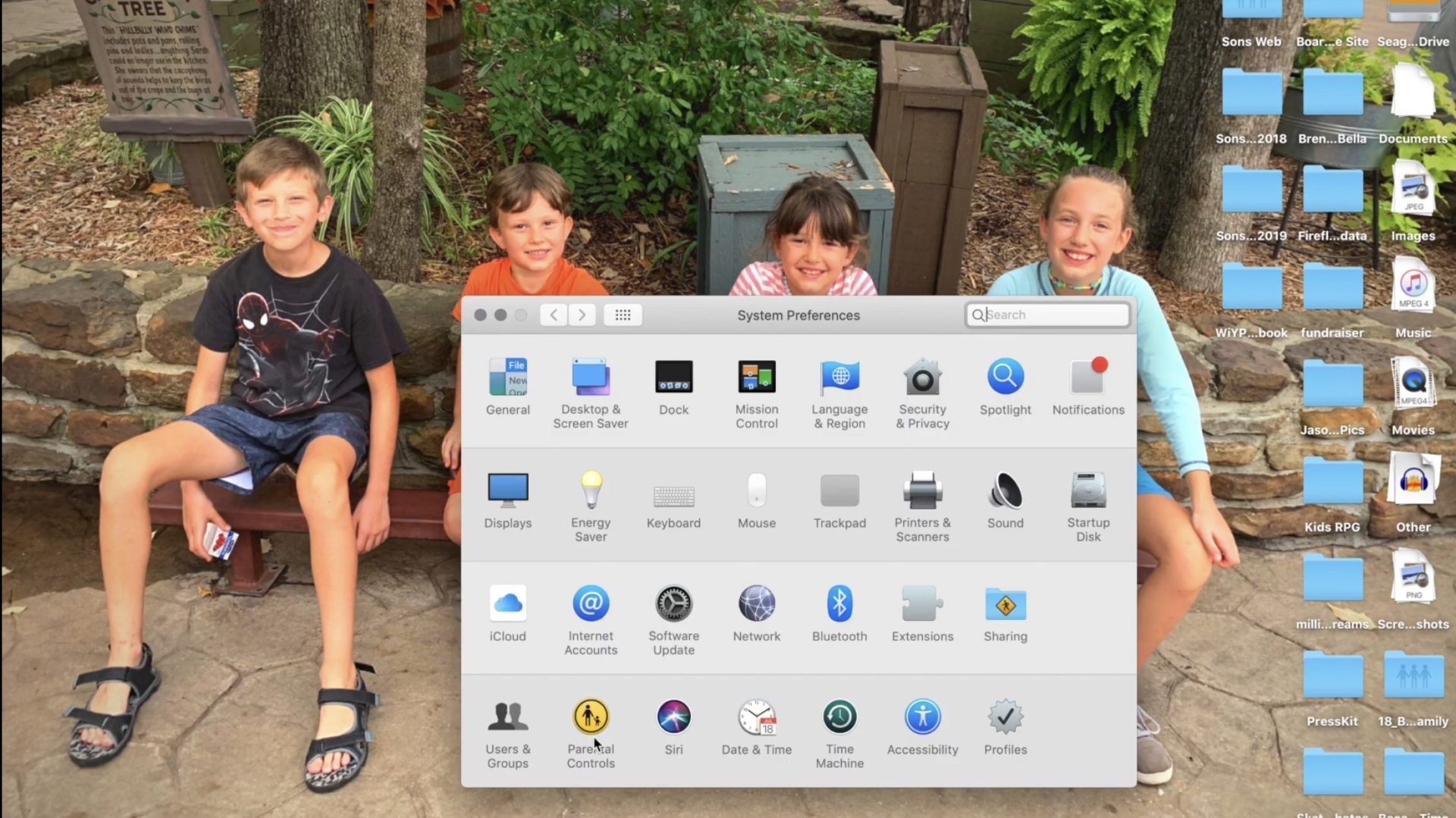
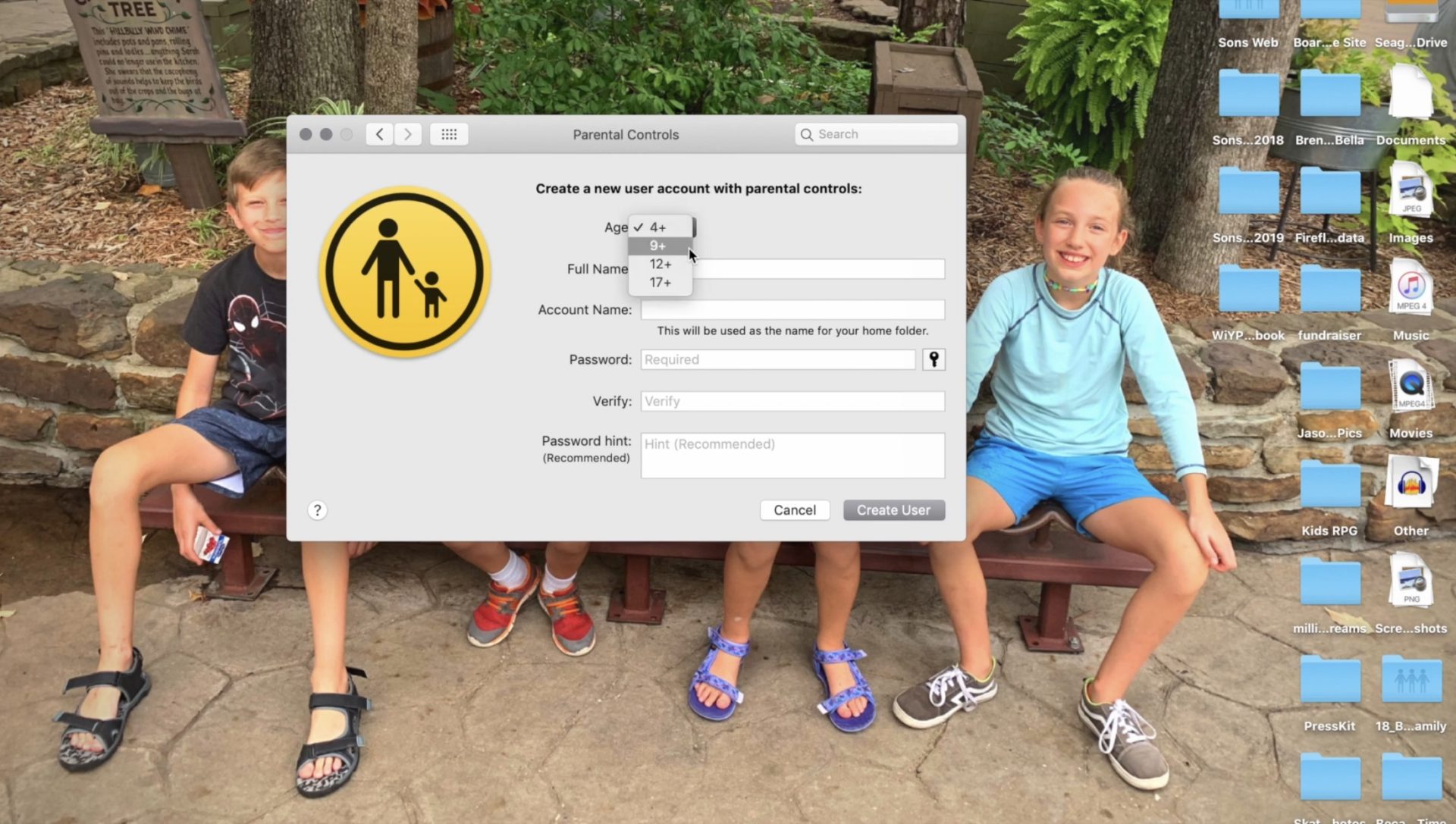
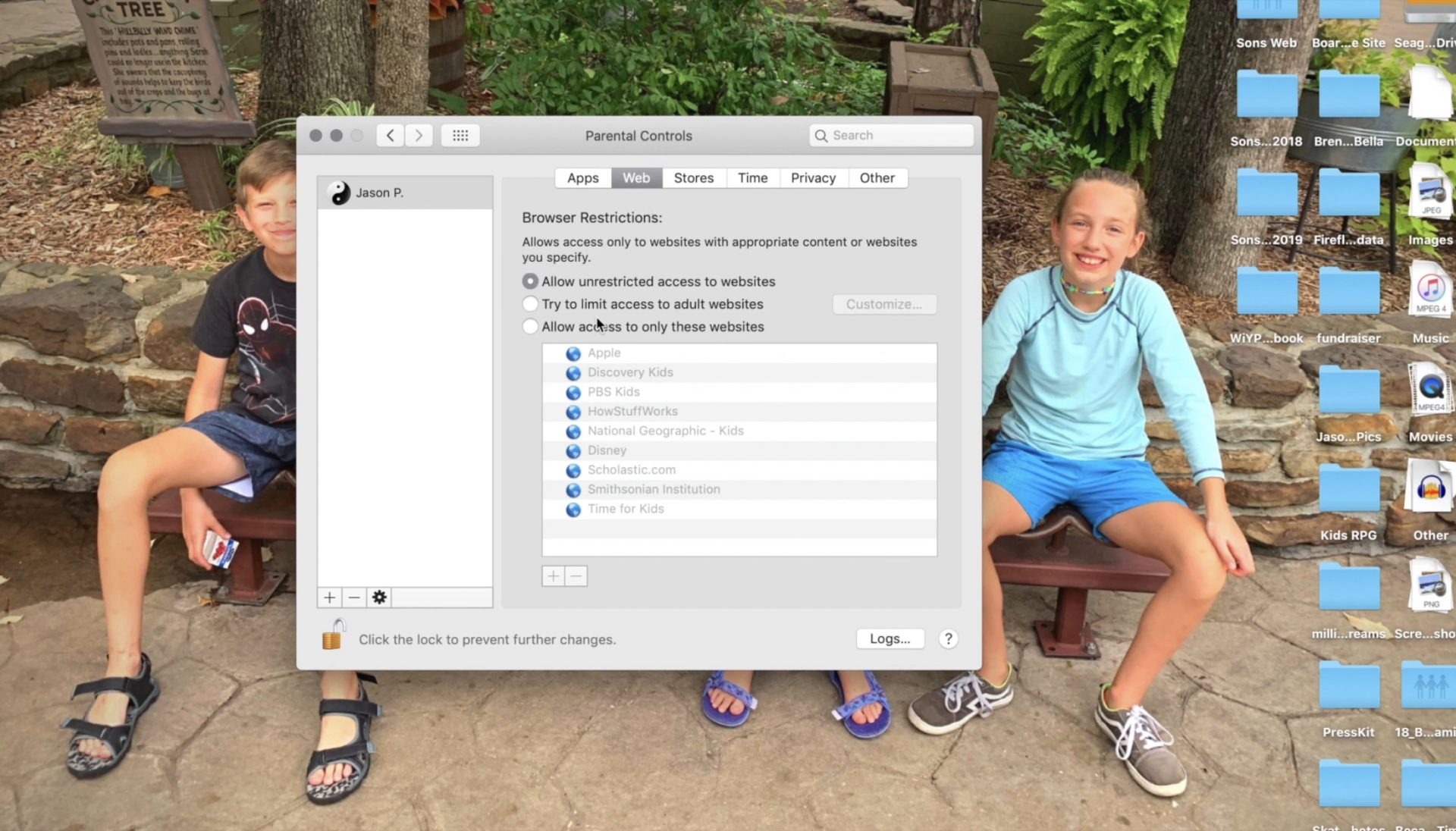
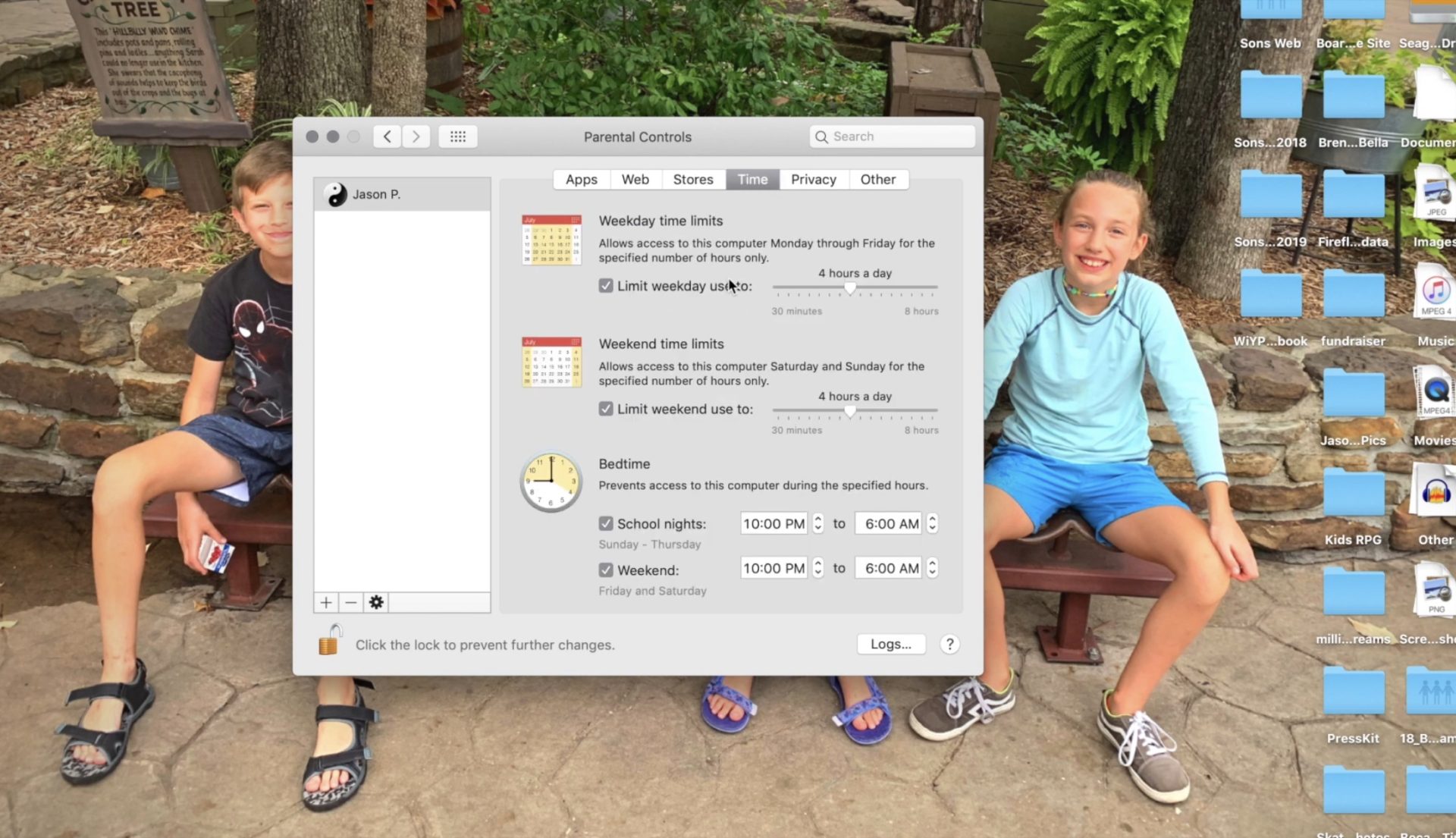
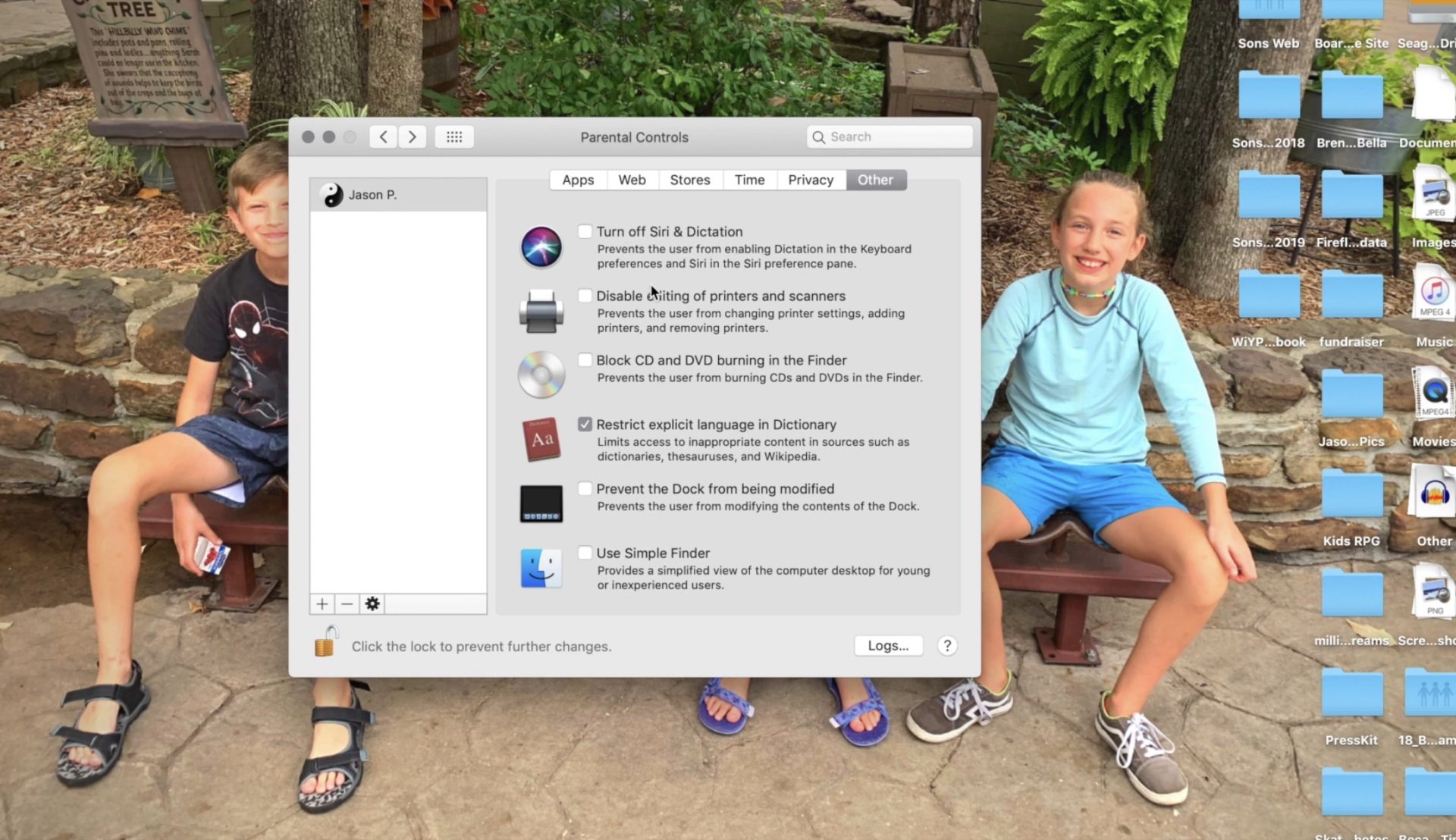
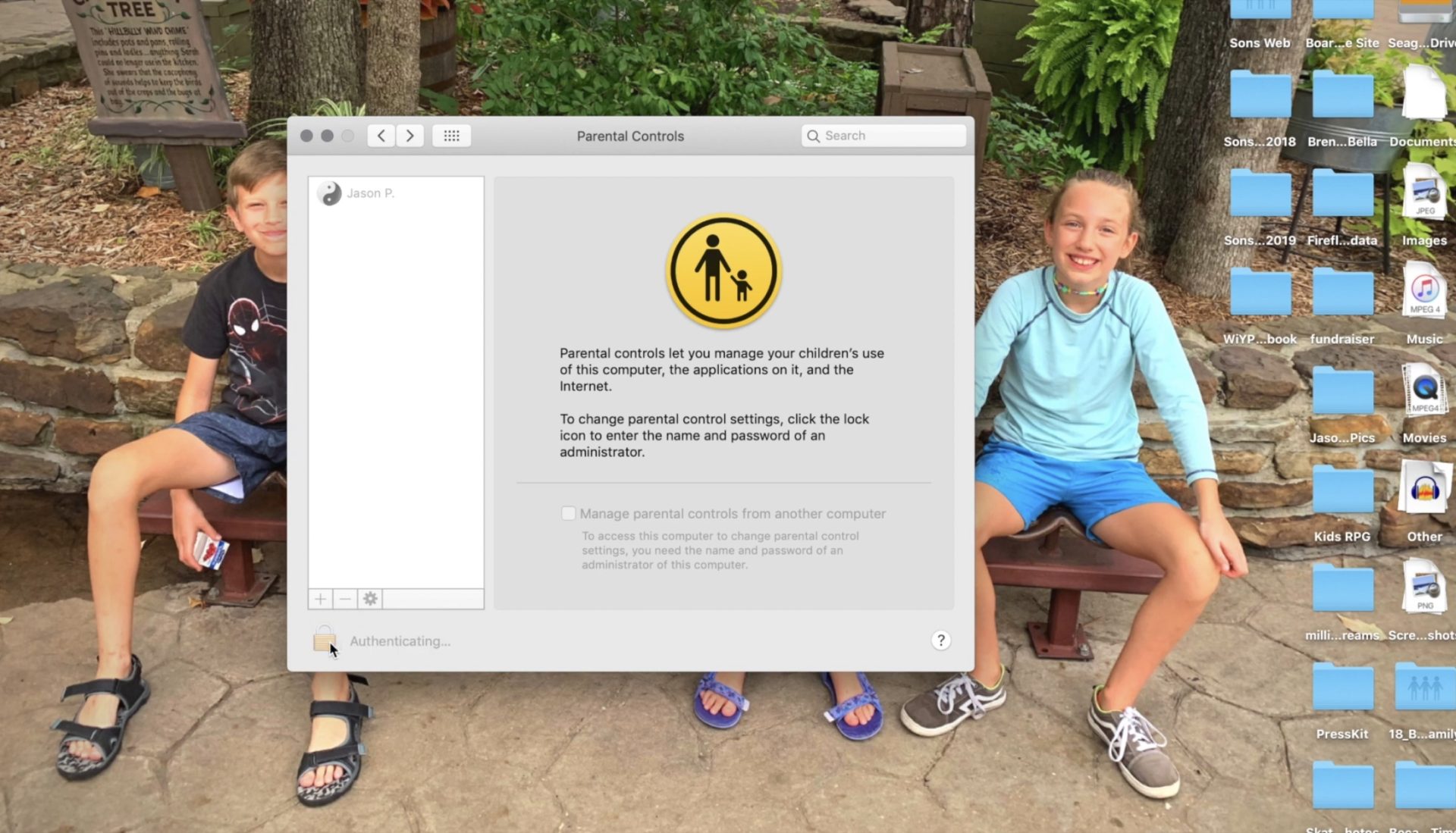
Setting these restrictions will help you have peace of mind while your child or teen uses their OSX device. If you would like further confidence that they are only seeing things that they should be seeing, look into an accountability software like Accountable2You. Also, if you come across any problems or have any questions please comment below or send us a message on Facebook.

I end every workshop and nearly every video and podcast telling parents to talk to their kids about digital citizenship, screen time balance, and internet safety. I often point them to videos or articles I have made or written that will help them with these topics. Cornell University, in partnership with Common Sense Media, have put together a resource for schools that claims to be perfect to help you, the parent, talk to your kids about these critical topics.
“Social Media Test Drive” is a curriculum created to help teachers and parents guide their kids through healthy internet use and digital citizenship. The lesson plans for younger children were good. They featured fun videos with cartoon characters singing about what to do if you see a bully and why you shouldn’t talk to strangers online. Some of the curriculum for older kids, however, gave me some red flags.
The videos that I watched that were created for older kids and teenagers did a good job of presenting research that shows how dangerous too much social media or screen time can be. Unfortunately, most of the videos then downplayed the research by comparing it to anecdotal evidence that is gained simply from the way they know kids feel about using their devices and social media. It felt as if the video was pandering to young people, encouraging them that there aren’t many dangers online as long as they know how to use the internet properly.
One of the things that is increasingly dangerous about social media and internet usage is exactly the same thing that many will say is a great benefit. The ability for kids (or anyone for that matter) to go online and find a group of people who think exactly like they do and believe exactly the same things they do. This seems like it would be a good thing. In fact, one of the Common Sense Media training videos called it “Finding your tribe.” The problem comes when you surround yourself with so many like minded people that you are no longer encouraged or even able to think critically about the things you see, hear, and experience. We should be hearing voices that contradict each other sometimes so that we can grow in our understanding of the world. The internet can be good for that. We can learn about new ideas, new places, and new types of people. The problem is that when we dive into social media by clicking like or double tapping every post of every person who agrees with us on everything we think, we are telling the algorithms to feed us more and more of the same thing. This is tricking us (not just our children or teens) into thinking that everyone who is right thinks exactly like we do. This is a dangerous attitude and if “your tribe” means people who won’t challenge you when you’re wrong. I hope my kids never find theirs.
Unfortunately these videos remind me of the after school specials we all made fun of when we were kids. The young guy standing in front of motion graphics and reading a script about how to use the internet wisely. It’s been done before. It was done with cigarettes, it was done with drinking and driving, now it’s being done with the internet. It all reminds me of the end credits scene for Spiderman Homecoming where Captain America shows up give a speech on patience. As I mentioned above, it seems to be pandering and I can imagine it being laughed off by most kids in the age group it is intended for. Even with the obsolescence of the “after school special concept” these videos attempt to be cool, especially by downplaying the dangers of phone usage and encouraging kids to just “be careful.” They try so hard not to say anything that will make students shut down that they barely say anything helpful at all.
Ultimately these issues are the responsibility of us as the parents of our children. Only we know what it will take to get them to understand the truth about their time online. We are the only ones that can set the standards of internet use in our families. We are the ones who can set the limits we feel are best and do it in a way that helps our children feel that they are partners with us as we work towards developing healthy tech habits together as a family.
We should use the resources at our disposal, accountability software, filters, message monitoring, and built in parental control settings can all go a long way to help us keep our kids safe and teach them how to protect themselves. There are truly dangerous things on the internet. These things shouldn’t be glorified or blown out of proportion but they shouldn’t be ignored or downplayed either. We, as the gatekeepers of our homes, must decide what level of discretion we will use in protecting our children. We can rely on our schools or other companies or organizations to do it for us.
Podcast: Play in new window
Subscribe: Apple Podcasts | Spotify | RSS

UPDATE 9-4-2019: This morning the FTC announced a 170 million dollar settlement with Google to end the investivations of YouTube’s children’s data collection practices. At the same time YouTube announced they are rolling out funding for original children programming. YouTube CEO, Susan Wojcicki said that the changes proposed by the FTC could be detrimental to much of the ad revenue made by content creators who make videos targeting children. She also said that the changes are rolling out slowly over four months to give creators time to adjust their content.
Child data security advocates are not satisfied with this fine or these changes. They were hoping for more:
“A plethora of parental concerns about YouTube – from inappropriate content and recommendations to excessive screen time – can all be traced to Google’s business model of using data to maximize watch time and ad revenue,” said Josh Golin, the Executive Director for the Campaign for a Commercial-Free Childhood (CCFC).
Parents should be aware that the changes to YouTube’s data collection and advertising properties are rolling out slowly but will affect both YouTube and YouTube kids. My advice as mentioned in the video below, is that parents pay close attention to the videos their children watch on YouTube. Understand that much of the content they consume is created to advertise products whether it be websites, video games, or physical products such as toys or food and candy. Advertisments will still be geared toward kids based on the videos they are choosing to watch, much like seeing commercials for toys during Saturday morning cartoons.
8-23-2019
YouTube’s data collection policies have garnered attention from media and government agencies alike over the past several months. After some shocking reports about child pornography on the site and restrictions handed down from the FTC, Google is finally taking some real steps to comply with the Child Online Privacy Protection Act (COPPA.) Bloomberg reported this week that YouTube will be ending targeted ads on videos intended for children.
Obviously, ads that target viewers use data that has been collected in order to assign advertisement to that user. If YouTube is targeting ads to children, it stands to reason that they are collecting information about them as viewers in order to create their advertising profile in the first place. This data collection is blatantly against COPPA and one of the reasons the site was investigated by the FTC earlier this year.
YouTube has already cut advertising income from videos that feature disturbing content aimed at children and eliminated comments in videos that feature children. It is estimated that YouTube makes nearly $750m annually from advertising on children’s videos. Obviously eliminating those targeted ads could seriously hurt Google’s bottom line but they say it is the least damaging option. There are other ways for YouTube to serve somewhat targeted ads to children. The company can use ads that are chosen based on the videos they appear on, thus tying the kids’ interest in the video itself with the ad that will be served. Those who have brought complaints against YouTube about their COPPA violations aren’t expected to be satisfied with that solution either.
Of course YouTube wants your children to use YouTube Kids. This is how they protect themselves from the very mess they are in now. They say that YouTube Kids doesn’t collect data from viewers and only shows ads as they relate to the video users are watching. Even so, my recommendation is that your kids only watch YouTube in a place that everyone can see what they are watching. If inappropriate content comes up you will want to see what it is. This way you can talk to your child about what they saw and how to avoid seeing that in the first place.
Another option is to use YouTube Premium to eliminate ads all together. We use this so that when we build a playlist of videos for our kids, we can be sure that they’ll only see what we selected and not some other video ad for something we may not approve of. YouTube is trying all they can to keep their ad based ecosystem alive while staying out of dangerous apps list and tech safety expert blog posts. Only time will tell if they are able to do so. This change could be a very tiny step in the right direction.
Podcast: Play in new window
Subscribe: Apple Podcasts | Spotify | RSS
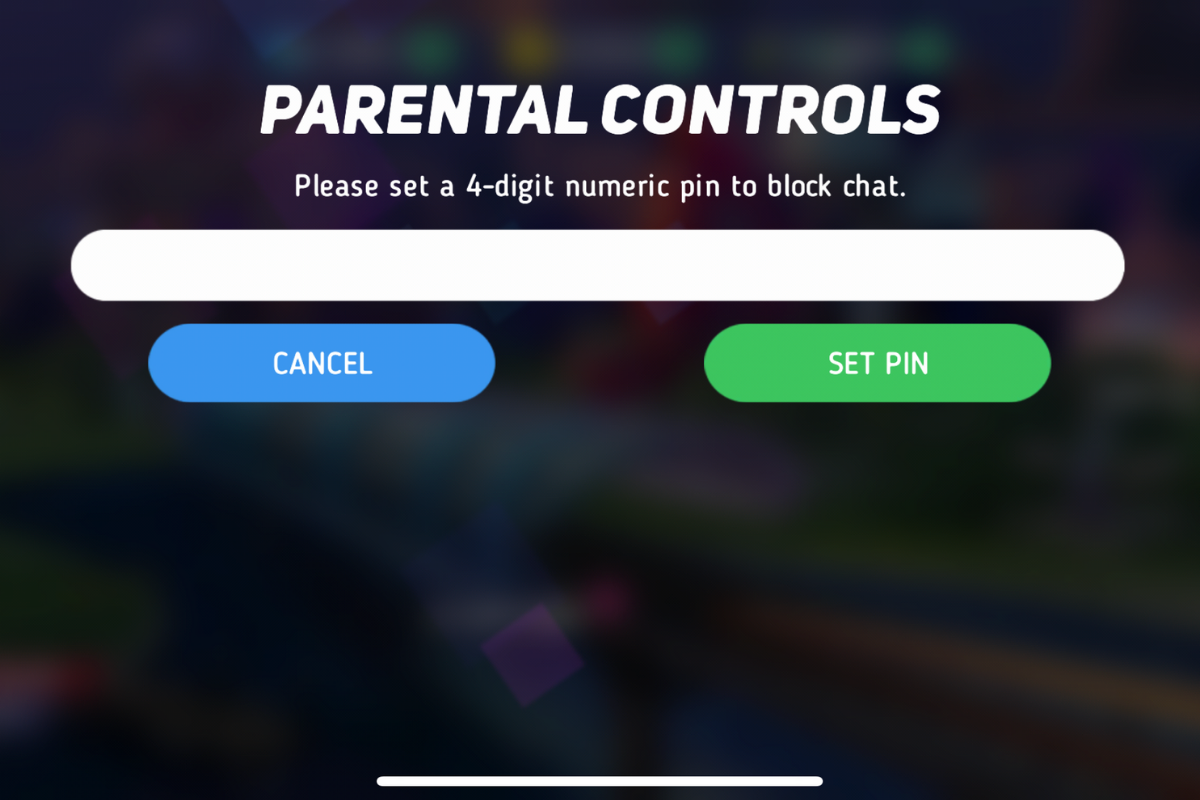
I was contacted this week by a parent who was shocked to find that adults had been chatting with her young son in Disney Heroes, Battle Mode, an app rated 9+ in the Apple App store. She sent me screen shots in which players were asking her son if he was a boy or girl. They asked how old he was and where he was from. One of them even confessed, “I am not a kid. LOL.” Obviously, when his mother found these messages she was extremely concerned, she removed access to that game and set some limits for their whole family for a while. Then, just a few hours later I received a link from a concerned parent about an app in which people are posing as employees of the game company and asking children to send pictures “without a shirt on” to prove their age. She asked if this was true and my response was that yes, these things are happening every single day. Here’s why these predators can gain such easy access to our kids.
After hearing about the trouble with Disney Heroes Battle Mode I downloaded the app to see what it was all about. After a short cenimatic and then playing through the tutorial you get a notification that the app has purchases built-in and that you shouldn’t be under 13 (app is rated 9+ in the app store. if you want to play. I simply tapped continue and moved right past the warning. No age verification, no password, no face id, nothing. Once in the app I started looking through the settings. I did find controls for the chat feature, including a password protected on/off toggle for chat access. This was good to see, especially since the issue I was researching had to do with chatting.

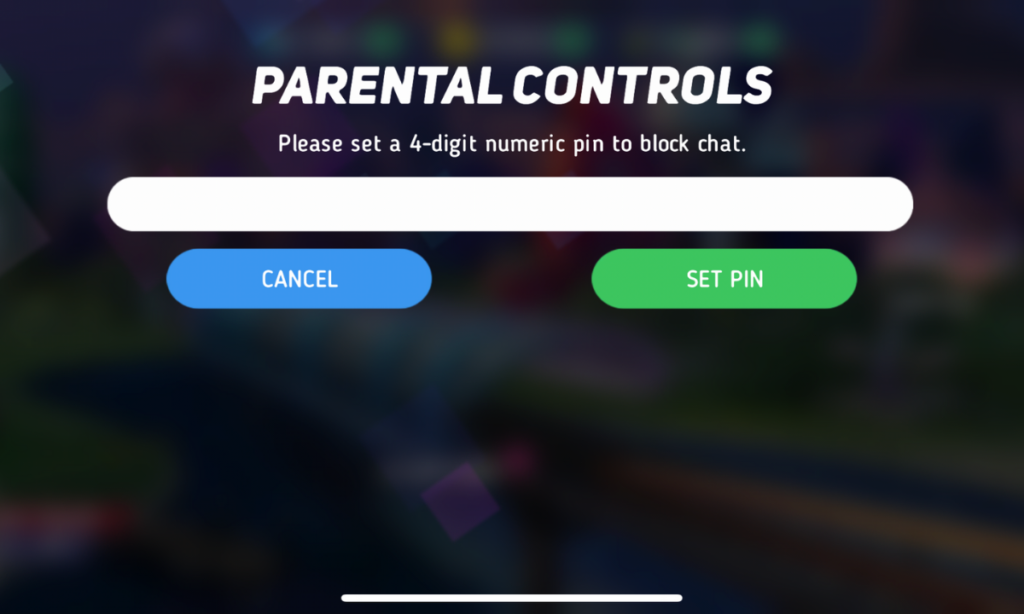
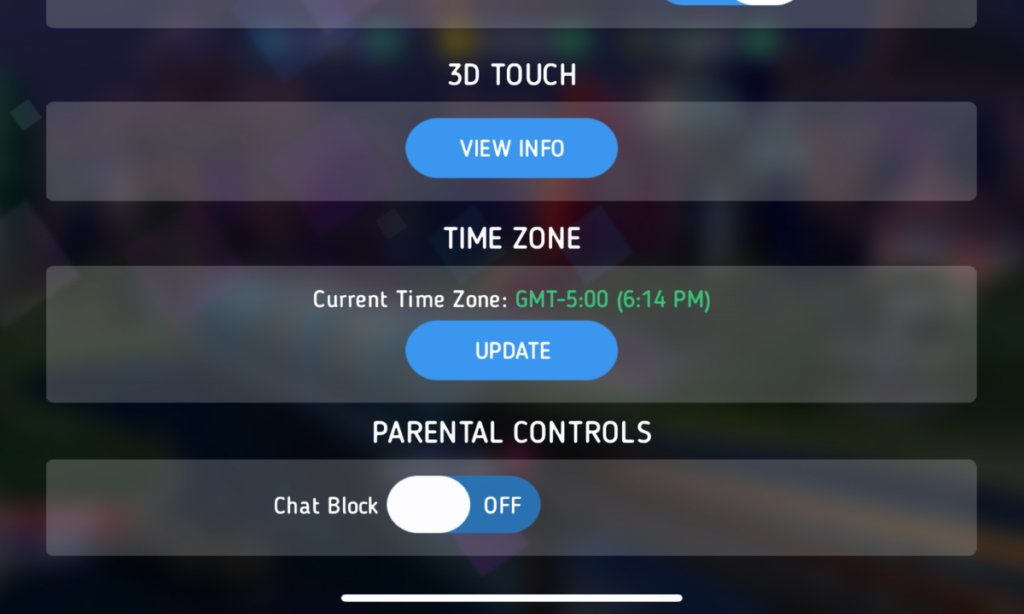
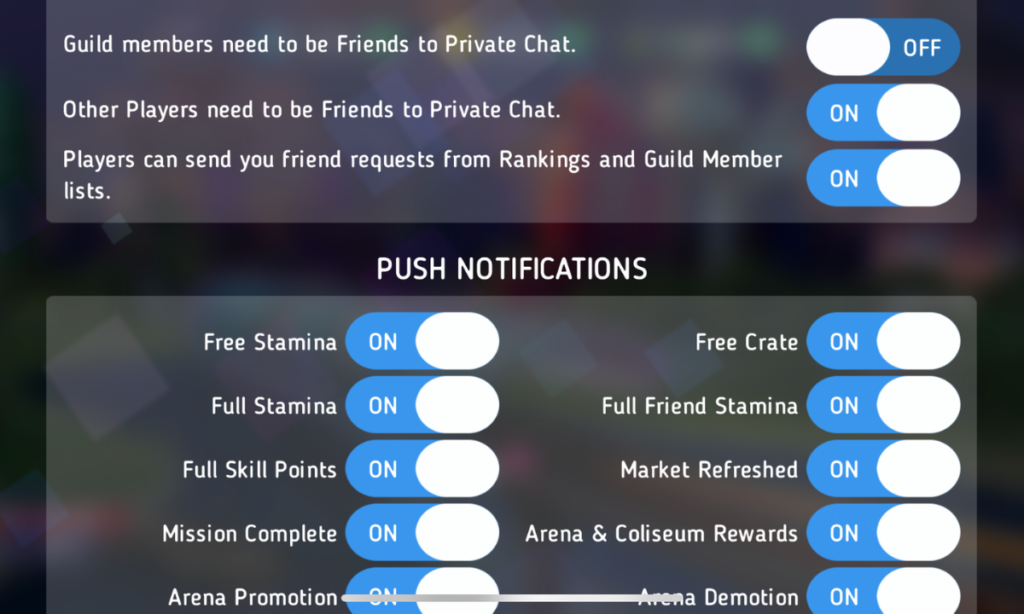
The problem is that apps like Disney Heroes give parents a false sense of security. The app is made by Disney, the company’s name on anything makes many parents think that the product is made with their kids’ health in mind. This could not be further from the truth. Disney is out for exactly what every other major corporation is out for, their financial bottom line. We have to remember that data is big money and apps that are made for kids collect just as much data as any other app. Data that is personalized to a user is worth more money which means app developers need users to make an account to sort and identify their data more easily. The easiest way to convince app users to create an account is by making it the only way they can chat with friends in the game.
I recommend taking a look at the game your kids play on their pones or tablets. Just because the game features cartoon characters doesn’t mean there aren’t adults playing the game. If the game has a social feature like chat or friend-mode you can be sure that your kids will be contacted by strangers. Look in the settings, preferences, or options of the games to see if there is a way to turn off chat mode. If they don’t allow you to disable social features, I would uninstall the game and encourage your child to find a different game to play.
We must remember that the companies that make these games offer them for free because their money comes from in-app purchases and advertising. In order to make money they have to keep people playing the games as long as possible. Research shows that there is no better way to keep someone in your app than social engagement. People will be sure to keep coming back if they have friends in the game to play with or against. This means that they will continue to put these social features in their games and while app stores may rate these games as safe for younger children, my rule is that if it has a social element it should be for kids older than 13. Even then you should ensure that you child understands what they should do if they are approached online by a stranger and encourage them to tell you if someone makes them uncomfortable in any social engagement online. We can do our best to protect them from this software but nothing is more affective in preventing these dangerous encounters than teaching them how to recognize them and end the conversations immediately.
Podcast: Play in new window
Subscribe: Apple Podcasts | Spotify | RSS

Ninja (Tyler Blevins) switched his streaming content over to Microsoft run “Mixer” on August 1st and has been migrating his viewers over to the service over the past couple of weeks. He took to Twitter to express his disgust over the fact that Twitch was running ads for other streamers on his channel’s landing page. The disgust didn’t stop there though, somehow a channel that was showing hardcore pornography was featured on Ninja’s page and this made him understandably upset. Again, Ninja posted about his frustration on Twitter and the CEO of Twitch was quick to apologize.
There is a lot of discussion in the gaming and streaming world about who owns the channels that streamers use to broadcast and who should be able to decide what is aired on the channel when the streamer isn’t live. Obviously, this affects you, as a parent in several different ways. First of all, your kids are likely going to be watching Ninja over on Mixer now. Secondly, you need to know that pornography can show up on these live streaming services very easily. You also should be aware of the money and politics currently involved in the video game streaming industry. It’s a major business now, and your kids are the target consumer.
Mixer started out as “Beam,” a streaming platform that claimed to offer a better service and higher quality streaming ability that competitor Twitch. In 2016 Beam was purchased by Microsoft and in 2017 Beam was rebranded as Mixer. The service still works to compete against Twitch but claims to offer a better ad share program to gamers as well as a better viewing experience for fans. The service has already made a few deals with pro-gaming leagues and now has acquired Ninja as an exclusive streamer on their platform. Just like Twitch, Mixer offers multiple types of streams including video gaming, tabletop gaming, vloggers, IRL (in real life), podcasts and more.
Since being purchased by Microsoft, Mixer is now available on Xbox, and on Chromecast and other streaming devices. It is becoming more and more popular and Ninja’s exclusive contract will guarantee even more growth. Twitch is suffering the same fate that many market leaders share. It can be difficult to balance making the kind of profit that a company that size needs to operate and keeping the same charm that your service had when it gained all of the popularity that you profit from. It seems that there is room in the video game live-streaming market for another service.
Video game streaming and esports are some of the fastest growing forms of entertainment ever. Advertisers are jumping on board and monetizing every minute your kids spend watching other people play video games. When you think about it, the video itself is a form of product placement for the game they are playing. When advertisers get involved, things often get messy. Content creators get tired of their media being turned into a way for someone else to make money. This makes them go look for a better deal. This is what has happened with Ninja.
You need to be aware that when people broadcast on live-streaming services there is usually a live chat going at the same time. Your kids can be in contact with strangers from all over the world. Also, it is very difficult to keep inappropriate content off of live streaming channels due to the fact that is being broadcasted in near real time. You should know what your kids enjoy watching on Mixer, Twitch, YouTube Live, and any other live-streaming platforms they watch. Know that many gamers use adult language and discuss adult topics on their streams. Most of the time those apps are rated 17+ because of the potential for adult content. Keep that in mind when deciding what you allow your child to watch online.
Podcast: Play in new window
Subscribe: Apple Podcasts | Spotify | RSS
Facebook Messenger kids was created to give children a safe place to communicate through text, stickers, video, and gifs with friends that are pre-approved by their parents or guardians. This week, however, the kids’ messenger app has had to send notifications to thousands of parents about their children having access to strangers in the app.
What happened is that a technical error allowed kids to create a group message with friends who would then invite their own friends who, while approved for them, may not have been approved by the parents of the first child. Confusing? Ya, this is possibly why the flaw was even possible in the first place. Facebook says they have alerted parents whose children may have had this type of interaction and that they’ve disabled any chats that were created, using this flaw. The story isn’t over, though, as some are calling for the FTC to look in to the error since it may have resulted in a COPPA violation.
The moral of this story centers around trust. It is important that, while we may trust our children, we can’t always trust who our kids are in contact with. We definitely shouldn’t blindly trust the companies who make the hardware and software that our children are using. When our kids use an app like Messenger Kids, the whole point of the app is that it gives parents control. When the control is hindered, even by a “technical error,” that is a severe violation. We can, however, take actions to protect our kids from dangerous effects that could come from these errors.
I recommend having a copy of the messenger kids app on your phone logged in to your child’s account. My wife and I are each logged in to one of our kids’ messenger kids apps and can see when they get messages and what the messages are about. We are notified when they receive a message and can look to see who it is from and even read it. I have, a time or two, jumped into the app to tell a friend to stop messaging since my son was past his allowed time for social media that day. I received a “yes sir,” and there were no more messages until the next day. We also use BARK to monitor their messages and alert us of any dangerous or inappropriate content.
Parents are gate keepers. Our job is to be sure our kids are growing up with guidance through every area of life. If they aren’t being taught how to manage social media and internet use safely then they will struggle to make healthy decisions when they are older. Messenger Kids is a good tool to help your kid learn the right way to use a messenger but it won’t work if you are uninvolved, pretending that the creators of the app only have your kid’s best interest in mind. The truth is that they want to provide you a service to make a profit. We cannot overlook that. It is our responsibility, and ours alone, to teach our kids how to be safe online. We should take it seriously. We should hold companies accountably when they have errors that put our kids at risk but ultimately we should be the ones making sure our children are protected on every app, site, and software they use.
Podcast: Play in new window
Subscribe: Apple Podcasts | Spotify | RSS

Last week everyone was posting pictures of themselves looking older or younger. They were all using FaceApp, an Android and iPhone app that uses AI to change your face to make you look older or younger, change your gender, and all kinds of different things. Then, suddenly everyone who had been posting pictures of themselves began sharing articles about the privacy dangers of FaceApp. What is true? What does FaceApp do with your pictures? Should we use apps like this? Here are the answers I found.
One of the major concerns due to political news lately is that all of these pictures have been stored by the Russians since the company that makes FaceApp is in Russia. The truth is that these pictures are stored on servers owned by Google and Amazon. Many of the photo apps you use including some of the social media apps you frequent use the same server companies to store your pictures and posts. There is no evidence to suggest that your images are being collected by the Russian government or even companies in Russia.
The face app privacy policies state that photos uploaded to their servers are usually deleted after 48 hours. They do state that some photos may be kept for analytical purposes but that they are not sent to the FaceApp companies. These photos are used by the artificial intelligence to make it smarter and help it do a better job of editing photos for people.
The policies of FaceApp do allow for them to give your photos to other companies “in their network.” Again, they say that this is for analysis purposes and not data tracking. They also say that they’ll give your photos to law enforcement if requested through legal means.
The company that makes FaceApp says that 99% of their users don’t login to the app. That means there are no ways for them to have your personal or identifying information. The only thing that they collect in those cases are your photos. If you have location settings turned off for your camera then there isn’t much personal data that can be gained from the images. All they actually have is a picture of a non-identified person’s face. Also, FaceApp only uses the photos you tell it to upload. Not your whole camera roll.
“…please note that we may transfer information, including personal information, to a country and jurisdiction that does not have the same data protection laws as your jurisdiction.” FaceApp Privacy Terms
The only major difference between FaceApp’s privacy policies and those of Facebook and Instagram are how much terminology they use to describe them. Personal data and photos are basically handled the same way by all these companies. You may consider it more of a fair trade off for Facebook and Instagram to collect your data in exchange for the services they provide. You also may be less inclined to be worried because of Facebook and Instagram being from the United States. Either way, your data is being used in the same way by all of these companies.
These instances of public outcry about the privacy policies of an app or a company are a great time to be reminded of the importance of thinking before you share. The truth is that everything, once shared on the internet, is public domain. It belongs to every citizen of the web and not to you any more. This should govern every choice you make on every site you visit and every app you use. If you wouldn’t want the whole world seeing that photo of you, your child, or your spouse, then you shouldn’t share it. If what you are about to post as a status would put your security in jeopardy then you shouldn’t post it. If you aren’t sure about a company or an app that is asking for your personal information then you shouldn’t give them your personal info. It is very simple. Just think before you fill out an online form. Think before you share a photo. Think before you past your thoughts about anything and everything.
The issue isn’t where your information is stored. It is the fact that you share photos, phone numbers, credit card numbers, and even your social security number like it is no big deal. You don’t have to be an internet security expert, you just have to pause and think.
Podcast: Play in new window
Subscribe: Apple Podcasts | Spotify | RSS

Researchers in Montreal have spent the last four years studying nearly 4,000 students and their screen time. The study was looking for links between self reported depression symptoms and uses of different kinds of screen time. The types of screen time studied were social media, television, video games, and computer use. The study used annual surveys to sample students in the Greater Montreal area in 2013-2018 and the results were analyzed in December of 2018.
The study found a substantial depressive symptom increased for every hour spent on social media, computer use, and even for television. Adolescents reported more cases of comparison to others because of their use of social media, leading to depressive symptoms. The study concluded that “Both screen time modes (social media and television) should be taken into account when developing preventative measures (for depression) and when advising parents.”
There has been a lot of research concerning screen time and the health of our children. This study is interesting because they chose to separate the types of screen time in order to try and identify if one type or another has a greater impact on the mental health of the children studied. There are a few things that stood out to me as I read this study. First, video games didn’t seem to be a determining factor for depression. While video games can cause other issues, it seems that the direct comparison or contact with others available through social media and even some of the stories on television create the atmosphere for decreased self satisfaction and can lead to depressive symptoms. While many kids between 7th and 11th grade can falsely report feeling “depressed” just because of their stage of life, this study found a pretty significant correlation between the subjects’ symptoms and their screen time activity.
Secondly, their approach of separating types of screen time should become a new standard for this type of research. Researchers are finding that the amount of time your kids spend on a screen can have varying affects based on what it is that they are doing. This study supports that approach by proving that some categories of screen time affect depressive symptoms in different ways. Finally, the final sentence of the conclusion supports the idea that screen time should be taken into account when developing preventative measures and when advising parents. Psychologists, doctors, and counselors should be considering, not just the amount of time kids spend on their devices, but exactly what they are doing. Parents should be considering those same things.
Your son may play a ton of video games and you’re worried about anger or lack of social skills, those worries could be valid and more research is needed to identify if video gaming is, indeed, a factor. Social Media use is proving to be a determining factor in the mental health of young teens as they age. Our kids are exposed to so many ideas and so many different environments at such an early age that we, as parents have to be the gatekeeper for what enters their minds. We have to help them guard their hearts and properly interpret their emotions. If kids are seeking help from other kids, they aren’t getting the mental health advice that they need. We parents should provide a safe space for our kids’ to express how they feel. We should then be willing to make arrangements to get the professional help they need if necessary. Parents can’t ignore our children’s feelings, we have to take them seriously and make every effort to support them in exploring their own mental health.
Podcast: Play in new window
Subscribe: Apple Podcasts | Spotify | RSS