Blog

  • Meet Sprinkles, Microsoft’s New Fun Camera App

    Meet Sprinkles, Microsoft’s New Fun Camera App

    Here’s what you need. You need a new camera app that will allow you to put text, stickers, and emojis on top of your photos. That’s what we all need, right? What? You already have six apps on your phone that do that? Well, nobody told Microsoft because they’ve just released their own. Ignoring the fact that they released it on April 1st (it’s still there so no, not entirely a joke) we should spend some time looking at what this app does and who the target audience is. 

    First of all it’s just a camera. This is not a photo sharing app with a built in social experience. When you take and edit your photo you can share it on any of the social media sites you have connected on your phone but there no native sharing system. The app uses a basic AI (artificial intelligence) to recommend what you could put on your picture. The choices are mostly text overlays and are based on what you took a photo of. You don’t have to post what it recommends, you can add your own text, stickers, or emojis by swiping the screen and hitting a few buttons.



    What Parents Should Know

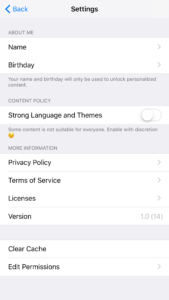
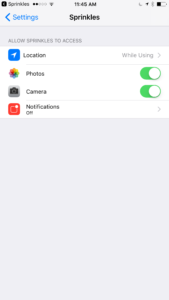
    This app is geared toward young users. The quotes or sayings are silly and there is a high volume of illustrated overlays and emojis to chose from. This app could be a good option for kids who want to take photos and put silly stuff over the top but shouldn’t share online. Just be sure to look at the settings by clicking the gear in the top left of the camera screen. The settings will give you the option to activate or deactivate more mature overlays. (Mostly language.) You can also set the permissions it has, such as location and notifications. You can enter your name and birthdate to allow the app to recommend certain overlays on your special day or with your name on them. Remember that photos taken on this app are scanned so that overlays can be recommended. Encourage your children that even if they aren’t posting online, they don’t want to take a photo of something they don’t want anyone else to see. It is a good idea to familiarize yourself with this app if you’re going to let your younger kids use it. Take it seriously, even though it was released on April Fool’s Day.


  • Adolescent Neuroscience and Online Safety

    Adolescent Neuroscience and Online Safety

    You hear it all the time. “Kid’s these days.” or “I just don’t get teenagers.” There’s a myth that our teenagers are becoming more and more selfish and entitled. In reality, however, adolescence is nothing new. William Shakespeare wrote of the craziness of the teen years in The Winters Tale,

    I would there were no age between ten and three-and-twenty, or that youth would sleep out the rest; for there is nothing in the between but getting wenches with child, wronging the ancientry, stealing, fighting.

    Teenagers of “the good ol’ days,” while they may have had jobs earlier in life or were thrown into battle before they could legally buy a beer, were still teenagers and dealt with the same issues as our kids do these days. The issues may be highlighted these days by the availability of technology and the hyper-connectedness of our culture. Young people have the entire world at their fingertips and can have face to face type interactions with anyone from anywhere. This is what is new and some recent studies in neuroscience have shed light on some of the biological reasons for a teen’s selfishness, risk taking, and lack of self control. Watch this Ted Talk from neuroscientist Sarah Jayne Blackmore.


    What Parents Should Know

    You, most of all, should be encouraged that your teen is just like every other teen. Their outbursts and seeming lack of responsibility is largely based on biological reasons. They aren’t stupid or handicapped, they are developing and this affects their behavior, especially online. A book by David Walsh called Why Do They Act That Way? reminds parents of the “use it of lose it” factor of brain development.

    During development your brain synapses are growing and they literally have to connect to each other in order for you to learn something. During the development of adolescence if you are not guided into proper choices the synapses in your brain will never connect. This means you could struggle with those types of decisions for the rest of your life. With the advent of social media and our dependency on screens for entertainment this necessity for guidance in healthy behaviour is even more evident.

    When your son or daughter tells you that they want a smart phone because all the other kids have one, this is an opportunity to help their brain develop a proper attitude. When your 13-year-old son has been watching YouTube videos for six hours a day setting time limits on your Wi-Fi is helping him practice self-control. When your daughter received a message from somebody she doesn’t know and you see it on your monitoring app and immediately tell her to block that person you’re teaching her how to make good decisions.

    Let this post encourage you. You are the mom or dad, and it’s up to you to help your young adult grow to be a contributing member of society. Their biology can get in the way but your guidance can show them how to make the right decisions. Hang in there, keep doing the hard stuff, we’ll keep giving you the info you need.

  • Facebook Creepers Beware!

    Facebook Creepers Beware!

    Anonymity on the internet is and has always been a myth. Facebook, however, has become a place where people can search for others and learn all about their lives without revealing their creepy behavior. Facebook’s new Stories feature is changing that a bit. In a move to keep and attract younger users Instagram and Facebook messenger added their own version of Snapchat’s stories. That feature has now been rolled out to the main Facebook app and it gives people an way to see who’s been watching. 

    Facebook’s stories are photos and videos that post in vertical-full screen format on your phone. They last only 24 hours and you can add text or drawings on the screen and the in-app camera has filters, masks, and overlays that you can add to your photos as well. There is also an option to see who looked at your photo or watched your video. This is a major difference for Facebook since the standard has been to go see what folks are up to with no threat of them finding out you’ve been watching. This may be good news for you because you don’t like the idea of people looking at your stuff without you knowing. Or, this may be disturbing because you, my friend, are the creeper. 

    What Parents Should Know

    Facebook is trying to become a real social media contender for young people again, so parents should be keeping tabs on the moves their making. The stories on Facebook add another way for people to show the reality of their life and world which is what your kid or teen likes to see and do on social media. You should encourage your son or daughter to keep an eye on who’s watching their story. Let them know that the feature is there and that if they’re using Stories they should go check out who’s been following their Story.

    Remind them, also, that anonymity online is a myth and that everything that is posted online can be there forever. Just because their Story disappears from Facebook after a day doesn’t mean it’s truly gone. Screenshots can capture an image and then it can be uploaded anywhere else on the internet. The rule should be that you never post anything on the internet that you don’t want the entire world to see and that you don’t want to be there forever. I say that these rules are good for us to teach our kids but some of us parents may need to remember these warnings as well.


    Get Our Latest Posts in Your Inbox


  • PODCAST: Why is the Instagram Search Bar Recommending Porn

    PODCAST: Why is the Instagram Search Bar Recommending Porn

    The Wishbone App could be an bad idea for your tween daughter. Apple is making some changes in the app store. Amazon Prime Video now has parental controls. What can you learn from search bar auto-fill terms?


    Video Version

    – Social Media Links

    Facebook: http://facebook.com/4pointfamilies
    Instagram: http://instagram.com/becausefamily
    Twitter: http://twitter.com/becausefamily

    – Newsletter Signup

    Ministry Updates:: http://eepurl.com/R7Btr
    Weekly Blog Posts:: http://eepurl.com/cvnhXD

    – Websites

    Ministry Site:: http://becausefamily.org
    Tech Blog:: https://safe.becausefamily.org
    Michael’s Speaking Info:: http://kmichaelprince.org

    – Donate and Affiliate Links

    http://BecauseFamily.org/partnership

    Music by Kevin MacLeod at http://Incompetech.com

  • What Can You Learn from Search Bar Auto-Complete

    What Can You Learn from Search Bar Auto-Complete

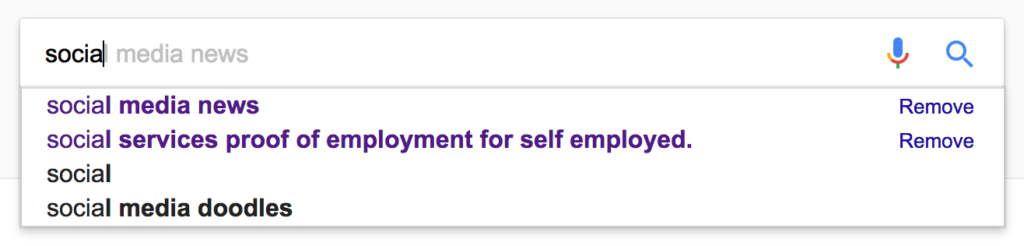
    I have no better advice for parents than putting your eyes on the devices your kids use as often as possible. As long as you’re communicating with your child it isn’t spying to take a peek at what their friends are posting on social media or what they’ve been searching for in their web browser. I do not, however, advise that you let yourself get too worked up over the recommended search results or auto-complete results in the social media apps your kid/teen uses. It can be frightening to type in a couple of letters and get a dropdown full of accounts you’re unsure of or search terms you wouldn’t want them to be searching for. The initial reaction of parents is usually to be concerned that this means their child has been looking for something inappropriate in the past. That isn’s always the case and I’ll try to explain why.

    Instagram, Facebook, Pinterest, and other photo or video sharing sites use algorithms that combine your past searches, popular items on their site, and your location to recommend the search results that may interest you. I don’t recommend parents take suggestions from these apps as evidence that their child was doing something inappropriate. You can, however, on many of those sites go find a search history and actually see what they have typed in the search bar in the past. This information is also deletable though. Regardless, looking at the search history is a much better way to monitor what your child is doing on these sites than assuming something from the first two letters you type in to the search bar.


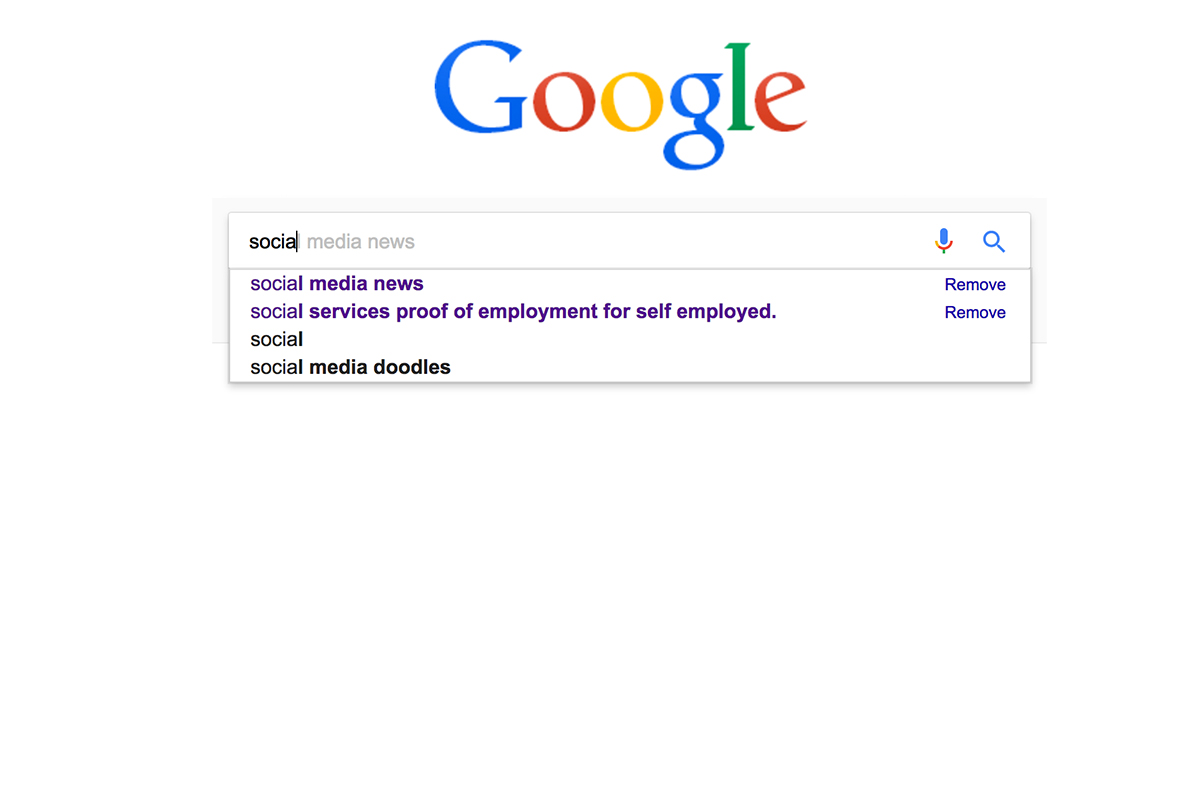
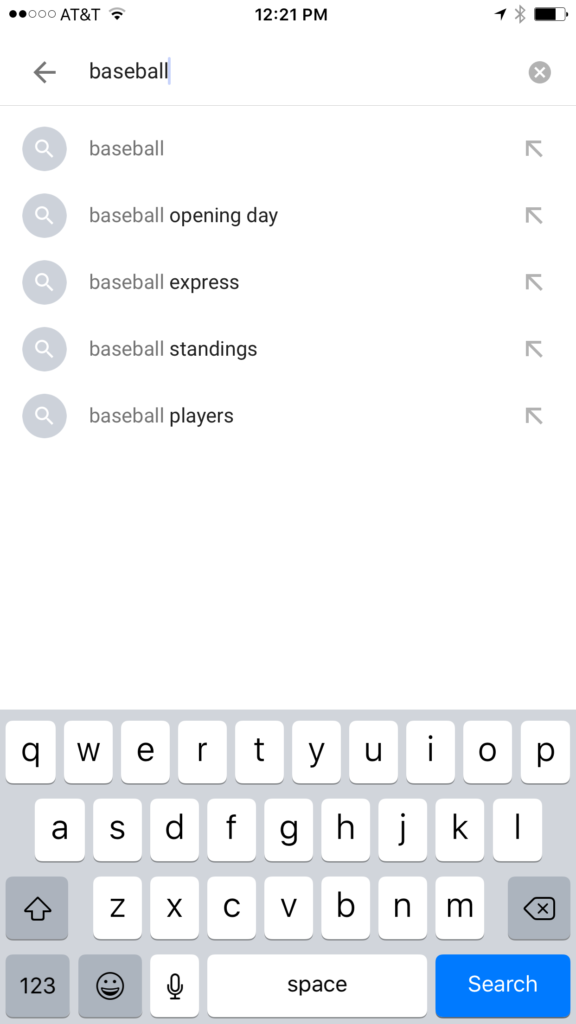
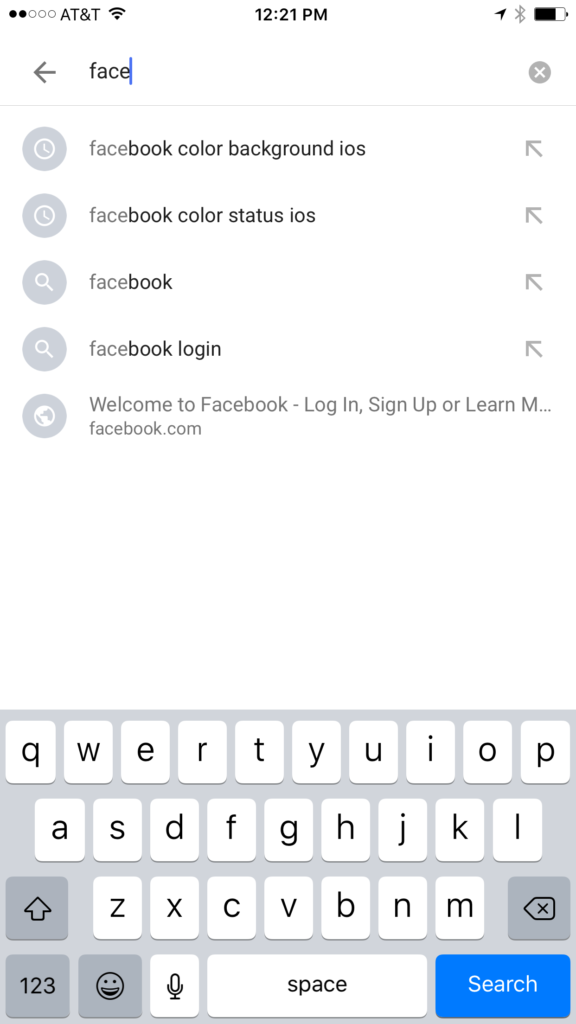
    Google and YouTube are the two most popular search engines on the internet. Thankfully, they’re a bit easier to monitor. The Google app has identifiers to help you know why it’s recommending certain things. You’ll see a clock icon if the recommendation is from search history and a magnifying glass icon if it is just recommended based on other data. On your browser the auto-complete results are a different color and you receive an option to remove them if they’re from history. YouTube, being a part of Google, uses the same methods to identify auto-complete search items.


    What Parents Should Know

    There is a lot to consider when you’re trying to monitor your child or teen’s online activity. Because so much of the internet is now consumed with photo and video sharing it goes without saying that some of the content you wouldn’t want your child accessing makes it’s way to those platforms almost immediately. This being said, there are better ways to monitor than trying to creep through search histories. I recommend using a good accountability software like Accountable2You or a filter like NetNanny. Another option is to install the social media apps they’re using and get to know how the search bars work for yourself. Find out if it’s using your history to establish the items it recommends for you or not. As you get used to it you’ll be able to get a better feel for what’s happening in your child’s account when you check their device.

    Remember that communication is key. Your kids should know you’re looking at their devices and social media accounts. Rules are good but without conversation and relationship they create conflict. Your goal is to set boundaries that will help your children develop healthy habits. A healthy approach to monitoring and regulating their internet usage will speak volumes to them about your family’s online safety standards.


  • Apple’s App Store Changes May Cost You a few Bucks

    Apple’s App Store Changes May Cost You a few Bucks

    One of my favorite things to do on my phone is search the App Store. I enjoy seeing what new releases are out, what apps might be discounted, and what apps I should add to my wish list. I often download an app to try it out just because I can easily see that it’s free. Apple’s new rules will block App developers from putting price information in the titles of their app. 


    This change means that apps that produce a free version won’t be able to use the title to illicit more installs. The game of making money through mobile app development has taken many turns over the past several years. You may have noticed that most of the top grossing apps are considered “Freemium” which means downloads are free but they sell content to you within the app. Having FREE in the title has long been a useful strategy for this type of software. Eliminating the price in the title could decrease the number of downloads for these apps and in turn, they’re revenue.

    Please remove any references to your app’s price from your app’s name, including any references to your app being free or discounted. If you would like to advertise changes to your app’s price, it would be appropriate to include this information in the app description. – App Store Submission Rejection Notice 

    These changes will immediately affect new apps being submitted to the App Store. There is no word if changes will be required for apps that are already listed in the store.

    What Parents Should Know

    We have all started to get used to the freemium model of app development and how to educate our kids about it. This update could change a few things. First of all it may not be as easy for younger kids to know if the app they’re looking at is free or costs something. Of course the price is listed right next to the app but this wouldn’t be the first time a kid accidentally spent some of their parent’s money.

    Secondly, if developers aren’t gaining more installs they may be required to raise prices on their in app purchases. This would mean that apps you may pay a little bit for would cost you extra. Alternatively, you could end up with fewer freemium apps and more that just charge you upfront for initial access.

    Whatever the result of these changes by the Apple App Store, the most important thing is, as always, that your children understand what has happened and know how to navigate the store properly. Teach them that money spent in these apps is often real money and usually your money. Set up your parental controls so that they have to ask permission to install anything. This will help you keep your money safe as well as your children.

  • Amazon Prime Video Jumps on the Parental Control Bandwagon

    Amazon Prime Video Jumps on the Parental Control Bandwagon

    Our children get access to media through streaming content more than any other method. Many of the streaming content providers have allowed parents to protect their children using parental controls. Amazon prime video has just added that feature as well.

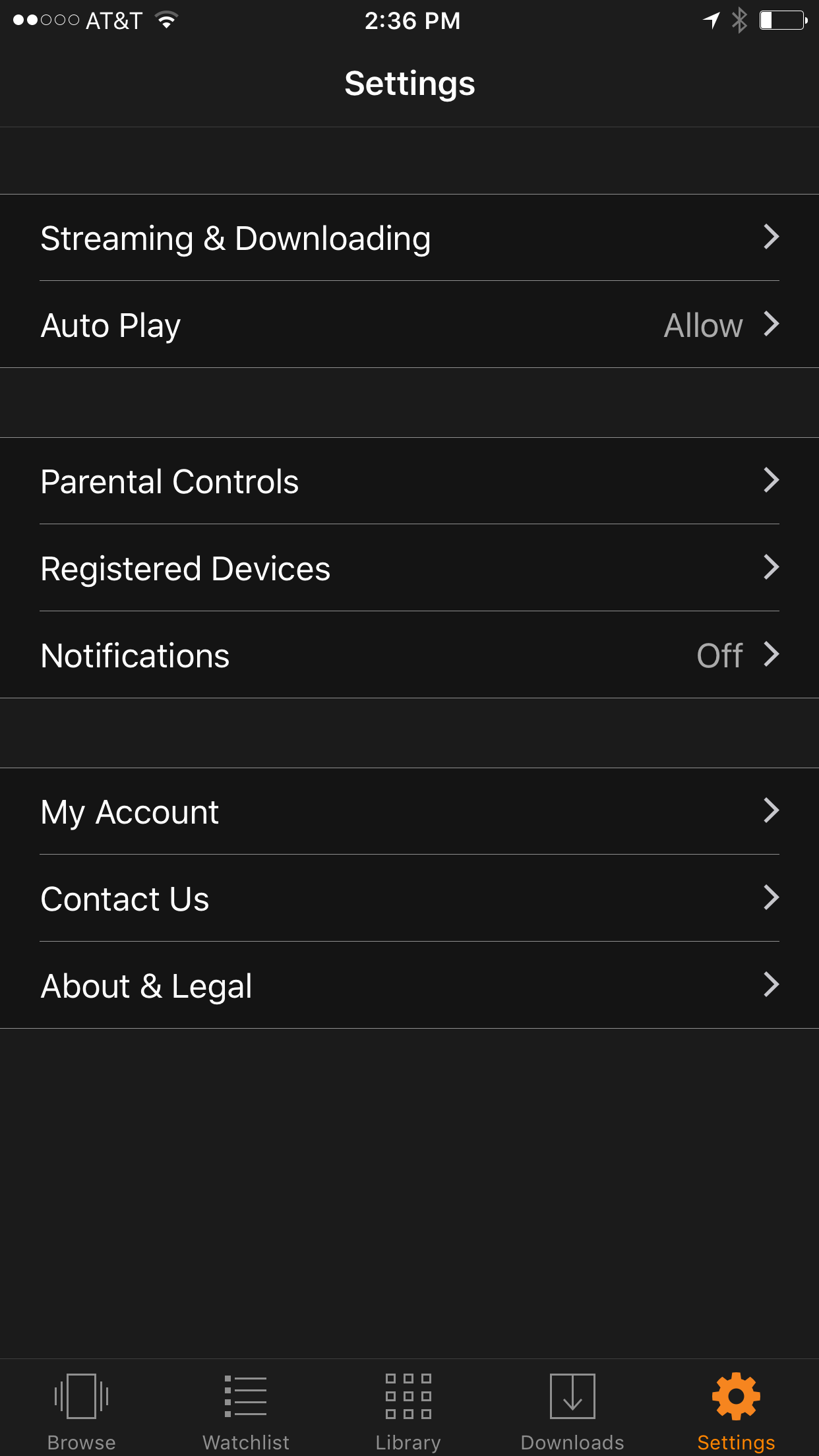
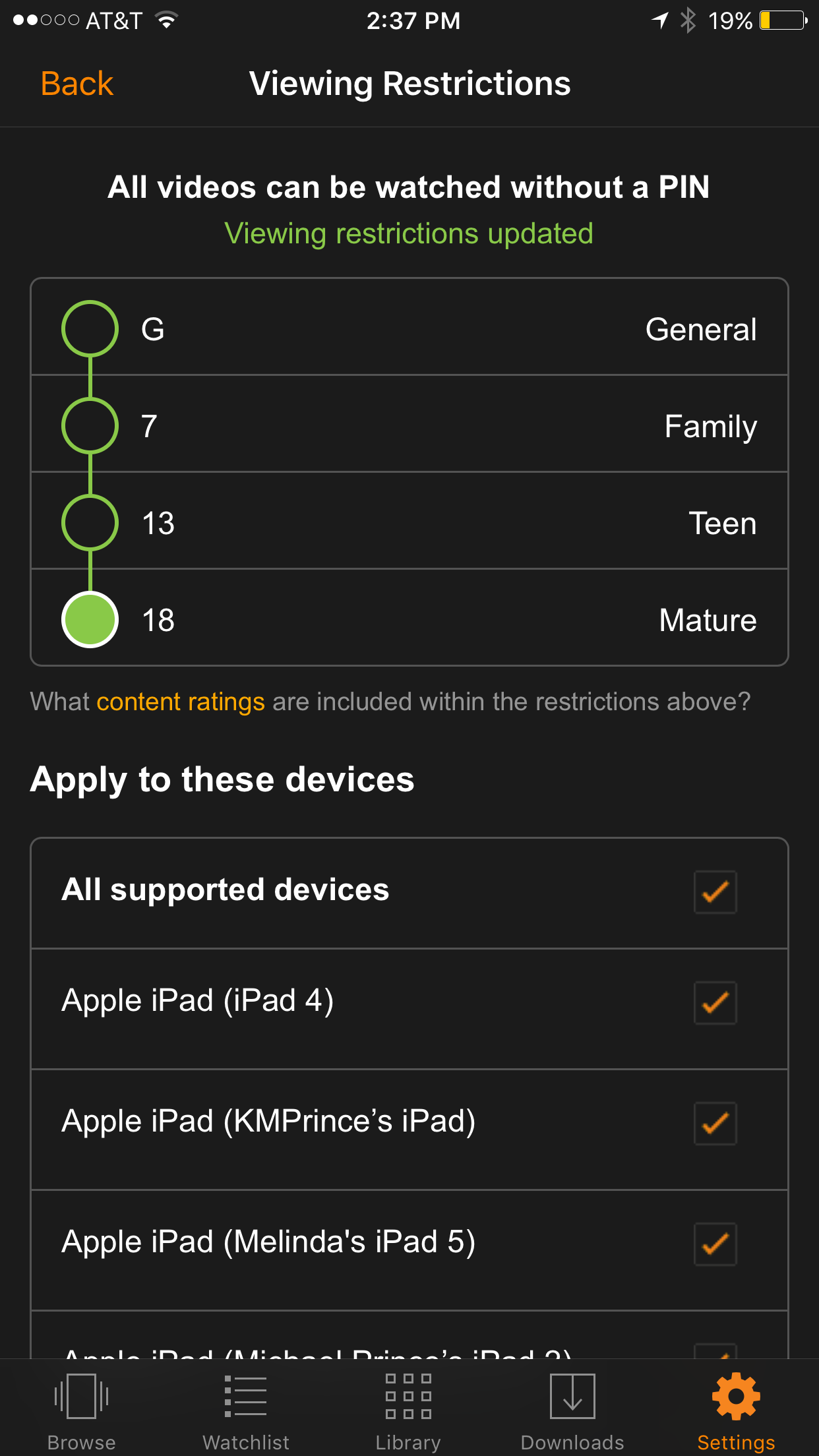
    We recently cancelled our Netflix subscription and switched over to Amazon prime because many of the shows our children enjoy have moved over there as well. Now you can ensure that your kids are only seeing shows intended for their age group. It’s really simple to set up; the photos below will show you how. (Photos show the iOS app, Android may differ slightly.)

    Go into your settings and tap Parental Controls.

    Set your desired age restriction and what devices should be included in the restrictions. 

    On iPhone you can also set up your Touch ID to bypass the settings when a video above the age restrictions is selected.

    What Parents Should Know

    Parental controls are a great feature but it’s also important to know what your children are watching. Parental Control settings batch all children’s programming together. It may not take into account the fact that some kid’s shows are geared towards older kids while others suitable for your preschooler. Kid shows, while not containing gore or sexual content, may still have violence and even some language at times. You should know what shows your kids like and why, I advise you even sit down and watch the show with them every now and then.


    Get Our Latest Posts in Your Inbox

    * indicates required


  • What’s the Story with Wishbone?

    What’s the Story with Wishbone?

    Wishbone is a polling app at heart. It pits one thing against another and lets you vote on how certain things make you feel. It features photos and whichever photo you select registers a vote. All the votes are tallied and you instantly see if you sided with the rest of the people using the app or not. You can tell very quickly that wishbone is geared towards young teen girls. The app features mostly fashion, celebrities, and food.

    You might see a picture of a dinosaur and be asked, with emoji’s, if it would make you happy or scared. It may have a picture of Ariana Grande and Britney Spears and say who is the best popstar. The app pits types of food, types of pets, all different things against each other than asks you to state your opinion. There are comments sections for each of the posts but most of them are filled with people asking you to follow them. There’s actually very little conversation about what the post is featuring.

    You create an account and are immediately asked to begin voting. Based on some of the earliest votes you get suggestions of people who you should follow. There are some geek type accounts and accounts such as “I love to read.” Most of them, however, are geared towards the younger girls. The app keeps track of how many votes you’ve cast and how many times something you posted has been voted on. I spent a couple days using the app off and on and I must say it felt rather silly.

    What Parents Should Know

    I wouldn’t say that this app is particularly dangerous. It’s more of a question of how much you want your child to be marketed to. There were obvious sponsored polls and after about every 12th vote you were shown a video ad. The ads were for everything from music player apps, to Twix candy, to some pretty adult oriented iOS games which I mentioned in an earlier post.

    If I had to come up with negatives about this app besides advertising it would definitely be the materialism that it may promote. Much of what you’re voting for are high cost clothing or products and you’re often comparing them to something that may be considered cheaper or less fancy. If you seem to be concerned about your daughter having an entitled attitude I could definitely see how this app would contribute to that mentality

    My advice is to use the app yourself for a little bit. Vote a few times on some polls look around on the app some and see what you think. Is it something your young daughter would enjoy? Could it be something that you would be concerned about them using? Whatever the case, be informed, your children depend on it.


    Get Our Latest Posts in Your Inbox

    * indicates required


  • These Games Let Your Tween Play Out Their Own Soap Opera

    These Games Let Your Tween Play Out Their Own Soap Opera

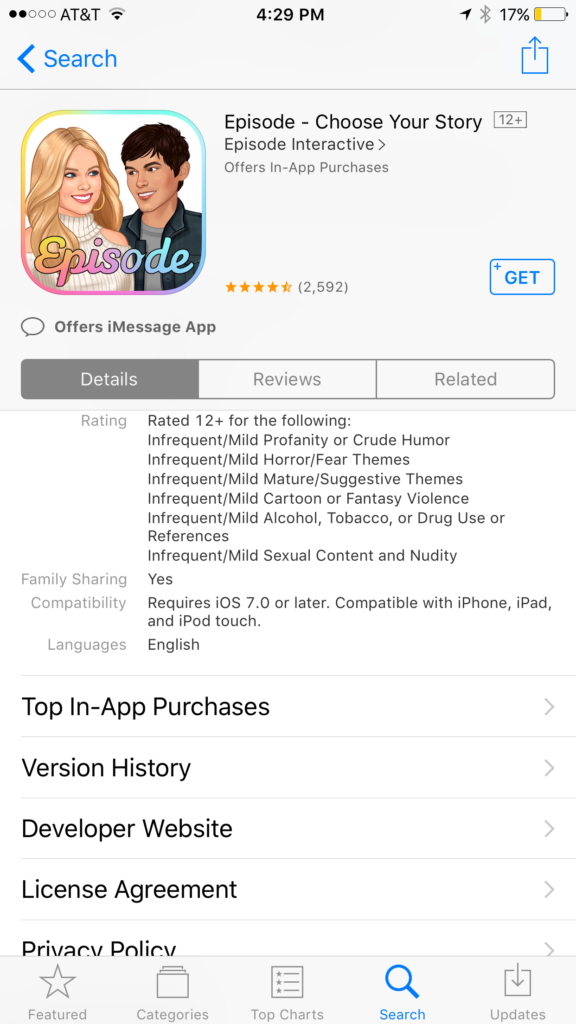
    I was doing research for an app to write about when an ad came up. The ad was for a game called Episode and it featured cartoon animated teen girls in situations that would only come from some mid-day television show. For example there was one girl deciding whether or not to perform CPR on her shirtless and handsome male companion. He winks at the “camera” and she thinks he may be faking so the player gets to chose her next move. “Perform CPR” or “Kiss him to find out.” This scenario is one of thousand available on these games that are developed by a company called Episode Interactive.

    Their apps are all interactive story games that put the player in control of the choices of the main characters. Each app features thousands of stories to play out. The scenarios feature romance, mystery, comedy, family, and a bunch more. The situations that the character is placed in during the stories can often be very adult oriented. Decisions whether or not to have sex. A choice to run away from a potential mugger or try to attack them back. There are some very dramatic and grown up themes in these games. A look at the description will tell you that the games are rated for ages twelve and over for various reasons including, sexual themes, drugs and alcohol, violence, and nudity.

    These games are a choose your own adventure of sorts for the new generations. They target young tweens with the glam of what it’s like to be a teenager or what High School life is like. It’s all obviously very fictitious but our kids buy these messages hook, line, and sinker. Think of apps like this as romance novels that are targeting your ten to twelve year old daughter. I say it’s targeting tweens because the app I was reviewing when I saw the ad for Episode was one that is obviously mostly populated with young girls. Your daughters will believe a message about who they are and what gives them value. Apps like this are speaking to a certain version of that message. We as parents must play defence against the wrong message to successfully teach the correct message.

    What Parents Can Do

    My advice is to make sure your child is far older than the recommended age for these games before you let them play. They are obviously meant to mimic the soap operas of our parent’s days and they feature exactly the same types of themes. The maturity of your child is best understood by you, their parent. It is usually not a good idea to take the age recommendation of an app, game, or other form of entertainment as the law and gospel. You have to use your own judgement. Unfortunately for some kids these themes are mild compared to things they’ve dealt with in real life. But for many of our ten, eleven, and twelve year olds, these games can introduce topics that they may not be mature enough yet to navigate. That’s why it’s so important for you as a parent to step in and see what they’re doing on their phone or tablet.

    Apps like Episode are easy to spot because they don’t hide their themes in the ads on the app store. It’s pretty obvious what they feature in your game. My advice is to use something like Google Play’s parental settings, or Apple’s Family Sharing to ensure you’re seeing every app being installed by your kids. If you see something that looks like it could be a choose your own adventure style of soap opera game then think seriously about the potential questions your child will be asked while they play it.


    Get Our Latest Posts in Your Inbox

    * indicates required


  • Uptime Lets You Watch Videos Together When You’re Not Together

    Uptime Lets You Watch Videos Together When You’re Not Together

    Youtube’s Uptime is still in the invite phase but I got my passcode today and spend some time playing around with it. The idea behind Uptime is watching videos with your friends even when they aren’t physically with you. This app allows you to watch select YouTube videos and leave emoji’s or comments during the video. Your small avatar photo slides around the progress bar, which is a rainbow line that wraps around the video, and your comments or emoji posts show up at the time you sent it during the video. If you’re sitting and watching at the same time as a friend who follows you on the app you can interact with each other as if you were sitting together.

    My initial reaction to the app was that it is a bit cluttered, there are icons and avatars everywhere and it’s a bit difficult to know what to do at first. There obviously aren’t a lot of people on it yet since it’s in invite only so there aren’t a lot of new videos being shared by the community. It’s mostly the ones that are curated by the developers of the app. In fact, while you can search for a video to share, many of them aren’t available to use in Uptime so you’re left kind of having to recirculate the ones that you can already watch. There will be more videos added in the future, I’m sure, so this is just a part of getting into the app during the early stages.

    Your profile is taken from your Google account just like YouTube so, while you can, you don’t have to create a new account. The profile page features videos you’ve shared and a few reward counter icons. It keeps track of how many videos you’ve posted, how many people have liked what you post, how many times you’ve been featured and Sushi. I honestly couldn’t find any information about what the “Sushi” icon means. Uptime currently doesn’t allow premium videos, YouTube Red videos or music videos. This app is taking the it’s que from Facebook, Instagram, and Snapchat’s live video options and giving people a way to enjoy video content together at the same time.

    What Parents Should Know

    First of all Uptime is currently invite only. You can download the app and watch their intro video but then you’ll be asked to submit your email address to get an invite. I entered my email about a week and a half ago and received my invite code today. The invite only phase means it’s not likely being used by most of our kids as of yet. I predict that it will catch on pretty quickly though once it’s fully public. Uptime doesn’t allow videos that are considered age restricted. I did, however, see some videos with adult language and some suggestive themes. I would caution you to remember that their definition of restricted may be less strict than your own. If the app catches on with your kids and their friends make sure you know what they’re watching and learn how to report any videos that you don’t believe are acceptable.

    It will be important to know who your kids are watching videos with and, of course, what videos they’re actually watching. Remember that comments are User Generated Content and can be difficult to filter. In the FAQ, the Uptime app is very clear that when you watch a video and are commenting on it, anyone else who is watching that video can see what you say. Remind your kids that since anyone can join them on that video they should consider it a public place. It is still important to not share personal or location information. It’s important to remember that with all online activity.

    Uptime seems like a novelty that many young teens and teenagers would enjoy. That’s why I’m telling you to keep your eye on it. In fact, if you’d like an invite code I can send you one. Email me at KMichaelPrince@Gmail.com with the subject “Uptime Code.” I’ll send you an invite as quick as I can. Then we can watch a few videos together.

    Also, sign up for our newsletter for a weekly wrapup of all of our posts from the previous five days.


    Get Our Latest Posts in Your Inbox

    * indicates required