Blog

  • Video Chatting Apps You Should Uninstall NOW

    Video Chatting Apps You Should Uninstall NOW

    Chat Roulette was a challenge that became its own website. The idea was that people could log on to the site and be connected with someone from around the world at random. The website isn’t as popular as it once was but there are many apps that simulate that experience and some of those apps are gaining popularity. Here are some of the ones climbing the app store charts. The ranking listed is for the Social Media category in the iOS App Store as of the publishing date of this article. I’ve only listed the live video or random connection chatting apps in the top fifty.

    Melon #14

    Melon is making the news as the latest video chatting fad. It connects you with new people based on social media friends and offers private messaging, video chat, and a people search feature. It’s gaining popularity and being featured in articles that are blasting it for the frequency of cyberbullying and the high concentration of males looking for girls that will do whatever they ask on camera.

     

    Live.Me #16

    Live.Me touts the ability to chat with stars and celebrities and broadcast to anyone all over the world. You can find anyone from anywhere or just look to see who is broadcasting around you. There is also the ability to search by topic or interest. Live.Me uses “gifts” and “diamonds” to allow you to share things with other users and even advertises the ability to “date” virtually through the app.

     

    Monkey #25

    I’ve written about Monkey before. This app was created by a couple of teens who dropped out of high-school to launch a tech startup. It quickly gained a reputation for having too much nudity and not taking some of the responsibility for the content found in the app. This app has been on the FamilyTechBlog uninstall list for a while now.

     

    MeetMe #35

    Formerly called “MyYearbook,” MeetMe is a app that advertises itself as a way to “meet new people.” The app uses your location to find people near you and information that you’ve entered to connect you with people who share your interests. It’s popular in the app store as it’s been around for quite a while and has the largest fan base. MeetMe offers private chat and video chatting as well as live video broadcasting.


    Climbing the Charts:

    YouNow #52

    Live stream video chat is pretty much all YouNow is about. You can broadcast yourself, find broadcasters, and even join the broadcast as a video guest. The app store listing calls for you to build your fanbase and become a YouNow celebrity. There are some complaints on in the reviews about accounts that have been reported for inappropriate content not being removed because they are popular on YouNow.

     

    CAM #56

    CAM is popular because it allows you to select the gender you’d like to chat with. It automatically connects you with someone and even automatically texts an invite to everyone on your contacts list without your permission. This practice has caused it to dip in the standings but some continue to use the app because they like the ability to chat or flirt with people they are attracted to.


    What Parents Should Know

    I don’t usually recommend any of these type of app for your teens or kids. Not only is it dangerous to connect with random people who could be broadcasting whatever they’d like for you to see. It’s also a problem because of the potential for predators. Any connection with strangers is dangerous. Some of these apps use your location to connect you and it’s therefore possible to meet people online that you may meet up with later. My advice is to uninstall any of these apps if you see them on your kids phones or tablets. There is no reason to use one of these apps to connect with friends since you can use Instagram or Facebook Messenger to do that now. Uninstall on sight.


  • Five Internet Safety Mistakes Parents Make

    Five Internet Safety Mistakes Parents Make

    I spend most days trying to help parents make and implement an internet safety plan. Too often I run into hurdles that I have to jump over in order to help them out. Here are five of the most common mistakes that get in the way of parents’ internet safety strategy.

    1. Secrecy

    Parents of older kids want to give their kids freedom on their devices but keep an eye on them at the same time. I’m often asked how to do that without the kids knowing mom and dad are watching. My answer is usually, “don’t do that.” The goal is building trust and a better understanding of responsible technology use and internet accountability. Sneaking around and spying on your kid, while it may seem like a good way to see what they’re actually in to, is an even better way to ensure they won’t ever come to you when they need to talk to someone about what they’ve seen or experienced online. Obviously, if they know you’re watching and you approach them about something you didn’t approve of then they’ll know it’s coming and will be ready to have that discussion. If you have to talk with them about something you caught them doing while you were sneaking around they’ll see that as a breach of trust and you’ll find yourself with a much harder road to travel from then on. The best thing about transparency is that your kids are more likely to make better decisions when they know they’ll be held accountable for those decisions. Telling them you’re watching them can lead to better responsibility.

    2. Giving Up

    Setting digital boundaries is not easy. There will be arguments, sneaky kids, tutorial videos, and lots and lots of research. The key is to never give up. Things change fast and it truly is difficult to keep up. You have to find the resources that you trust that can help you stay informed. You should find the people you know can help you set your boundaries up to fit your needs. You have to keep reading up on what’s going on in the digital world your kids live in. If you give up you will get left behind and that means you’re not keeping your children safe.

    3. Sharing Passwords

    As obvious as this may seem, I have to say it. You must resist the temptation to reveal passwords to your kids. What happens is that kids (especially the younger ones) get tired of what they’re doing very quickly. When they are playing a game and you have it set with guided access or something like it that won’t allow them to back out of the app you will have to be the one who has to switch apps for them. Unless you just tell them the password. More convenient? Maybe. Safe? Absolutely not! There is honestly no reason at all to have any kind of boundaries set up if you are easily urged to hand over the passwords to the tools you use to establish those boundaries. Passwords are meant to keep the parental controls within the controls of the parents. Again, seems obvious, but you would be shocked at how many people have to be reminded of this truth.

    4. Not Starting

    The hardest step to take in protected your family online is the first one. Creating your internet safety plan begins with assessing the current situation in your home. That can be overwhelming at best, and extremely discouraging at worst. Some families don’t even know how many devices are in their home or who they all belong to. I worked with a family once that was shocked when their kids kept bringing phones down out of their rooms over and over again. Come to find out, their friends would give them their old phones and they’d use them on wifi when they were grounded from their own. Yes, it is discouraging but it is absolutely necessary. You need to have a plan and you must have conversations with your kids about that plan. You can’t do anything, though, if you never start. Begin today! Email me if you’d like. I will help you get started.

    5. Never Updating Software

    I covered this in a recent post but I have to reiterate because its one of the most common mistakes I see parents make. If your accountability software, filter, or devices are not updated regularly then they aren’t as secure as you’re needing them to be. If you pay monthly for these apps and software then you aren’t getting what you’re paying for, you’re only getting part of it. Updating the software when you see the notification is critical for keeping your internet safety tools in full working order. Filters use updates to load the latest information that lets the filter know what sites should be blocked and what shouldn’t, other apps like accountability software use the updates to keep their “red-flagged sites” lists up to par with what’s out there. If you aren’t updating you are eliminating an entire piece of your digital boundaries puzzle.

    Don’t let yourself fall victim to any of these blunders of internet safety planning. Read all you can on this site and subscribe to our mailing list so you see the latest news. Keep track of internet safety news with other blogs and websites as well. Keep your software updated, talk to your kids about your plan, and for the love of facepalm emojis, get started as soon as you can.

  • You Should Ditch Your Windows Phone, Microsoft Is!

    You Should Ditch Your Windows Phone, Microsoft Is!

    Yesterday marks Window’s Phone’s “end of support” classification with Microsoft which means they will not be updating the phones anymore, not even for security.  While Windows 10 Mobile is still available there aren’t many phones that are compatible with this OS. What does this mean? It means that if you have a Windows phone, it’s time to switch to Android or iPhone. Security is one of the most important reasons to allow your operating system to update, if those updates aren’t available then all of the personal data you put on your phone is at risk. This is a real problem and not only for Windows phone users.

    There is a new operating system coming for Apple and Android towards the end of the year and you shouldn’t use a phone that will not be included in these major updates. Yes, the new features and designs of these operating systems are cool but they aren’t the only reasons you should tap ok when the update notification pops up. These updates protect your personal data from theft, hacking, phishing, and spamming. Updates to your OS are often responses to new security threats that developers have become aware of so while the notification every few months to instal version 1.2.4.3.2 can be obnoxious it’s too important to ignore.

    Here’s a list of some of the devices that WILL BE recieving the new Android OS called Android O:

    • Pixel
    • Pixel XL
    • Nexus 5X
    • Nexus 6P
    • Pixel C
    • Nexus Player
    • Galaxy S8 and S8+
    • HTC U11 (Maybe older devices but it’s still unclear.)
    • Z-Droid
    • Z Play
    • Moto Z
    • Z Play Droid
    • Z Force Droid ( Verizon exclusive in the USA)
    • Z2 (2017)
    • G4
    • G5 Plus
    • Moto G5
    • G4 Plus
    • G4 Play (Not Confirmed)
    • OnePlus3
    • OnePlus3T
    • OnePlus5 (Rumored)

    Rollout dates for Android O differ for every device and there are some devices who’s companies have yet to confirm an Android O rollout at all.

    As for your Apple Device, here’s the list of the phones and tablets that will receive the new iOS 11 update when it’s fully available:

    iPhone

    • iPhone 5s
    • iPhone SE
    • iPhone 6
    • iPhone 6 Plus
    • iPhone 6s
    • iPhone 6s Plus
    • iPhone 7
    • iPhone 7 Plus

    iPad

    • iPad mini 2
    • iPad mini 3
    • iPad mini 4
    • iPad (5th generation)
    • iPad Air
    • iPad Air 2
    • 9.7-inch iPad Pro
    • 12.5-inch iPad Pro
    • 12.9-inch iPad Pro (1st generation)
    • 12.9-inch iPad Pro (2nd generation)

    iPod touch

    • iPod touch (6th generation)

    If your device isn’t going to be updated this fall or early next year it may be time to consider upgrading. While some of the older phones will still get OS updates from time to time it won’t be long before they go the way os Windows Mobile and become more of a risk to use. Yes, I know it can be annoying to get used to a new phone and a new user interface and system but the safety and security is too important to ignore. Just take the leap or, if all else fails, faxing can be a pretty safe way to communicate. I kid because I care.

  • Just Be Nice!

    Just Be Nice!

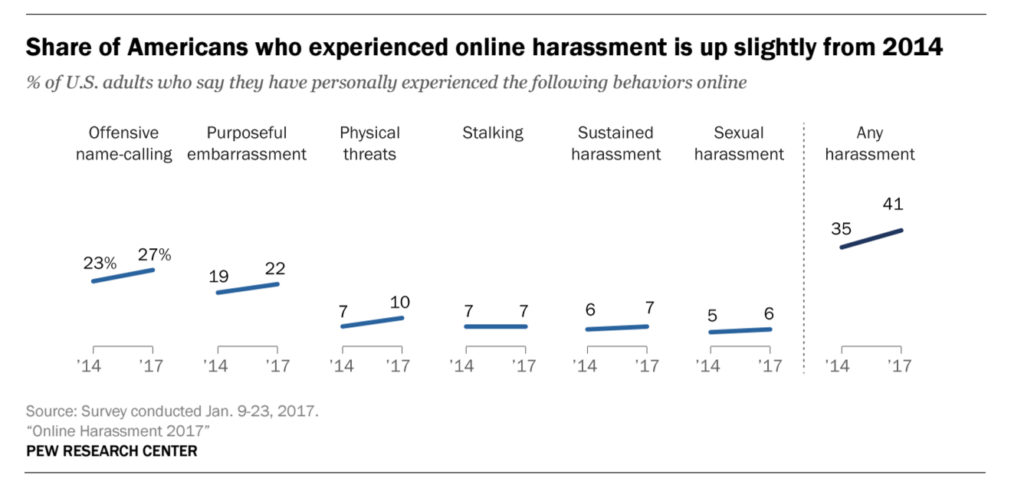
    A new study by the pew research center has highlighted that online harassment and bullying isn’t isolated to kids and teens. It seems that adults have become more comfortable with speaking their mind online even if what’s on their mind isn’t very nice. The study shows 27 percent of adults admit to being called “names” on social media and as many as 41 percent say they’ve been harassed in some way. This was up from 23% being called names and 35% being harassed in 2014.

    Obviously social media was the most popular platform that people reported seeing harassment. Men were the most harassed except for sexual harassment cases, more women admitted to being victims of unwanted sexual content including images sent over messaging. You can see more of the results in the chart below.

    What Parents Should Know

    How can we expect our kids and teens to stop or report bullying if we are participating as well? What example are we showing our kids when we profane someone because they disagree with something we said or shared online? Just because we aren’t face to face doesn’t mean the words don’t have an effect. These are things we should be teaching our kids but we obviously need to heed these warning ourselves.

    We’ve all heard the old adage, “If you can’t say anything nice, don’t say anything at all.” Apparently we have forgotten that what we say online still has consequences. This is the exact message that I have shared with teenagers and kids all over the country and I can guarantee I’ll be sharing the same message with adults now as well.

  • Snapchat Update Adds New Effects and Sharable Links

    Snapchat Update Adds New Effects and Sharable Links

    Snapchat’s latest update will give the camera background effects and allow you to change your voice without using one of their filters. The other major feature is the ability to share links and open them within Snapchat’s very own browser. While you can’t type a url into the address bar at the top of the browser you can click around online and end up at any website you’d like. That’s right, that means your kids can now browse the internet within Snapchat. This has always been possible in other social media apps like Twitter, Instagram, and Facebook but now Snapchat will allow users to tap right on a picture and open a link without leaving the app.

    What Parents Should Know

    If the Discover Page, disappearing photos, private video chat, and SnapMap isn’t enough to put this on your uninstall list, perhaps the ability to access the entire internet without leaving the app will help you pull the trigger. Yes, this feature is available in other social media apps but when you factor in all of the other features that can be a detriment to your internet safety plan it puts Snapchat at the top of my uninstall list.

  • FB Now Boasts 2 Billion Users, What Does That Mean for Your Family?

    FB Now Boasts 2 Billion Users, What Does That Mean for Your Family?

    Facebook CEO Mark Zuckerberg announced today that the social media platform has surpassed 200 billion users every month. The growth has been said to come from a focus on developing countries and regaining lost users. Zuckerberg’s response to this growth was one of excitement and responsibility, he said:

    “We’re making progress connecting the world, and now let’s bring the world closer together.” -Mark Zuckerberg

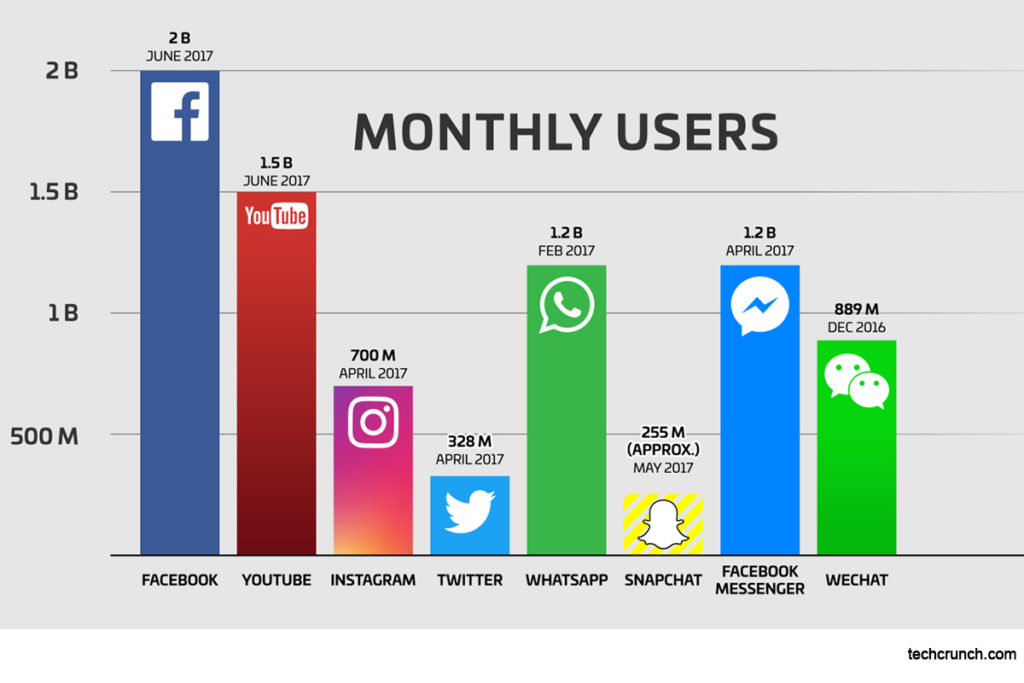
    Facebook started in 2004 and reached 1 billion users in 2012. The social media is the most used platform with YouTube a distant second with 1.5 billion users every month. What’sApp and FB Messenger both have 1.2 billion but they are also owned by Facebook. The obvious staying power of Facebook is evident in these numbers and their strategy of gaining new users in developing countries and regaining users who had left Facebook is paying off. What do these numbers tell us about the state of Social Media and the Internet? (If they really are two different things.)

    1. Your kids are probably on Facebook.

    The joke has forever been that once parents started using Facebook the kids jumped off. In reality, your kids are most likely using Facebook again. The reason they’ve returned is simple. There is more there to offer. The option to adjust what they see on their timeline and what ads they see are appealing and the AR camera and story feature in Messenger and the Facebook app has come a long way to entice former users to give Facebook another try.

    2. The entire world is available to your kids on Facebook.

    Two billion users is almost a third of the entire world. That means the influence available to your kids is more global than ever. When you add in the other social media services your kids use the globe just gets even smaller. Every idea anyone has or has ever had is available to your children through social media. Every thought anyone has or has ever had on any topic is available to digest and use to develop their own beliefs and thoughts. The influence of the world available on social media has changed the way our kids grow up and what they believe tremendously and the more these services like Facebook grow the more confusing some of these voices can be. There is, of course, a great opportunity to help your kids understand the larger world they live in but you have to help them navigate that world in a healthy way.

    3. Your example of internet citizenship is more important than ever.

    The globalization of our kids’ influences through social media should be a wake up call for parents. We need to understand the responsibility we have to keep our kids protected from the many dangers that are available to them online and to teach them how to be a good citizen of the internet. What do we do when we see something that could be fake or click-bate? Do we fall for the trap? What photos do you share? Are you smart with how you broadcast your location? These are all important safety concepts that our kids have to understand. The best way they’ll learn this wisdom is by watching us implement it ourselves.

    Facebook is proud that they’re the pinnacle of social media greatness. Mark Zuckerberg is emphasizing the responsibility they have to use this influence to bring people together and not tear them apart. Recent news and election cycles have been an example of how social media can cause people to ignore facts and strengthen their own beliefs with information from sources that haven’t been proven or vetted at all. Facebook is doing what they can to curb this trend. The reality, however, is that it’s up to us as the citizens of these social media services to make the right choices and to teach our kids how to do the same thing. The responsibility lies with us, not with Mark Zuckerberg or Facebook. These tech giants are going to make choices based on what is right for their companies and we, as parents and leaders, have to step up and make the choices that are right for our families.

  • New Filters, Reactions, and Screenshot Controls in FB Messenger

    New Filters, Reactions, and Screenshot Controls in FB Messenger

    Facebook is updating their camera in Messenger so you can have some new AR filters while video chatting. The first is Filters which will add color schemes and other effects to your video feed. Reactions will allow you to use the like/love/emoji reactions you can use on FB posts to enhance your live video chat experience. Finally the screenshot button will let you take a still image of your chat with a simple tap of the screen instead of having to fumble around with the hardware buttons on your phone.

    Obviously Facebook is doing its best to separate itself from the rest of the video chatting market. These new features make Facebook live video chatting more interesting than Skype or FaceTime and definitely go a long way to compete against Snapchat’s offerings. What will this all mean for our families? Well, the main thing to remember is that your kids should only be chatting with people they know.

    What Parents Should Know

    It’s important that your kids understand the dangers of video chatting with anyone they don’t know. Messenger uses your friends list to populate your contacts so, in theory, your kids should only be chatting with friends. These augmented reality filters and reactions will add to the reasons to want to upgrade a text messaging session to video chat so if you’re against video chatting by principle then you’ll want to keep them off of FB Messenger. I recommend keeping an eye on who your kids have been messaging no matter what platform they use or if it’s by text, images, or videos. You can do this a number of ways but none is better than having their passwords and checking in on their account regularly. As always I recommend you have a conversation with your children about what they are and aren’t allowed to do on messenger and why. Let them know you’re keeping an eye on things and don’t sneak around. You want your kids on your team.

    Want to get exclusive content and support our work to keep you more informed about your kid’s digital culture? You can partner with us at Patreon.com/BecauseFamily.

  • Turn Off Snapchat’s SnapMap NOW!

    Turn Off Snapchat’s SnapMap NOW!

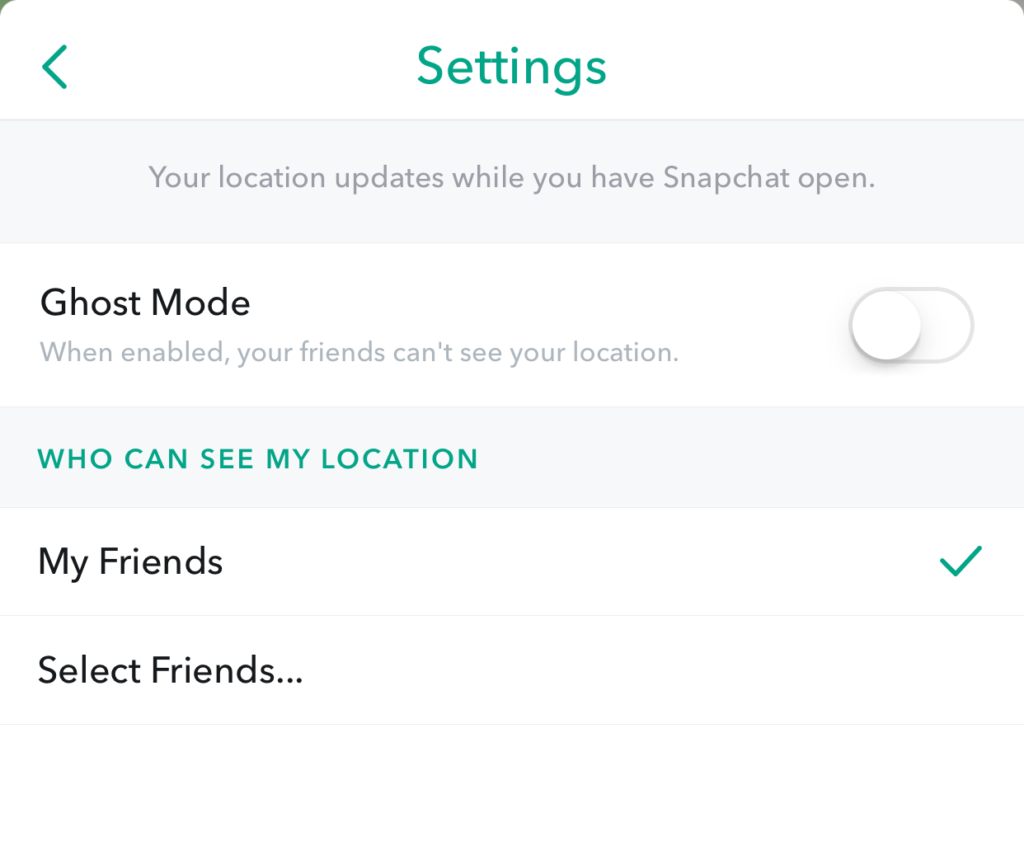
    Snapchat’s newest addition to it’s offerings is SnapMap. This feature shares your location on a map so that other’s can see snaps from similar places or events in real time. This all sounds well and good but what’s really happening is causing tech experts everywhere to warn against using SnapMap. SnapMap shares your location every time you open the app, not just when you post something. This isn’t concerning for just tech safety writers like myself but everyone who spends any time learning about the latest Tech trends is warning that users should disable this feature on their SnapChat account.

    I heard a story last week of a mother who’s daughter and her group of friends had been targeted by a sex trafficking ring using snapchat. The predator befriended a large group of related friends all at the same time and just watched their posts for a while. They all thought they were befriending someone who went to school with them since they had a bunch of friends in common. This person got very close to my friend’s daughter and started talking about a meet-up. Mom saw the posts during a check-in of her daughter’s phone and decided this “friend” was a bit shady. She contacted the police and found out that this predator was part of a larger ring of sex traffickers who use Snapchat to locate and abduct their victims. These guys had to work for months to learn more about where these teens spent their time. The SnapMap would give them that information in seconds.

    SnapMap’s initial setup is only a four step process, if you decide to turn on SnapMap you won’t be warned that your location will always be available. You’ll only be told how your friends can see where you are when you post. If you aren’t sure who all of your friends are and if you don’t know that SnapMap is pinging your location every time you open the app whether you post or not, you’re eliminating every privacy setting you’ve ever set on your phone. Your teenagers don’t know this!

    What Parents Should Know

    Teenager’s brains are developing in such a way that they’ll always fire before they aim. They’ll see the SnapMap option and opt-in just because they want to have everything set up like their friends do. You MUST talk to your kids about what SnapMap is and why it’s dangerous. You’ll want to advise (or demand) them to put their SnapMap on “GhostMode” which will hide their location on their friend’s map. If you’re allowing them to use Snapchat (which is on my uninstall list) you can’t expect them to see the SnapMap for the red flag that it is. You have to protect them by setting that boundary on their behalf.


    Don’t miss a single post. Get a list of our top posts every Friday in your email.

    Subscribe to our mailing list

    * indicates required


  • PODCAST: Is My Kid Safe on Tumblr?

    PODCAST: Is My Kid Safe on Tumblr?

    FAMILY TECH WEEKLY: Tumblr “safe mode” is a joke, Musical.ly is bringing original show content, and you can now hide images in Instagram.

    Social Media Links

    Facebook: http://facebook.com/4pointfamilies
    Instagram: http://instagram.com/becausefamily
    Twitter: http://twitter.com/becausefamily

    Newsletter Signup

    Ministry Updates:: http://eepurl.com/R7Btr
    Weekly Blog Posts:: http://eepurl.com/cvnhXD

    Websites

    Ministry Site:: http://becausefamily.org
    Tech Blog:: https://safe.becausefamily.org
    Michael’s Speaking Info:: http://kmichaelprince.org

    Donate and Affiliate Links

    http://patreon.com/becausefamily
    http://BecauseFamily.org/partnership

    Music by Kevin MacLeod at http://Incompetech.com

  • Tumblr’s New “Safe Mode” isn’t All That Safe

    Tumblr’s New “Safe Mode” isn’t All That Safe

    I have a list that you can download here of all the apps I recommend you remove from your kids’ phones if you see them. Tumblr is on that list because of the overwhelming amount of easily accesible explicit content. A few months ago Tumblr launched a way to turn off the automatic safe search required by apple on all iOS devices. Now they’ve added a “safe mode” to their app and website to keep NSFW (not safe for work) content from appearing in your Tumblr feed. This mode is available in the settings of the app and website in your browser. It will be automatically on for people who’s age is under 18 and who aren’t logged in to Tumblr when accessing content.

    The safe mode works, not as a filter to keep out content, but as a cover to hide NSFW images so any onlookers won’t see. The feature adds a cover on posts with explicit content that can be removed by tapping or clicking “show post.” The goal isn’t to keep sensitive material from appearing in your feed, it’s meant to keep you from getting caught looking at the sensitive content. The safe search option, together with this safe mode setting could lead you into a false sense of security with what is available for your kids to see on Tumblr but these settings aren’t meant to keep this content away from people trying to find it. They are more suited to keep folks from scrolling past something on accident. Both security modes can easily be bypassed in settings that can’t be protected by a password.

    What Parents Should Know

    The fact remains that pornography is by far the most commonly searched content on Tumblr (over 20% of all searches are for porn the next most popular is literature at just over 7% of all searches.) Explicit content is easily available on Tumblr and because of that I caution parents about this app all of the time. This is one app that I recommend be uninstalled and a social media platform that I would keep my kids from altogether. My advice is that you add Tumblr to your filter blacklist and your accountability software red flag list. This will keep the entire site off of your kids phones and computers and give you peace of mind that they won’t find any of the easily accesible images so prevalent on the site.