Blog

  • CES 2018: Here’s What Marketing Researchers are Saying About Your Teenagers

    CES 2018: Here’s What Marketing Researchers are Saying About Your Teenagers

    Karen Rampacher and Kathy Sheehan from the market and user experience research firm GfK spoke about the changing culture of one of the newest most powerful buying groups. This group is teens and young adults ages 15-24 and they’re calling them Generation NOW. GfK studies the trends of buyers of all ages but they’ve been doing it so long that they can compare different age groups from different eras and track the differences. Here is what they’re saying about your older teens.

    Who is GenNow?

    GenNow is a major market for businesses and advertisers with $830 billion spent by them or on them. They are digital from birth (digital natives) and don’t have to spend much time getting to know devices and screens. Interestingly they don’t define themselves by their ability to use tech but feel as if it’s something everyone can do now, no big deal. In fact, they don’t really worry too much about how they define themselves at all. The research has shown that they aren’t concerned as much about “standing out” as they are being true to their own identity. Identity brings up a whole new set of issues for marketers, who consider the self-identification of the Now Generation to be a puzzle that they have to solve. This age group’s interest in social justice and equality surpasses any generation before them and they are content to just let people be who they have decided they want to be. They are also less likely to reach the traditional “adulthood milestones” as early as their predecessors. Things, like getting married, having children, moving away from home, and starting a lifelong career, aren’t less important but have been placed on the backburner for most of this group.

    GenNow and Advertising

    The question of for the meeting I attended was: “How do you market to a group like Generation Now?” The answers may surprise you. First of all the data suggests that, while this younger generation is most likely to adopt new tech, they’re more concerned about their privacy and security than generations before them. They know what data is being collected, who is collecting it, and what it’s being used for. Sometimes they’re ok with it and sometimes they aren’t. A recent mistake by Netflix on Twitter shows that this generation isn’t going to ignore an inappropriate use of their data. This generation understands artificial intelligence to some degree and they aren’t afraid of it. They are, however, smart enough to disapprove of a misuse of their own info and invasion of their privacy.

    More interesting data suggested that some in this group may never enter a retail store. They purchase things online and trust user/peer reviews to help them determine what they’d like to buy. They value convenience and there’s nothing less convenient than having to go to a store to buy a pair of pants.

    As far as how they consume media, things are changing but not in the ways many have expected. Yes, more kids are viewing streaming media but they haven’t necessarily lost interest in the traditional TV. 85% of Gen Now polled admitted that watching TV makes them happy. They usually define TV, however, as anything you watch on a television. Many even label watching content on any device as TV. Streaming, DVD/BluRay movies, and gaming all fall into the “TV” category for most of the Gen Nowers polled by GfK.

    The amount of content watched was no surprise with an average of 29 hours per week being consumed. More than three-quarters of those polled admitted to binge-watching their favorite shows. (Binge watching is defined as watching three or more episodes of a show in one sitting.) Most of them are watching content on “ad-free environments.” Netflix, Hulu, Youtube Red, and other paid streaming services keep them from having to watch commercials.

    Media companies have answered with short “six-second” adverts that even run alongside live events like sports games and concerts. Product integration or product placement has also become a very important thing for advertisers. Think, Eggo waffles in Stranger Things. Finally, marketers are having to be more careful about how they use the data they collect from this generation’s online and social media activity. They have to prove that they’re not being “creepy” and that the information is being used to bring value and not inconvenience.

    What Parents Should Know

    Obviously, all of the information in this post falls into the category of things parents should know. To summarize, Generation Now is bringing some interesting challenges for marketers and corporations as well as for parents. Moms and dads should take heed of some of the trends this research has found. Use this information to help you build your strategy for internet safety, security, and health.

    As for advertising you’ve probably already noticed short social media videos and posts being used to promote various products. You’ll also see social media influencers being used more and more by companies to review and sponsor their offerings. Your child’s favorite YouTuber or Instagram influencer will be trying out products on their channels and accounts in no time.

    The advertising world is always working as hard as they can to reach our kids with their message. It is important for us as parents to understand the message we want to convey to our kids and retrofit the message that the media is telling them to fit our standards. That’s why this blog is here, to teach you how to do exactly that.

  • CES 2018: Family Tech Product Rollouts and Predictions for 2018 Tech

    CES 2018: Family Tech Product Rollouts and Predictions for 2018 Tech

    My first day at CES 2018 was kind of split into two categories. I spent the first half of my time at a press conference and a market research report. This may not sound fun to you but this information is why I’m here. There’s lots of information being shared and learned here that can benefit parents as we work to raise healthy kids in this digital culture. Along with a couple of videos, I wanted to present a simple list that will show you a little bit of what I learned here at CES on media day one.

    Day One Takeaways

    • Augmented Reality and Virtual Reality are being used for diagnosis and treatment by doctors and other healthcare providers.
    • Voice Controlled speakers were the name of the tech industry game in 2017 with a 279% increase in purchases with another 60% of growth expected in 2018.
    • 715 million connected devices are expected to be sold in 2018 to the tune of $351 billion.
    • Augmented reality will be making its way into our everyday lives with uses like shopping, gaming, and health tech.
    • Companion robots are bursting onto the scene. Used as a “family companion,” photos and video, security, speaker, entertainment, and even sleep and home health management.
    • People are more aware of how artificial intelligence (how websites and connected devices collect our data) works and getting acclimated to using it.
    • Virtual reality is becoming a real tool for the fitness and home gym industry.

    Family Tech Product Releases

    • Alexa ready baby monitor. By Project Nursery (More in videos)
    • In device augmented and virtual reality toy gun with 6 depths of field. By MERGEVR (More in videos.)
    • Jimu build and code robot. (Also in video)

    Final Thoughts

    Technology is continuing to move forward faster tthanwe can imagine. The biggest talk at this year’s CES is about voice command technology like Alexa and Google home, self-driving cars, and augmented reality content. As parents, our we should understand that our kids are going to be some of the first adopters of much of this technology and so it is important that we understand it. Kids aren’t watching content just on their televisions anymore, they aren’t having to type search terms into Google, and they are always always connected. That is what was said at day one the most, we are moving from the digital age to the connected age. You’re connected, your kids are connected, and so is everyone else so be sure to stay in the loop so that you can keep every connection safer.

    Stay tuned tomorrow for my report on day 2 of CES Media Days where I’ll talk about teen market research and more about the future of connectivity. Share this article with your friends and let them know that you’re keeping track of the latest tech trends by following FamilyTechBlog.com’s reporting on CES2018.


  • Three Ways to Identify a Dangerous YouTube Video Before Your Kids See It

    Three Ways to Identify a Dangerous YouTube Video Before Your Kids See It

    I sat down with my three-year-old while he got a breathing treatment the other day and starting watching Daniel Tiger. While he was watching I was perusing the recommended video list to see what to click next. I was very careful to only click on the video links that I felt like I could trust. Sometimes videos that look like they are meant for kids have been edited in a way that can be inappropriate for the original show’s target audience. Think, cartoon characters committing suicide and visiting each other’s gravesides. YouTube’s answer has, so far, been to bolster their response to reported videos. That means that enough people have to see the video and report it before it will be taken down. Even the YouTube Kids app isn’t edited by people, videos are sorted as safe or unsafe by an algorithm. Parents eyes are the only safe way to use YouTube for your kids. How do you know if a video will be safe before watching it?  I have a few different things I look at. I thought these clues would be a good thing to share with you.

    Title and Description

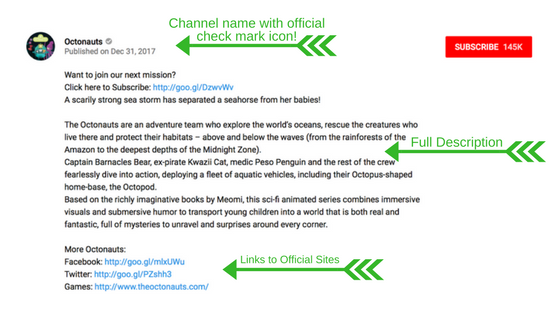
    Sometimes the last several words of a video’s title are hidden in search results. The title of the video should tell you quite a bit about what to expect in the clip. You may find that the video result shows up as “Octonauts Adventure Under the Se…” That may look safe enough since it is a kids show but if you click on it you can easily see on the title listed under the video and above the description that it’s called “Octonauts Adventure Under the Sea Ends in Dispair.” I made that example up off the top of my head but it is exactly the kind of editing that happens with some of these fake kid videos on YouTube.

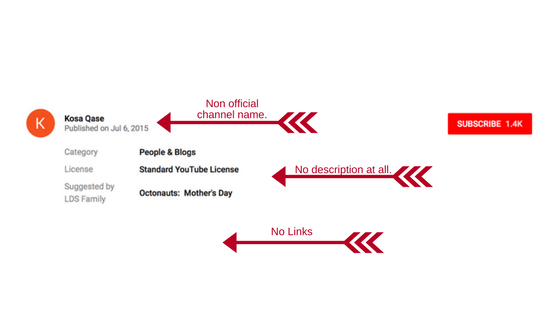
    The description will give you further information. Those who actually produced the original content will normally have a pretty professional looking description complete with links to their websites and social media. If the video is not to be trusted, you’ll see no description or links at all or a link that doesn’t seem to be official. Check out the examples below. Sometimes, even if the video is inappropriate for kids there will be a full description but it will mention the changes. Usually, these are videos that are meant to be shockingly funny, not meant to deceive children or parents.

    Channel Name

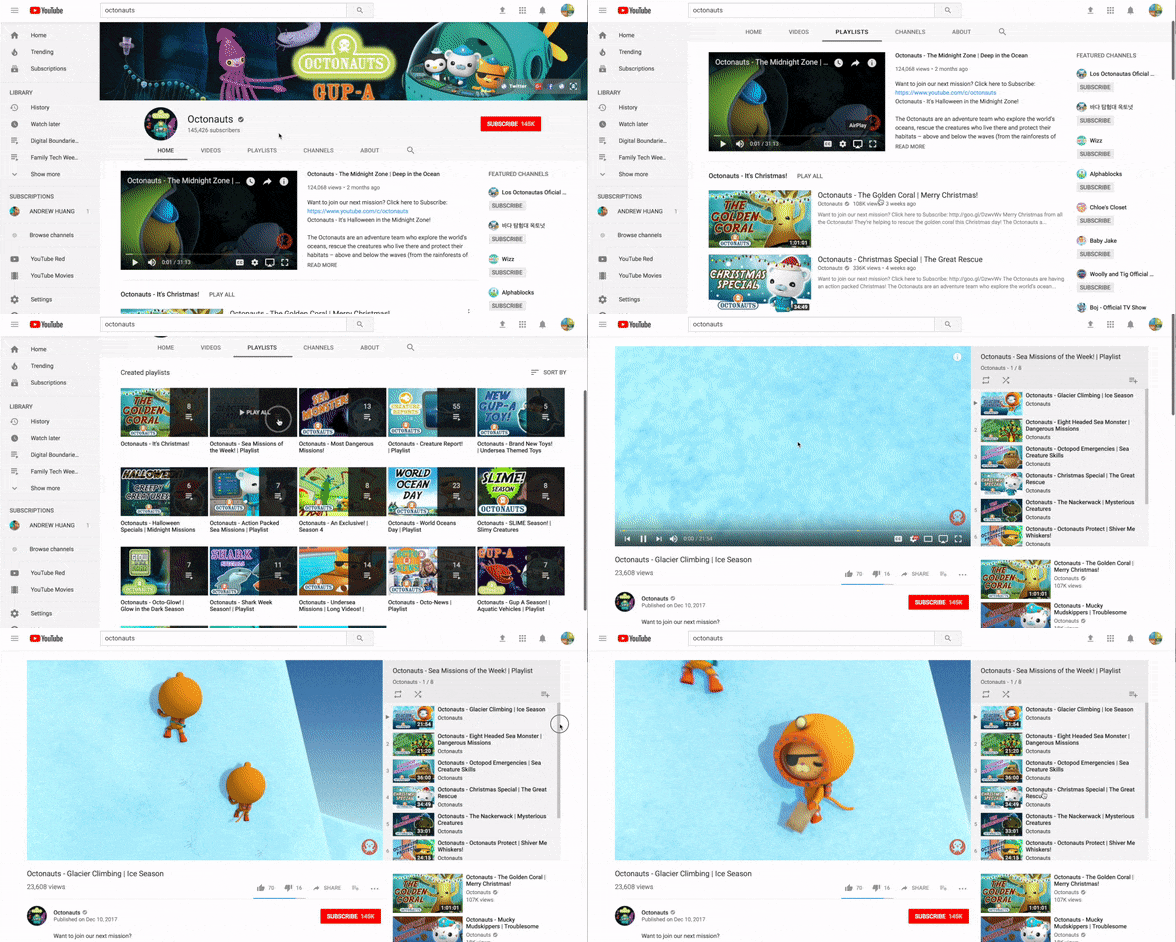
    The name of the channel a video was uploaded by is an easy way to identify an indication of whether or not the content can be considered official. If you know who originally published the video (i.e. Daniel Tiger was produced for PBS Kids) then you’ll want to try and find an official video from the same publisher. If you can find that publisher’s YouTube channel then you should be able to find videos produced by them and those will be safe, unedited clips or episodes of your kid’s favorite shows. The name of the YouTube channel is clickable ins search results to start by clicking on it and then browsing what videos they have to offer within their channel. That’s also where you’ll find playlists.

    Autoplay/Playlists

    Playlists are my favorite way to keep track of what my kids are watching on YouTube. You have a couple of options when it comes to playlists. First, you can find the playlists already assembled by the channels that make the videos that your kids love. If you go to the Youtube search results and click the channel link (see above) you will be taken to their channel’s “home page.” This page will have a sort of menu at the top. This menu contains a PLAYLIST link. You can play this list with autoplay turned on and it will automatically transition from video to video within the playlist without playing random clips from channels you know nothing about. You can also build your own playlists. I have made a tutorial video about building playlists and you can find it HERE. This method sets up a list of videos that have all been pre-approved by you. Autoplay will let you keep these videos running, again, without the concern of unexpected content.

    Nothing is Better Than Parental Monitoring

    Nothing beats your own eyes on what your kids are watching. Let them watch it on the TV or Computer so that you can hear and see what’s happening most of the time. Let your kids know what to do if they see something that makes them feel uncomfortable. They should know that it’s safe to come to you with concerns about what they’ve seen online. Use the titles, descriptions, and channel names to identify videos that may not be safe and use that info to find and build playlists of videos you’ve already screened. Remember that the safest videos will be the ones from the official publishers of the content and a good rule of thumb is that if you don’t know where it came from, assume it isn’t safe. Your kids are depending on you to help them learn how to have healthy tech habits and keeping content age appropriate is an important part of that process. Happy Youtubing!

  • BecauseFamily Offering a Family Tech Masterclass

    BecauseFamily Offering a Family Tech Masterclass

    Our kids and teens are spending more and more time online. Research continually tells us that the more time our kids spend playing video games, texting, and posting on social media the more dangerous their habits become. As parents, we have three options when it comes to protecting our kids. Option one is to throw up our hands and say that it’s all too much for us to understand, we can just let our kids do as they will and hope for the best. Second, we play the hermit, keeping our children away from anything with a screen until they are old enough to be held responsible for their own mistakes. I am proposing the third option. My suggestion is that we learn everything we can about the digital culture our kids are growing up in. We can and should know what each social media service is mostly used for and what games are recommended for kids’ our ages. We should be able to set up our accounts online and protect them with passwords that aren’t on the “Worst passwords of 2017” list. As parents, we won’t be fooled into thinking we can trust everyone else to protect our kids from danger, why would we assume that about digital society? This is why BecauseFamily has launched Raising Digital Natives.

     What is Raising Digital Natives?

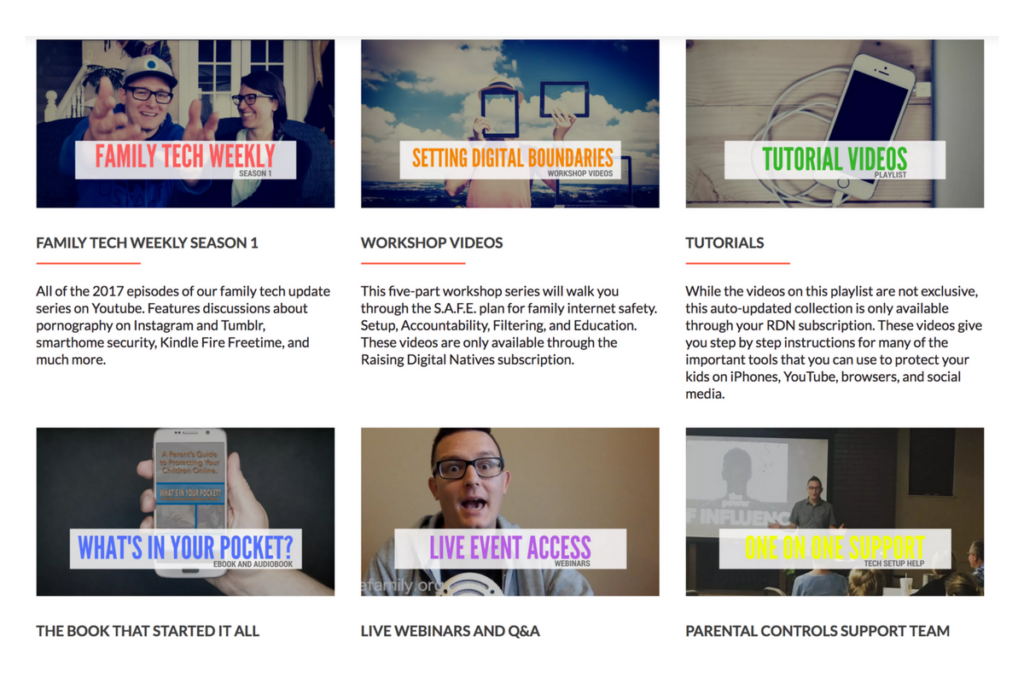
    Raising Digital Natives is a “masterclass” of family internet safety. The point is to give parents more than just inspiration and basic social media and tech news but to continually educate them on what they can do to protect their kids online. This exclusive content will include past seasons of our podcasts, tutorial videos, live workshop events, live Q&A sessions, and one on one parental control support opportunities. The tools included in Raising Digital Natives will give parents a major advantage to raising kids in this digital culture we’re living in. The live workshops will feature topics such as, “What is a digital native?” “Sexualization and the internet,”Legal ramifications of sexting,” and “Keeping them safe when they’re away.”  Workshops will be done online and archived in the member’s section of the website so geography and schedule won’t hinder parents’ ability to learn. Membership costs $4.99 per month and gives 12 months worth of access to anyone who users share their password with.

    What are you waiting for?

    Content is already available and live meetings begin at the end of January (2018.) Go to BecauseFamily.org/rdn to learn more and to sign up. BecauseFamily is the non-profit that is responsible for all the content of FamilyTechBlog.com.

  • Tools to Monitor Your Own Screen Time in 2018

    Tools to Monitor Your Own Screen Time in 2018

    Happy New Year!

    The first of the year has come and we are all trying to make ourselves a little better. Maybe you’re concerned about you and your family’s increased screen time. This is normal, we’re all thinking about what we can change in the new year and spending less time looking at a screen is on the top of many lists. These tools can go a long way to help you identify the amount of time you spend on your device, narrow down what you’re doing that sucks up so much of your time, and even set boundaries to alert you or block access when you’ve reached your desired limits.

    Accountable2You

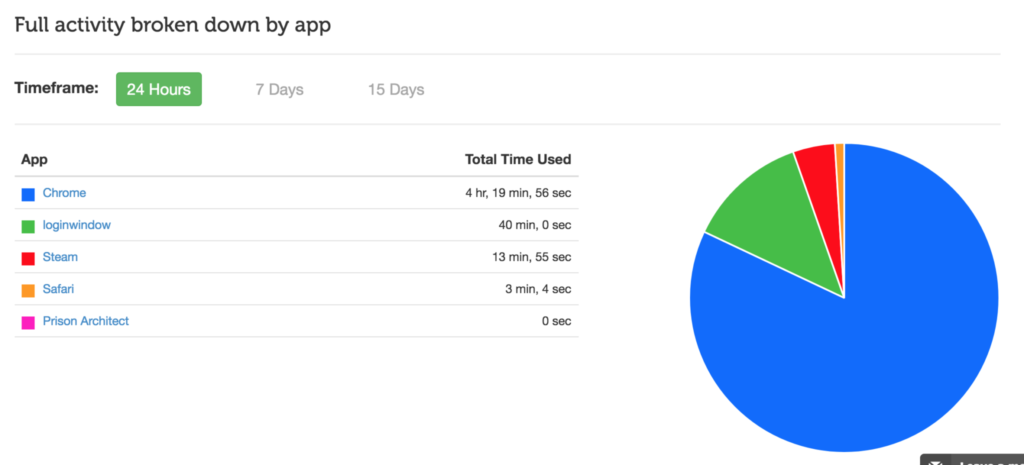
    No matter what device you use, Accountable2You can help you keep track of what you’ve been doing online. The online dashboard will give you an App Usage report, complete with a circle graph of how you spend your time online. Whether you use this to keep track of your kids’ devices or your own screen time, it’s an easy to read way to be aware of how you’re spending your days.

    Accountable2You is an accountability software at heart. It will notify you if there anything inappropriate has been accessed by those you’re keeping an eye on. It’s easy to set up, affordable (6.99 for 10 devices and 9.99 for 20,) and it works for every device. Even the Chromebook your kid got from school. It’s what I use and the best part is that if you sign up with our link, our non-profit will get a bit of help every month because of your payment.

    Android Family Link

    Android’s first stab at native parental controls focuses mainly on time management. That is, in fact, almost all it focuses on. Google FamilyLink is designed to allow parents to set time restrictions, time limits, and bedtimes as well as monitor the amount of time spent using the device. This will be accomplished by a complete disabling of the device once time limits or restricted times are reached. A tool like this could easily be used to limit or monitor yourself as well. If you, like me, spend most of your time in front of your computer for work, you may want to be able to set limits on how much time you spend on your phone or tablet for recreation purposes. FamilyLink should be a pretty good way, if you have an Android device, to cause your entire device to shut down when your limit is reached, or even just take a look every few days to see how much time you’ve spent on those devices.

    iPhone Battery Meter

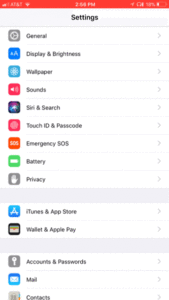
    For iOS users, Apple has built in a way to keep an eye on what you’re spending your time on while using your device. Your battery meter can be used to monitor your own screen time. It will even sort your time by app used and separate it into “on screen” and “background” time. To use this, simply go to your settings app and open the Battery section. When the usage area loads, tap on the clock icon on the upper right of that section. You can set your timeframe to be 24 hours or 7 days. This gives a pretty good snapshot of how you spend your time on your iOS device. Try it, you may be surprised.

    Moment App (iOS only)

    The Moment App uses your battery meter to build a nicely laid out report for you to keep track of the time you spend on your phone. Moment is only available for iOS (Android app is in development.) It automatically tracks your usage and allows you to see simple reports that separate your usage by the apps you spend time on. Moment lets you coach yourself on your screen time habits so that you can make changes if you want. You can set up time limits and Moment will notify you if you’ve gone over the time you’ve allowed.

    This app works pretty well. I used it for about a month and definitely made some changes to the amount of time I spend on my phone. Since it’s free you can even consider using Moment to install on other devices in your family and setting up limits for them. It will be up to them to put the phone or tablet down when they are notified but there’s something to be said for teaching your older kids to take the responsibility into their own hands. Moment is a free app but there are premium features (including extra family controls) that you can pay for.

    UnGlue

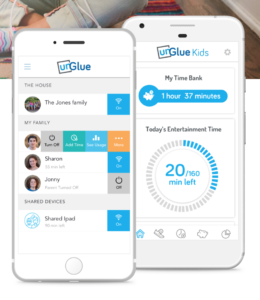
    UnGlue was created to give the power of screen times to the kids themselves. The website touts a plan to “give kids the power to learn healthier habits – within your boundaries.” UnGlue uses a scheduler to set up your kids’ screen time allowance. You can give them control of how they spend their time by giving the rewards for things like chores and exercise. Unglue works from just an app, no separate device to hook up. The basic UnGlue package gives you access to screen usage reports only. You can use this free feature to keep an eye on the time you spend online. Further features will cost up to $9 per month. UnGlue is fairly new and has been updated quite a bit recently. It will work on iOS or Android and even on your home devices. (With the full-featured service.) Go check out UnGlue and tell them FamilyTechBlog.com sent you.


    Circle

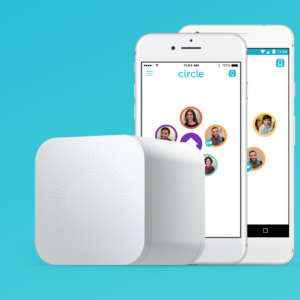
    I’ve spent a lot of time talking and writing about Circle. I recommend this parental control tool to everyone I speak to and I even use it myself. Circle lets you filter by age and category and limit screen time for your kids but it’s been cool for us to have a profile for ourselves. This profile lets us see, in one glance, how much time we’ve spent on every single one of our devices. When you’ve built your profile, you just add the devices you use to be monitored under your account, this results in a very useful and detailed report on how much time you’ve spent in front of your screens. It even monitors your smart tv, BlueRay, and gaming system usage. Circle is a $99 investment for in-home wifi protection, (with the option to pay $10 monthly for on the go monitoring) but in my experience, it’s an all-in-one parental control system. You can buy circle at Amazon or at Best Buy and Bed Bath and Beyond.

    Whatever you do, start.

    New Year’s Resolutions are notoriously easy to forget about but my advice is that you just get started. When you begin my tracking how much time you spend on your screens, you’ll find yourself truly motivated to make a change. It worked for me. Using Moment and my battery life meter led to my decision to not start using my phone until I’ve had breakfast with my family. We’ve even started doing some Social Media Free Saturday’s a couple of times per month. Whatever your goals are, you’ll never accomplish it if you never begin so grab hold of one of these tools and get started!


  • Why I Told My 10 Year Old EVERYTHING About Pornography

    Why I Told My 10 Year Old EVERYTHING About Pornography

    Disclaimer: This post is a bit different than usual but it hits to the heart of why this blog exists. Thank you for understanding.

    Yesterday my 10-year-old son asked me what pornography is. Honestly, I thought he knew. I talk about it a lot when I speak and in podcasts and videos. I was surprised at his question but I answered him. I told him what porn is and why we avoid it.

    I told him that it affects your brain like drugs and causes your synapses to stop firing properly. I told him that what you see sticks in your mind and imprints as a template for what you prefer sexually. I explained, also, that the pornography industry is well known for abuse and sex trafficking. I told him EVERYTHING. Even though he’s only 10. Why did I tell him these things?

    First, because he asked. If we don’t take advantage of our kids’ curiosity we miss a chance to help them learn in a way that they’ll never forget. What’s worse is when we say “Ill tell you when you’re older” so they go find another way to learn about it now. Then we find out they googled “porn” or asked a friend about it and we come down on them. We get scared and explode at them and the shame cycle begins.

    I know this cycle well. That’s the second reason I told him the whole truth. I was 10 when my friend’s older brother brought in a VHS tape and said: “You guys HAVE to check this out.” From then on it was years of seeking out scrambled HBO or Cinemax. Sneaking up to the living room late at night to try and find something online to meet the insatiable appetite. Years of shame, of hiding, of never being satisfied. I was getting more broken with every video and every image. My mind was fracturing and I was losing who I was.

    When I was 18 I got busted. A super high phone bill (because that’s how the internet used to work) caused my mom to ask questions and I told her the truth. I told her I couldn’t sleep at night until I had “fed the beast.” That’s what it was like for me. I couldn’t function until that urge was given a release. She took away the computer and I started digging into scripture. I would read a verse and then write eight to ten pages about how it could apply to my life. I would dig into word meanings and unpack the context so I could fully understand what The Word said about who I am. That new habit changed me.

    Fast forward four or so years and now I am married. This is the third reason I am not shy to talk to my kids about sexuality and pornography. I married the most pure and righteous woman I’ve ever met. She had been taught to be pure and guard her heart while I was watching adult videos in secret. We are an incredible match but our intimacy wasn’t a match made in heaven. Imagine the confusion that comes from the two different ideas we had about sex. My mind was still wrecked from the fictional, abusive things I had seen. I had no clue how to respect and honor my wife in our intimacy. It has taken ten years to work all of it out and issues still surprise us every now and then.

    Our society isn’t afraid of sex. The culture your kids live in isn’t waiting for them to “come of age” before teaching them their truth about sexuality. The church isn’t helping. They’re too scared to speak up because people get uncomfortable. I fielded many frustrated parents when we, as a youth ministry, would try and teach healthy attitudes about relationships and sexuality. Moms and Dads HAVE to educate their kids and let them know how to understand purity, not as the absence of desire or sex, not as a discomfort with their body and what it needs, but as a healthy knowledge of why God created sex and in what context it can contribute to the overall wholeness of who you are and the relationship you have with your spouse.

    Share this to spread the word and if you feel the need to discuss this more, feel free to comment or send me an email. Let’s get this thing right. Let’s raise children who are less broken than we were.

  • Instagram will Begin “Recommending” Posts from Accounts You Don’t Follow

    Instagram will Begin “Recommending” Posts from Accounts You Don’t Follow

    A new “recommended for you” feature will be rolling out on Instagram very soon. This feature will post pictures from users that aren’t on your friends list in an attempt to get you to increase the number of users you follow. In 2016 Instagram changed the way your feed works by changing from chronological to an algorithm based timeline. The latest change comes as Instagram is looking for ways to better market their platform to advertisers. Increasing visibility of accounts run by companies should boost those accounts followers and therefore the reach of paid advertising. The content you see you will be chosen for you based on your likes in the likes of people you follow. You won’t necessarily just see any random image, but images that the Instagram algorithm believes might be relevant to you.

    What Parents Should Know.

    Obviously, any content delivered to our children and teens by an algorithm can be suspect. This change makes it increasingly important for you to understand who your children follow on Instagram. The best way to do that is for you to log into their account on your device and check regularly. While accounts that use spam techniques or inappropriate images won’t likely be delivered to users through this method, it is still against my wishes for anyone other than myself or my child themselves to determine who or what they see on social media. My best advice for parents is that you be proactive and keep an eye on your kid’s accounts.

  • Taking Too Many Selfies is Officially the Latest Mental Disorder

    Taking Too Many Selfies is Officially the Latest Mental Disorder

    “Selfitis” is the new term for obsessively taking selfies and it’s being called a symptom of other, more serious, mental disorders. The study by Nottingham Trent University was held in India because of their high population and social media user numbers. Also, because of the high number of deaths caused by taking selfies in a dangerous situation. Researchers studied a focus group of 200 people and asked them questions about their selfie-taking behavior. The results had some surprises and some expected outcomes. The most likely candidates to have selfitis were men, which was unexpected, but as you may have guessed, the youngest group also scored the highest probability to suffer from the disorder.

    The idea for this study came from news stories in 2014 about selfitis becoming a recognized mental disorder. At the time these stories were false but now the term is beginning to get scientific research to back it up. The researchers’ findings are, probably, only the beginning of the information we will get about what our increasingly online lives are doing to our habits and mental condition.

    “Typically, those with the condition suffer from a lack of self-confidence and are seeking to ‘fit in’ with those around them and may display symptoms similar to other potentially addictive behaviors,” – Dr. Janarthanan Balakrishnan

    What Parents Should Know

    It’s obvious how the appeal of Instagram likes and Twitter followers can lead to obsessive behavior. This condition falls under the same category as internet, video game, and media addictions and its actual diagnosability is debatable in some psychological circles. My unprofessional but educated opinion is that anything that becomes obsessive and compulsive should be considered dangerous by parents. It can take conscious effort for many of us to avoid taking a photo or selfie to share during an event. I have often made the distinct decision to not take a photo and just enjoy a moment for myself. The study of selfitis shows that there are increasingly more people out there who cannot make that decision for themselves. The first thing they think about is what a good social media post this moment would make and then they can’t deny themselves the opportunity to share it online and see how many likes it gets.

    Selfitis and other social media related conditions will always be ridiculed because it seems like just making a decision to stop something would solve the problem. Serious professionals, however, are giving these behaviors real attention and I think we, especially parents, should too. Find out what your child’s attitude is about social media. Why do they post? How important is it to them to get likes and followers? Do they take down photos if they don’t get the amount of attention they want them to? Knowing your child’s online and social media habits can go a long way to help them have a healthy attitude towards how they represent themselves online. Mom and dad are the first line of defense and diagnosis. You should be having conversations with your kids.

    You can see the entire study HERE. Including the questions asked to those tested in the study. Maybe you can use these questions (also listed below) to see what your kids think about their selfie habits…or your own.


    Selfitis Behavior Scale

    1. Taking selfies gives me a good feeling to better enjoy my environment
    2. Sharing my selfies creates healthy competition with my friends and colleagues
    3. I gain enormous attention by sharing my selfies on social media
    4. I am able to reduce my stress level by taking selfies
    5. I feel confident when I take a selfie
    6. I gain more acceptance among my peer group when I take selfie and share it on social media
    7. I am able to express myself more in my environment through selfies
    8. Taking different selfie poses helps increase my social status
    9. I feel more popular when I post my selfies on social media
    10. Taking more selfies improves my mood and makes me feel happy
    11. I become more positive about myself when I take selfies
    12. I become a strong member of my peer group through selfie postings
    13. Taking selfies provides better memories about the occasion and the experience
    14. I post frequent selfies to get more ‘likes’ and comments on social media
    15. By posting selfies, I expect my friends to appraise me
    16. Taking selfies instantly modifies my mood
    17. I take more selfies and look at them privately to increase my confidence
    18. When I don’t take selfies, I feel detached from my peer group
    19. I take selfies as trophies for future memories
    20. I use photo editing tools to enhance my selfie to look better than others

    Scoring: Responses are rated on a 5-point Likert scale: (5 = strongly agree; 4 = Agree; 3 = Neither Agree or Disagree; 2 = Disagree; 1 = Strongly Disagree). Scores are summed. The higher the score, the greater the likelihood of selfitis

    Items 1, 7, 13, and 19 relate to environmental enhancement – Items 2, 8, 14 and 20 relate to social competition – Items 3, 9, and 15 relate to attention seeking – Items 4, 10, and 16 relate to mood modification – Items 5, 11, and 17 relate to self-confidence Items 6, 12, and 18 relate to subjective conformity


  • Soon, All Tech Will Know Your Face…Get Used to It!

    Soon, All Tech Will Know Your Face…Get Used to It!

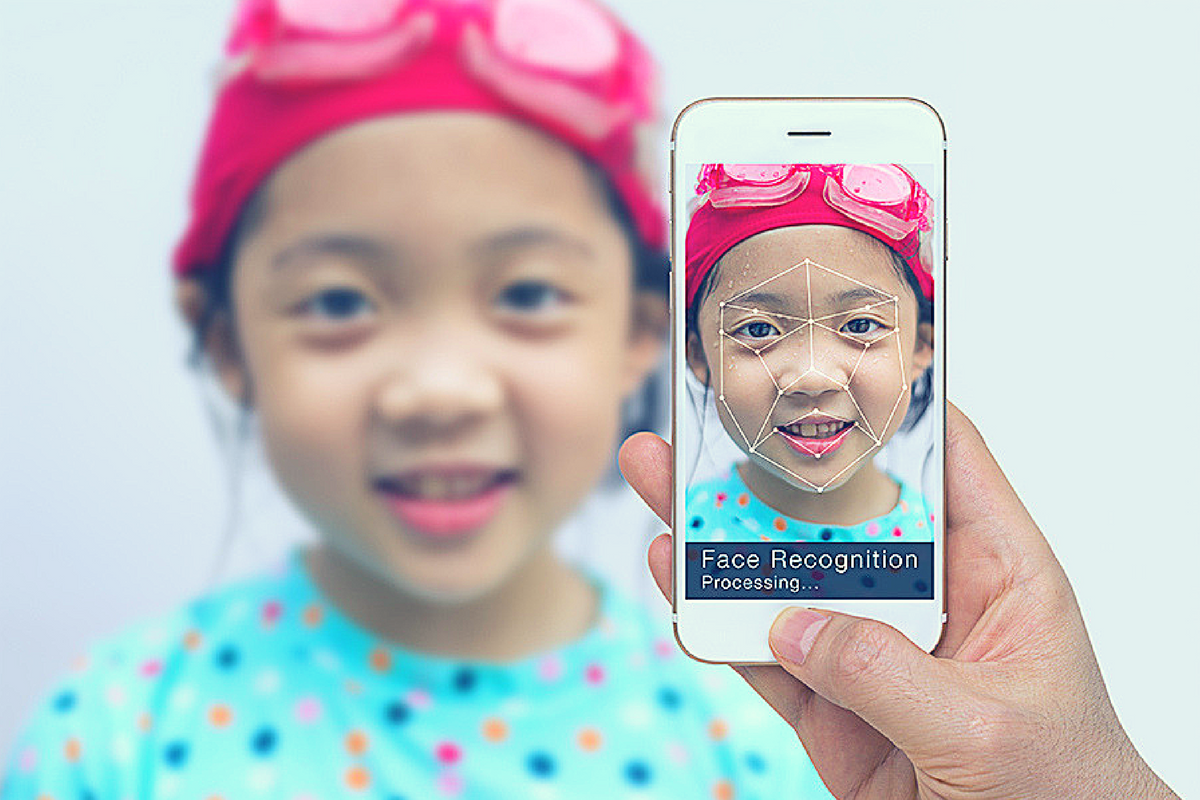
    Facial recognition is one of the hot-button topics of 2017. iPhone is featuring it now, several social media platforms have been using it for a while to help you tag your friends in photos. In fact, Facebook has just announced how they’re using facial recognition to help the blind learn more about photos on their timeline. Artificial intelligence in our social media timeline tells us what images and posts we want to see first, it identifies who is in our photos, it even decides what ads we will be most likely to click on. Social media isn’t the end of facial recognition AI, though. As I prepare to head to Las Vegas for the Consumer Electronics Show (thank you, by the way, your readership of this blog made that possible) I see more and more smart-home and gaming tech using facial recognition for their main functionality.

    Security

    The application of facial recognition in security tech should be pretty obvious. Amazon has a camera that you mount outside your door that will only allow approved delivery people into your home to drop off your packages. Smart security tech will use motion sensors and facial recognition to identify who enters a room and determine if they belong or not. If you aren’t approved, an alert goes to the homeowner and they can decide to alert the authorities or not based on seeing the picture that the security device took of you.

    Smart Home Tech

    Smart home technology isn’t early market anymore, it’s actually becoming more of a mainstay in the American household. People are calling out to Alexa, Google, and even Cortana more an more every day. The latest technology will be featuring the ability to recognize you and adjust the “settings” of your home accordingly. Think lights dimmed, music on to your playlists, coffee part started, and your tv turned on to your favorite channel. Most of the latest smart home tools are putting cameras on their devices and making facial recognition standard in their algorithms. That means that more and more “affordable” or “budget” devices will be scanning your face. When you pay less for similar tech, what you usually save money on is the privacy and security side of things. You have to be careful to understand the security settings and privacy policies of any “smart” device you purchase.

    What Parents Should Know

    Every single new tech development has the challenge of balancing convenience and progressiveness with security and privacy. Having your lights come on because a device saw your face walk into a room sounds like a really convenient thing. Being alerted by Facebook when someone uploads a picture of you is a great idea. It can help you keep photos you don’t like of yourself off of the internet or just help you make sure you are tagged in the photo you’re in. If all of these new technologies can ensure that your identity is secure then it’s a great way to use the latest developments to add convenience to your life. 

    My advice with the newest releases is always to wait a while. Let the lawsuits and hackers do what they will before you own one of the devices and your personal data is in jeopardy. Once it’s been out for a while then maybe integrate it into your life, but only if you know how to set it up and secure it properly.

  • Why the Repeal of Net Neutrality Matters to Every Parent

    Why the Repeal of Net Neutrality Matters to Every Parent

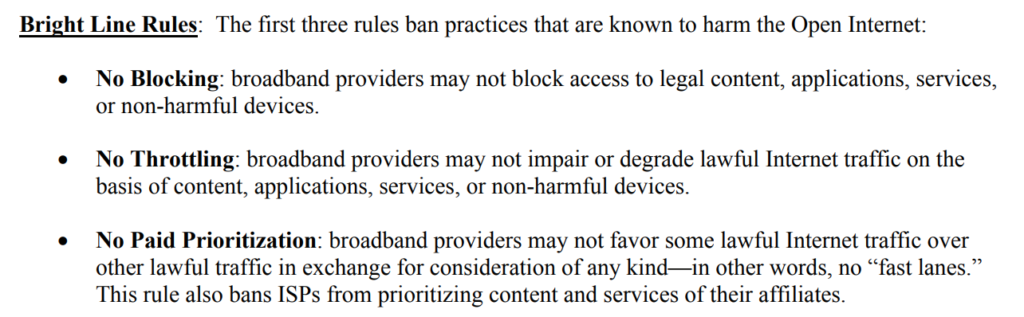
    Today, the FCC voted to repeal the net-neutrality rules that made access to the internet a Title 2 utility for consumers. This categorization, among other things, allowed the government to keep companies from denying, slowing, or charging extra for access to the internet and the content on the internet because it was considered a public right. The repeal removes those regulations and may allow companies to prioritize the content you can access based on their profit margin. The fears outlined by many non-profits, senators, online content creators, and companies that have taken action against this repeal include speed throttling, site blocking, loss of innovation, and a general prioritization of access by internet service providers.

    Supporters of the repeal have said that government oversight isn’t necessary to maintain a free and open internet and that the free market will keep companies from resorting to these feared measures in order to increase profits and popularity. They state that the internet was free and open before the 2015 Net Neutrality measures were passed and that it will continue to stay open after it’s repealed. 


    Screenshot from the 2015 FCC Net Neutrality Press Release

    What does (could) it mean?

    It may not mean a lot right away but it could eventually mean higher prices for internet use and a sort of “cable tv style” bundling of internet access. It could also mean a more difficult (or maybe even impossible) road to success for creative internet and software startups.

    Imagine, for example, that Spotify is getting started and it’s catching on with music fans. Then, imagine that Comast (everyone’s favorite ISP to hate) starts their own music streaming service because they see the opportunity to increase revenue. Since Comcast wants to be more successful they will have to come up with anything they can to attract more customers than Spotify. This may include slowing down data access to you while you’re streaming music through Spotify. Eventually, you may get annoyed enough to switch to Comcast’s own music streaming service simply because there are fewer interruptions in streaming. Spotify eventually fails because their users can’t get the access necessary to help the company succeed. Next Comcast makes their music service only available if you are a Comcast customer. What do you do then? Switch ISPs because the services you feel are most important to you are only available if you use them to provide you with your internet service? Finally, their prices can rise and rise because more people are using Comcast based on the fact that their favorite internet content has now become inaccessible on any other ISP. There is no more competition.

    I’ll give you that this is a worse case, distant future scenario, but if you look at Cable and Sattelite TV it doesn’t seem that far-fetched. Under Net Neutrality, Comcast, Time Warner, or anyone else for that matter aren’t allowed to throttle down internet speeds to certain sites and services. They definitely can’t block access to the sites you want to visit. They aren’t allowed to bundle websites into different cost packages either. This means you can use whatever streaming service and websites you like best and not have to worry about access being slowed or blocked. You can imagine why a small, non-profit, tech safety website startup might be a little concerned about ISPs getting full control of an audiences internet access. Net Neutrality puts access to the internet in a category similar to electricity and water. Access to these necessities is considered a basic right and the companies that profit from these resources are only allowed to operate in a way that allows equal and fair access to all users. 

    Why does it matter to parents?

    It matters to you as a parent because you want more people innovation online. You want services like Mobicip, Accountable2You, and Unglue to be able to create their products to help your family be smarter and safer online. If the only way to be successful online is to become affiliated with a major corporation or to pay that corporation to be included in their access package, many of the newest most helpful resources for parents wouldn’t exist. Again, I’m against fear tactics and panicking but I encourage you, as a parent who is concerned for their child’s safety online, to speak out. Contact your congresspeople and tell them you support Net Neutrality. The vote is over but the battle is not. Lawsuits and petitions are already beginning to be filed and you’ll be hearing about this issue for a while.

    I don’t like to spend much time talking about political issues but this could, eventually, affect this blog and our work for families in a serious way so I had to say something. Thank you, now back to your regularly scheduled internet safety blog posts.