Blog

  • How I Used the Sens8 Connected Security Camera and Still Protected My Privacy

    How I Used the Sens8 Connected Security Camera and Still Protected My Privacy

    We have always been a bit leery of using internet-connected cameras in our home. The idea of having a camera or microphone always on in our house gives us caution. When Sens8 asked us to use their smart security camera for a bit, I decided it would be a great way to try out this cool tech, while providing a guide for you as to how I used it as safely as possible.

    IoT (Internet of Things) devices are products that you may use every day that can now connect to the internet. Thermostats, refrigerators, toasters, mirrors, security systems, and baby monitors can all be controlled from your phone or computer over your home wifi. Some are even able to connect to your voice command technology like Alexa or Google Home. This sounds like the future is now! We are living in a time that had previously only been imaginable in movies and books. Some experts, however, are very concerned about the security of these devices.

    CHECK OUT: This series about the risks of a fully connected home.

    How I Used the Sens8 Connected Security Camera

    Setting it Up.

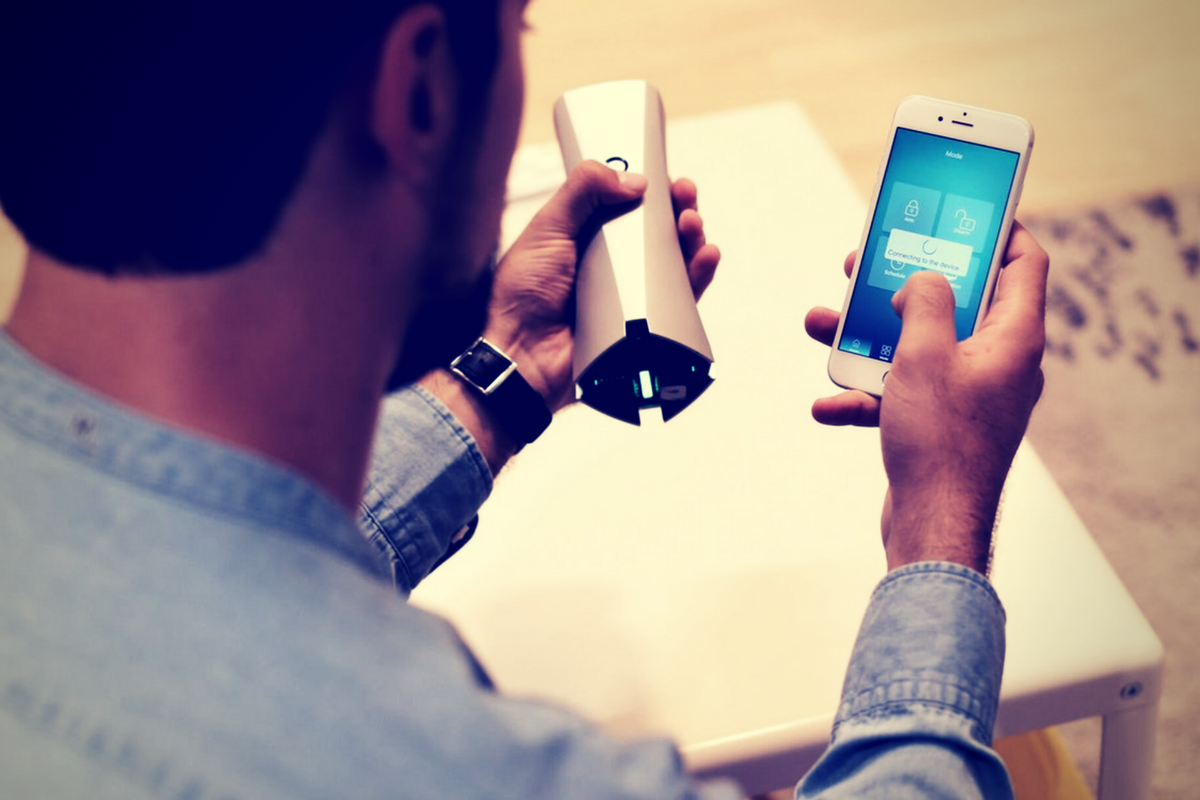
    The SENS8 Connected Security Camera is a full HD camera with auto arm/disarm and many other features. It will keep track of temperature, humidity, and sound levels in your home to create a “Health Index.” The idea is having a security camera/system without paying a monthly fee. SENSE8 is available on Amazon for $169. The features I liked were the clarity of the video images and being able to arm/disarm from my phone. There is an alarm built in to scare off any invaders but it can be turned off in case you have a pet or children that seem to walk around during the night and would set it off. When something triggers the built-in motion sensor, the camera comes on and captures the intruder. You get an alert almost immediately and can see the video. It also saves in the app for future use. I think SENS8 is the perfect budget home security solution. It works well, it’s small and inconspicuous, and the alarm (if you use it) is loud enough to wake you and scare away any intruders.

    I set up my SENS8 in the Family Room facing the front door. The widescreen 1080p camera captured most of my living room and the entry to my kitchen. The sensor would start the camera if there was movement from the hallway, the kitchen entry, or the front door entryway. The camera was sitting about waist high but captured floor to ceiling at as close as three feet away. I felt confident that anyone who came in would be caught on camera and I would be notified before anyone could even figure out there was a camera in the room. To me, that was the most important thing.

    We used the camera for about two weeks, obviously, there were never any break-ins but was able to be sure my wife made it home safely a couple of times while I was out. I was notified while I was at early meetings that someone had been moving around the house. I looked at the video, which was available in the app in less than a minute, and saw my three-year-old walking around the living room. I told my wife he was up so she could see what he needed. Turns out it was breakfast. Surprise surprise. The camera worked exactly how it was supposed to, and that is why I took it down.

    What About Privacy?

    Realizing how much of my families in home activities could be captured on this camera I had a few questions for the developers of SENS8. Here are there answers:

    Consumers are increasingly worried about security from hackers accessing connected baby monitors, security cameras, and microphones. What security measures, besides account creation and login, are in place to give families peace of mind while putting a wifi connected camera in their home?

    • “First, all SENS8 devices utilize two-step SSL/TCL authentication technology, ensuring videos cannot be accessed from the device or the cloud by unauthorized users. Second, Telnet, SSH and HHTP (remote login) servers have been disabled in SENS8 devices, which also prevents unauthorized access. Finally, all user information is protected using AES-256 encryption.”

    Your terms and policies don’t mention what you do with temperature, humidity, location, video and audio data broadcasted through Sens8. Is that data stored on your servers? Are videos and audio kept secure, and if so, how?

    • “SENS8 uses an authorized token to upload content to Dropbox. The SENS8 product has been reviewed and approved by Dropbox to ensure data security. Communication between devices and Dropbox is based on two-way SSL encryption technology.”

    While Sens8 isn’t a voice assistant, it does have a microphone. Is the mic considered “always on?” Or only when switched on by the app?

    • “SENS8’s microphone works in 3 ways: First, it works as a normal sound level meter, which helps users to know whether there’s too much noise at home, as a noisy environment can cause negative health effects. For this function, the microphone is always on but doesn’t record or catch any content. Second, it delivers sound when a user initiates the two-way talk feature through the app. Third, the microphone records audio when it is triggered by abnormal activities.”

    What does all of that mean?

    Basically, SENS8 has all of the security and privacy protection I would expect them to have. Their policies maintain that they don’t use any of the video footage or audio from your camera for any purpose. The only data they collect from you is your email address, login information, and location information (for the device’s weather function.) The microphone doesn’t stay on and record you all the time. It doesn’t accept voice commands so that wouldn’t be necessary. All in all I would say SENS8 is as secure as any other smart camera on the market. It’s most likely one of the most private and secure at its price point.

    My Best Practices Recommendations

    Only point a camera at something if you’re ok with it being posted publicly.

    There are several places I would never put a connected security camera/microphone. My or my children’s rooms, pointing at my front door or somewhere you can see my street address number, a closet or bathroom where I may change clothes. It sounds obvious but the connected baby monitors and security cameras that people use are often set up in bedrooms or places that could capture personal data or information. If, somehow, the security features on your device are compromised (old security measures, server outages, etc.) you don’t want those devices located somewhere that can put videos or images of your family, checkbook, tax documents, or password entries online.

    Set new, quality passwords.

    Most smart home devices are shipped with standard usernames and passwords built in. Every expert recommends changing that username and password immediately upon the installation of your device. Hackers can find lists of standard and built-in passwords and use those lists paired with software to access your device and through that, sometimes, your whole network.

    Use antivirus/malware software on your computer.

    Many antivirus and malware services will now scan every device on your network for you. I use Avast and run a scan about every two days. I’ve had security installed forever and I still find something that slipped by every now and then. If you feel like you are at risk for serious data security issues then I recommend paying for the full version of your antivirus software to ensure complete security.

    If in doubt, turn it off.

    If you feel like something strange is going on with your internet (suddenly very slow, computer acting weird, devices and other devices won’t work properly) run an antivirus scan of all the devices you can and then turn off and unplug your non-affected smart-home devices until you have figured out what is going on. If you don’t know how to do all that, get some help.

    Buy quality devices. 

    Most importantly, buy devices from manufacturers you can trust. Make sure they have a lot of documentation about their product. Read the frequently asked questions and the terms of service and privacy policies. If anything in their documentation sounds fishy (or phishy) it probably is so don’t buy. Read user reviews and try to find sites like this that will do third-party reviews of the security and functions of the device. Be smart when you shop for your smart home. 

  • Here is our Uninstall List for This Spring

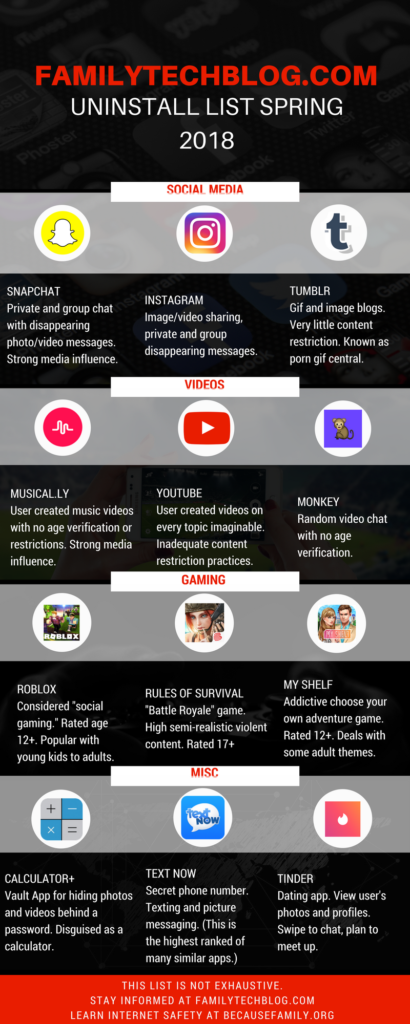
    Here is our Uninstall List for This Spring

    Some apps are just annoying, some are a bit risky, others should just be uninstalled. This is the list of apps that FamilyTechBlog thinks should be removed from your kids’ phones on sight. No, this isn’t an exhaustive list. There are plenty more apps that can be dangerous. Our list features some of the most popular apps in each category and apps that highlight a certain genre that may need to be avoided altogether.

    Feel free to click on the image below to see the large version of the infographic. If you want some help with internet safety resources and strategies, contact us here. Also, share this post with everyone you know. Let’s make a difference and spread something helpful on our social media timelines for a change.

    FAMILYTECHBLOG.COM UNINSTALL LIST
    SPRING 2018

    CLICK FOR LARGER VERSION

    Please consider keeping resources like this free to you by donating $5 to our non-profit organization.
    Visit BecauseFamily.org/partnership to give.

  • The FamilyTechBlog Uninstall List for Spring 2018

    The FamilyTechBlog Uninstall List for Spring 2018

    Please consider keeping resources like this free to you by donating $5 to our non-profit organization.
    Visit BecauseFamily.org/partnership to give.

  • Instagram Letting Users Change Privacy Settings on More Sensitive Messages

    Instagram Letting Users Change Privacy Settings on More Sensitive Messages

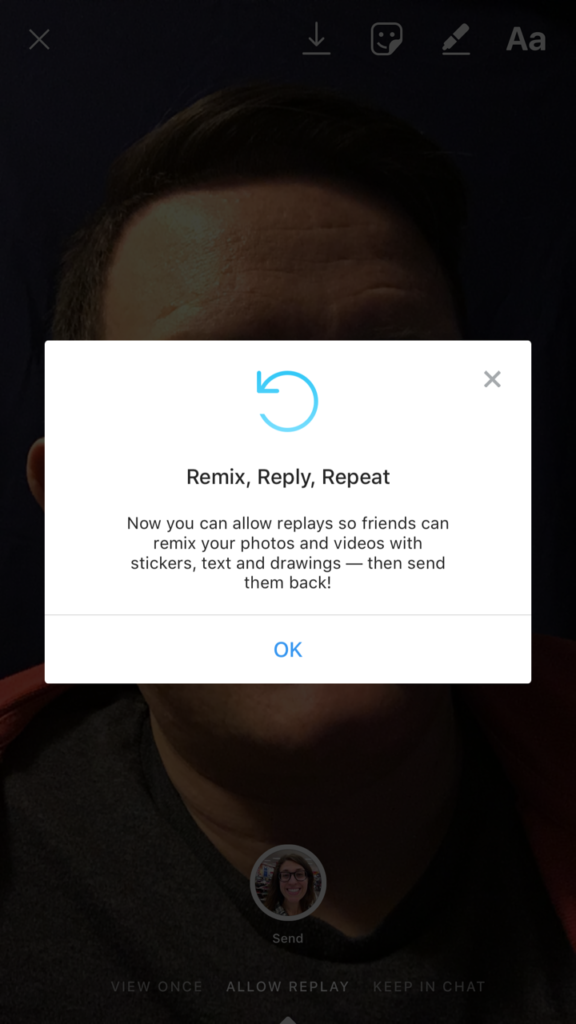
    Instagram has made an update that will let users set privacy settings on their private messages. With the options to “See once, Replay Once, or Show in Chat,” these settings provide a sense of safety when sending that “sensitive” message to someone. Until now, users could replay any message they got on Instagram, but the new Direct Camera settings will allow the sender to make the rules.

    Many are seeing this change as an obvious attempt to combat Snapchat in the disappearing-message department. There is still no way to change settings on your Snapchat private messages. Instagram and Snapchat have been competing back and forth for more than a year now and it seems Instagram is looking to take on the secret message market.

    What Parents Should Know

    As sexting becomes more common, the last thing parents need is another one of our kids’ favorite social media services featuring disappearing messages. The problem with sexting is that kids think there aren’t consequences for the messages they send. Something like a “See Once” feature is exactly what would cause your 14-year-old to give in to that pressure to send an inappropriate picture. Since they can’t see it more than once, nothing can go wrong, right?

    I’m not the only one saying that these features are meant for naughty images. It’s pretty much a given that when you don’t think these messages can be screen captured or saved, you’ll send whatever pops into your mind at the time. I’m adding Instagram to my uninstall list because of the addition of the see once and replay once feature. You’ll do whatever you think is best for your own kids but I’m going to call Instagram an 18+ social media app.

  • Snapmap Featured User Sourced Videos of the Florida School Shooting

    Snapmap Featured User Sourced Videos of the Florida School Shooting

    Snapchat’s “Snapmap” feature highlights news stories that are curated by their team of news editors. The team chose to feature posts from the school shooting in Parkland Florida on their map yesterday. It was comprised of Snaps from students in the school, news outlets, and passersby whom the editors thought had posted something that contributed to the viewers understanding of what was going on during the shooting. You can see that editing was done before the Snaps were put on the map because a “Warning Graphic Content” posts start the slideshow, followed by a video of what seems to be the inside of a classroom in which you can hear the gunshots from nearby. Language is bleeped out and there are no actual victims shown but you do see a couple of students who are talking about watching their friends be killed right next to them.

    Snapchat hired a former CNN exec to lead their team of news editors and they say their news team is doing their best to follow the right journalism practices. They are working to remove overly sensitive content and choosing to only feature Snaps that contribute properly to the story they are covering. Snapchat’s main audience is under 18 which likely contributed to the fact that they had so much content to use to cover the shooting in a High School. This also means though that our kids who use Snapchat, and anyone else using their map in a browser, can have access to on the scene footage of what is happening during events like this. A school shooting is a national tragedy and social media is becoming one of the most common ways that people learn about what is happening or has happened. Snapchat is attempting to provide a curated look at this news, but is that what we want our kids to see when they look at their phones?

    What Parents Should Know

    As mentioned above, posts from Snapchat are not automatically sent to the map. These posts are curated and especially selected and edited before being added. While I’m grateful for some oversite from Snapchat when it comes to sharing this news, I have to question whether or not I would want my 13 or 14-year-old to have access to some of the images seen during the shooting on Wednesday. Just seeing something so dangerous portrayed in such a real way can be damaging and cause fear in our kids. We have to look out for this and know if this is something our child can handle or not. For some of them it may be fine but for others, they aren’t mature enough to deal with that much realism.

    (Opinion warning!) I can’t tell you what’s right for your kids, I will, however, give credit to Snapchat for trying to bring some truth to the news by using information from people who are actually there. I will also keep this info from my kids for a while. There are enough things that cause fear in our lives, I wouldn’t want added influences like their social media accounts to increase that fear. Snapchat is on my uninstall list for a lot of reasons, I’m grateful they aren’t just putting every public post from one of these tragic events onto a feed that your and my kids could see but I will think long and hard before allowing my child access to this source of news.

  • Facebook’s “Messenger Kids” App Launches on Android

    Facebook’s “Messenger Kids” App Launches on Android

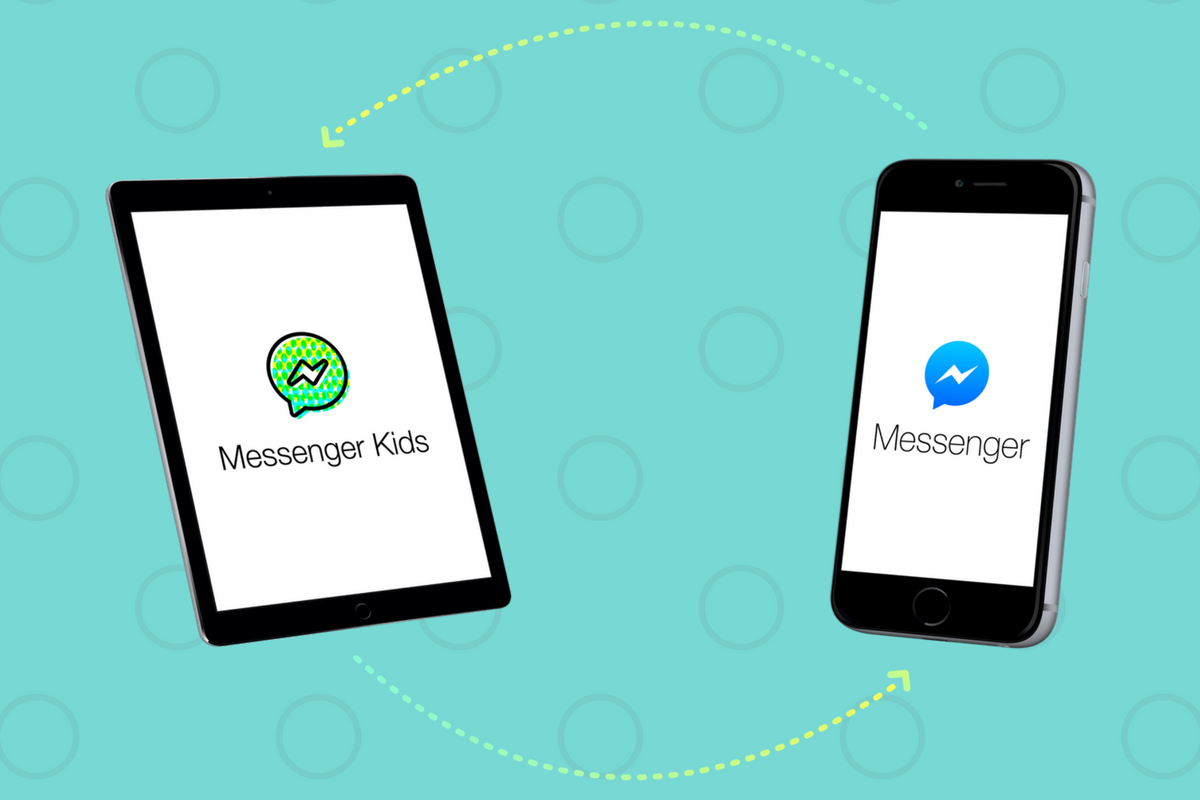
    Today, Facebook released the Android version of their Messenger Kids app. This means it’s available on iOS, Android, and Kindle now. That should pretty much cover most families. Facebook Messenger Kids puts the control in the parent’s hands, making it easy by building it into the Facebook App and Messenger App that you likely already use. You can decide who they are allowed to chat with and approve or deny friend requests.

    CHECK OUT: Facebook Messenger for Kids! for even more info about the app.

    My family uses Messenger Kids, albeit with some strict time limits (1hr per day) which we enforce through Circle (all devices) and unGlue (our older child.) It is a great way to help them get a feel for chatting through a messenger without strangers, bullies, or the constant notifications or FOM0 (Fear of Missing Out) that can accompany tech addiction. Facebook built in a lot of the controls and made the app kid-friendly by not allowing gifs that don’t originate in the Kids Messenger app and not allowing messages to be sent to unapproved friends.

    What Parents Should Know

    Since settings are controlled through your Facebook account, parents don’t have to have the same type of device as their child. You can set up your kids’ messenger app on his Android through your iPhone, for example. Keep in mind how addicting it can be to message your friends. Remember not to give them access to approve or disapprove of their friends on Messenger, this defeats the entire purpose. I know it can get tiresome to always have to sign off on everything they want to do online but Facebook makes it pretty easy with notifications on your own app.

    Use something to manage their time, like unGlue.  Talk to your kids about only messaging people they know in person and let them know what to do if someone asks them something they aren’t comfortable with. They should know that they can come to you when there is trouble. Messenger Kids is a good idea from Facebook and they did a lot of work to learn what parents would want out of a messaging app for their kids. Now the app is available on all devices so, if your kids have people they want to talk with, use this as a way to keep them in touch safely.

  • Family Tech Update: “The Time Well Spent Movement” {podcast]

    Family Tech Update: “The Time Well Spent Movement” {podcast]

    There’s a movement to take back our time and curb our tech addictions. What does it mean for families and how can we take charge of tech addictions? Plus: Snaps can be embedded on any site, and coding is king, but not on a screen!

    unGlue Affiliate Link

    Facebook: http://facebook.com/becausefamily
    Instagram: http://instagram.com/becausefamily
    Twitter: http://twitter.com/becausefamily

    Newsletter Sign up

    Ministry Updates:: http://eepurl.com/R7Btr
    Weekly Blog Posts:: http://eepurl.com/cvnhXD

    Websites

    Ministry Site:: http://becausefamily.org
    Tech Blog:: https://safe.becausefamily.org
    Michael’s Speaking Info:: http://kmichaelprince.org

    Donate and Affiliate Links

    http://BecauseFamily.org/partnership


  • Two Ways Your Snaps Can End Up Anywhere On the Web

    Two Ways Your Snaps Can End Up Anywhere On the Web

    One of my initial internet safety tips for parents is to turn off location data for their camera. Many of them do this immediately upon hearing my advice. The problem, however, is that they then jump over to Facebook and Snapchat to use that camera and their location settings are as public as can be. Today’s news gives us even more information about how your location data is used by Snapchat and Snapmap.

    Embedding

    Snap has opened up the ability to “embed” a snap into a website. This means that if your snap is public, a code can be copied and pasted so that your post shows up on the site that contains the embed code. It’s easy to do and really isn’t a new concept since public Facebook videos and photos can be embedded by default as well. I’ve embedded a snap from Disney on Ice in Des Plaines, Illinois:

    SnapMap

    Snapmap went into browsers today. This means that you don’t have to have the Snapchat app to see public posts overlayed onto a map of anywhere in the world. Concentrations of Snaps show up as colored dots that range from light blue (few Snaps) to bright red (high concentration of Snaps.) When you click on these colors you see the Snaps in a slideshow style format. They appear as most recent first and move to the past as you click or watch until the end of each post.

    Most of the Snap-map posts highlight breaking news (i.e. the recent ice storm in my area or a basketball game or concert) but it will sometimes feature posts from the general user if their posts are relevant and set to public. Posts are curated by a team of news editors. The idea is that Snapchat wants news organizations and sites to use their map to highlight current events and breaking news in real time. This offers a real opportunity to see real news, as it happens. It could also be dangerous if your kids aren’t setting their Snapchat settings to private or friends only.

    What Parents Should Know

    Location privacy is a major concern for parents. We post more of our private lives online than ever before and a map that highlights where we are and what we are up to can be considered a privacy disaster. Especially when it comes to our kids. Users of Snapchat are meant to be 13 years old or older. Some kids under than 13 spend a lot of time on the app, though, and their snaps are, therefore, available to be used as news coverage on this public map. I consider this a real problem for parents.

    I would recommend that if your kids use Snapchat, you ensure that they have their profiles set to private or friends only. Disable the Snapmap (put it in Ghost Mode) so that what they are posting won’t show up. Not taking these precautions could lead to your home address being featured on Snapchat’s map and even someone else’s website. Take location privacy serious. Talk to your kids about staying private, encourage them to never post anything they wouldn’t be comfortable being seen by anyone in the world. The internet isn’t private and social media is growing increasingly more public. Your kids need to understand that.

  • Connectivity IS NOT Connection

    Connectivity IS NOT Connection

    Our society has more connectivity than ever. At CES 2018 the conversation was all about how we’ve transitioned from the “digital age” to the connected age. Psychologists, however, warn that connectivity isn’t the same thing as being connected. Here’s what they mean.

    Connectivity

    We carry supercomputers around in our pockets and instead of using them to solve complex arithmetic or learn new information we watch videos of cats, read fake news, and gossip publicly about our friends. All of our devices are united on the same network, sharing data (intentionally or otherwise,) and building our digital identities.

    The algorithms that run our favorite social media and search engines have learned how to continuously feed us the same versions of the information we want to see. When we search for a news story we will immediately see stories from the same source we always see it from, when our kids search for videos on a topic for school they will always get regurgitated versions of the same information. “This doesn’t broaden their horizons.” Dr. Jenny Radesky, developmental-behavioral pediatrician, American Academy of Pediatrics at yesterday’s “Truth About Tech” summit in Washington. While we think that screens and tech are the way of the future and critical for our kids’ education, we have to continue to balance the benefits of digital tools with evergrowing entertainment uses.

    From Tools to Entertainment

    Everything on the Internet has potential to be an awesome tool. Social media is no exception. However, when the information we use to connect is sold to the highest bidder as marketing data and our means of connection turns into entertainment it’s actual usefulness comes into question. Social media is great when we use it to keep in contact with friends and family but when we use the tech as a replacement for actual learning or time with our kids we have missed the point of connection entirely.

    Connection

    Social Media executives boast that they are connecting the world like never before but we aren’t seeing true connections. We are seeing these companies treat our information like a product to be sold. This results in a click/share/comment model of connectivity that doesn’t build meaningful relationships. Scientists have found that face to face conversations create empathy. When your brain sees the expressions on someone’s face it triggers chemical’s reactions that you to feel what they are feeling.

    Neuroscience is teaching us that constantly communicating through text and simulated video chat isn’t actually connection. Our bodies physically lack the response we’re supposed to have when interacting with other human beings. Studies have shown that people admit to caring less in general. Especially, though, about the things they see on social media. When a friend loses a job, a simple “thoughts and prayers” post on Facebook makes us feel better but we are less stirred into any form of beneficial action. Sure, we have connectivity like never before, but we are increasingly less connected.

    What Parents Should Know

    “Make media a shared family activity and play your kids’ apps with them.” – Dr. Jenny Radesky, developmental-behavioral pediatrician, American Academy of Pediatrics

    I can’t say it enough. We have to model healthy tech habits for our kids. If they see us caring less and less because of the increased connectivity without true connection, they’ll follow directly in our footsteps. Teaching them to manage the amount of time they spend on social media will go a long way to increase their desire and ability to truly connect with people. Spending time with them on and off of our screens and having critical, face to face conversations with them will encourage them to do the same thing.

    Our favorite online activities are designed to cater to our own preferences and can create a selfishness that we don’t even recognize. Our teens don’t need any help being selfish, their brain development makes it hard enough for them to empathize, overuse of technology and social media just exacerbates that problem. Parents are the first line of defense to make a change in your kids’ lives. You have to do something. Here’s what I would suggest.

    Use unGlue to monitor their time and let them set limits. Subscribe so you can see what they are doing online and help them make good choices. Maybe your kids are younger. Use Circle to limit certain types of sites that decrease empathy in young kids like social media and gaming. Talk to your kids frequently about the dangers of having serious conversations over text or chat. Remind them how important face to face conversation is and that a face on a screen doesn’t count. Model that behavior for your kids and help them make decisions that strengthen their concern and care about others instead of diminishing it. We can all agree that in the world we live in, we should all be caring more, not less. The first place kids will learn these traits is in their homes, from family.

  • Facebook and Snapchat Join the “Time Well Spent” Movement

    Facebook and Snapchat Join the “Time Well Spent” Movement

    What is “Time Well Spent?”

    The Time Well Spent movement is a project of the Center for Humane Technology who exists to “Reverse the Digital Attention Crisis and Realign Technology with Humanity’s Best Interest.” The idea is that we have been trained to focus so much on social media and technology that we are missing out on the quality time we’re meant to have in our lives. The CHT works to educate parents, teachers, and industry leaders on the dangers of our addiction to technology and what we can do to overcome that addiction.

    Taking time to enjoy nature and have real face to face conversations are things we’ve taken for granted and the Time Well Spent movement is trying to get us back to those beneficial offline activities. We have begun to see some major social networks take notice of the desire for healthier tech use. As you’ll read below, awareness of these problems has lead to some actual changes for some of the most popular social media networks.

    Snapchat Redesign

    Not long ago Snapchat redesigned their app to be more user-friendly. They’ve also quietly added features that allow you to silence conversations for a while and added new styles of text to your snaps. The silencing feature is an obvious attempt to join the “Time Well Spent” movement.

    The do not disturb feature allows you to silence groups or individuals so that you don’t get notifications from them but don’t have to leave the conversation completely this allows you to keep a streak going while taking some time off of Snapchat, it also allows you to silent someone for a bit without making them feel like you’re ignoring them. Being able to silence conversations on Snapchat can make it easier to take a break without completely silencing your phone. Sure, you want to be accessible but you may not want to be as accessible as we can be these days with social media. I say good on Snapchat for adding this new do not disturb feature.

    Facebook Timeline Changes

    Facebook has been taking strides to encourage their users to use the platform in a more healthy way. From notifying you when you’re reading fake news to lowering the frequency of viral video content in your timeline or removing reasons to just blindly scroll Facebook without purpose. These changes seem to have led to a decrease in time spent on Facebook to the tune of 50 million hours per day.

    Zuckerberg has spent quite a bit of time talking about the responsibility Facebook has as the leading social media platform to encourage users to be more responsible with their activity online. It seems that they were willing to take this belief seriously even to the point of temporarily affecting their bottom line. Facebook’s new stats show a decrease in revenue, likely based on the usage decrease. While income was down during the last quarter of 2017, Facebook predicts that their numbers will level off as ad appearances on your timeline decreases but serious/meaningful engagement increases.

    What Parents Should Know

    I’ve never fully believed that the blame for addiction or overuse of tech and social media falls on developers. Yes, they can create services that encourage healthier use, and it’s good that some of them are beginning to think in that direction. The responsibility, however, falls on users to keep a healthy attitude. If our kids are who we are worried about then the responsibility to teach and model a healthy digital lifestyle falls to parents.

    Monitor the time you’re spending on social media. Set limits for yourself using some kind of software, like unGlue. Learn about the clues to whether news articles are fake or reliable, how to report people online that are causing problems, and how to avoid spammers and phishers. You should take the role of educating your kids on “Time Well Spent” seriously enough to model it for them yourself.