Author: Michael

  • Post Father’s Day Challenge for All of You Dads

    Post Father’s Day Challenge for All of You Dads

    I had some deep thoughts during Father’s Day yesterday. As always they concerned my work with families and internet safety and so I posted the following status on Facebook. I want to make it available to our blog readers here too. Moms, please share this with the fathers of your children; dads, please be challenged and let me know what steps you’ve taken to protect your kids online.  

    From Facebook on Father’s Day, Sunday, June 18, 2017.

    It’s Father’s Day and I’m thinking about some of the greatest opposition I face in our work to help parents protect their children online. You would think that kids would hate me. I’m the guy that comes in and sets up restrictions on their phones and computers. They’re not the ones giving me the stank eye, though, it’s the dads.

    Too often, the worst critic of my attempt to block pornography from the family computer or phones is the father. “Well, is this going to block dumb stuff?” “Is YouTube going to be useless now?” I am constantly hearing concern that in my attempt to protect their children from cyber bullying, adult content, porn, or sexting I’ll inconvenience dad in some way.

    Please understand that there have been many dads who were totally onboard and even some who have admitted to wanting better accountability for themselves but those dads aren’t the norm. I hear moms who are exasperated, sometimes to tears, because they want to keep their kids safe while dad is calling it “no big deal.” Again, the father too often seems to be more concerned about facing limitations of his own than the digital health and boundaries he’s setting for his family.

    Step up dads. If your kids need accountability then so do you. You should have it installed on your devices first. You should set the filters more strict than necessary and tell your kids that it’s annoying sometimes but it’s worth it because the alternative is something you don’t want to face. I wish I got more emails or calls from dads (I’ve had some) that are desperate to set boundaries for their kids’ internet use. I pray that it will change. Dads, we MUST be the example of the change we want to see. Call me. Let’s get your family a gift this father’s day. The gift of your commitment to higher standards while online.

    If you need help. Let me know EMAIL ME or contact me on Facebook or Instagram. I’d love to give you a hand.


  • How YOU Can Keep the FamilyTechBlog Alive

    How YOU Can Keep the FamilyTechBlog Alive

    We are not at risk of shutting down. We do, however, have hopes of becoming more and more affective in reaching families with the latest internet safety and family tech news. We are writing several articles a week and producing podcasts, tutorial videos, and other resources for you to use as tools to keep your family safe online. Offline we also reach out to schools, police departments, churches, and other organizations with internet safety workshops. We often don’t charge for these workshops because the groups we are working with wouldn’t be able to have us in if we did. This means our greatest resource is you, our reader/viewer/listener.

    There are several ways to support this blog. The easiest and most helpful to you is to use one of our affiliates. Accountable2You is a great accountability software resource, NetNanny is a filter that we recommend, and MobiCip is another, affordable, filtering and reporting option. Another way to help us out while helping yourself is to buy our book, “What’s in Your Pocket? A parent’s guide to protecting your children online.” The book is only $10.50 from this site and we’ll ship it the day you order it. It’ll really help us out while giving you the confidence and knowledge you need to protect your kids online. Finally, you can partner with us directly through a couple of ways, fist of all is Patreon. Patreon.com/becausefamily is where you can sign up to support our blog and podcast and be listed as a partner in the credits of our video and audio resources. You can also donate a special gift using Square or Paypal. Sharing our articles is also a wonderful way to show your support. Help us spread the word.

    Our vision is to reach as many families as we can with informative and relevant information to keep them up to date on the digital world their kids are growing up in. This blog and the podcast is and always will be free to the reader and listener but it isn’t free to produce. Your gift and the use of our affiliate links keep us writing and recording so that you and the parents you know can have more tools that you can use to keep your families safe.

    Thanks for your partnership and for putting up with this plea for support…now to your regularly scheduled tech safety information.

  • Musical.ly’s New Original Shows Could Undermine Your Internet Safety Goals

    Musical.ly’s New Original Shows Could Undermine Your Internet Safety Goals

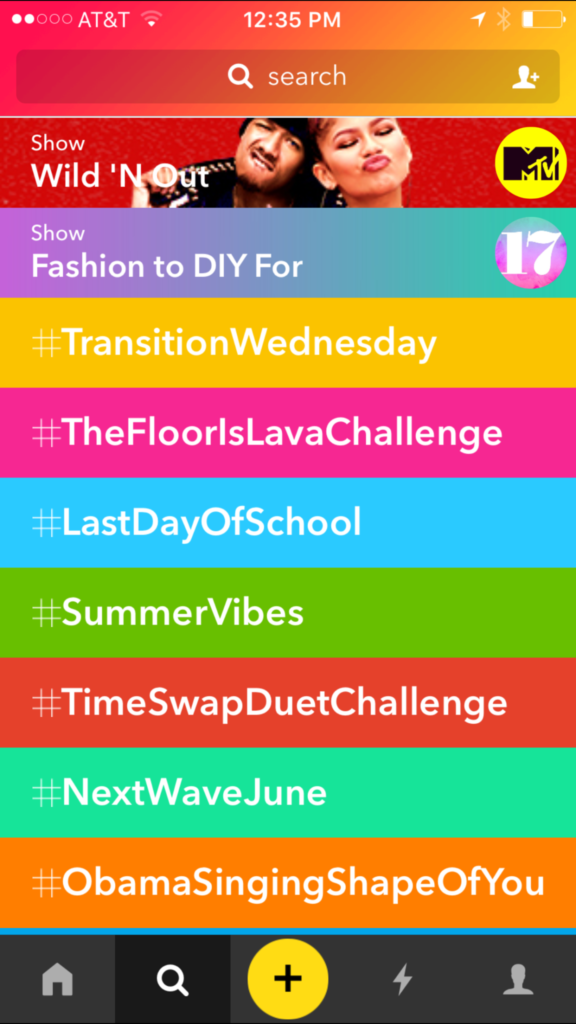
    Musical.ly has joined the ranks of the social media apps that are bringing original show content to user’s feeds. The lip sync music video producing platform launched a couple of shows today. One of the shows is from MTV/Viacom and one is from Seventeen Magazine, with two more from the same companies coming out on Saturday.  New shows are also coming from NBC, E!, and Telemundo. Musical.ly isn’t charging networks for this content or even selling ads for it, they’re really just using it as a test for future network deals. Whether or not this programming will provide value to the social media platform is yet to be seen. What is very apparent, however, is that there will be more content for your kid to watch than just the lip sync videos they’ve enjoyed thus far.

    What Parents Should Know

    Musical.ly is on my uninstall list because there is no age verification. Users can log in and watch other people’s videos without telling Musical.ly how old they are. This means you don’t know who’s watching you or sending you private messages. Most of the trending video sections are filled with tween and teen girls and boys acting out the different challenges or songs. The lack of age verification has brought some criticism to Musical.ly and many didn’t like their CEO’s response to such criticism. It seems they’re happy to allow people of any age to use the service without proving their age.

    My advice is pretty obvious. I recommend you uninstall Musical.ly. Mostly because I wouldn’t allow my kids to use an app where they can be contacted by anyone and everyone regardless of age and gender. The addition of these new shows just strengthens my belief that Musical.ly can undermine your internet safety goals. Content on these shows can reach outside the boundaries of what is allowed on TV. Unless you’re watching every episode of the original shows Musical.ly puts on their trending feed, you have no real way of knowing what your kids are consuming. Musical.ly will stay on my uninstall list and if I had the list in any particular order it would probably move up the rankings as well.

  • Can Your Kids Now Hide Photos from You Right in Instagram?

    Can Your Kids Now Hide Photos from You Right in Instagram?

    Kids hide images on their phones in several ways and for many reasons. Some just don’t want all of their embarrassing goofy pictures with their friends to be shared. Sometimes there’s a more sinister reason. Something involving sexting or cyberbullying. Kids can use different kinds of apps to lock away photos. There are some that look like calculators or phone utilities apps and still some that don’t hide what they do. Now, Instagram is allowing posts to be saved within the app without being made public. It’s called Archive.

    Instagram’s new archive feature allows users to remove posts from their feed without deleting them. It allows you to put the photos in an archive to be looked at in the future and even reposted. If you do repost it falls back in its original chronological order so it kind of just magically reappears where it was originally. A little arrow clock icon in the upper right corner of your profile page in the Instagram app will give you access to your archived posts. You can fill the archives by tapping on the “…” in the upper right of a post. Then just tap “Archive.”

    Why would you want to archive photos? Well, some may decide later that their post wasn’t something they’d want everyone to see. Maybe the pictures from the party you attended last month wouldn’t look good to that employer you just applied for a job with. No problem, just archive those things and you can still see them without them being public. Maybe you broke up with that guy or girl and don’t want everyone to see you together all over your Instagram page. Well, just archive them and they become a private photo stash for you to weep over on your own. Your kids will even use the feature to hide posts that didn’t get as many likes as they want.

    What Parents Should Know

    I recommend you understand the Archive feature on Instagram and learn how to find it on your kids’ profile. If you often take your kids’ phone and look at their social media behavior this is a way for them to share a photo for a brief time and then save it to an archive, knowing you’ll be looking at their feed later. If you don’t know how to access the Archived photos it’s possible you can miss some of what they’ve been posting. “Finstagram” or Spam accounts are popular with teens because it’s a way to have a more private collection of photos that they don’t share with many people. I recommend you find out if your kid has a spam account and follow it. I now, recommend you check to see what photos they’ve archived as well.

  • PODCAST: What’s the Deal With Let’s Play Videos?

    PODCAST: What’s the Deal With Let’s Play Videos?

    Apple and Android are each getting a new OS, teaching healthy tech habits, and the eSports debate.

    FAMILY TECH WEEKLY EPISODE 8

    Social Media Links

    Facebook: http://facebook.com/4pointfamilies

    Instagram: http://instagram.com/becausefamily

    Twitter: http://twitter.com/becausefamily

    Newsletter Signup

    Ministry Updates:: http://eepurl.com/R7Btr

    Weekly Blog Posts:: http://eepurl.com/cvnhXD

    Websites

    Ministry Site:: http://becausefamily.org

    Tech Blog:: https://safe.becausefamily.org

    Michael’s Speaking Info:: http://kmichaelprince.org

    Donate and Affiliate Links

    http://BecauseFamily.org/partnership

  • This Social Media Parody App May Cause You to Re-Think Everything

    This Social Media Parody App May Cause You to Re-Think Everything

    There are more articles on this site about social media than any other topic. I truly believe that social media is not a part of the internet, it is the reality of what the world wide web is now all about. Every site you visit has a social aspect, even if it’s just a way to connect to your favorite social media platform. Our businesses are run through social media and advertising is more prevalent and successful on our newsfeeds than nearly anywhere else. Social media isn’t a fad or a trend. It’s the world we live in and for some, it’s an addiction.  A new app, Binky, is providing a bit of a caricature of the social media lifestyle and it may just be something you should check out.

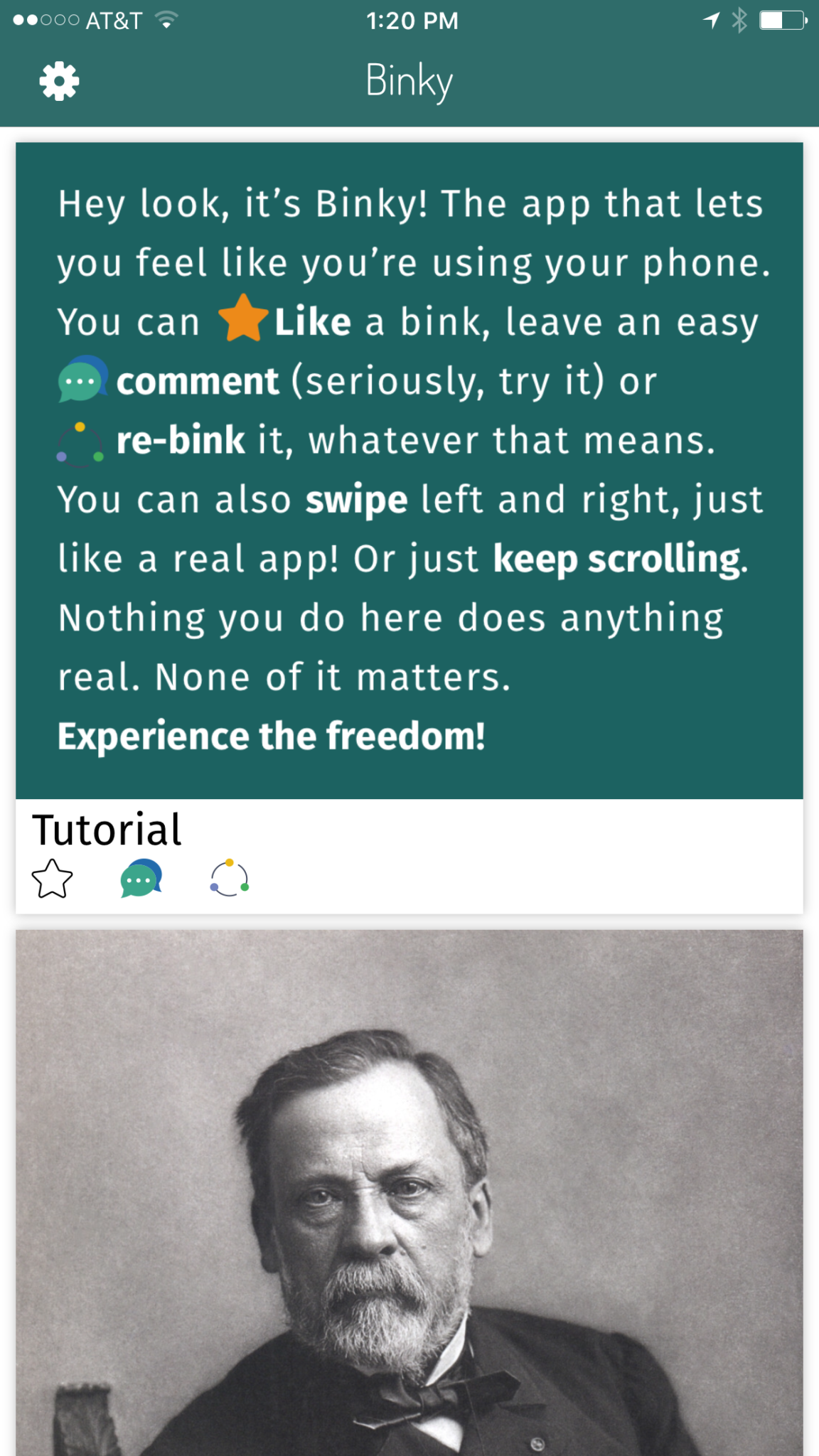
    Binky is a social media simulator (more like a parody) app that started as a joke. It simulates the features of most status and photo sharing social media platforms by giving you a seemingly endless stream of fake posts to scroll through. As you scroll you’ll see absolutely random and unrelated images with captions that may or may not make sense. You have the option to “Bink,” (read: Like) comment or “Re-Bink” (read: Share) the images that you’re scrolling through. When you click the Bink button you get an explosion of stars from under your tapping finger and a delightful bloop bloop sound. Commenting is my favorite feature of this app because it doesn’t actually let you say anything. Every letter you type after tapping the comment icon automatically puts in a word to form a randomly generated comment of text and emoji complete with meaningless hashtags. Finally, when you share the app you’ll receive a notice that asks if you are sure you want to “Re-Bink” this post. You’re reminded that the Re-Bink doesn’t actually do anything but it actually does. You get an explosion of thumbs up icons. That’s it though, there is not really anyone to  share with in Binky.

    What is the point?

    There really isn’t a point, except for satire and parody. You may be able to say that using this app is a bit eye opening, however. I think it was for me. As I mindlessly scrolled through Binky and clicked on the meaningless buttons and commented the automatically generated sentences on each post I couldn’t help but think about how not far from actual social media this was. What difference does what I do on Instagram or Facebook actually have? Is it any more that my activity on Binky today? I don’t know for sure but I think thinking this way is a good thing. We tend to be so concerned about how we look online that many of us, especially your teen and young adult children, may actually put on a false persona on our social media pages. Binky was a way for me to see the ridiculousness of working so hard to get more likes, comments, and shares.

    What Parents Should Know

    As I said before this app isn’t a real social media app. There is no social aspect to it at all. It’s more like a simulation of social media. Something to give us another perspective on what our behavior online truly looks like. I recommend spending some time messing with this app and encouraging your young teens and teens to install it and play around on it. It’s not only humorous but could lead to some conversations on the futility of living your life and finding your worth on social media. Maybe, just maybe, you can use an app like Binky to start a conversation that could help you make some good decisions with your kids on what healthy social media use looks like in your family.

  • New Operating Systems Coming for iPhone and Android

    New Operating Systems Coming for iPhone and Android

    The last few weeks have been loaded with updates from the two major tech brands in the industry. Google’s I/O event was May 17-19th and they had some major announcements including virtual reality, augmented reality, and a brand new operating system for Android, Android O. Apple’s Worldwide Developer’s Conference (WWDC) was this week, June 5-9th, and they’ve made similar announcements including a new version of their smartphone operating system that they’ve branded iOS 11. These two new systems will run the majority of the newer phones and tablets being released so it’s important to understand what each is offering. Here’s a rundown:

    Android O

    Android’s newest system should be made public this Fall. The most significant features are design changes in the Settings Menu and User Interface (UI.) Many of the smaller changes are things users won’t notice such as changes in how the OS will handle security and background operations, as well as channels or categories for notifications. Also, picture-in-picture support, notification badges that will appear on app icons, and better bluetooth support will definitely be features that makes Android O a step up for it’s users.

    iOS 11

    A new dock, multitasking with drag and drop, a files app, and better Apple Pencil support make iOS 11 a major upgrade for iPad. iPhone users will notice more apps in messenger, an app store that looks and works completely differently, and a new and improved Siri, including a new voice. The control center, the lock-screen, notifications screen, maps, Apple Music, and AirPlay are all getting improvements as well. iOS 11 is also slated to release this fall.


    What Parents Should Know

    There haven’t been any announcements on Parental Control improvements for either of these operating systems. When the test version of iOS 11 is released I’ll be giving it a full look-over and writing a review for you. One thing that parents will enjoy from iOS 11 is the ability to turn on an automatic Do Not Disturb while driving. The phone will sense your movement and speed and automatically silence any notifications until you’ve stopped. This will be a good way to keep your older kids safe while they are on the road. As for Android, they recently put out a new Parental Control option for their OS and it’s proving to be a pretty good setup. It’s only available on newer devices, however, and we still don’t know what changes have been made for when Android O is released.

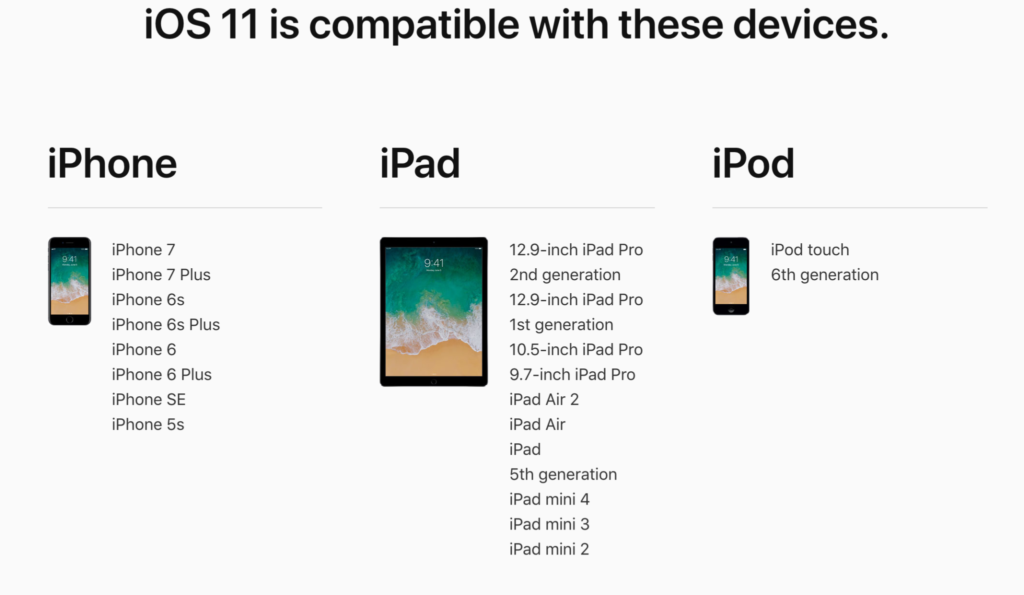
    I always recommend keeping on top of updates when they are made available. Both of these new Operating Systems should be available this fall and you should be sure, if your devices are compatible, that you’re upgrading soon after release.  This isn’t just important to get any of the new features but also because security and privacy updates come with these new systems. The apps you use, including the ones you use for internet safety and monitoring will update to keep up with the latest software and if your devices are behind you’ll start to see holes in your security. Keep your eye on the update section of your settings menu and when it shows that a new version is available you should install immediately. You can also keep checking in to this site as I will keep you informed on the latest releases as well as how they can affect your family.

  • Social Media, Globalization, and Our Kids’ Convictions

    Social Media, Globalization, and Our Kids’ Convictions

    We’ve got “covfeve”, Hillary Clinton speaking about politics at a programming conference, Kathy Griffin vs Donald Trump on Twitter, Mark Zuckerberg and Elon Musk talking about the President’s climate change beliefs, and all other kinds of tech notables using their platform to promote their political and ethical beliefs. There’s no doubt that our kids are growing up being more aware of the polarized political landscape we live in than ever before.

    I remember knowing there was a President when I was a kid. I remember hearing a thing or two about impeachment and adultery but I didn’t care or pay too much attention. I was a preteen and I had more important things to deal with. Mainly video games, girls, and baseball. I don’t remember hearing anything about politics while I was in middle school or high school. I registered to vote when I was 18 and voted for who my family said would be a good choice. Now, the people who run our favorite entertainment companies openly state their disdain or support for our government officials. Protests have hashtags and political videos and memes go viral equally because of people agreeing and disagreeing with them. It’s obvious to our kids now that we are living in a volatile political situation.

    Political opinion is formed by who you grow up listening to. It used to be formed by parents, grandparents, and the culture in your local community. Globalization now allows our kids access to every opinion from any voice they want to hear from. Many times these voices are people mom and dad may not be comfortable with. Declaring whether or not that is a good thing is not the intent of this article. My goal with this article is to give understanding to parents who are confused about why their kids grow up to think differently than they do.

    Your children live in a globally influential world instead of the small section of the country that we grew up in. I grew up in Texas, New Mexico, and Missouri and believed the better part of what I was raised to believe. The global landscape of social media (which is just the state of the internet in our culture) has caused many of those beliefs to shift or even outright be changed. Not just for me but for most in my generation and younger.

    Parents should be aware, whatever your thoughts are on today’s hot political topics, that your voice is most likely not the loudest voice in your children’s lives. The Snapchat Discover page, that YouTube vlogger, Instagram influencers, and even Twitter are telling them whatever message they’re more interested in soaking in. The algorithm’s on these platforms provide them with a steady stream of reinforcement for whatever it is they’ve been tapping or clicking on up to this point. Opinion isn’t being formed by their church, their school, or their family like it used to. It’s formed by anyone and everyone in the entire world. Whatever your thoughts on what your kids should believe or where they should form these beliefs, I just wanted you to know where it’s actually coming from. 

  • You Can Finally Get a Refund for those Old Amazon Purchases Your Kids Made

    You Can Finally Get a Refund for those Old Amazon Purchases Your Kids Made

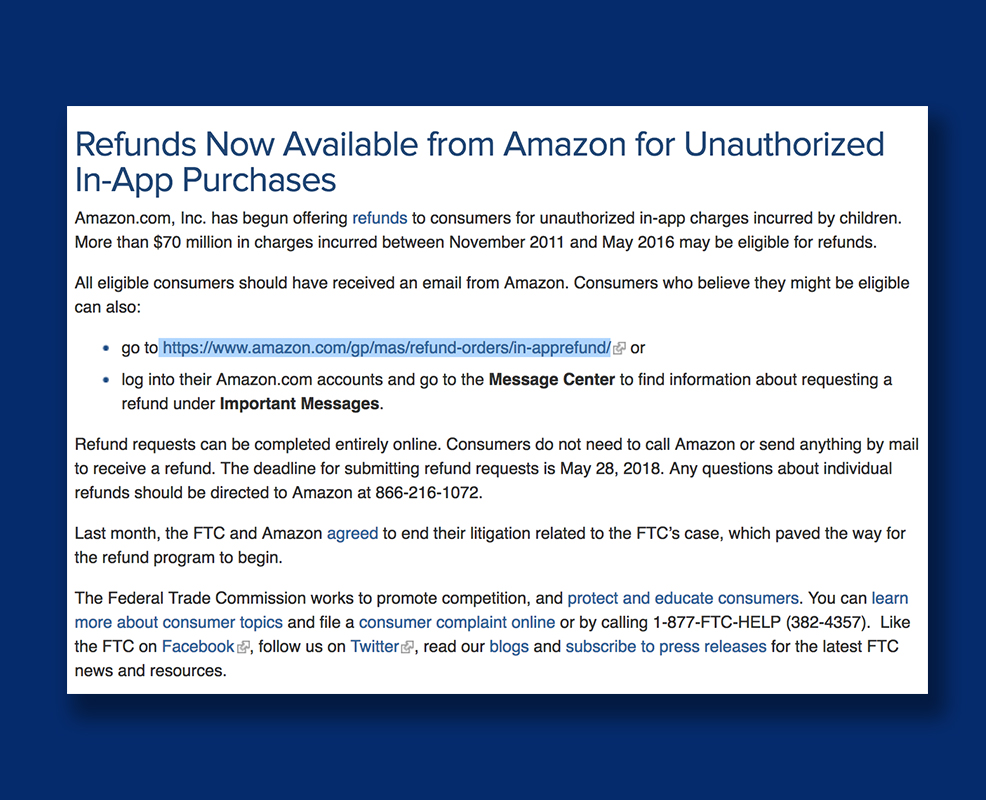
    Remember those unintended charges your kid racked up on your Amazon account? You can finally get a refund for that. Amazon announced this week, after teasing in April, that they’re opening up their refund system for those old charges. You may recall that Amazon got in to some trouble with the Federal Trade Commission for being too lax on in app purchases. This caused thousands of parents to see charges show up on their accounts that they weren’t responsible for. Their kids could buy gems, gold pieces, upgrades, or whatever else in the games they were playing with no secret pin or passcode required. At the time Amazon added the parental restrictions but were still working on a way to give out all of the refunds.

    They will be emailing users who are eligible for a refund and you can follow the steps from there. There is a one year deadline to submit for your refund and them the time is up. These refunds will cost Amazon up to $70 million dollars and are available to users who had this problem from 2011 through 2016. If you think you’re eligible but didn’t get an email you can visit https://www.amazon.com/gp/mas/refund-orders/in-apprefund/ to find out if you qualify.

    The Federal Trade Commission’s Official Statement

    What Parents Should Know

    Obviously you should get your refund if you qualify but these charges can still happen if you don’t have your settings right. You can set up purchase permissions on iTunes, Amazon, or Android’s Google Play store. You also have to set individual permissions on most of your devices. This will allow you to require passwords and pins in order to make a purchase, thus keeping you from seeing strange charges on your credit card or bank statements. I’ve made a video to help you with your Apple devices. Hopefully you can use these steps to keep from having to apply for any refunds for purchases you didn’t make yourself.

  • Here’s Why Your Kids Watch Other People Play Video Games

    Here’s Why Your Kids Watch Other People Play Video Games

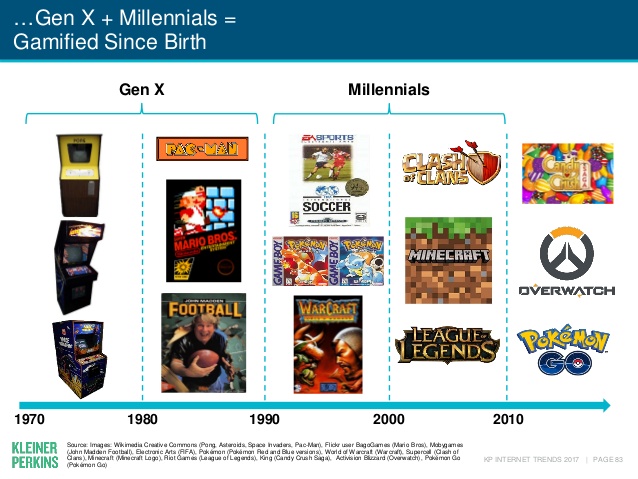
    Watching other people play video games may not be something that you, as a parent, understand. The truth, however, is that it isn’t weird. It’s called esports and its popularity has grown in leaps and bounds. In fact, the recently released Kleiner Perkins 2017 Internet Trends report states that the popularity of esports has grown 40% every year. Also, 40% of the demographic that your kids belong in (millennials) even state that they prefer esports to traditional sports.

    Esports is growing all over the world it allows those with video game skills to test their abilities against the best on our globe. Most esport competitions begin with online qualifying matches and then culminate in an actual tournament style playoff in front of a live, and online audience. You can find an esports league for pretty much any video game you play. There are sports gaming leagues, Role Playing Game leagues, first person shooter game leagues, and even leagues and competitions for the most casual of puzzle games.

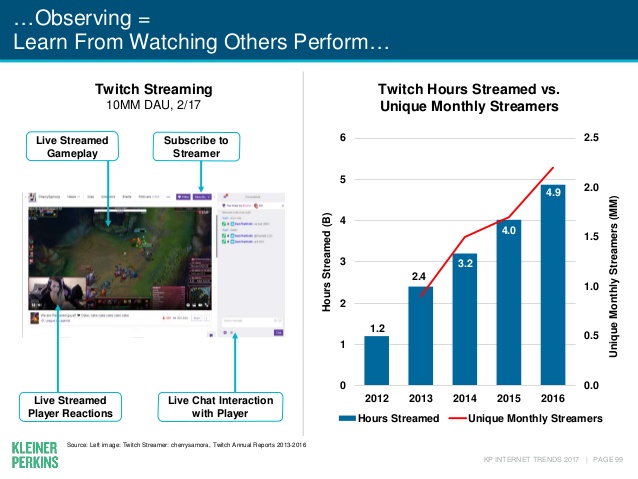
    Not all video gaming entertainment is competition based. “Let’s Play” video games on YouTube and LiveStreams on Twitch have also seen a massive increase in popularity. These videos feature gamers playing their favorite games and narrating their experience while thousands of fans watch and comment on the videos. On Twitch, streamers react in real time to the comment section or “twitch chat” allowing them to engage with their viewers and even let those watching help them make in-game decisions and strategies. These Let’s Play gamers build large communities that are extremely faithful and supportive. Many have even been able to make gaming their full time job because of ad revenue and the generosity of their viewing community. 

    What Parents Should Know

    First of all I recommend you take the idea of esports being a fad out of your mind completely. The truth is that esports is simply the next phase of the same video game culture that started while or before you were even a child. When people start to do something that takes any level of skill, opportunities to measure your skill against opponents will soon follow. Then, of course comes the chance to play for money since these competitions will surely draw a crowd who will pay for the privilege to be entertained by your tournament. Just think about poker or chess or cheerleading. These are all things that many start out doing as a hobby but there is a real competitive culture for these activities and therefore, a real industry. Video Gaming is no different.

    As far as your kids’ safety, I recommend that you know what games and gamers they like to watch. Get into that world a little bit for yourself and learn who these people are that your kid is watching play. There are adults that play games you kids love on YouTube but they don’t use very kid friendly language while they play. There are also people on YouTube who play very adult oriented games. You should have a general idea who your kids are viewing and what kind of content they share. The best way to do this is to share their YouTube and Twitch account and keep an eye on who they follow or subscribe to and their viewing history. I know this just adds more pieces to the internet safety puzzle but it’s worth the effort.