Author: Michael

  • The “Grown Up Fortnite,” PUBG, is Now FREE on iOS and Android

    The “Grown Up Fortnite,” PUBG, is Now FREE on iOS and Android

    If your kid doesn’t play Fortnite, they’ve asked if they can. It’s a battle royale game that combines the third person shooter genre with crafting and resource gathering. You parachute onto an island and battle against 99 other players to the last man. Along the way, you collect resources, weapons, and armor. You use your resources to craft walls, towers, and such to help you fight against other players. Fortnite is made with cartoon style graphics and no blood or gore. You do, however, play against or with players online from all over the world.

    Player Unknown’s Battleground started the battle royale genre hype. It follows the same model as Fortnite, minus the crafting and resource collection. The biggest difference, however, is the realism. While it still plays like a game, it is a third person shooter with plenty of violence and blood. You don’t build and craft, you just run around avoiding enemies until you have to battle it out. Then, the choice is to kill or be killed. The game wasn’t made for young kids. It is now available for free in mobile app stores so more kids can have access to it.

    CHECK OUT: Podcast – Boys and Video Game Addictions

    What Parents Should Know

    My advice is to use something like Family Share or Android FamilyLink (if available) to keep an eye on what apps your kids are downloading. I’m not one to say that kids playing violent video games will immediately lead to them committing violence themselves, but I do know that there are psychological effects on young boys who experience the intensity of simulated battle while their brains are developing. I recommend not allowing your kids to download this app. Fortnite is questionable, but to me, PUBG is a definite no.

  • PODCAST: Social Media isn’t For the Users Anymore

    PODCAST: Social Media isn’t For the Users Anymore

    Family Tech Update: Entertainment Software Rating Board will Warn Parents of In-Game Purchases in Video Games – Movie Pass Reveals that They Collect Much More of Your Data than You Thought – Netflix Testing “Patches” to Reward Kids’ Binge-Watching – and Social Media isn’t For Users Anymore!

    Show Notes:

    Facebook’s algorithm change
    Instagram never going back to chronological
    Pay for reach…
    For Parents
    there’s a system behind social media
    marketers are paid to manipulate the system
    Companies make decisions based on marketing opportunities
    Social Media isn’t made for the user anymore
    No social media until 17…

    Social Media Links

    Facebook: http://facebook.com/BecauseFamily
    Instagram: http://instagram.com/becausefamily
    Twitter: http://twitter.com/becausefamily

    Newsletter Sign up

    Ministry Updates:: http://eepurl.com/R7Btr
    Weekly Blog Posts:: http://eepurl.com/cvnhXD

    Websites

    Ministry Site:: http://becausefamily.org
    Tech Blog:: https://safe.becausefamily.org
    Michael’s Speaking Info:: http://kmichaelprince.org

    Donate and Affiliate Links

    http://BecauseFamily.org/partnership

    Music Creative Commons

  • Netflix Testing “Patches” to Reward Kids’ Binge Watching

    Netflix Testing “Patches” to Reward Kids’ Binge Watching

    Saying they are trying to achieve a more “interactive experience,” Netflix has begun testing patches on kids shows. These digital badges will be given as rewards for watching certain episodes or a certain number of episodes of a Netflix original show. Patches don’t unlock any extra content. They are meant to be their own reward.

    There has been some backlash from parents and others on Twitter who are concerned about kids binge-watching more shows. I can attest to the difficulty of convincing your kids that it’s time to turn off their shows and move on to some other activity. I agree that the last thing we need is the collection of badges or patches as another excuse for our kids to get sucked into episode after episode.

    Netflix has tried in the past to increase interactivity for viewers with their choose your own adventure content. These movies contained built-in pauses to ask the viewer what the main character should do. The story developed into different scenes based on the choices of the viewer. While the end of the story seemed to be the same no matter your choice, it provided a bit of interactivity as opposed to just sitting and watching a story play out on the screen. There haven’t been very many more of these shows since the original test episodes came out.

    What Parents Should Know

    Too much screen time is always a concern for parents these days and I would be surprised if the response to badges for watching shows is positive at all. The goal is pretty obvious: Netflix wants to increase viewership. I imagine that the testing phase will end with the removal of patches and badges. Parents are becoming more and more aware of the amount of time their kids are spending online and watching video content and setting stricter boundaries. Hopefully, Netflix gets wise to that fact and allows it to inform their decisions.

  • How to Turn Off Hidden Location Access in iOS

    How to Turn Off Hidden Location Access in iOS

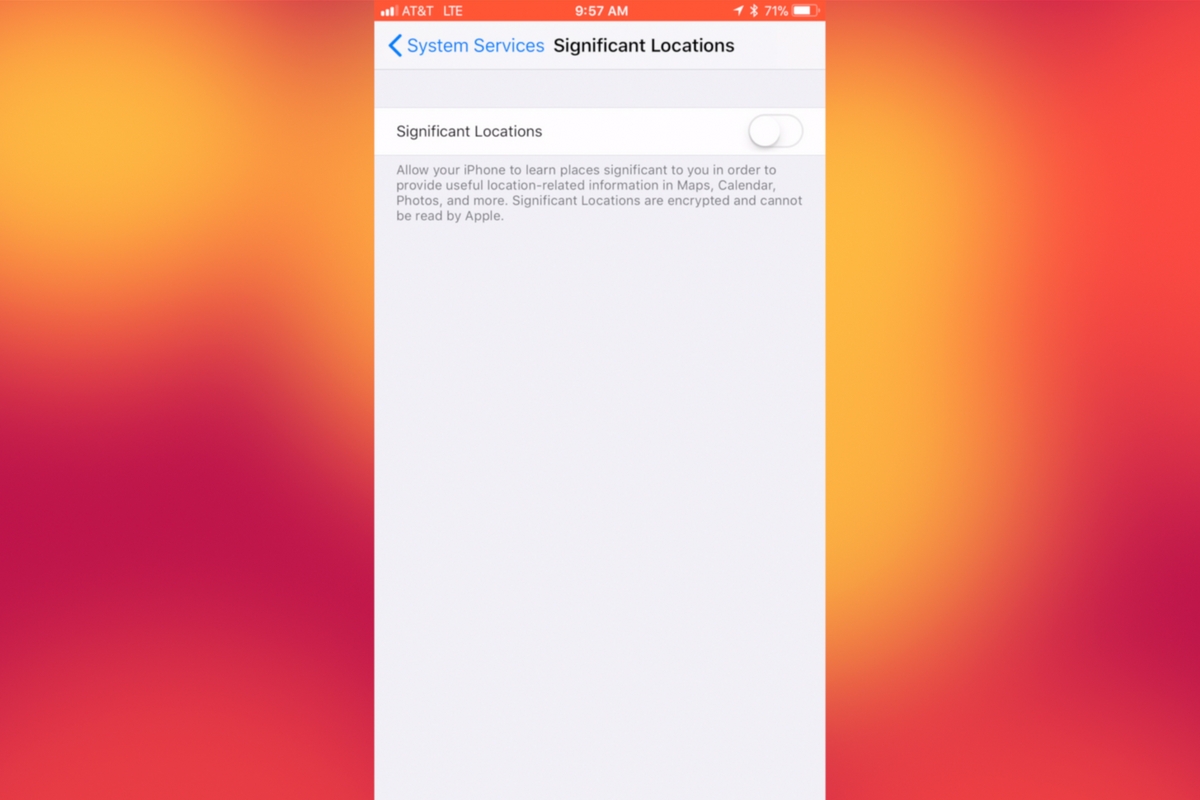
    I recently noticed that some of my photos and videos were still being tagged with a location. One of the most common pieces of advice I give to parents is to turn location access off to their cameras. I was a bit annoyed because I never saw location information in my Photos app before, but now I was. Well, I did a bit of digging and found the culprit. It’s about five taps deep into your privacy settings and, therefore, easy to miss. Below is a short video tutorial to help you be sure location info on your phone stays as private as possible.

    Why Turn This Off

    Your location information is easy to track and very easy to gather from the data in the videos and pictures that you upload to social media. There have been instances of kids being harassed by predators who learned where they were through images their parents had shared online. Common sense tells us never to post pictures or videos that show an address number, school name, or sign of a place you frequently go with your family. The problem is that some of the apps on our phones tag our locations by default. I recommend you look at every app’s location request and ask yourself, “Does this app HAVE TO know where I am to function properly?” If it does not, then turn off access to your location.

    Hopefully, this short video helps you make the changes you need to feel like your privacy is even more secure. I know I feel better.

  • Movie Pass Reveals that They Collect Much More of Your Data than You Thought

    Movie Pass Reveals that They Collect Much More of Your Data than You Thought

    Several websites and apps have recently gone viral through facebook posts. These apps allow you to connect your Facebook account and see pictures of yourself be changed in some way. Maybe to look like a movie star or a politician or a model. Sure, we all want to see ourselves as celebrities or as the latest magazine cover model but there is a price to pay. If these things seem too free or cheap to be a good idea, it’s because that’s exactly what’s going on. They don’t have to charge for access to those little images or services because they make their money by selling your data.

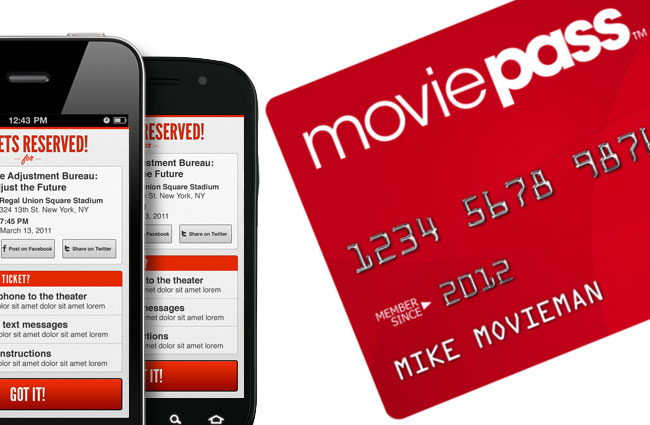
    MoviePass made waves several months ago with their inexpensive movie theater subscription service. Their app was super successful because ten bucks per month is a super low price for up to one movie per day in the theater. I remember seeing this offer shared online numerous times over the past several months. People were amazed that it actually worked and in a world where there are mega blockbuster movies being released every month, an all-access pass is a value that seems too good to be legit. The truth is, it isn’t as legit as you may think.

    At a recent event, Mitch Lowe, the CEO of Movie Pass gave a talk called “Data is the New Oil: How MoviePass will Monetize It.” In it he bragged about the amount of data the app received from its users:

    “We get an enormous amount of information. We watch how you drive from home to the movies. We watch where you go afterwards.” he even said, “We know all about you.”

    Data mining isn’t new, in fact, it has been happening almost since the dawn of the internet. The difference is how little information the companies are required to give users about the amount of data they’re tracking and what they do with it. Terms of Service and Privacy policies are rarely read by users and even if they were, they give the most bare-bones information about the practices of the company. MoviePass claims to ping your location data once when you search for movies in your local theater. It seems they do a bit more than that.

    We are all a bit used to our data being tracked by the sites we use. We’ve seen ads from Amazon show up on our Facebook feeds every single day for years now. Unfortunately, however, not all of the data that companies like Viralemon and MoviePass receive is about what we’re shopping for. This data can be sold to other advertisers and be used to add promotional options to their apps or websites. The biggest concern is the often less than effective security protocols these companies have. If their site is compromised for some reason, all of that data can get into the hands of hackers with less than wholesome intentions.

    My Advice

    First of all, don’t give random sites access to your social media pages. If a site, game, or activity redirects you to a link that asks you to click ALLOW in Facebook then click away immediately. If you want to upload a picture, that’s up to you but letting a sill site like that access your Friends list, timeline photos, profile photos, videos, page clicks, likes, and who knows what all else is just a bad idea. Always.

    Don’t upload pictures of your kids to these sites. Photos of kids are prime real estate. It sounds sick but you wouldn’t believe the use for random pictures of your son or daughter in the marketing, advertising, and much worse industries.

    If it sounds too cheap to be legit…IT IS NOT LEGIT! This one speaks for itself, if they aren’t making money by charging you to use their service or buy their product then they’re making money some other way. In the internet/connected age, they’re almost always making money by selling your information.

    Share and don’t Share! Cool, you are now well aware of the risks of giving these sites access to your social media accounts. Now you need to share this knowledge with your friends. Remember that if they give away their info, much of that info could include you. Let them know it isn’t safe and then stop sharing these dumb, clickbait, data mining apps and websites so that they’ll stop going viral, stop making money, and have to shut down. That would make the internet a much safer place.

  • Entertainment Software Rating Board will Warn Parents of In Game Purchases in Video Games

    Entertainment Software Rating Board will Warn Parents of In Game Purchases in Video Games

    Hopefully, most parents are aware that video games have a rating system very similar to movies. Rating range from “E” to “T for Teen” to “Mature” and contain extra information to help you know why it received the rating it got. As mobile gaming continues to influence more of the video game marketplace, in-app or in-game purchases are becoming the norm. This has inspired the ESRB to add new warnings into their rating systems in an effort to make parents aware when there are pay-to-play items in the latest video games.

    “The video game industry is evolving and innovating continually, as is the ESRB rating system. ESRB’s goal is to ensure that parents have the most up-to-date and comprehensive tools at their disposal to help them decide which games are appropriate for their children,” said ESRB president Patricia Vance. “With the new In-Game Purchases interactive element coming to physical games, parents will know when a game contains offers for players to purchase additional content. Moreover, we will be expanding our efforts to educate parents about the controls currently at their disposal to manage in-game spending before their kids press ‘Start’.”

    Most games now offer things you can purchase to make your gaming experience better or at least easier. Things like storage upgrades, suits of armor, character “skins,” and weapons can all be purchased and used in-game. These items, while not always necessary to complete a game, are very tempting as they let you customize or even accelerate your experience. Notification of in-game purchases is great, but what’s even better is the new ESRB Parent Tools page.

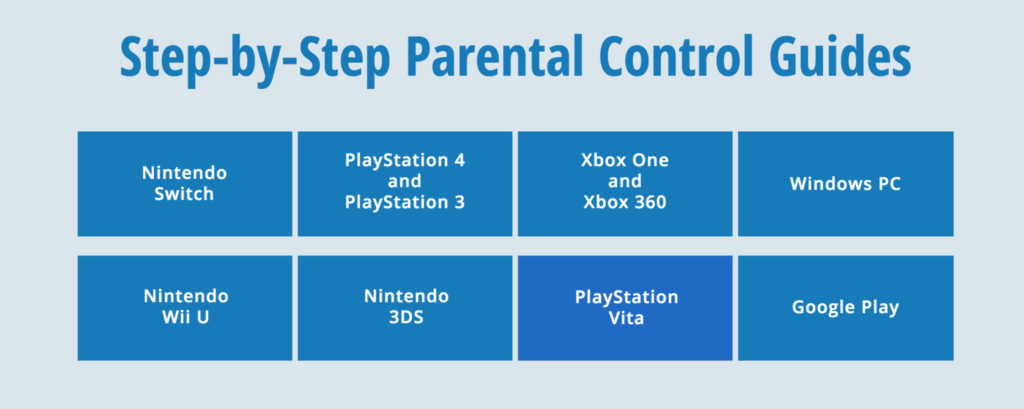
    The Parent Tools page has news updates, rating explanations, and best of all, step by step instructions for setting up parental controls on any current (and some older) gaming systems. There’s also a link to their resource center which contains a wealth of video game rating information that can help you make quality decisions for your children’s gaming adventures.

    What Parents Should Know

    If your kids play video games, this is great news for you. Countless parents have had purchases charged to their accounts without realizing it because of their kids buying items in-game. It isn’t known when these warnings will begin to show up on gaming packages but you should be on the lookout for it. Talk to your kids about what they should do if they want to purchase something in a game they’re playing. If it’s against your rules, then they should know that and stay away from the in-game store. What are the consequences of spending money you didn’t approve of? All of these things should be discussed and the game shouldn’t be bought until they are clear on your expectations.

    The ESRB is offering some great resources on their site. Parents should take advantage of these resources, learn how to set up parental controls, peruse the resource center, and look up your kids’ favorite games to see what their ratings are and why. This is a great way to ensure your kids aren’t seeing content you wouldn’t approve of. Many video games have content as mature or even more mature than some rated R movies. Don’t be caught off guard. With resources like this at your disposal, you don’t have an excuse.

  • TUTORIAL: How to Download All of Your Photos, Videos, and Messages from Facebook at Once

    TUTORIAL: How to Download All of Your Photos, Videos, and Messages from Facebook at Once

    There could be a number of reasons you’d want to download all of your Facebook data. Maybe you’re making a fresh start but don’t want to lose photos and videos, maybe something’s going on and you need message data downloaded, or maybe you just want to back up all your data for when the giant electromagnetic pulse goes off someday and the internet comes crashing down. Whatever reason you’re interested, here are the simple steps you can take to download all of your Facebook info at once. The tutorial video is at the bottom of this post.


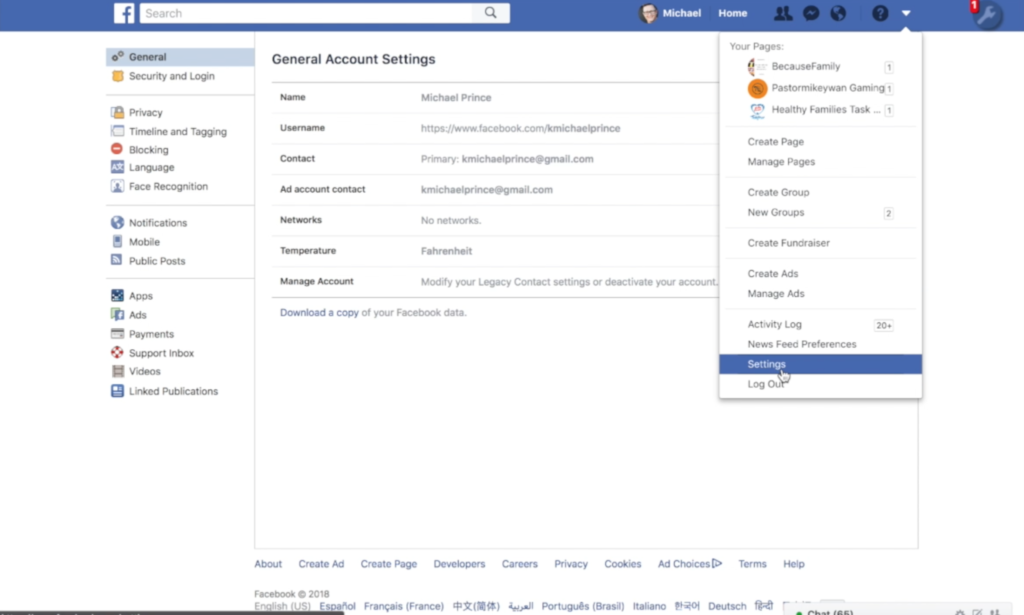
    1. Go to your settings page.


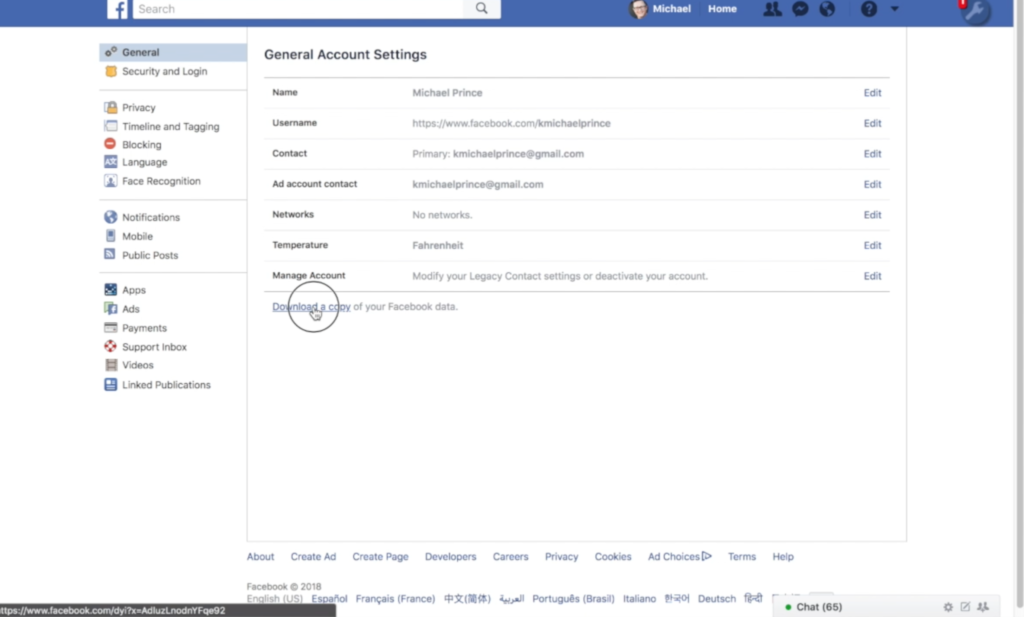
    2. Click on Download a copy Facebook Data


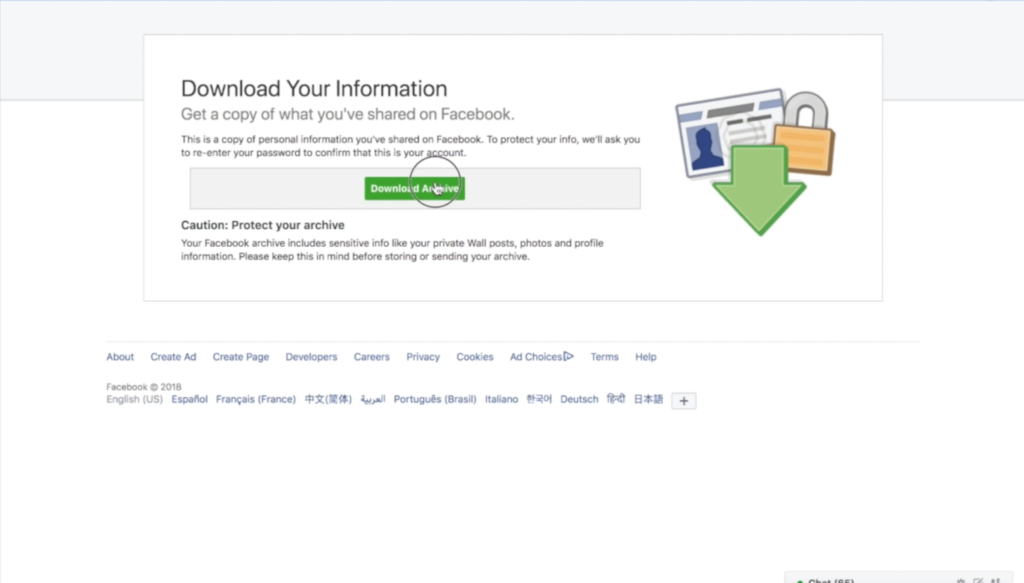
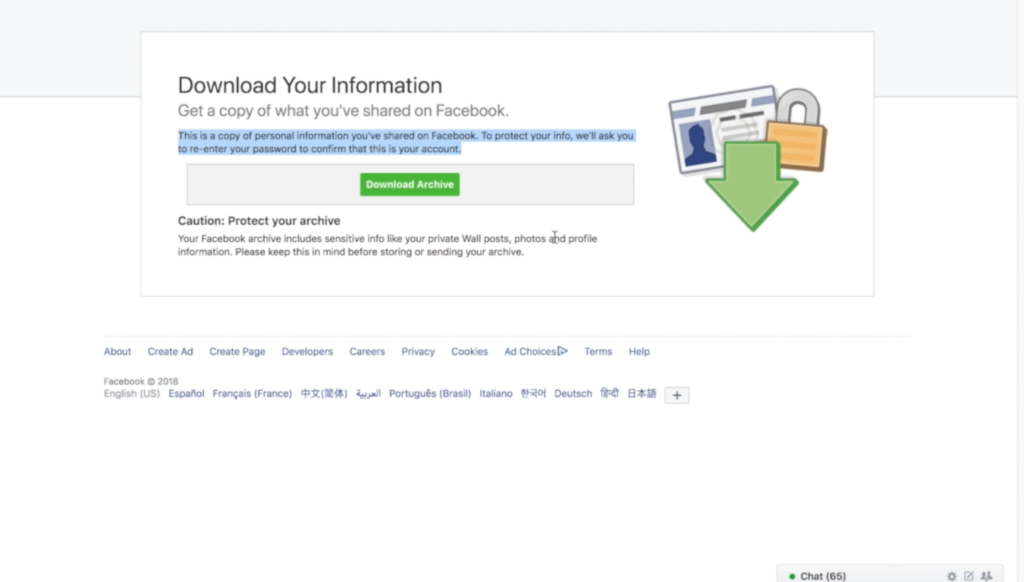
    3. Click download archive.


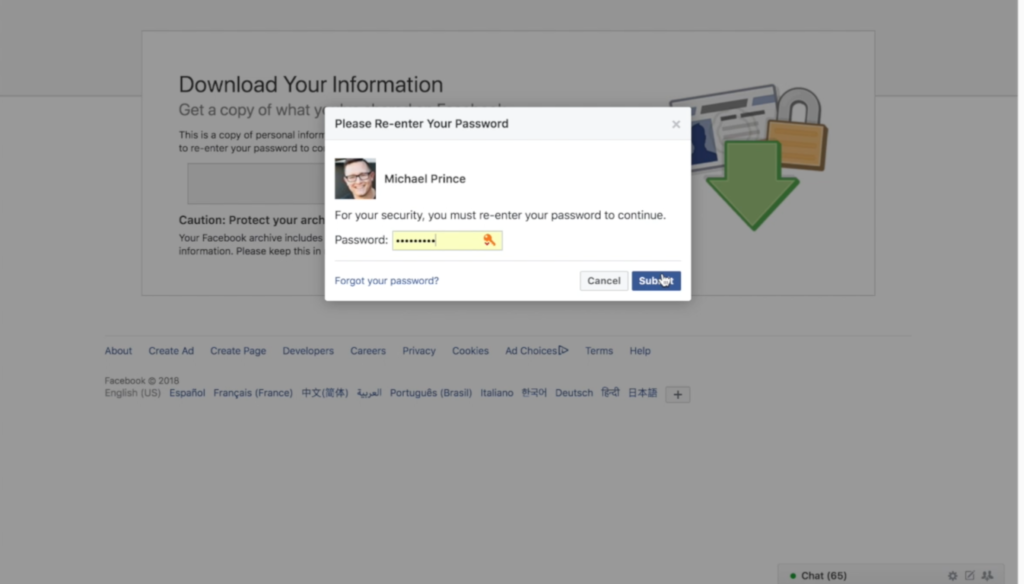
    4. Enter your password and click Submit


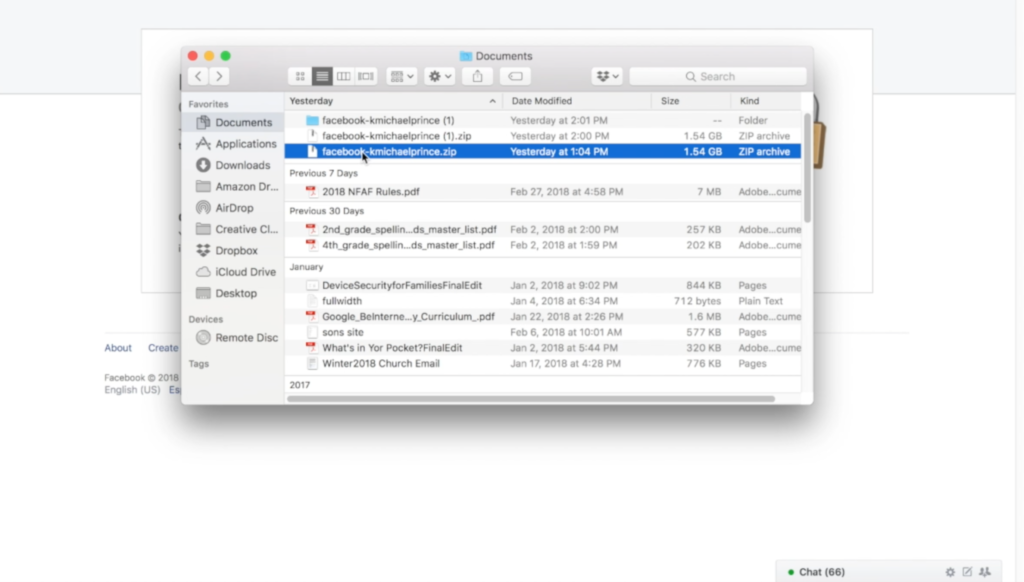
    5. Your data downloads as a zip file.


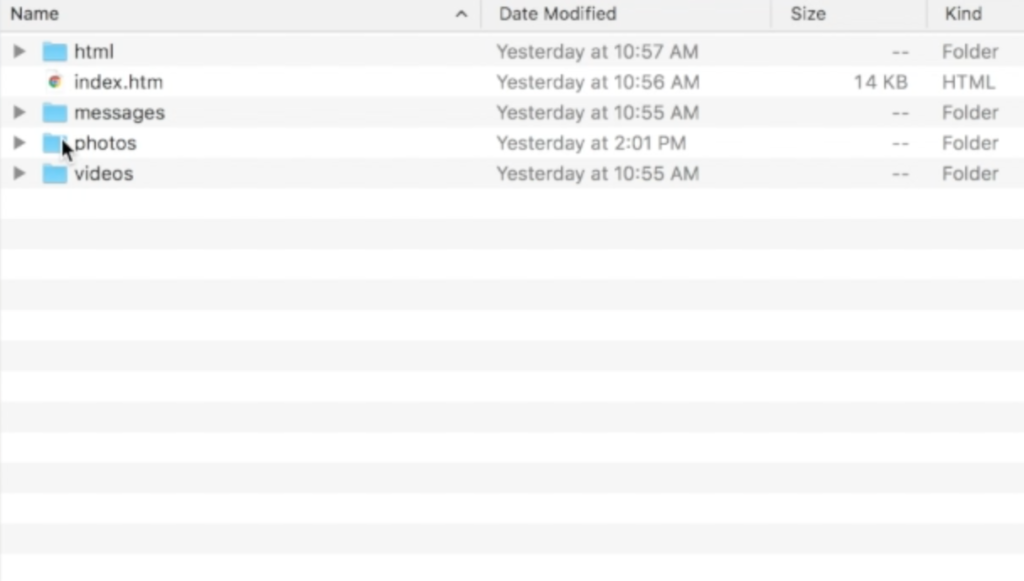
    6. Once unzipped, you’ll see your files separated into folders.


    7. Keep somewhere safe and share with caution as some of the data is personal.


    There are the instructions. Here’s a video tutorial:


  • PODCAST: Three Apps Your Kids Should Uninstall

    PODCAST: Three Apps Your Kids Should Uninstall

    Family Tech Update: These apps can be seriously dangerous for your kids. Adult content, privacy issues, stranger danger, all kinds of issues here, and some of them are only rated 12+!

    Social Media Links

    Facebook: http://facebook.com/becausefamily
    Instagram: http://instagram.com/becausefamily

    Twitter: http://twitter.com/becausefamily

    Newsletter Sign up

    Ministry Updates:: http://eepurl.com/R7Btr
    Weekly Blog Posts:: http://eepurl.com/cvnhXD

    Websites

    Ministry Site:: http://becausefamily.org
    Tech Blog:: https://safe.becausefamily.org
    Michael’s Speaking Info:: http://becausefamily.org/bookings

    Donate and Affiliate Links

    http://BecauseFamily.org/partnership

    All music/audio effects are public domain.

  • How I Used the Sens8 Connected Security Camera and Still Protected My Privacy

    How I Used the Sens8 Connected Security Camera and Still Protected My Privacy

    We have always been a bit leery of using internet-connected cameras in our home. The idea of having a camera or microphone always on in our house gives us caution. When Sens8 asked us to use their smart security camera for a bit, I decided it would be a great way to try out this cool tech, while providing a guide for you as to how I used it as safely as possible.

    IoT (Internet of Things) devices are products that you may use every day that can now connect to the internet. Thermostats, refrigerators, toasters, mirrors, security systems, and baby monitors can all be controlled from your phone or computer over your home wifi. Some are even able to connect to your voice command technology like Alexa or Google Home. This sounds like the future is now! We are living in a time that had previously only been imaginable in movies and books. Some experts, however, are very concerned about the security of these devices.

    CHECK OUT: This series about the risks of a fully connected home.

    How I Used the Sens8 Connected Security Camera

    Setting it Up.

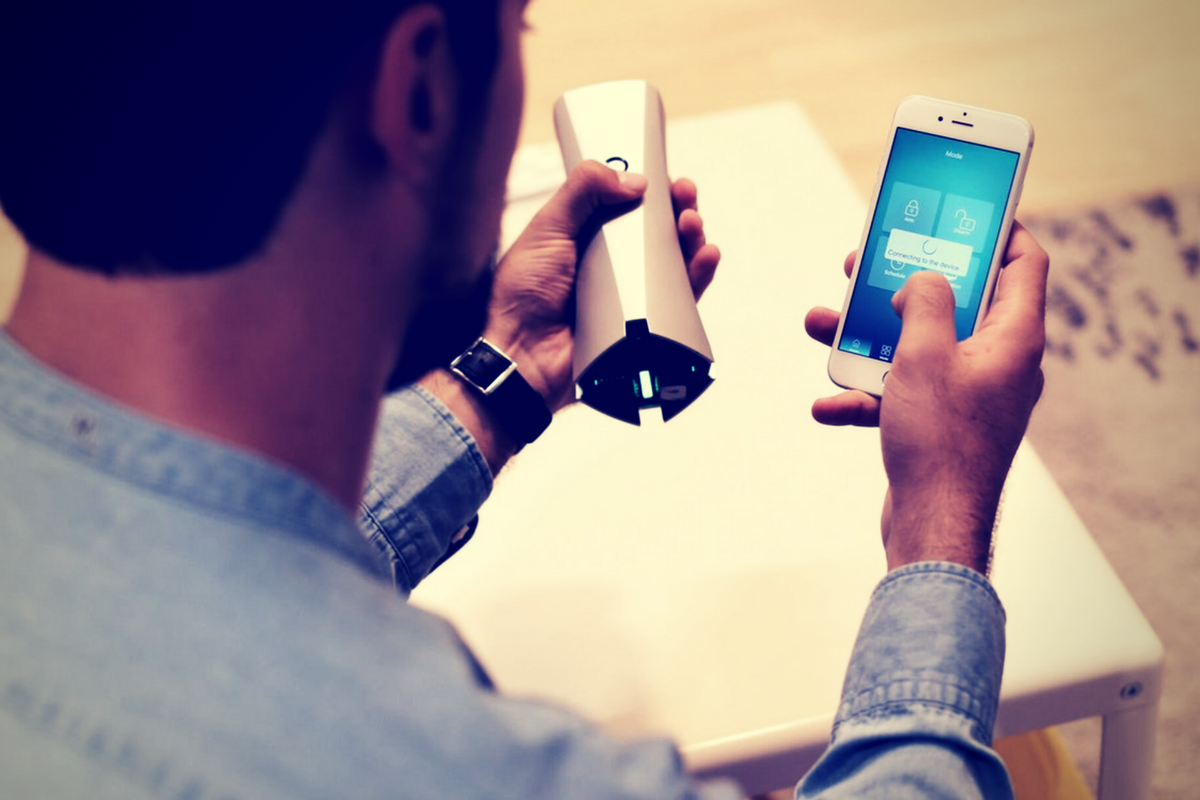
    The SENS8 Connected Security Camera is a full HD camera with auto arm/disarm and many other features. It will keep track of temperature, humidity, and sound levels in your home to create a “Health Index.” The idea is having a security camera/system without paying a monthly fee. SENSE8 is available on Amazon for $169. The features I liked were the clarity of the video images and being able to arm/disarm from my phone. There is an alarm built in to scare off any invaders but it can be turned off in case you have a pet or children that seem to walk around during the night and would set it off. When something triggers the built-in motion sensor, the camera comes on and captures the intruder. You get an alert almost immediately and can see the video. It also saves in the app for future use. I think SENS8 is the perfect budget home security solution. It works well, it’s small and inconspicuous, and the alarm (if you use it) is loud enough to wake you and scare away any intruders.

    I set up my SENS8 in the Family Room facing the front door. The widescreen 1080p camera captured most of my living room and the entry to my kitchen. The sensor would start the camera if there was movement from the hallway, the kitchen entry, or the front door entryway. The camera was sitting about waist high but captured floor to ceiling at as close as three feet away. I felt confident that anyone who came in would be caught on camera and I would be notified before anyone could even figure out there was a camera in the room. To me, that was the most important thing.

    We used the camera for about two weeks, obviously, there were never any break-ins but was able to be sure my wife made it home safely a couple of times while I was out. I was notified while I was at early meetings that someone had been moving around the house. I looked at the video, which was available in the app in less than a minute, and saw my three-year-old walking around the living room. I told my wife he was up so she could see what he needed. Turns out it was breakfast. Surprise surprise. The camera worked exactly how it was supposed to, and that is why I took it down.

    What About Privacy?

    Realizing how much of my families in home activities could be captured on this camera I had a few questions for the developers of SENS8. Here are there answers:

    Consumers are increasingly worried about security from hackers accessing connected baby monitors, security cameras, and microphones. What security measures, besides account creation and login, are in place to give families peace of mind while putting a wifi connected camera in their home?

    • “First, all SENS8 devices utilize two-step SSL/TCL authentication technology, ensuring videos cannot be accessed from the device or the cloud by unauthorized users. Second, Telnet, SSH and HHTP (remote login) servers have been disabled in SENS8 devices, which also prevents unauthorized access. Finally, all user information is protected using AES-256 encryption.”

    Your terms and policies don’t mention what you do with temperature, humidity, location, video and audio data broadcasted through Sens8. Is that data stored on your servers? Are videos and audio kept secure, and if so, how?

    • “SENS8 uses an authorized token to upload content to Dropbox. The SENS8 product has been reviewed and approved by Dropbox to ensure data security. Communication between devices and Dropbox is based on two-way SSL encryption technology.”

    While Sens8 isn’t a voice assistant, it does have a microphone. Is the mic considered “always on?” Or only when switched on by the app?

    • “SENS8’s microphone works in 3 ways: First, it works as a normal sound level meter, which helps users to know whether there’s too much noise at home, as a noisy environment can cause negative health effects. For this function, the microphone is always on but doesn’t record or catch any content. Second, it delivers sound when a user initiates the two-way talk feature through the app. Third, the microphone records audio when it is triggered by abnormal activities.”

    What does all of that mean?

    Basically, SENS8 has all of the security and privacy protection I would expect them to have. Their policies maintain that they don’t use any of the video footage or audio from your camera for any purpose. The only data they collect from you is your email address, login information, and location information (for the device’s weather function.) The microphone doesn’t stay on and record you all the time. It doesn’t accept voice commands so that wouldn’t be necessary. All in all I would say SENS8 is as secure as any other smart camera on the market. It’s most likely one of the most private and secure at its price point.

    My Best Practices Recommendations

    Only point a camera at something if you’re ok with it being posted publicly.

    There are several places I would never put a connected security camera/microphone. My or my children’s rooms, pointing at my front door or somewhere you can see my street address number, a closet or bathroom where I may change clothes. It sounds obvious but the connected baby monitors and security cameras that people use are often set up in bedrooms or places that could capture personal data or information. If, somehow, the security features on your device are compromised (old security measures, server outages, etc.) you don’t want those devices located somewhere that can put videos or images of your family, checkbook, tax documents, or password entries online.

    Set new, quality passwords.

    Most smart home devices are shipped with standard usernames and passwords built in. Every expert recommends changing that username and password immediately upon the installation of your device. Hackers can find lists of standard and built-in passwords and use those lists paired with software to access your device and through that, sometimes, your whole network.

    Use antivirus/malware software on your computer.

    Many antivirus and malware services will now scan every device on your network for you. I use Avast and run a scan about every two days. I’ve had security installed forever and I still find something that slipped by every now and then. If you feel like you are at risk for serious data security issues then I recommend paying for the full version of your antivirus software to ensure complete security.

    If in doubt, turn it off.

    If you feel like something strange is going on with your internet (suddenly very slow, computer acting weird, devices and other devices won’t work properly) run an antivirus scan of all the devices you can and then turn off and unplug your non-affected smart-home devices until you have figured out what is going on. If you don’t know how to do all that, get some help.

    Buy quality devices. 

    Most importantly, buy devices from manufacturers you can trust. Make sure they have a lot of documentation about their product. Read the frequently asked questions and the terms of service and privacy policies. If anything in their documentation sounds fishy (or phishy) it probably is so don’t buy. Read user reviews and try to find sites like this that will do third-party reviews of the security and functions of the device. Be smart when you shop for your smart home. 

  • Here is our Uninstall List for This Spring

    Here is our Uninstall List for This Spring

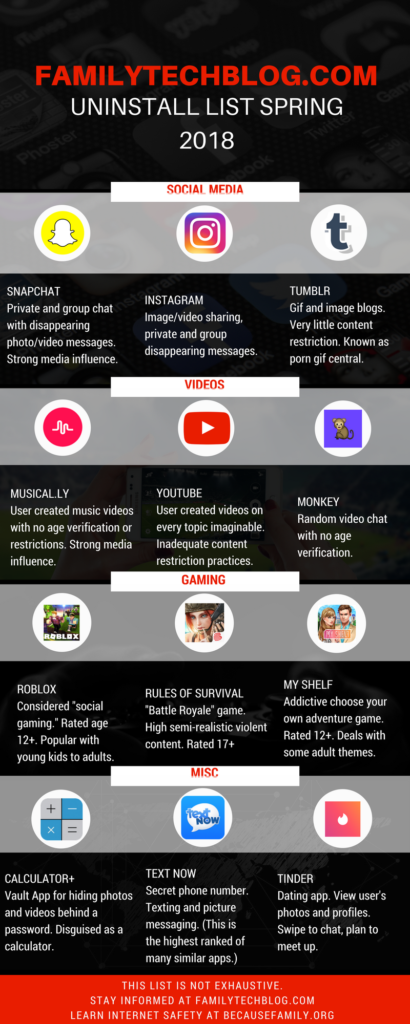
    Some apps are just annoying, some are a bit risky, others should just be uninstalled. This is the list of apps that FamilyTechBlog thinks should be removed from your kids’ phones on sight. No, this isn’t an exhaustive list. There are plenty more apps that can be dangerous. Our list features some of the most popular apps in each category and apps that highlight a certain genre that may need to be avoided altogether.

    Feel free to click on the image below to see the large version of the infographic. If you want some help with internet safety resources and strategies, contact us here. Also, share this post with everyone you know. Let’s make a difference and spread something helpful on our social media timelines for a change.

    FAMILYTECHBLOG.COM UNINSTALL LIST
    SPRING 2018

    CLICK FOR LARGER VERSION

    Please consider keeping resources like this free to you by donating $5 to our non-profit organization.
    Visit BecauseFamily.org/partnership to give.