Sometimes I decide not to do parent guides for games because they are so obviously geared towards adults that it should be a no-brainer for parents. This game was on that list until I saw the download/purchase records it broke on release. Cyberpunk 2077 is one of the biggest video game releases in history and is sure to have your kids’ attention. The following review is short but is intended to inform parents and allow them to make quality decisions for their families.
Cyberpunk 2077 is an open-world, action-adventure story set in Night City, a megalopolis obsessed with power, glamour and body modification. You play as V, a mercenary outlaw going after a one-of-a-kind implant that is the key to immortality. You can customize your character’s cyberware, skillset and playstyle, and explore a vast city where the choices you make shape the story and the world around you. – cyberpunk.net
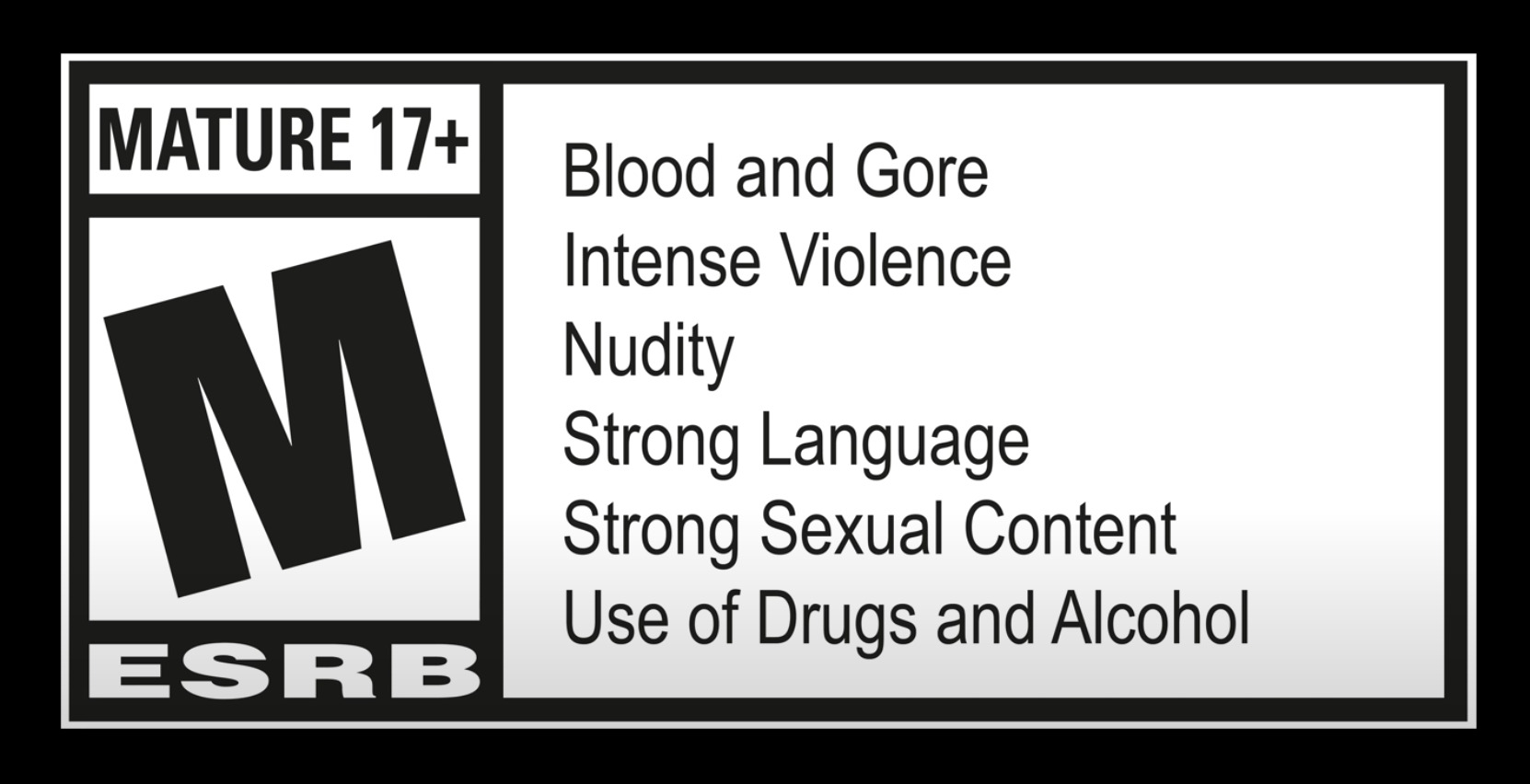
This video game is filled with everything that makes a game mature. There is nudity, sexual innuendo and content, violence, blood, gore, extreme language, adult themes, drug use, and mature plot and story features. In my informed opinion, there is no reason anyone under the age of 16 should be playing this game. It seems to be made for adults and has all the features that adults will look for in a video game.
I am not sensitive or prudish when it comes to movie or video game content. I am, however, cautious about content that will cause young gamers to think frivolously or casually about very serious and complex topics. The themes in Cyberpunk 2077 include gender identity and body modification, political corruption and corporate greed, violence against all types of people, enemies, police, criminals, and basically anyone else. While these topics are real and important in this day and age, there is good evidence that they should be explored by young people in the safety of trained counselors and people who have their best interest at heart. Whether it be the opinions of friends on social media or the developers of a video game, a 12-year-old isn’t equipped to unpack these complex issues as presented in this content.
What Parents Should Know
As I said, the M rating for this game is well earned. It is likely that most parents will keep their kids away from the game as much as possible. There are, however, always those parents who don’t pay attention or believe their child when they say, “Ya it has all that stuff but I just play it to have fun. Its no big deal.” I truly believe that any content consumed by our children develops their attitudes and beliefs about their world. A game like Cyberpunk 2077 is set in a world of very absolute beliefs that could be contrary to those you’re trying to instill into your family. For that reason, this game is on my no-play list for any kids or teenagers you don’t think are mature enough to handle this kind of mature content and these kinds of controversial topics.
This is a Parents’ Guide to Among Us This guide is intended to inform parents to help them make quality decisions for their families. The rating is based on my opinion of playing Among Us and viewing others playing the game as well.
The rating below is based on the game content. Online interactions will always increase the risk of unwanted content.
Violence – 3
Language – 4
Sexual Content – 5
Positive Message – 2
Monetization -2
Total Score – 16out of 25
(The higher the rating, the safer the game is for kids.)
ESRB Rating – Among Us has an ESRB rating of 10+. It is rated 9+ in the app stores and Common Sense Media gives it a rating of 10+.
About the Game
Among Us is an online multiplayer game of social deduction, teamwork, and betrayal. You play as crewmates on a space ship or space station who are trying to prepare the ship for take off. You have tasks that you all must complete to win the game. The catch is that there is an imposter Among Us. This (or these) imposter(s) can sabotage your efforts to prepare your ship, they can also kill you or your crewmates. When a dead body is found, a meeting is called. The entire crew discusses what has happened and what they’ve seen that could give hints as to who the imposter is. They then all vote and if someone gets a majority of votes, they are ejected from the ship. If that person was an imposter, the crew wins, otherwise, it’s back to the ship to complete your tasks and hope the imposter doesn’t get to you first.
This game has a little bit of everything. There are simple puzzles, social interactions, mystery, and even some opportunity to be a little dark by killing your friends in-game. The graphics are simple and a bit silly, but the gameplay is so fun that it doesn’t matter. This is truly a social game and cannot be played on your own. There is a “freeplay” mode in which you can explore the map and get familiar with puzzles but it is really just for preparing to play online multiplayer.
Violence
One of the key themes in Among Us is murder. The imposter is trying to sabotage the ship by whatever means necessary. This usually includes killing crew members. You kill by simply tapping or clicking an icon when you’re close enough to a crewmate. There is then a short animation of your murder. Sometimes you slice them in half, sometimes your small companion (in-game purchase) will shoot them, and sometimes a spear-like tongue will come from you and pierce them in the face. While the animations are a bit graphic, they aren’t really bloody or gory, and they very cartoon/silly. The characters don’t look like humans, they are better described as colorful walking spacesuits so when they are killed, there isn’t much realism.
Language
There is no dialog or narration in Among Us. This means that there is no adult language in the game itself. This is a game, however, that is meant to be played with other people over the internet. When you play a multiplayer game online you are always opening yourself up to unsavory language. In Among Us, this happens in the chat which is used to discuss murders and vote out crewmates. There is a censor mode that is on by default. This censor will use symbols to block out adult language and other inappropriate comments. This doesn’t mean that players don’t use these words. You’ll often see sentences with words asterisked out and most of us can tell by the number of symbols and the context of the sentence what words were meant. It is nice that a censor is included and on by default, it is simple to deactivate with one click/tap and is not password protected.
Sexual Content
Again, there is no sexual content in Among Us. The style of the game doesn’t lend itself to that kind of material. This is another issue, however, that is greatly impacted by online play. While the censor mentioned above will block some sexual comments, most make it through. While playing the game I saw many players with suggestive usernames. Nothing obvious but definitely innuendo. When these names were commented on in chat, however, they were mostly met with annoyance by other players who just wanted to play the game and were therefore not amused.
In other words, there will always be people who think their immature sexual jokes and comments are funny but in such a social game you’ll also find a majority of players who aren’t interested in that kind of humor. These players usually kick out or shut down the inappropriate players pretty quickly.
Positive Message
I guess we can talk about teamwork and trust here but in reality, this game is just all about having fun. There is no real moral to Among Us, it is intended to be a clone of the classic party game Mafia but set in space. Playing with friends is easy through their local or private game settings and this allows for kids to have fun with friends even though we can’t be around each other all of the time these days. I think this is what made Among Us the breakout game of 2020 even though it has already been released for two years.
Monetization
Among Us does have in-game purchases but they aren’t game-changing. You can buy packs of costumes, skins, and even pets. The prices are between $1 and $3 per pack and the game is definitely playable without spending more than the $4.99 it cost on the PC. The mobile version (free for Apple and Android) has ads that can be removed for $1.99. I recommend removing these ads because some of the games advertised should, in my opinion, be rated for adults only.
What Parents Should Know
Among Us is a game that I have been playing quite often lately. It is easy to pop in and do a ten or fifteen minute round and then log off. I have played in public rooms with friends as well, that was quite fun as we were able to work together (trying not to cheat) to complete tasks and win. It can be a time drainer as you always want to play another round. I find myself saying “one more round” a few times before I actually quit the game. Like Fortnite or other online multiplayer games, kids aren’t going to want to drop out in the middle of a game so giving them a warning about getting off their screen will be better than saying, “Put it away, now!” Trust me, you’ll have less conflict if you say “Be finished after this round, alright?” and then hold them to that.
The only real danger in this game is from strangers online. While that is always a concern with online multiplayer games, rounds are so short and fast-paced in Among Us that there isn’t much time for “grooming” or bullying especially since there is no private or direct messaging. You can stay in the same “Lobby” to play with the same people but it is so easy to back out and go into another game if you need to that I wouldn’t expect too much trouble from people in chat in Among Us.
As with most games, my recommendation is that parents understand Among Us, how it works, and what their kids like about it. Know who they are playing with online and if they are playing with strangers, be sure they feel comfortable coming to you if they see something that makes them feel strange. This game is simple enough and quick enough that many parents should be able to play along with their kids some as well. Do this. It would be really fun for you to get into their world a little bit, plus you may just enjoy the game yourself.
Well, it is Prime Day and as usual, there are some deeply discounted items available on Amazon. My family usually looks but doesn’t buy on Prime Day, hoping to be able to predict the discounts we may see on Cyber Monday or Black Friday in a few weeks. We especially avoid any smart speaker or digital assistant hardware since we have always had (well informed) privacy issues and concerns. This year it has been different. We caved and bought Amazon Echo Dots for the whole family. Here’s why.
Our forever family home is being built and we are planning a move-in just a few months from now. We are going to have more space for the six of us than we have ever had, especially in the kids’ rooms, the master suite, and the kitchen/dining great room. We’ll be a bit more spread out than we’ve ever been and the Echo has some great options for communicating throughout your home without having to scream up the stairs or down the hallway. The intercom feature was a deal sealer for both my wife and myself. The kids are pretty excited too.
Digital Homeschool Help
More of us are homeschooling than ever now and with four kids, all doing school work nearly every day, we need help sometimes. YouTube can be great to present some complicated concepts in helpful ways (7th-grade math, anyone) but my kids looking at screens and using a Google Search for spelling or calculator solutions isn’t the safest proposition. Alexa (the Virtual Assistant on Amazon Echo) will answer your spelling, language arts, science, and math questions with no risky search results or screen use at all. It is more important for my kids to know how to get information than it is that they know the info when they pass a grade. Alexa and other Virtual Assistants are the new waves of information access and they aren’t going away. They’re only getting smarter and faster.
Less Screen Time
My kids, like all kids, love to sit around and look at a phone or tablet. We are constantly having to get on to them about their obsessive behavior. We try to set better examples, we don’t always succeed, but giving them alternatives is very helpful. The Echo Dot is a smart speaker without a screen. At night, when the kids want to listen to a podcast or music for bedtime they can ask Alexa to play it for them instead of having their screens in their faces right up to when they fall asleep. Studies have shown this isn’t good for their sleep and can actually very detrimental to their development. With parental controls on the subscription services we use and on Alexa itself, we can ensure that our kids aren’t looking at their screens and are only listening to music and podcasts we’ve approved of.
Safety and Security Upgrades
All of this is great but digital safety and data security are always an issue. Especially with artificial intelligence that is designed to learn about you in order to be more useful to you. There is an obvious trade-off. You’re giving it information in exchange for convenience. I believe most of us consider that an acceptable exchange, considering Alexa and Google Home have been some of the fastest tech product to be integrated into people’s homes. The truth is that we have been making this exchange for a long time without really thinking about it. Every post on Facebook, Twitter, or Instagram, every search on Google, and every purchase or browsing session on Amazon has been used to build a database of advertising information about you. This can be scary to many but in all honesty, that ship has sailed and you raised the sails for it to do so.
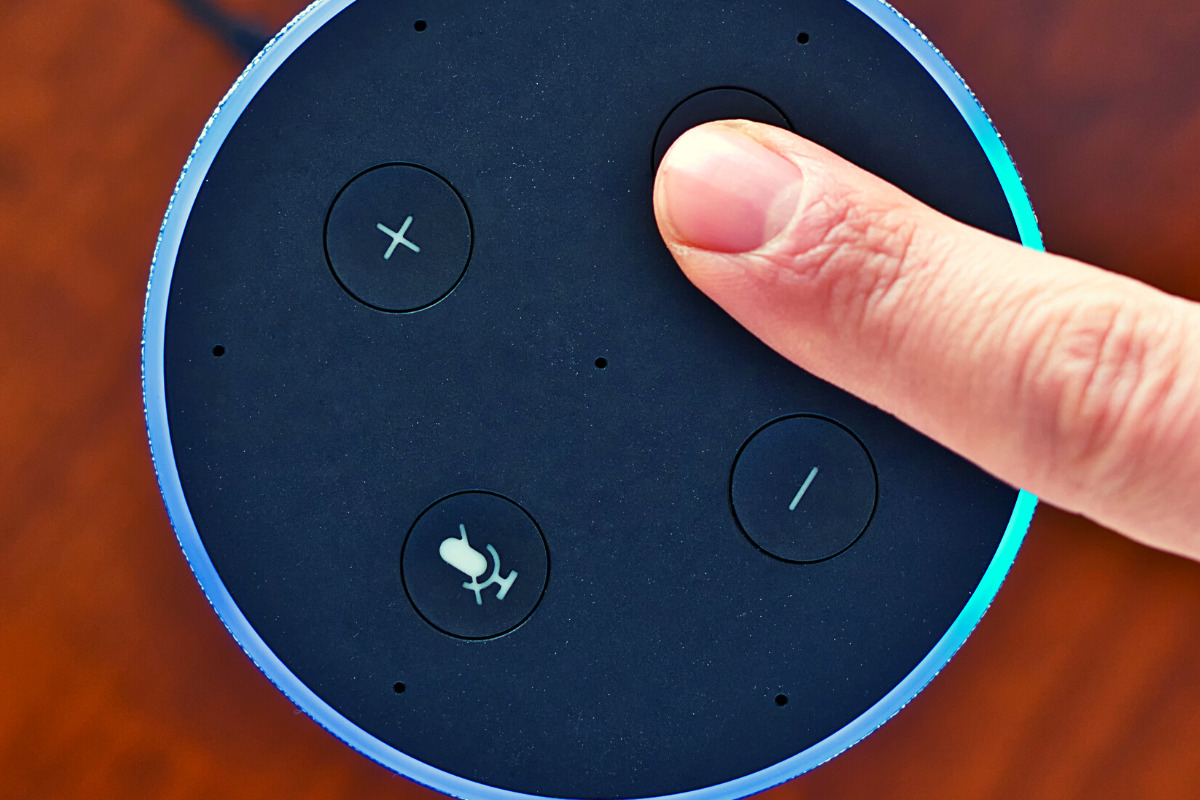
When you use these sites, you allow them access to your information. Alexa is no different and my family has considered the risks and decided it’s worth it. First of all, we already get targeted ads because we do so much of our shopping on Amazon and searching on Google. Secondly, the latest models of Amazon Echo Dot have added features like a hardware button to turn off the microphone that makes us feel like we can avoid being listened to when we don’t want to be listened to.
Risk/Reward
When you narrow it down it is a consideration of opportunity cost. You have an opportunity for convenience but it will cost some of your info. At a $19.99 price point, the Echo Dot is a great deal right now on Prime Day so we bought four of them. They’ll be here in a couple of days and I’ll set one up and let you know how it all goes. Stay tuned for my (late but in-depth) review of the Amazon Echo Dot as a tool for controlling kids’ screen time.
If you shop the Amazon Prime Day today, consider using http://smile.amazon.com and signing up to support our non-profit, Four Point Families. You’ll have to search for Four Point Families and select it as the organization you’d like to partner with. Then Amazon will send .5% of your purchase our way to help us continue to protect families. Thanks.
Technology is a significant part of all our lives, but more so for our children. After all, they grew up in an era surrounded by technology. In fact, our previous post on what your kids do online found that most, if not all, older children are very much inclined to spend their money on tech, such as new smartphones, Netflix subscriptions, and finally, video games. If given the opportunity, younger children may be equally invested in these things as well. Here is what parents need to know about the latest gaming tech.
Of course, that’s not to say that gaming is bad. Multiple studies have emphasized ways that video games can benefit your kids, from better coordination to sharper cognitive ability. But there are aspects that every parent should look out for when it comes to gaming tech, and we’ll introduce those in a bit.
What gaming tech should you expect your children to be on now?
Video games and technological advancements are heavily intertwined, and new technology comes and goes every year. This year, we’ve witnessed the next generation of consoles, with the newest Xbox and PlayStation coming out for the holidays. The metal core PCBs on these devices are built out of materials that allow for better heat dispersion, ensuring smoother performance even for high-end games. They also boast a lot of neat features like haptic feedback and motion-triggered 3D audio that aims to boost the gaming experience. Your children are definitely going to want one.
However, with new technology comes new threats, and you have to pay attention to what they are doing if you want to ensure they game safely.
What should parents be wary of?
Data Privacy
Users give a lot to access online gaming stores, such as birthdates and mailing addresses. The former is there to check the age of the user, which is needed to block them from certain games until they’re older. Mailing addresses are asked so the system can accurately compute for taxes when the user buys a new title. Both are equally dangerous when exposed. It’s highly encouraged that you get physical copies from your nearby GameStop or Best Buy instead.
“Always On”
Since much of the modern consoles’ features are tied to the Internet (such as streaming, social sharing, and online play), they will always have the option to have their built-in wireless connection turned on automatically. While this is convenient, it could also leave your kids vulnerable to breaches. Since a lot of games are single-player, have them turn off this feature when they don’t need to be connected to the Internet. This will lessen the chances of someone hacking into the console.
Motion Tracking
As mentioned, upcoming consoles will have a feature called motion-triggered 3D audio. This is where the console tracks the user’s movements so that the game’s sound is projected to where they’re seated. The biggest downside to this is that the game will ask for permission to track human movement in your house, which you shouldn’t give. Turn off this feature when it comes. If your kids want to experience 3D sound, you can always have them plug in some earphones.
Protecting your kids is not about taking them away from things that you deem dangerous. This will only make them want more, sometimes going behind your back to get them. Instead, support their hobbies. Work with, and not against them, to thwart the dangers that they pose.
This school year is sure to be unlike any other. We are facing a global pandemic causing many schools to shut down and send students online. Parents shaming others for their decisions to send or not to send kids to the classroom. Political upheaval in an election year, and racial outrage all over the country are causing stress levels to increase too. There has never been a time when protecting our kids’ minds and hearts has been so critical for their education. This Back to School Tech Safety Checklist can help you enjoy the 2020 school year with your kids instead of losing your mind.
Back to School Tech Safety Checklist
Accountability Software
I hardly ever write an article about protecting your children on the internet without mentioning accountability software. This software will securely monitor the sites being visited on a computer or mobile device and report anything inappropriate. Most of the time this software allows you to customize the sensitivity of the system so that you aren’t being alerted for things that aren’t actual threats. Our favorite software, Accountable2You, allows you to adjust settings on multiple devices and will send you an email or text when something you don’t approve of has been visited. If the site wasn’t what the algorithm thought it was, simply login to the Accountable2You site and adjust the settings for that site so you won’t be alerted for it anymore.
Your child will likely be doing more and more work for school on their computer. (As if they weren’t already doing a ton of schoolwork online.) This means that they’ll be searching the web and using web based cirriculum. Accountability software allows you to give them the freedom to use their Chromebook or PC knowing you’ll be alerted if they happen upon something not intended for kids or education. You can even set up certain sites on “blacklists” that will alert you. This means their favorite gaming site or YouTube can be put on the list so you’re notified if they’re wasting more time than they should be.
Home Network Filter
Monitoring what your kids see online is a good start. It is definitly step one, in my opinion. Step two, or maybe step 1.5, is a content filter for your home network. A lot of newer internet routers and modems come with content filters that can easily be set up from an app on your phone. These filters will block most adult content from showing up on your child’s device. We’ve all had that experience where a seemingly innocent Google search resulted in an assault on our eyeballs with some crazy adult site that seems to have been intentionally named to show up if you had a typo in the search bar. Filters can keep those nafarious sites from showing up. Even if they are sought out intentionally.
Remember that a home network filter will protect your child on your home wifi connection. When they disconnect from it and use cellualar data, the protection will be gone. There are filter options for that, though. Circle is one of my favorite options. Bark is also a good resource since they have added time limits and content filters recently.
Screen Time Limits
Speaking of time limits, that is also something you need to consider while your kids are spending so much time using technology for school. The good news is that not all screen time is created equal. Experts are saying that creative or educational screen time for our elementary aged and older kids can be beneficial compared to time spent playing games or consuming video content. This means you can probably still give your son a bit of time on Minecraft or Fortnite after they’ve already been doing school work on the computer for four hours.
Gaming can relieve stress, playing games online with friends can provide some social interaction that they aren’t getting if they’re not going to school every day. These things are benefits of recreational screen time. Also, creativity can be stimulated by use of their screens. Minecraft is a great example, if your child is building a world in the game they’re doing a lot of important critical thinking and creative reasoning which is good for them. I encourage you to be aware of how much time your kids are spending on a screen and use features like Screen Time or Family Link to limit social media, entertainment, and gaming but don’t freak out about the extra time spent learning online.
Plenty of “Green Time”
Green Time is simply defined as time spent outside. Our kids need to run around, play, and enjoy the outdoors. Your younger kids can enjoy time on a playground or just running around playing kid games at the park while your older kids enjoy a sport, hike, or some other recreational activity. There has been research to show that green time improves attention span, relieves stress, and we have known for years that it helps kids’ physical health as well. Build in “Green Time” breaks for your kids during their online school day. If the school schedules their day for them, make sure you allow for time outside when the school schedule has ended. You’ll see them have better health, get better grades, and even have a better attitude. If you’re spending all day at home with them this year, you’ll be super grateful for that last benefit.
Communication
I emphasise the importance of communication in nearly every post I write, podcast episode I record, and in person presentation that I do. You have to talk to your children about their digital wellbeing. Kids are smarter about these things than you think. You may be surprised at how much they want to do the right thing. Encourage them to come to you when they see something inaproppriate, tell them you’re on their team and want them to have the best school year possible despite the crazy circumstances. Help them know you are a safe place to come about their digital lives and they’ll be grateful to know you are there to support them.
Adapt and Enjoy!
If I have learned anything during this crazy year its that you have to adapt and be abe to enjoy life right where you are. Hopefully these tips can help you enjoy this extra time with your kids. After all, when you count how long you have with them by school years rather than days, you may be happy that you got this time with them during this crazy phase of life.
This blog has been silent for a while. To be honest, I have been very busy learning and listening. I am not an authority on any of the most important topics of today. I am trying to see the world beyond my small town in Southwest Missouri and discover a world of people who are trying to find change. I haven’t felt that there is a need for education on protecting our kids online during this time of upheaval and division. I have quieted my voice, to try and amplify some others. There are a few voices that I have found very helpful during this time and I wanted to share them with the readers of the Family Tech Blog. I am including a video and links for three of these voices. Please check out the videos below and don’t stop there. Continue listening by clicking the links to their articles, channels, and podcasts.
Their entire podcast is loaded with great insight on what scripture says about our world and our role as God’s Image in the world.
Uncomfortable Conversations with a Black Man
This series has several videos that you will find helpful in starting conversations with your children about race, racism, and justice.
These resources have been helpful to me and my family. We’ve been able to learn and have conversations that need to be had during this time. While, as one video series is aptly titled, these conversations can be uncomfortable, they are necessary. As a tech blog that is founded in faith in God and His way of living, justice is a priority. We shouldn’t protect our children from difficult topics, only dangerous ones. Open up to your kids about your experiences with race and racism and allow them to learn, grow, and listen with you.
WELCOME to Raising Connecting Kids the podcast that answers your questions about the connected world your kids are growing up in.
Thank you to everyone for partnering with BecauseFamily and making these resources possible. Visit BecauseFamily.org/partnership to help us continue to protect your family by making free content like this podcast.
QUESTION OF THE WEEK
I get multiple questions a week. Sometimes through email or FB messages and sometimes face to face at an event or meeting. In this podcast, I’ll be answering the most common questions I’ve had and even, your questions. Email me at BecauseFamily@gmail.com to get your question read and answered on the Podcast.
Question: How do Social Media Sites censor content?
User-Generated Content
Generally accepted standards.
Nudity/Sexual Content
Extreme Violence
Hate Speech
Harmful content disguised as kid content.
Keep in Mind:
Location of the company.
Lawsuits and bad PR
More than one reviewer.
Usually flagged by users.
Protecting viewers from dangerous false facts, visual content, and messages is not censorship. It is the company’s right to protect their image and intellectual property.
These companies can make decisions based on their own guidelines. They are not government entities. The CAN censor content if they want as long as they have put reasons in their terms and agreements.
CONCLUSION
Thank you again for listening to Raising Connected Kids, the podcast that answers your questions about the connected world your kids are growing up in. Subscribe on iTunes, Stitcher, YouTube, Spotify, Google Podcasts, and anywhere else you listen to podcasts. Like/Follow us on Facebook, Twitter and InstagramShare the show with your friends and leave a review on your favorite podcast app to help spread the word. Remember to visit BecauseFamily.org/partnership to partner with us as we protect children and teenagers by bridging the technology gap between them and their parents.
TikTok is the biggest app right now in every app store with over 2billion downloads. They have added some parental controls. This video and podcast episode outline some things you should know while setting these controls up. Below is a link to a great step by step for using these parental controls.
The parental controls on TikTok allow you to lock privacy settings, keeping strangers from making friend requests, sending messages, and even seeing videos. You must use your child’s account to give yourself permission to set up parental controls. This means you must have a TikTok account yourself if you’re going to use the parental control settings. Previously your child’s account could be set to private, but they could change the settings per video and post publically regardless of your settings.
Do TikTok Parental Controls Allow you to be Hands Off?
No parental control is a substitute for parental involvement in their child’s online experience. Be sure they know they can come to you to discuss things that make them feel uncomfortable or go against your rules. Should your kids use TikTok? If they are under 13 no. If they are under 16, maybe yes but with parental controls. If they are over 16, then you should be discussing their digital health with them and trusting them to make quality decisions as they grow into adults.
Thanks for checking out this article. You can visit BecauseFamily.org/partnership to support our work to protect children and teenagers by bridging the technology gap between them and their parents. You can donate, support our affiliates, or just share our ministry with your friends. Thank You.
More companies are adding kid and family content to their platforms
Kids are spending time with each other in “virtual environments.”
Kids miss their friends
This was already a trend, now it has been accelerated
Tech companies are seeing kids as innovative inspiration for their products
The tech industry will see a major boom after this COVID19 crisis.
Large public events are taking place in digital spaces (Roblox awards show had 600,000 kids in attendance.)
What Parents Should Know
This isn’t going away.
This dependence on Technology was already becoming the new normal. It is now been accelerated due to lockdown. Don’t expect this to change.
Become Familiar With Your Kids’ Technology
You can’t be blind to the connected, digital world your kids live in. Focus on the difference between productive/educational time and educational time. It’s about quality of time spent more than the quantity.